Satellite 6.1 Feature Overview: Errata Management
Overview
Red Hat Satellite provides additional capability with regards to errata management. These new capabilites enable the administrator to:
- Quickly identify which systems require a errata, such as a Red Hat Security Advisory (RHSA), Red Hat Bugfix Advisory (RHBA), or Red Hat Enhancement Advisory (RHEA), regardless of which lifecycle environment and content view a system is registered to.
- Receive notifications on errata events, such as when errata are promoted to a lifecycle environment or synchronized on the Satellite
- Quickly address a high-priority errata such as a 0-day vulnerability like Shellshock or Heartbleed, or a bugfix that may be affecting a production system.
Example Use Cases
- As an administrator of Red Hat Satellite, you'd like a means to identify errata required by systems and report on them.
- As an administrator of Red Hat Satellite, identify which systems require remediation based upon Red Hat's published Security Metrics
- As an administrator of Red Hat Satellite, you'd like to receive notifications when certain important events occur, such as when a synchronization or content promotion makes new errata available.
Requirements
- Red Hat Satellite 6.1
- Managed Systems running Red Hat Enterprise Linux.
- It is expected that the Satellite is configured with a This content is not included.Synchronization Plan, such that it frequently receives the latest errata from Red Hat. Errata applicability is done based upon which errata the Satellite has downloaded. Thus it is paramount to ensure that the Satellite is synchronized often so that errata reporting is accurate and current.
Working with Errata Management in Red Hat Satellite 6.1
Errata Reporting
Within the Satellite UI, view the Content -> Errata. On this page, errata are noted in one of two states:
- Applicable: This errata contain RPMs can update a system in the environment. It is known that 1 or more systems require it.
- Installable: This errata has been promoted into a lifecycle environment where the affected system has access to it. i.e. a yum update will install it.
Using an example errata (RHBA-2015:0953), it can be determined that 2 systems require this errata (It is applicable), but 0 of them can actually install it (it is not installable).
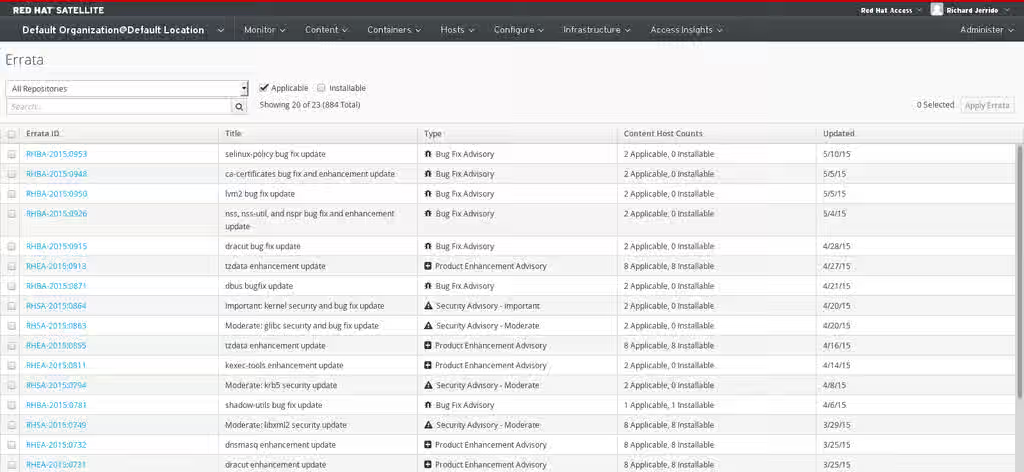
Next, selecting this errata (RHBA-2015:0953) allows further investgation. Selecting the content host tab displays a list of which systems are affected by this errata
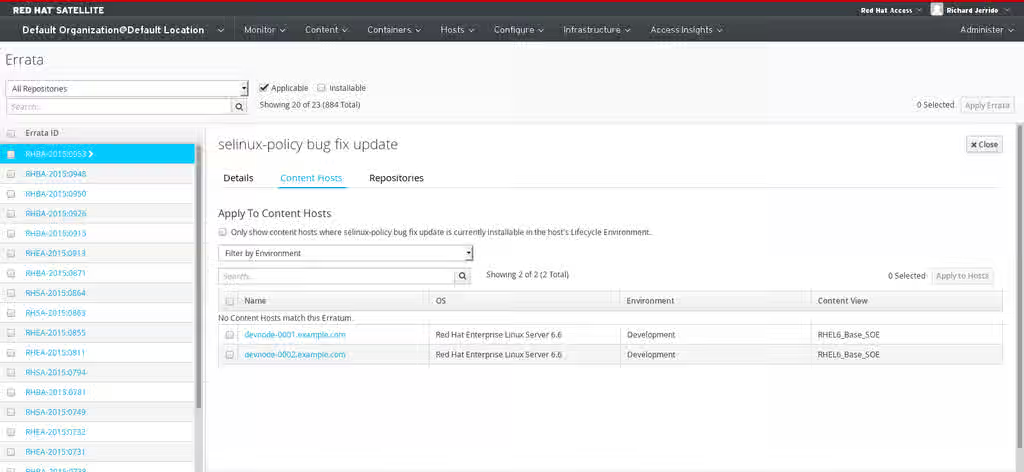
As stated above, these two systems cannot install this errata yet (as it has not been promoted into a lifecycle environment / content view that they have access to. The Incremental Updates feature allows the ability to quickly release this errata in an out-of-band fashion, without affecting the normal release cadence of content.
Incremental Updates
From the example above, we'll select one of our hosts (devnode-0002.example.com in this example) and select Apply To Hosts so that this errata can be addressed.
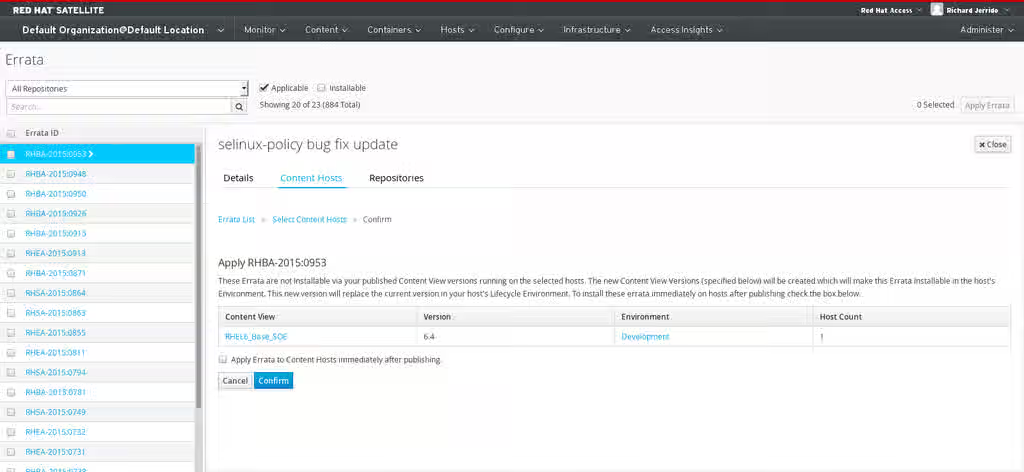
Next, Satellite informs the administrator that the errata is not made available in the Content View that the system is currently subscribed to (RHEL6_Base_SOE). In order to release this errata, Satellite will make a minor revision of this Content View (version 6.4) which contains what is currently in the Content View + the RHBA-2015:0953 errata.
Lastly, the option to immediately deploy the errata can be selected. Select Confirm to publish the errata.
Setting up mail notifications
The Red Hat Satellite 6.1 installation needs to be configured to send emails. On the Satellite, as the root user, edit /etc/foreman/email.yaml to suit your environment.
# Outgoing email settings

production:
  delivery_method: :smtp
  smtp_settings:
    address: smtp.example.com
    port: 25
    domain: example.com
    authentication: :none
Next, enable a user to receive reports. Under the Administer->Users menu, select a user and select the Mail Preferences tab
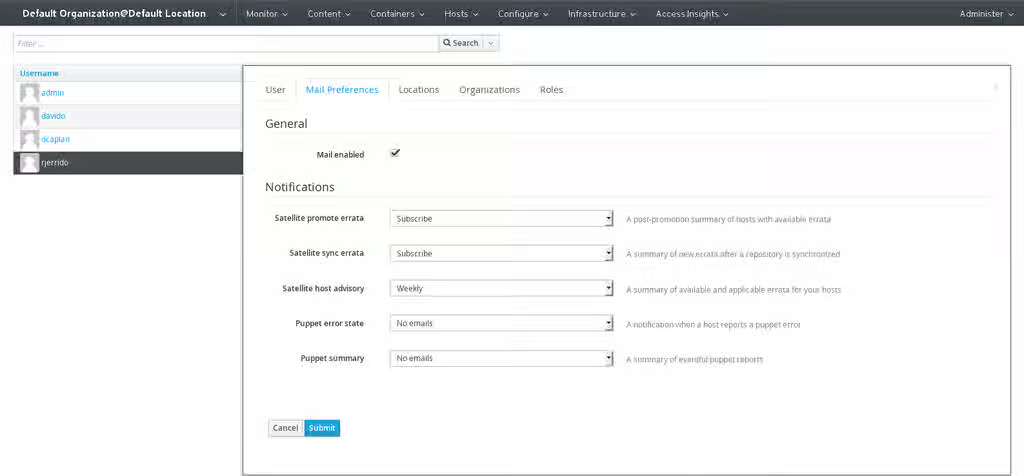
The three email reports consist of
- Satelite Promote Errata - A post-promotion Summary of hosts with available errata This content is not included.Example Report
- Satellite Sync Errata - A summary of new errata after a repository has been synchronized This content is not included.Example Report
- Satellite Host Advisory - A summary of applicable and installable errata for your hosts. This content is not included.Example Report
Select the reports that are desired and their frequency, and select Confirm
Configurable Options.
The following options are configured under the to Administer -> Settings -> Katello tab:
- content_action_accept_timeout - How long does Satellite wait for a content-host to pickup the task to install the incremental update. Default is 20 seconds
- content_action_finish_timeout - How long does Satellite wait for the content-host to complete the incremental update task. Default is 3600 seconds
