Preparing Satellite 5 systems for Red Hat Network's End of Life
Preparing Satellite 5.x systems for the retirement of Red Hat Network.
Release of Satellite 5.8
With the release of Satellite 5.8, Red Hat STRONGLY recommends that users upgrade from 5.6 & 5.7. Satellite 5.8 has the ability to both register via Red Hat Subscription Manager (RHSM) and retrieve content from the Content Delivery Network (CDN). Satellite 5.8 introduces several new features, enhancements and programs, including increased speed with channel install and content syncing, improved diagnostics of background tasks and jobs, updated support of Oracle DB and PostgreSQL, and offering extended lifecycle support beginning in 2019. The upgrade to Satellite 5.8 effectively includes the process outlined in this document, and the information and guidance included in this document should not be attempted on a Satellite 5.8 server. This document is only specific to customers on Satellite 5.6 or 5.7 only. Instructions for upgrading to Satellite 5.8 can be found Here.
However, some users may decide to remain on older version of Satellite, such as 5.6 & 5.7. For those users, the instructions in this document are applicable.
As part of the retirement of Red Hat Network, Satellite 5.6 & 5.7 servers will need to be migrated from Red Hat Network (RHN) to Red Hat Subscription Management(RHSM). Special care needs to be taken with Satellite 5.6 & 5.7 servers to ensure that the systems will work properly.
Details
Red Hat Satellite 5 servers leverage Red Hat Network for both errata for the operating system that the Satellite software runs AND to synchronize various software channels that are used by the Satellite's clients.
As part of the process of registering a system to Red Hat Network, the systemid file /etc/sysconfig/rhn/systemid is created, which is used by the system to authenticate with Red Hat Network and receive updates and errata. Additionally, when running satellite-sync, the utility for synchronizing a Satellite's content, the systemid file is presented to RHN allowing the Satellite to be validate as a properly entitled Satellite. Without a valid systemid file, a system registered to RHN can neither receive updates, nor can it synchronize content.
When migrating systems from Red Hat Network to Red Hat Subscription Management, the systemid file is deleted, and an RHSM consumer ID (the RHSM equivalent of a systemid) is created. However, without additional configuration, a Satellite 5 server that is migrated to RHSM will not be able to synchronize content using the satellite-sync command. There are two configuration changes that need to be made, one by Red Hat, the other by the end user.
- [Red Hat] - Update Red Hat Network to accept an RHSM Consumer ID as valid for the purposes of syncing content and activating. As Red Hat Network and Red Hat Subscription Management are distinct systems, Red Hat needed to integrate certain parts of the two systems to allow Satellites which have migrated from RHN to RHSM to continue to sync properly. This work is completed and is live.
- [End User] - Migrate Satellite system to RHSM and install errata which allows the Satellite to present its RHSM Consumer ID when syncing content or activating.
Diagram of the current state of Satellite 5 synchronization
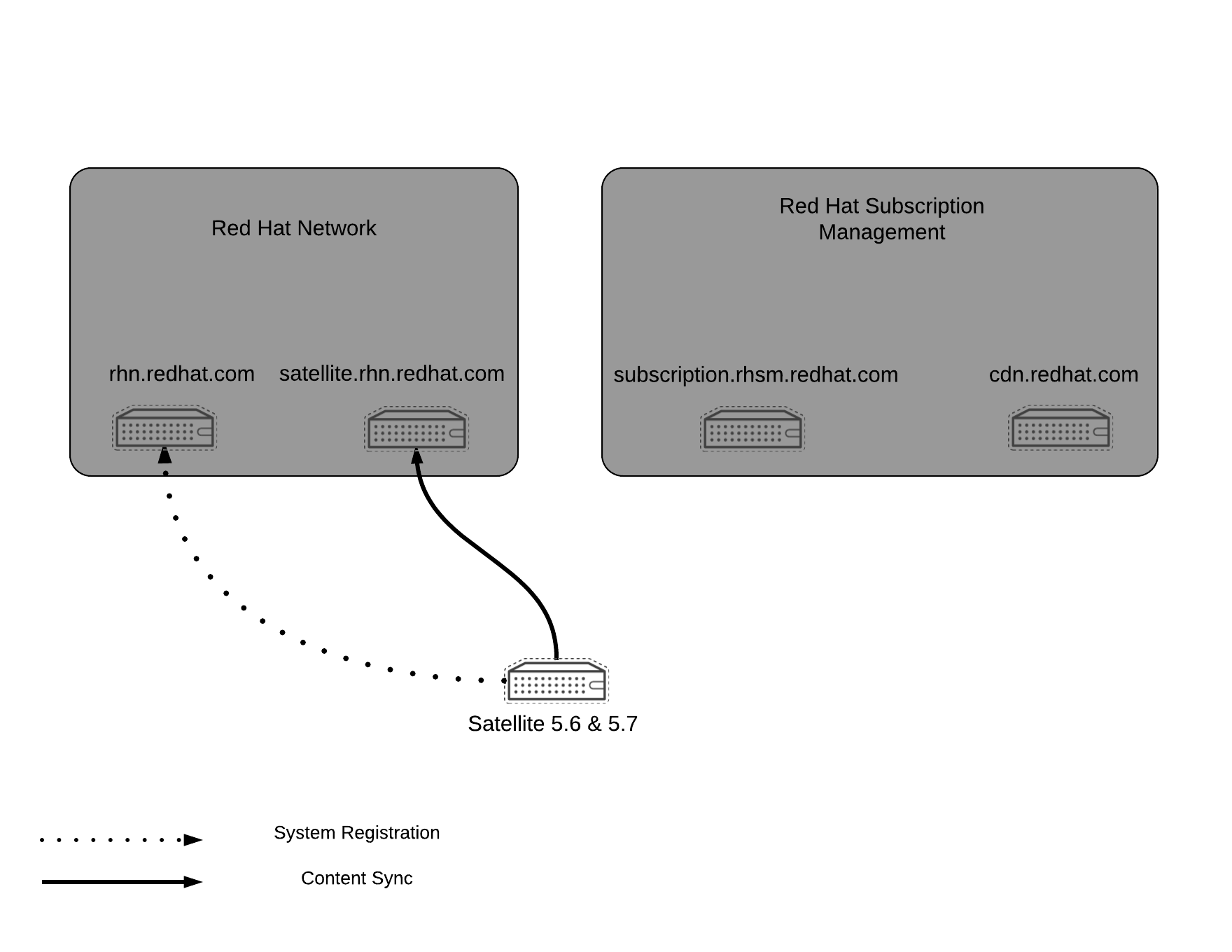
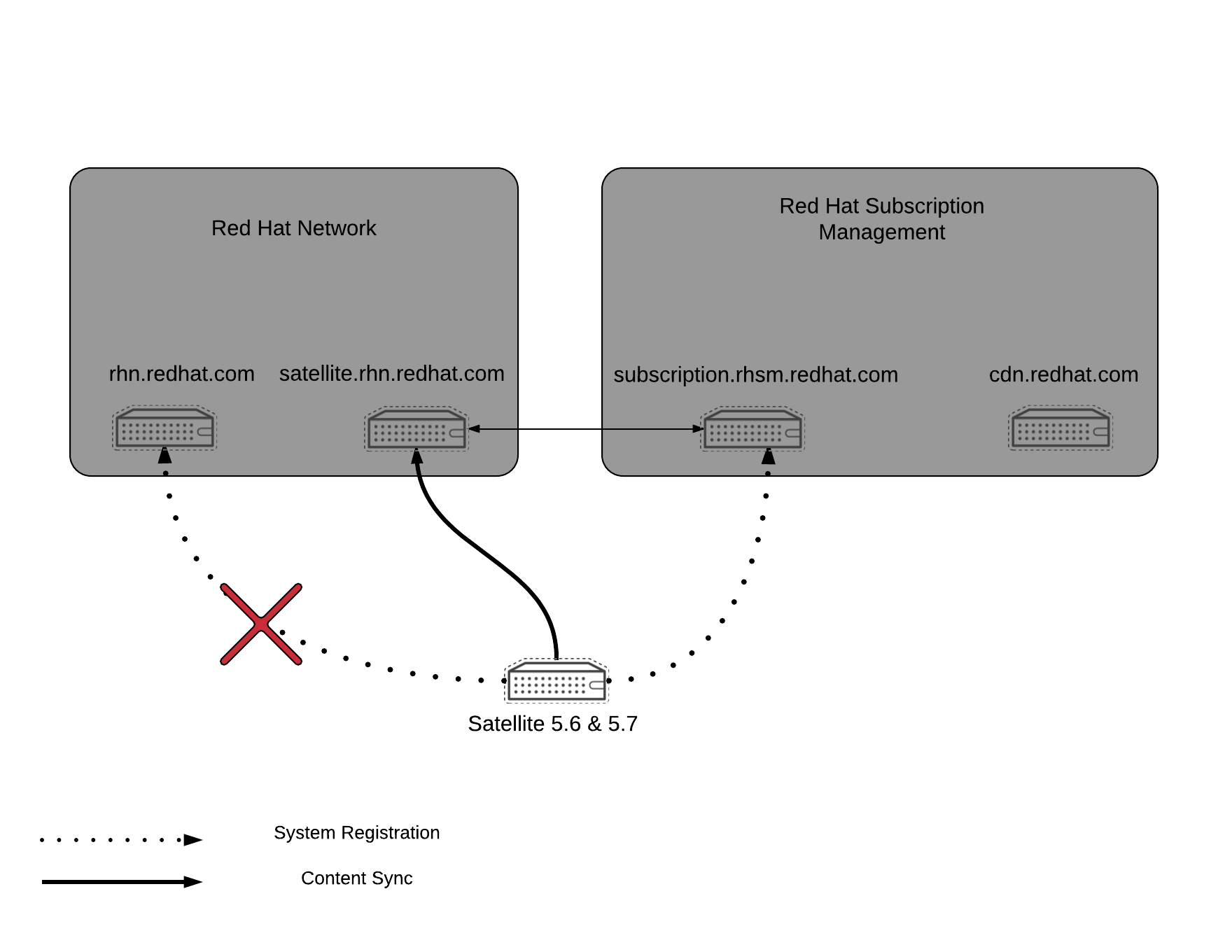
Diagram of the future state of Satellite 5 synchronization (post RHN End of Life)
Frequently Asked Questions:
-
Q : With the exception of the Satellite servers that are directly registered to Red Hat Network, are there other system that need to be modified?
-
A: There are a number of cases where components of a Satellite-5 topology are NOT AFFECTED by RHN's End of Life, where the administrator does not need to make any changes. These include:
- RHN-Proxies registered to an existing Satellite-5
- Satellite-5 Inter-Satellite-Sync Slave to an existing Satellite-5
- Systems managed by an existing Satellite-5
-
Q: Instead of using a username and password to register my systems, can I use an activation key instead?
-
A: Activation keys are not supported for the usage of migrating Satellite 5 systems to RHSM. Please use username & password. Additional details are found in this KCS
-
Q : On my systems directly registered to Satellite 5, will the client tooling change? Will these clients now need to use
subscription-managerin lieu of tools such asrhn_register&rhnreg_ks -
A : NO. There are no changes required on the Satellite 5 clients. They will continue to use
rhn_register&rhnreg_ks. -
Q: I need to prepare a change request, so that I can schedule an outage to perform this work. How long does this process take?
-
A: It should take between 30-60 minutes to complete this process, factoring in any time for troubleshooting or to back out the change (if necessary).
-
Q: We are using Red Hat Satellite v 5.6/5.7 in disconnected mode and/or it is self registered, do we still need to follow steps to migrate system to RHSM?
-
A: If Red Hat Satellite 5.6 / 5.7 is setup in self registered mode, follow this Article: "How do I migrate my self-subscribed Satellite 5 to RHSM? " If the Satellite is in disconnected mode, then no actions required on the satellite server to migrate to RHSM.
Required action (High-Level)
Red Hat has released RHEA-2017:0369 for Satellite 5.6 & 5.7, which will allow a Satellite 5.6 or 5.7 system, registered via RHSM to continue to sync via satellite-sync. Satellite 5.6 & 5.7 systems registered in this manner continue to retrieve content via RHN. Satellite 5.8 will both register to RHSM for operating system updates & errata and retrieve content for its clients via the CDN.
This errata MUST be applied prior to migrating the system from RHN to RHSM. It is expected that the administrator will complete the following tasks, prior to 31-Jul-2017 (the date of Red Hat Network's UI shutdown):
- Install the errata on your Satellite 5.6 or 5.7 server
- Migrate the system from Red Hat Network to Red Hat Subscription Management using the
rhn-migrate-classic-to-rhsmcommand. - (re)activate the Satellite, using the
rhn-satellite-activatecommand.
Note - Satellite 5 customers who run in the ManagedDB configuration are required to contact Red Hat Support prior to beginning this procedure. Please open a support ticket for guidance if you are a Satellite 5 customer who runs in the ManagedDB configuration.
Required action (Detailed)
Note: If the Satellite hasn't been updated in a while, it is possible that the satellite-schema package, which provides schema updates to Satellite is out of date. Check to see if the satellite-schema package needs updating by running yum check-update. If it does, it is strongly advised to follow the process as described in This content is not included.How do I upgrade the database schema of a Red Hat Satellite server to properly update the Satellite's schema.
Next, ensure that you have the most updated packages installed by running yum update. In particular confirm that you have the spacewalk-backend-2.0.3-42 or newer package installed (for Satellite 5.6 users) or spacewalk-backend-2.3.3-46 (for Satellite 5.7 users)
Satellite 5.7 users
# rpm -q spacewalk-backend
spacewalk-backend-2.3.3-46.el6sat.noarch
Satellite 5.6 users
# rpm -q spacewalk-backend
spacewalk-backend-2.0.3-42.el6sat.noarch
Note: If the above versions of the packages cannot be installed or you are having difficulty accessing them, do not proceed any further and please contact Red Hat Support.
Next, install subscription-manager and subscription-manager-migration which contains the rhn-migrate-classic-to-rhsm script that is needed to reregister via RHSM.
# yum install subscription-manager subscription-manager-migration
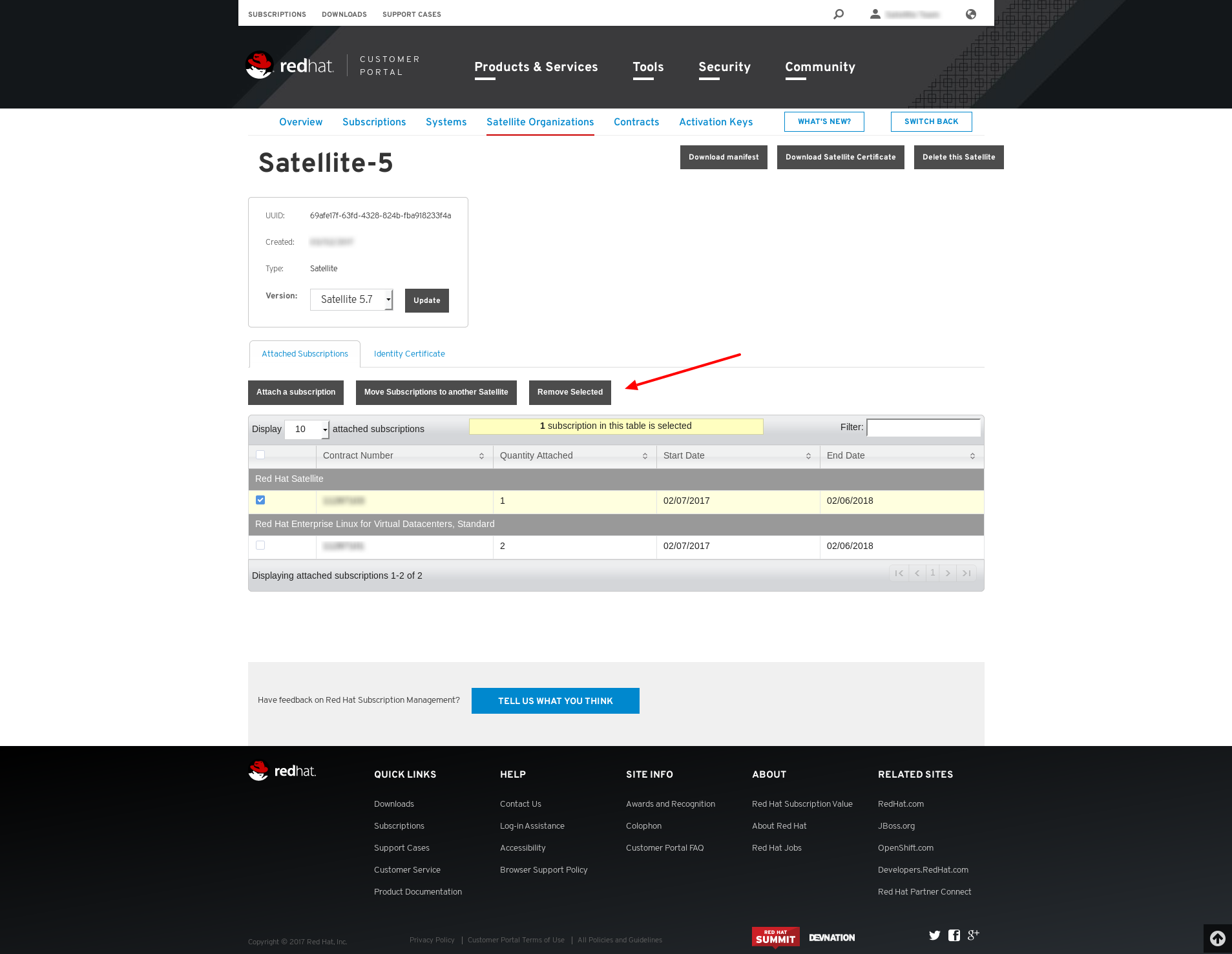
Next, visit the This content is not included.Subscription Allocations page in the customer portal, select the Organization you wish to modify, and remove your Satellite subscription from your Satellite Organization. This frees the Satellite subscription to be attached to the running Satellite server so that it may receive updated errata and packages.
In previous versions of Red Hat Satellite, it was mandatory to include the Satellite subscription as part of your Satellite Organization in order to generate a Satellite certificate that could be properly activated. As part of this migration from RHN to RHSM, this restriction has been relaxed. Thus, it is no longer required to include your Satellite subscription while generating a Satellite 5.x certificate.
Download a new copy of the Satellite Entitlement certificate by selecting Download Satellite Certificate. Please note that if you do not have an entry for your Satellite Organization on the Satellite Organizations page, you will need to create one, add subscriptions to the profile to entitle the Satellite's client systems (please do not add the Red Hat Satellite subscription to the profile), and then download a new copy of the Satellite Entitlement certificate by selecting Download Satellite Certificate.
If your Satellite entitlements are provided by the "Red Hat Satellite and Capsule Server for Cloud Providers" subscription and you have Satellite Proxy systems in your environment, please do not remove all of your "Red Hat Satellite and Capsule Server for Cloud Providers" subscriptions from the Satellite's certificate, as this can and will unentitle your Satellite Proxy systems.
UI Example (Click to Enlarge)
Run rhn-migrate-classic-to-rhsm to migrate the system from RHN to RHSM.
Note
- You'll need your RHN username & password.
rhn-migrate-classic-to-rhsmuses the subscribed channels for a system to determine which product certificates to deploy. It also handles unregistering systems from RHN Classic and registering them via RHSM. - If your Satellite server is running behind a Firewall/Proxy Server, then please make sure that you have opened the required Ports on the Firewall/Proxy Server. The list of Ports are mentioned in the article How to access Red Hat Subscription Manager (RHSM) through a firewall or proxy.
# rhn-migrate-classic-to-rhsm

CAUTION : Do NOT use Email Address as Legacy Username.

Legacy username: <YOUR_RHN_USERNAME>
Legacy password:  <YOUR_RHN_PASSWORD>

Retrieving existing legacy subscription information...

+-----------------------------------------------------+
System is currently subscribed to these legacy channels:
+-----------------------------------------------------+
rhel-x86_64-server-6
redhat-rhn-satellite-5.7-server-x86_64-6

+-----------------------------------------------------+
Installing product certificates for these legacy channels:
+-----------------------------------------------------+
rhel-x86_64-server-6
redhat-rhn-satellite-5.7-server-x86_64-6

Product certificates installed successfully to /etc/pki/product.

Preparing to unregister system from legacy server...
System successfully unregistered from legacy server.

Attempting to register system to destination server...
Registering to: subscription.rhsm.redhat.com:443/subscription
The system has been registered with ID: 284e025c-4a60-4084-b49c-4cb26fd7cf93

Installed Product Current Status:
Product Name: Red Hat Enterprise Linux Server
Status:       Subscribed

Product Name: Red Hat Satellite
Status:       Subscribed

System 'satellite.example.com' successfully registered.
Next, disable all unneeded repositories
# subscription-manager repos --disable=*
And enable only the repositories needed for Satellite. Choose one of the below depending on your scenario
Satellite 5.7 on RHEL6
# subscription-manager repos --enable rhel-6-server-rpms --enable rhel-6-server-satellite-5.7-rpms && yum clean all
Satellite 5.6 on RHEL6
# subscription-manager repos --enable rhel-6-server-rpms --enable rhel-6-server-satellite-5.6-rpms && yum clean all
Satellite 5.6 on RHEL5
Red Hat Enterprise Linux 5has entered Extended Life Phase onMarch 31, 2017.Red Hat Satellite and Proxy 5.6servers running onRHEL 5therefore alsoended its support lifecycle. It is recommended toupgradetheunderlying OSof systems running Satellite and Proxy 5.6 to RHEL 6 to ensure full support, as Satellite and Proxy 5.6 platformed on RHEL 6 will continue to be supported.Red Hat Enterprise Linux 5 ELSsubscription does not cover support for Red Hat Satellite or Proxy 5.6.
Lastly, reactivate the Satellite, using the rhn-satellite-activate command
# rhn-satellite-activate -vvv --rhn-cert=Satellite-57.xml
RHN_PARENT: satellite.rhn.redhat.com
What happens the day after Red Hat Network UI Shutdown (01 Aug 2017)?:
Scenario 1 - Customer does absolutely nothing.
If no action is taken, the following will occur:
- The Satellite server remains registered with RHN
- The Satellite server receives updates for the Satellite's Operating System from RHN
- The Satellite server synchronizes content from RHN via
satellite-sync - The system can no longer be managed via the RHN UI
- If the Satellite needs to be re-activated (with new or old cert), current
activation is used
Post 31 Jul, it will become harder to manage the system (as the Red Hat Network UI is offline). Additionally as further portions of RHN are retired in the future, it will become more difficult to (re)register a Satellite server. Again it is STRONGLY recommend to migrate to RHSM to maintain a management experience similar to that of RHN
Scenario 2 - Customer installs RHEA-2017:0369-1 and takes no further action.
In this scenario, if the updated erratum/packages are RHEA-2017:0369-1 is installed, but no additional action is taken.
- The Satellite server remains registered with RHN
- The Satellite server receives updates for his Satellite's Operating System from RHN
- The Satellite server synchronizes content from RHN.
- The system can no longer be managed via the RHN UI
- If the Satellite needs to be re-activated (with a new or old cert), activation via the
rhn-satellite-activatecommand will fail, as it now defaults to using the consumer UUID for authentication, and the system does not have one yet. - The
rhn-satellite-activatecommand will have an--force-rhnoption, which will allow activation, using the old RHN APIs. (This makes Scenario 2 effectively equivalent to Scenario 1)
Scenario 3 - Satellite is migrated to RHSM, but RHEA-2017:0369-1 has NOT been installed.
In this scenario, the Satellite is migrated from RHN to RHSM, using rhn-migrate-classic-to-rhsm but does NOT install the updated erratum/packages
- The Satellite is re-registered with RHSM and may subscribe to the Satellite repo.
- The Satellite 5 system receives updates via RHSM & the CDN.
- The Satellite can be managed via the RHSM UI.
rhn-satellite-activatefails. (as without the required versions of thespacewalk-backendpackages, the activation process uses the older model, which requires a RHN systemid/etc/sysconfig/rhn/systemid)satellite-syncalso fails.
Red Hat strongly encourages the end user to ensure that the prerequisite versions of packages are installed prior to migrating.
Scenario 4 - Satellite is migrated to RHSM, AND the updated erratum/packages have been installed
In this scenario, the Satellite is migrated from RHN to RHSM, using rhn-migrate-classic-to-rhsm and the updated erratum/packages has been installed.
- The Satellite is re-registered with RHSM and may subscribe to the Satellite repo.
- The Satellite 5 system receives updates via RHSM & the CDN.
- The Satellite can be managed via the RHSM UI.
rhn-satellite-activatesucceeds. (as the required versions have been installed, the activation process uses the newer model, which uses the RHSM consumer UUID)- The Satellite server synchronizes content from RHN via
satellite-sync
Also see this page for key information and updates for Satellite 5: Important Changes Coming to Red Hat Satellite 5