How do I access Red Hat Enterprise Linux 5 Extended Life Cycle Support (ELS) content using an Extended Life-cycle Support Add-On subscription after Red Hat Enterprise Linux 5 transitions to Extended Life Phase?
NOTE: As of Jun 2021, you can access the RHEL 5 ELS repo without needing an Extended Life-cycle Support Add-On subscription. To learn how to do so, please refer to Accessing Red Hat Enterprise Linux 5 Extended Life Cycle Support (ELS) content after the ELS phase has ended.
Issue
- How do I access Red Hat Enterprise Linux 5 Extended Life Cycle Support content after Red Hat Enterprise Linux 5 transitions to Extended Life Phase?
Environment
-
Red Hat Enterprise Linux 5
-
Red Hat Network (RHN), Red Hat Subscription Manager (RHSM) or Satellite
Resolution
On March 31, 2017 Red Hat Enterprise Linux 5 transitions from Production phase to Extended Life Cycle phase. You can read more about product life cycles here. At this time, Red Hat Enterprise Linux 5 content will continue to be accessible in the same way as it always has been via Red Hat Network (RHN), Red Hat Subscription Manager (RHSM), and Satellite.
If you have purchased the Red Hat Enterprise Linux 5 Extended Life Cycle Support (ELS) Add-On offering, you will receive continued updates for Red Hat Enterprise Linux 5 via a new child channel under the Red Hat Enterprise Linux 5 base channel in Red Hat Network (RHN) Classic, Red Hat Subscription Manager (RHSM), and Satellite. Follow these steps to access Red Hat Enterprise Linux 5 Extended Life Cycle Support (ELS) content:
Connecting Red Hat Enterprise Linux 5 systems to ELS content via Red Hat Subscription Management (RHSM)
Firstly, ensure that the system is using 5Server as its release version, as ELS content is only released for the 5Server
# subscription-manager release --set 5Server
Find your ELS subscription.
# subscription-manager list --all --available
+-------------------------------------------+
    Available Subscriptions
+-------------------------------------------+
Subscription Name: Red Hat Enterprise Linux Extended Life Cycle Support (Physical or Virtual Nodes)
Provides:          Red Hat Enterprise Linux Server - Extended Life Cycle Support
SKU:               RH00270
Contract:          11260534
Pool ID:           8a99f9835a4887e0015a685ef286223d
Available:         90
Suggested:         1
Service Level:     Layered
Service Type:      L1-L3
Subscription Type: Instance Based
Ends:              02/20/2018
System Type:       Physical
Note the Pool ID above, and attach the subscription.
# subscription-manager attach --pool 8a99f9835a4887e0015a685ef286223d
Successfully attached a subscription for: Red Hat Enterprise Linux Extended Life Cycle Support (Physical or Virtual Nodes)
Lastly, enable the ELS repo
# subscription-manager repos --enable rhel-5-server-els-rpms
Repo 'rhel-5-server-els-rpms' is enabled for this system.
Enabling Red Hat Enterprise Linux 5 ELS content with Satellite 6
In the case of Satellite 6, it is required to add a subscription to your subscription manifest which provides access to the RHEL 5 ELS repositories.
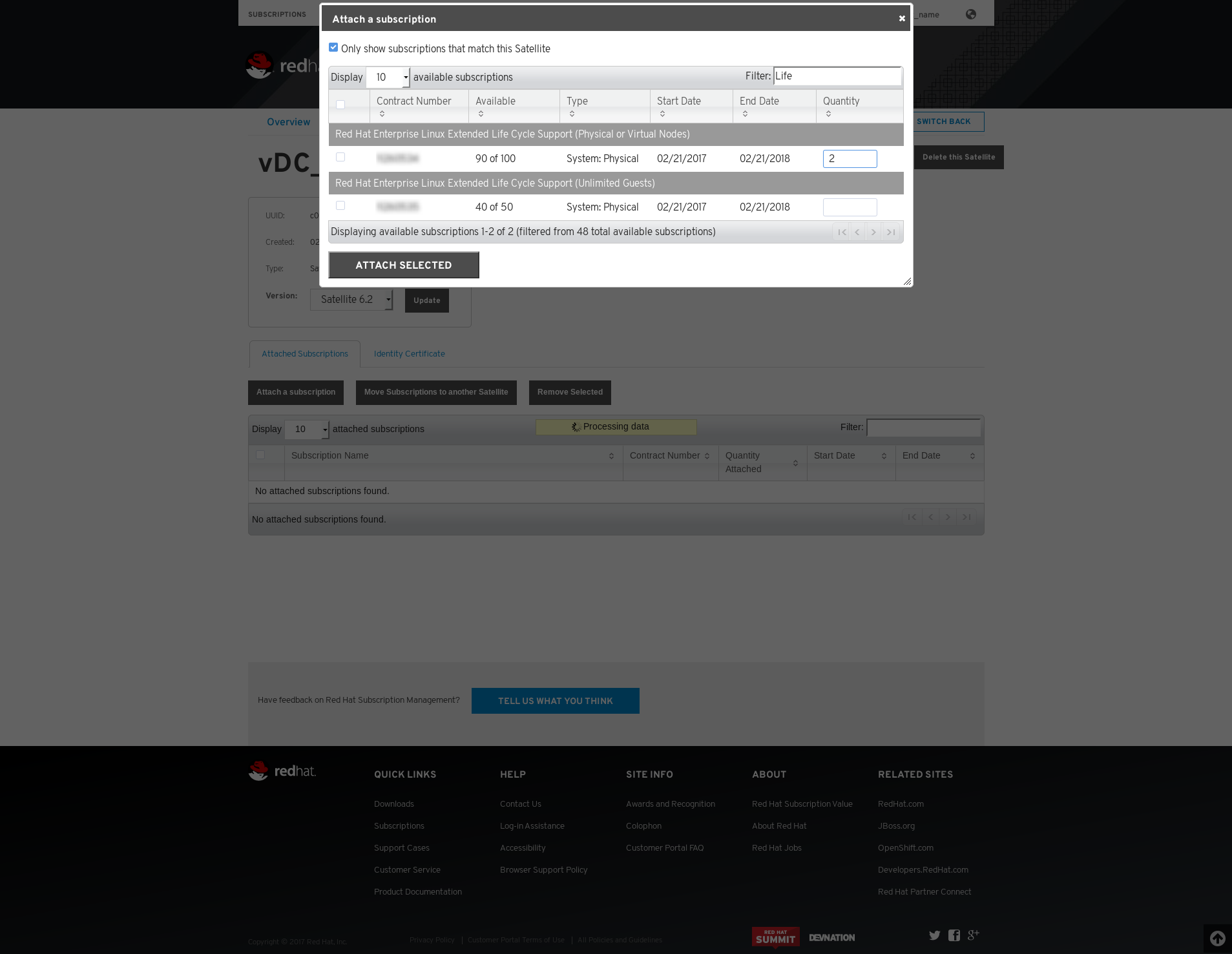
Firstly, via the This content is not included.Customer Portal and select the Satellite Subscription Management Application you wish to add ELS subscriptions to. Select the subscription and click Attach Selected to add it to your manifest.
Example (Click to Enlarge)
Next, perform only one of the following:
- On the Content -> Red Hat Subscriptions page, select Manage Manifest, and then Refresh Manifest
- Alternatively, download the manifest from the Customer Portal by selecting Download Manifest. Then in the Satellite UI, via the Content -> Red Hat Subscriptions page, select Manage Manifest, and then click Browse to select the location to which the manifest was downloaded.
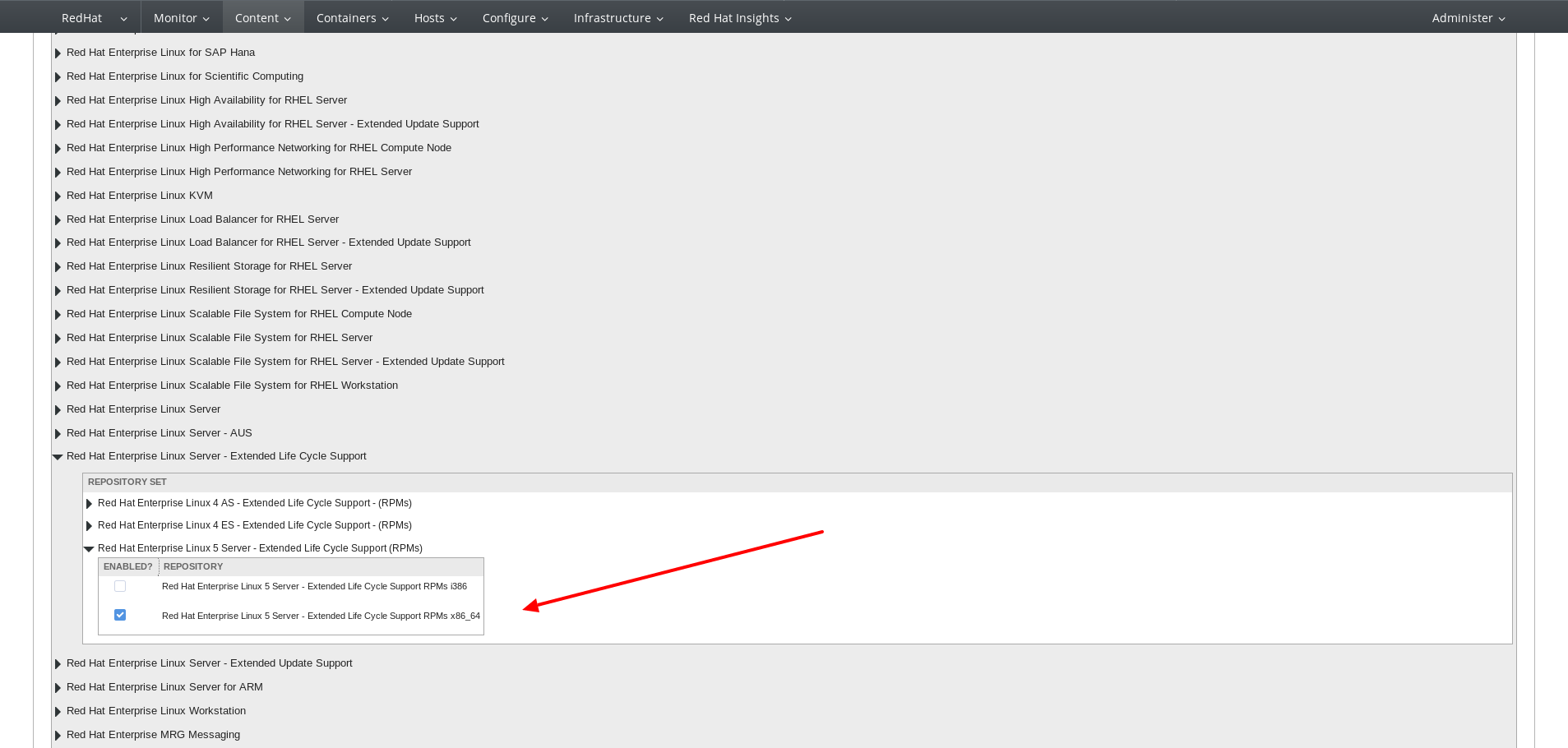
Next, on visit the Content -> Red Hat Repositories page to select the ELS repository. This repo can be found by expanding
- Red Hat Enterprise Linux Server - Extended Life Cycle Support
- Red Hat Enterprise Linux 5 Server - Extended Life Cycle Support (RPMs)
And then selecting the appropriate repository.
Example (Click to Enlarge)
After the repository is enabled, it can be synchronized via the Content -> Sync Status page.
Lastly, you can enable the repository on any client registered to Satellite 6.
Connecting Red Hat Enterprise Linux 5 systems to ELS content via Satellite 5
First, a new Satellite 5 Certificate will need to be generated using the Certificate Generation tool:
- This content is not included.Red Hat Satellite Certificate / Manifest FAQ
- This content is not included.What is the workflow for generating a Satellite 5 Certificate?
- This content is not included.Self-service Satellite 5 Certificate generation tool
Once the new certificate has been created, it must be activated on the Satellite:
Once the certificate has been activated, the Satellite is now ready to sync Red Hat Enterprise Linux 5 Server ELS content. Do so by executing the below from the Satellite server's command line.
Please note: the channel label will depend on the architecture of the desired RHEL 5 ELS content.
- To sync x86_64 architecture content:
For Satellite 5.6/5.7:

# satellite-sync -c rhel-x86_64-server-5-els

For Satellite 5.8:

# cdn-sync -c rhel-x86_64-server-5-els
- To sync i386 architecture content:
For Satellite 5.6/5.7:

# satellite-sync -c rhel-i386-server-5-els

For Satellite 5.8:

# cdn-sync -c rhel-i386-server-5-els
- To sync s390x architecture content:
For Satellite 5.6/5.7:

# satellite-sync -c rhel-s390x-server-5-els

For Satellite 5.8:

# cdn-sync -c rhel-s390x-server-5-els
Once the RHEL 5 ELS content in the desired architecture has been synced to the Satellite, the content is ready to be served to client hosts. Systems registered to the Satellite may subscribe to this content by executing the below from their command line interface.
Please note: the below example specifies the RHEL 5 ELS channel in x86_64 architecture; the channel label will need to be modified for i686 and s390x architectures.
# rhn-channel -a -c rhel-x86_64-server-5-els
Connecting Red Hat Enterprise Linux 5 systems to ELS content via RHN
Systems registered directly to RHN can subscribe to RHEL 5 ELS content by executing the below from the command line interface:
- To subscribe to x86_64 architecture content:
# rhn-channel -a -c rhel-x86_64-server-5-els
- To subscribe to i386 architecture content:
# rhn-channel -a -c rhel-i386-server-5-els
- To subscribe to s390x architecture content:
# rhn-channel -a -c rhel-s390x-server-5-els