Red Hat Virtualization: Firewall Requirements Diagram
Updated
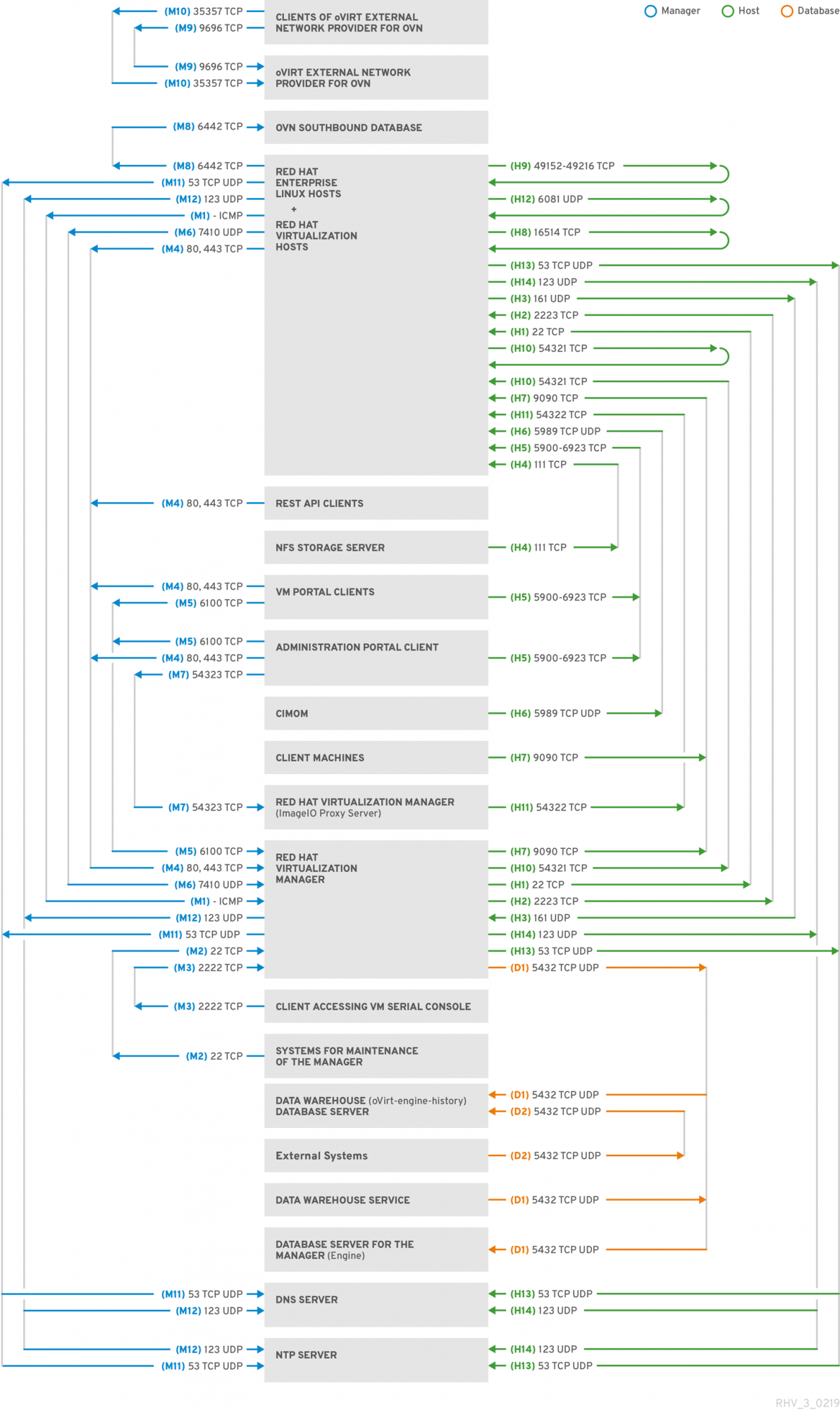
The following diagram summarizes the firewall requirements of a Red Hat Virtualization (RHV) cluster.
Using the Diagram
To see the complete diagram, right-click the image and choose the appropriate menu option, such as Open image in new tab in Chrome or View Image in Firefox.
Getting More Information About a Connection
For more information about a connection in the diagram, you can look it up in in the RHV documentation:
- In the diagram, get the ID of the connection from the parentheses in the connection label. For example, for the connection labeled "(M10) 35357 TCP", the ID is "M10".
- Use the first letter of the ID (for example, "M") to pick one of the following links to our documentation:
- M = This content is not included.Manager requirements
- H = This content is not included.Host requirements
- D = This content is not included.Database requirements
- Look up the ID (for example, "M10") in the left column of the table.
Exceptions
The diagram does not illustrate connections for the following items. Follow the links to the documentation instead.
- For DNS, NTP, and IPMI Fencing, see This content is not included.Firewall Requirements for DNS, NTP, and IPMI Fencing.
- For Metrics Store, ElasticSearch, and Kibana, see Network Configuration for Metrics Store virtual machines.
The Diagram
SBR
Product(s)
Category
Article Type