Using RHEL subscriptions (2013 packaging): Scenario 2 - Basic RHEL hypervisor
The new Red Hat Enterprise Linux (RHEL) 2013 packaging model provides a more flexible and intuitive way of managing your RHEL system entitlements. This is one of a set of articles (all available at Overview of Red Hat Enterprise Linux 2013 Packaging Model) that describes different RHEL configurations and how to use tools to entitle your RHEL systems and view the results with the 2013 packaging model.
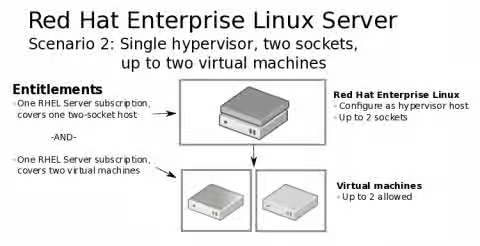
This scenario includes a single, two-socket computer where you want to run RHEL as a hypervisor with two additional virtual machines. The following figure illustrates this type of RHEL configuration:
RHEL Hypervisor 2013 Subscription Types
You could use one instance-based, two-socket subscription for the host computer and another of the same subscription types to cover both virtual machines. Here are the attributes of that type of entitlement:
-
One Red Hat Enterprise Linux Instance-based Subscription (for the two-socket Hypervisor system)
- Stackable (if the system had more than two sockets, you could add more instance-based entitlements as needed)
- Web support: Access to customer portal, software fixes, and upgrades.
- Call-in support: Can open cases and call for support. (Different levels of support available.)
- In this scenario, in order to entitle your virtual machines, you will need an additional subscription that is applied directly to each virtual machine (see below)
-
One Red Hat Enterprise Linux Instance-based Subscription (which can be split to cover two VMs)
- The same subscription type used for the hypervisor
- A single subscription can be used to entitle two virtual machines.
Registering a RHEL Hypervisor and VMs with 2013 Subscriptions
Follow this procedure to register your RHEL hypervisor and VMs with Red Hat Network, assign entitlements, and view consumed entitlements in different ways. Note that:
-
The same type of 2013 subscriptions (instance-based and stackable) are used for both the hypervisor and VMs.
-
The hypervisor (host) consumes a whole two-socket, instance-based subscription while two VMs only consume one of the same type of subscription.
-
Log into RHEL Hypervisor: On the RHEL hypervisor system you want to entitle, open a shell and log in as the root user.
-
Register RHEL Hypervisor: Run subscription-manager to register the system:
# subscription-manager register
 Username: your_username
 Password: your_password
 The system has been registered with id: 231c3a37-8e14-449c-a232-3de2d5c8fa8a
-
View subscriptions: List available subscriptions by typing the following:
# subscription-manager list --available | less
 ...
 Subscription Name:      Red Hat Enterprise Linux Server, Premium (Physical or Virtual Nodes)
 SKU:                    RH00003
 Pool Id:                8a01f9843ecdf027013fd44d02da5243
 Quantity:               14
 Service Level:          Premium
 Service Type:           L1-L3
 Multi-Entitlement:      Yes
 Ends:                   04/06/2014
 System Type:            Physical

 Subscription Name:      Red Hat Enterprise Linux Server, Standard
 SKU:                    RH00004
 ...
-
Choose subscription: Choose which subscription to use. From the output above, you can see:
-
Subscription Name: The fact that the subscription names don't show socket numbers on this line indicates that these are from the new two-socket 2013 subscription model. Either of the two SKUs shown can be used for the hypervisor or VMs.
-
SKU: For the 2013 subscription model, both RH00003 and RH00004 are the instance-based (stackable) SKUs, with Premium or Standard support, respectively.
-
Pool ID: The Pool IDs are the numbers you use when you add a specific subscription to a RHEL system (in other words, you don't just have a subscription automatically selected when you register).
-
-
Subscribe the RHEL host system. Here is an example of the command you would run to subscribe to a premium (instance-based/stackable), using the output above:
# subscription-manager subscribe --pool=8a01f9843ecdf027013fd44d02da5243
-
List RHEL host subscriptions: Type the following to list the subscriptions you have consumed on this system:
# subscription-manager list --consumed +-------------------------------------------+ Consumed Subscriptions +-------------------------------------------+ Subscription Name: Red Hat Enterprise Linux Server, Premium Provides: Red Hat Enterprise Linux High Performance Networking (for RHEL Server) - Extended Update Support Red Hat Enterprise Linux Server - Extended Update Support Red Hat Enterprise Linux Server Red Hat EUCJP Support (for RHEL Server) - Extended Update Support Red Hat Enterprise Linux Resilient Storage (for RHEL Server) - Extended Update Support Red Hat Software Collections (for RHEL Server) Red Hat Beta Red Hat Enterprise Linux High Availability (for RHEL Server) - Extended Update Support Red Hat Enterprise Linux Scalable File System (for RHEL Server) - Extended Update Support Red Hat Software Collections Beta (for RHEL Server) Red Hat Enterprise Linux Load Balancer (for RHEL Server) - Extended Update Support Red Hat S-JIS Support (for RHEL Server) - Extended Update Support SKU: RH00003 Contract: 26343927 Account: 1239350 Serial: 47543324761175555645 Pool ID: 8a01f9843ecdf027013fd44d02da5243 Active: True Quantity Used: 2 Service Level: Premium Service Type: L1-L3 Status Details: Starts: 10/07/2013 Ends: 04/06/2014 -
Subscribe the RHEL virtual machine systems: Repeat steps 1 through 6 on each virtual machine system.
-
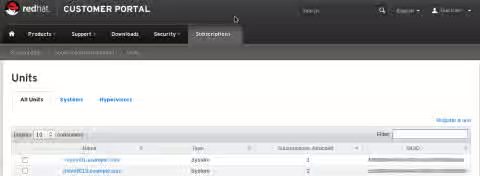
View subscriptions from Red Hat Customer portal (https://access.redhat.com): When you view your available and consumed subscriptions, notice that the host shows two entitlements are consumed. Since the same type of subscription can cover two VMs, notice that with only one VM installed, only one entitlement is consumed.