Predicting Vmcore Size
Environment
- Red Hat Enterprise Linux
Issue
When available storage space at the kdump target filesystem is less than total RAM on the server, the kdump service prints the following error message:
Warning: There might not be enough space to save a vmcore.
Resolution
Note: There is no guaranteed method to predict a vmcore size with 100% accuracy. The only way to ensure you will always have enough available storage space for a vmcore dump is to have available storage be at least equal to or greater than total RAM on the server.
While there is no guaranteed method to consistently predict vmcore size, an exhaustive internal review of over 1500 vmcores collected from various support cases ranging from Red Hat Enterprise Linux 5, Red Hat Enterprise Linux 6, Red Hat Enterprise Linux 7, and Red Hat Enterprise Linux 8 kernels indicated that using the default dump_level setting of -d 31 often results in a vmcore size of under 10% of RAM on a system.
As such, since root cause investigations sometimes necessitate analysis of multiple vmcores yielded from frequent crashes, a best-practice recommendation for small-to-medium size servers (<500 GB RAM) is to have available storage space at the kdump dump target be sized at 50% of total RAM on the server, equivalent to available storage for at least 5 vmcores estimated at 10% of total RAM each.
For larger servers (>500 GB RAM), the best-practice recommendation is available storage space at the dump target be at least equal to 30% of total RAM, or 3 vmcores estimated at 10% of total RAM each. This compromise of a lower recommended available space value for larger servers helps mitigate the storage burden of ever-growing memory sizes on large systems.
For both small-to-medium and large size servers, having the dump target's available space sized over 10% of total RAM can potentially provide a storage space 'cushion' to help capture outlier vmcores that exceed 10% of total RAM size. These vmcore exceptions that exceed 10% of the total RAM size are most commonly seen when slab usage is higher than a typical workload or when a dump_level other than -d 31 is used, since the size of a vmcore is relative to the amount of kernel pages in use at the time of the crash. Adjusting the dump_level flag or having a condition/issue that causes a larger amount of memory in use by the kernel or slab will often see a larger vmcore, potentially greater than 10% of RAM size.
Diagnostics steps
kdump Deployment
Ensure the kexec-tools package that provides kdump is installed and that the kdump service is active:
# rpm -qa | grep kexec
kexec-tools-2.0.20-14.el8.x86_64
For Red Hat Enterprise Linux 7 or later:
# systemctl status kdump
● kdump.service - Crash recovery kernel arming
   Loaded: loaded (/usr/lib/systemd/system/kdump.service; enabled; vendor preset: enabled)
   Active: active (exited) since Fri 2021-01-01 02:21:00 EST; 2s ago
[...]

or

# systemctl is-enabled kdump.service
enabled

or

# kdumpctl status
kdump: Kdump is operational
For Red Hat Enterprise Linux 6:
# chkconfig | grep kdump
kdump          	0:off	1:off	2:on	3:on	4:on	5:on	6:off
If the kexec-tools package is absent or the kdump service is inactive, please reference the following article to install, enable, start, and configure kdump:
How to troubleshoot kernel crashes, hangs, or reboots with kdump on Red Hat Enterprise Linux
Verify the default dump_level is in use
By default the makedumpfile line found in /etc/kdump.conf uses dump_level 31 as seen below, evident by the -d 31 flag:
core_collector makedumpfile -l --message-level 1 -d 31
The -d 31 flag instructs makedumpfile to use dump_level 31 which excludes zero pages, non-private cache pages, private cache pages, user process data pages, and free pages from the dump. The exclusion of these pages significantly reduces the vmcore size and these pages are frequently unnecessary for vmcore analysis to determine root cause for a kernel panic, crash, or hang.
Verify available space at dump target meets the best-practice recommendation relative to total RAM
Use the /proc/meminfo file to determine total RAM on the server:
$ head -1 /proc/meminfo
MemTotal:       32781692 kB
Validate the available space at the dump target is adequate for the appropriate best-practice vmcore collection recommendation:
$ df
Filesystem               1K-blocks     Used Available Use% Mounted on
[...]
/dev/mapper/vgsys-lvroot  29337600 17354536  11983064  60% /
In the above example the system has a total RAM size of around 32 GB with nearly 12 GB available storage space free at the root filesystem on which /var/crash resides. While the default dump_level of 31 is in use and this server will likely meet the space requirement to capture a vmcore, the amount of available space at the root filesystem is not adequate to capture 5 vmcores, around 16 GB of available storage space. In this example, the available storage space should be increased or a different target filesystem for vmcore dumps should be used to ensure that enough space for 5 vmcores at 10% of RAM total RAM is available.
Exceptions
As previously outlined, exceptions do arise and vmcore size can exceed 10% of the total RAM size. These instances are most commonly seen when slab usage is higher than a typical workload or when a dump_level other than -d 31 is used, since the size of a vmcore is relative to the amount of kernel pages in use at the time of the crash. Adjusting the dump_level flag or having a condition/issue that causes a larger amount of memory in use by the kernel or slab will often see a larger vmcore, potentially greater than 10% of RAM size. There is no guaranteed method to predict a vmcore size with 100% accuracy. The only way to ensure you will always have enough available storage space for a vmcore dump is to have available storage be at least equal to or greater than total RAM on the server.
Data excerpts
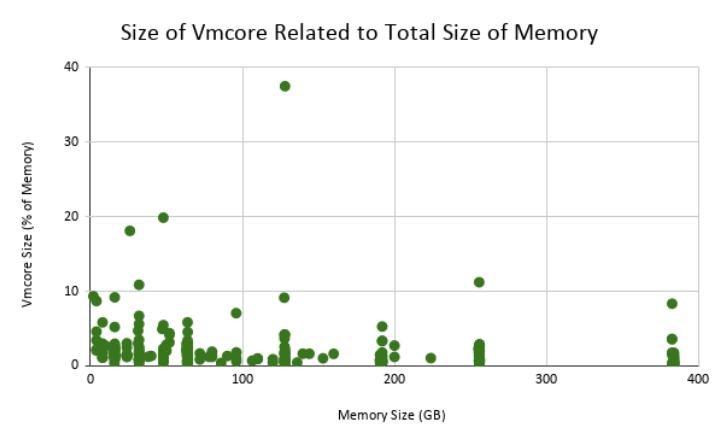
Below is a chart of 367 vmcores collected from Red Hat Enterprise Linux 7 kernels. The chart shows that of the 367 vmcores, only 5 exceeded 10% of the size of RAM in size:
In the following vmcore, we see that dump_level 31 was used, and although the system in question had over 500 GB of RAM, the dump is only around 3 GB in size:
crash> sys
      KERNEL: /cores/retrace/repos/kernel/x86_64/usr/lib/debug/lib/modules/3.10.0-693.el7.x86_64/vmlinux
    DUMPFILE: /cores/retrace/tasks/106034746/crash/vmcore  [PARTIAL DUMP]
        CPUS: 112
        DATE: Thu Dec 24 23:28:59 EST 2020
      UPTIME: 139 days, 20:21:01
LOAD AVERAGE: 0.06, 0.25, 0.35
       TASKS: 3481
    NODENAME: hostname
     RELEASE: 3.10.0-693.el7.x86_64
     VERSION: #1 SMP Thu Jul 6 19:56:57 EDT 2017
     MACHINE: x86_64  (1999 Mhz)
      MEMORY: 511.9 GB                      <<<----------
       PANIC: "BUG: unable to handle kernel NULL pointer dereference at 0000000000000018"

crash> help -n | grep dump_level
          dump_level: 31 (0x1f) (DUMP_EXCLUDE_ZERO|DUMP_EXCLUDE_CACHE|DUMP_EXCLUDE_CACHE_PRI|DUMP_EXCLUDE_USER_DATA|DUMP_EXCLUDE_FREE)

$ ll -n --block-size=M
total 2499M
-rw-r--r--. 1 174 5845 2499M Dec 29 03:19 vmcore