How to deploy Red Hat EAP 7 in OpenShift 4 using Operator
EAP Operator provides an easy deploy monitoring that can be done via source to image or bootable jar. It uses a statefulset, which will ensure persistence storage and network hostname stability for EJB remoting (after restart).
For application deployment, see solution How to deploy an application in JBoss EAP 7 in OCP 4
This is a step by step guide to run an application in EAP 7 starting with the EAP's Operator.
This complements EAP 7 Getting started with EAP for Openshift
-
Create an OpenShift project and Install the EAP Operator (which will show Wildfly Server):
1.1. Log in OCP cluster and create a new project
1.2. Search and Install the JBoss EAP Operator
EAP Operator has its own pod, which will be responsible to keep it the operator lifecycle manager for new versions of EAP. -
Create instance in the EAP Operator | Create a custom resource Wildfly Server:
On the main overview of the operator, click on wildfly server and press Create Wildfly Server:
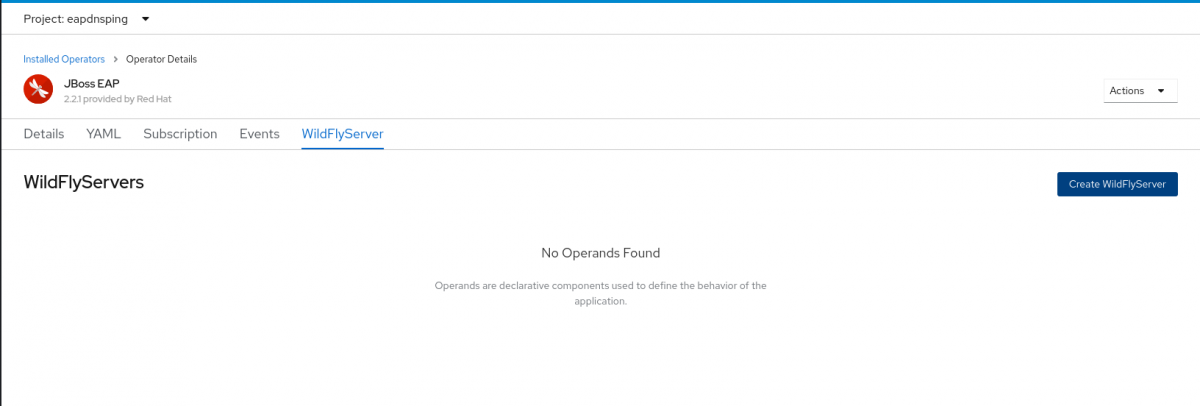
2.1 Fill the features/details via yaml or console fields<br>
The mandatory fields are: Name, the number of replicas, and application Image, which is the name of the application image to be deployed. Optional setting include `Environment Variables`, to Disable HTTP Route, Secrets and Standalone Config Map.
- Verify the WildflyServer Custom Resouces created
Verify thestatefullset, as well as two services: aheadless(service used to ensure the specific dns name is set for the pod) and aloadbalancer(with a unique address, which can be used across the pods).
Using template
Creating EAP Operator via template:
- apiVersion: operators.coreos.com/v1alpha1
  kind: Subscription
  metadata:
    name: eap-operator
    namespace: ${OPERATOR_NAMESPACE}
  spec:
    channel: stable
    installPlanApproval: Automatic
    name: eap
    source: redhat-operators
    sourceNamespace: openshift-marketplace
    startingCSV: eap-operator.v2.3.2
Creating Wildfly CR via template (just change the applicationImage for the EAP+application):
- apiVersion: wildfly.org/v1alpha1
  kind: WildFlyServer
  metadata:
    name: eap-example
    namespace: ${CLUSTER_NAMESPACE}
  spec:
    applicationImage: 'jboss-eap-7/eap74-openjdk11-openshift-rhel8:7.4.4' <---------------- add the image with the application
    replicas: 1
The image deployment must require registry.redhat.io in the front as in: applicationImage: 'registry.redhat.io/jboss-eap-7/eap74-openjdk11-openshift-rhel8:7.4.4':
 spec:
    applicationImage: 'registry.redhat.io/jboss-eap-7/eap74-openjdk11-openshift-rhel8:7.4.4' <---------------- image must directly refer to registry.redhat.io
Given that the Operator might try to fetch first from the quay instead of registry and fail to fetch.
Common errors
ImagePullBackOff
This means that a Pod couldn’t start because Kubernetes could not pull a container image.
When not setting an application image or wrong path for the application image, will result in error:
Pod:example-0 ImagePullBackOff
Without the Operator
To deploy EAP without the operator, login into OCP, and then create a deployment on OCP via template (Helm Charts are still Tech Preview):
$ oc new-app registry.redhat.io/jboss-eap-7/eap74-openjdk8-openshift-rhel7:7.4.4-2.1652304391
-> Found Docker image e540573 (8 days old) from registry.redhat.io for "registry.redhat.io/jboss-eap-7/eap74-openjdk8-openshift-rhel7:7.4.4-2.1652304391"

    JBoss EAP 7.4
    -------------
    Platform for building and running JavaEE applications on JBoss EAP 7.4

    Tags: builder, javaee, eap, eap7

    * An image stream tag will be created as "eap74-openjdk8-openshift-rhel7:7.4.4-2.1652304391" that will track this image
    * This image will be deployed in deployment config "eap74-openjdk8-openshift-rhel7"
    * Ports 8080/tcp, 8443/tcp, 8778/tcp will be load balanced by service "eap74-openjdk8-openshift-rhel7"
      * Other containers can access this service through the hostname "eap74-openjdk8-openshift-rhel7"

--> Creating resources ...
    imagestream.image.openshift.io "eap74-openjdk8-openshift-rhel7" created
    deploymentconfig.apps.openshift.io "eap74-openjdk8-openshift-rhel7" created
    service "eap74-openjdk8-openshift-rhel7" created
--> Success
    Application is not exposed. You can expose services to the outside world by executing one or more of the commands below:
     'oc expose svc/eap74-openjdk8-openshift-rhel7'
    Run 'oc status' to view your app.
The command oc new-app generates OpenShift Container Platform objects that will build, deploy, and run the application being created, on this case the image is EAP 7.4.4. On this instance the project used was the default, since that was the one set before starting the oc new-app.
Below an example that creates a eap-demo project, set the display name, and then creates a deployment with EAP 7.4.4 image with jpa, jaxrs-server, datasources-web-server, and includes datasource package:
oc new-project eap-demo --display-name 'EAP Test with JDBC'
oc new-app registry.redhat.io/jboss-eap-7/eap74-openjdk8-openshift-rhel7:7.4.4-2 -p IMAGE_STREAM_NAMESPACE=eap-demo -p SOURCE_REPOSITORY_URL=https://github.com/jboss-developer/jboss-eap-quickstarts -p SOURCE_REPOSITORY_REF=7.3.x-openshift -p GALLEON_PROVISION_LAYERS=jaxrs-server,jpa,datasources-web-server -p CONTEXT_DIR=helloworld-html56 --build-env GALLEON_PROVISION_FEATURE_PACKS="org.jboss.eap:eap-datasources-galleon-pack:7.4.0.GA-redhat-00003"
To scale down and up
With the operator the scale must be set on the operator itself, by editing the infinispan' CR:
oc edit infinispan.infinispan.org/example-infinispan -n rhdg8-mutua
Without the operator the scale must be set on the deployment config:
$ oc get dc
NAME                             REVISION   DESIRED   CURRENT   TRIGGERED BY
eap74-openjdk8-openshift-rhel7   1          1         1         config,image(eap74-openjdk8-openshift-rhel7:7.4.4-2)
$ oc scale eap74-openjdk8-openshift-rhel7 --replicas=5
error: resource(s) were provided, but no name, label selector, or --all flag specified
$ oc scale dc/eap74-openjdk8-openshift-rhel7 --replicas=5
deploymentconfig.apps.openshift.io/eap74-openjdk8-openshift-rhel7 scaled
Troubleshooting
- See pod logs
- See services for instance loadbalancer and headless