Ansible on Azure: Deployed Resources and Access to Those Resources
During the deployment of an instance of Ansible Automation Platform (AAP) on Azure, various components and resources will be deployed on Azure infrastructure. This article will help customers to get a better understanding of the components, their purpose, and access levels.
Resource Groups
When an instance of Red Hat Ansible Automation Platform on Microsoft Azure is deployed, it requires a total of 3 resource groups for provisioning the managed application. These resource groups are created (or used) by the managed application to ensure proper functioning of the managed application.
The resource groups are as follows:
-
Resource Group (RG)
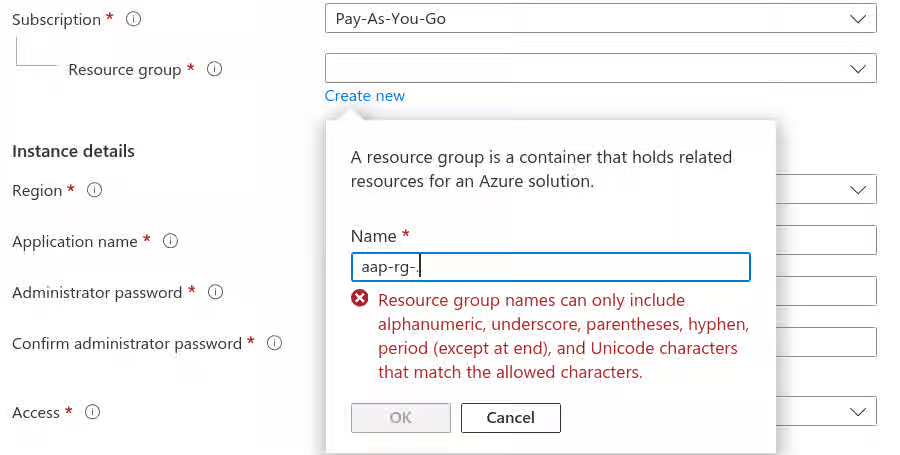
Description This is the resource group that managed application is deployed into. It can be a new or an existing resource group and customers have the ability to either create a new resource group or to select an existing resource group when deploying the managed application.
Access Red Hat does not have access to this resource group.
Deleting this resource group will delete any managed applications inside of it.
Naming RG has minimal naming restrictions. It can be named anything, provided it complies with the requirements from Azure.
Note: RG name cannot be changed once the application deployment has started.
>>
-
Managed Resource Group (MRG)
Description This is the managed resource group where most of the managed application resources are deployed. These resources are required to setup and maintain/upgrade the managed applications.
Access This managed resource group is "read-only" for customers. Red Hat (Ansible on Azure SREs) have access to this managed resource group for upgrades, bug-fixes, routine maintenance activities are performed on/using resources.
Naming By default, MRG name will be auto generated and follows a naming convention,"mrg-rhaapomsa-$timestamp", however the MRG name can be changed provided it complies with the requirements from Azure.
Note: MRG name cannot be changed once the application deployment has started.
>>
-
Node Pool resource Group (NPRG)
Description This is the Azure Kubernetes Service (AKS) node pool resource group which is created outside of the management of Red Hat.This contains resources such as:
- Virtual Machines for AKS
- The app gateway and Azure Web Application Firewall (if public)
- Network routing for peering
- Kubernetes load balancer
- Kube-apiserver
Access Red Hat (Ansible on Azure SREs) and customers have write access to the NPRG. (see note below)
Naming NPRG is named automatically by Azure following this convention:"rg-$appName-nodepools-$region".
Example: "rg-aapynih6a7n6esbq-nodepools-centralus"NOTE - Node Pool Resource Group
The NPRG is a first-party (Microsoft) requirement for AKS deployments. This resource group contains resources that AKS uses to function. See Content from docs.microsoft.com is not included.Microsoft documentation for more information about NPRGs.
Microsoft does not provide the capability for Red Hat to restrict a customer’s ability to change resources in the NPRG as is the case with the MRG. Therefore, it is possible for a customer to access and change or delete the resources in this NPRG.
Changes to resources in the NPRG cannot be protected by Red Hat and can cause irrecoverable damage to the application. Please ensure that your organization does not interact with any resources in this NPRG unless explicitly directed to by the Ansible Automation Platform on Azure SRE team.
Resources, Purpose, and Access
Below table(s) show a summary of the Ansible Automation Platform on Azure’s various components, their use/purpose, and customer access to them.
Resource Group and Contained Resources
| Resource | Purpose | Customer Access | |
|---|---|---|---|
| 1 | Resource Group (RG) | Resource group that the managed application is deployed into. | ✅ Full Access |
| 2 | Managed Application | Actual Ansible Automation Platform on Azure deployment instance. | ✅ Full Access |
Managed Resource Group and Contained Resources
| Resource | Purpose | Customer Access | |
|---|---|---|---|
| 1 | Managed Resource Group (MRG) | Managed resource group that contains resources needed for the managed application. | ✅ Read-only (restricted) |
| 2 | Azure Kubernetes Service (AKS) | Kubernetes for AAP deployment. | ✅ Read-only (restricted) |
| 3 | Storage Account | Used for storing Ansible Automation Platform on Azure related data. | ✅ Read-only (restricted) |
| 4 | Key Vault | Used during installation but removed upon successful deployment. | ✅ Read-only (restricted) |
| 5 | Azure Database for PostgreSQL flexible server | Used for storing AAP related data such as automation controller data like jobs, templates, projects, etc. | ✅ Read-only (restricted) |
| 6 | Managed Identity | Used for providing a managed identity to resources that use AD. | ✅ Read-only (restricted) |
| 7 | Log Analytics workspace | Used for log analytics. | ✅ Read-only (restricted) |
| 8 | Container Insights | Used for monitoring the performance of container workloads. | ✅ Read-only (restricted) |
| 9 | DNS zone | Used for networking. | ✅ Read-only (restricted) |
| 10 | Private DNS zone | Used for networking. | ✅ Read-only (restricted) |
| 11 | Private endpoint | Used for networking. | ✅ Read-only (restricted) |
| 12 | Network Interface | Used for networking. | ✅ Read-only (restricted) |
| 13 | Virtual network | Used for networking. | ✅ Read-only (restricted) |
Node Resource Group and Contained Resources
| Resource | Purpose | Access | |
|---|---|---|---|
| 1 | Node Resource Group | The node resource group of AKS. | ✅ Full Access |
Network Configurations
To know more about network peering and other networking related information, please follow article here:
AAP Azure Network Peering
Logs and Audit Entries
To know more about logs and audit entries, please follow article here:
Ansible on Azure: Accessing logs of the Managed Application