Scaling OpenShift Data Foundation cluster using YAML when flexible scaling is enabled.
For internal-attached (Local Storage Operator based) deployment, if the deployment was done with less than 3 failure domains enabling the flexible scale deployment, you can scale up by adding any number of disks. Unlike Internal (Dynamic Provisioning) mode deployment, there is no constraint to scale up by adding 3 disks at a time.
Note: Flexible scaling features get enabled at the time of deployment and can not be enabled or disabled later on.
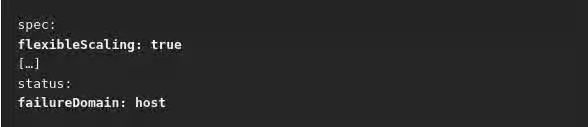
Before we get into the scaling steps. Let's assure that flexible scaling is enabled on the cluster by following the steps below:
Verify if flexible scaling is enabled
- In the Web Console, click
Home→Search - Enter
StorageClusterin the search field - Click
ocs-storagecluster - In the YAML tab, search for the keys
flexibleScalingin spec section andfailureDomainin status section. - If
flexible scalingistrueandfailureDomainis set tohost, flexible scaling feature is enabled.
Add capacity using the YAML
To add OSDs to your storage cluster flexibly through the YAML, perform the following steps:
- Prerequisites
- Administrator access to the OpenShift Container Platform web console.
- A storage cluster with flexible scaling enabled.
- Additional disks available for adding capacity.
- Procedure
- In the OpenShift Web Console, click Home → Search.
- Search for ocs-storagecluster in the search field and click on ocs-storagecluster from the search result.
- Click the Action menu (⋮) next to the storage cluster you want to scale up.
- Click Edit Storage Cluster. You are redirected to the YAML.
- In the YAML, search for the key count. This count parameter scales up the capacity.
- Increase the count by the number of OSDs you want to add to your cluster.
- Click Save.
Important
Ensure the count parameter in the YAML is incremented depending on the number of available disks and also make sure that you add disks in a way that the cluster remains balanced.
*Note
You might need to wait a couple of minutes for the storage cluster to reach the Ready state.