Transition of Red Hat Hybrid Cloud Console APIs from basic authentication to token-based authentication via service accounts
Red Hat has implemented a crucial security enhancement on our cloud service APIs on console.redhat.com, and has discontinued support for basic authorization to connect to our services' APIs.
To support our customers in transitioning from basic authentication to token-based authentication, the Hybrid Cloud Console is integrating service accounts with User Access functionality to provide granular control over access permissions and enhance security when transitioning to token-based authentication.
What are service accounts?
Service accounts are used to authenticate applications and services, whereas user accounts are used to authenticate human users. Service account authentication should be used when:
- An application or service needs access to specific resources.
- The application or service needs to access resources without the need for human intervention.
- The application or service needs to access resources from multiple locations.
Why is this change being made?
The security of our customer data is of the utmost importance to Red Hat. As such we are discontinuing the use of ROPC, also known as direct access grants. Password grants do not allow the use of important security and authentication mechanisms like multi-factor authentication and federated single sign-on. Password grants also expose users to more vulnerabilities and attacks such as phishing. They expand any organization’s vulnerable surface area to all systems which handle passwords, rather than limiting it to single sign-on and identity systems where security requirements are more strict.
What do I need to do?
To ensure a seamless transition and uninterrupted access to our APIs, we request you switch to using service accounts and update your authentication mechanisms accordingly. Service accounts offer enhanced security features and better access control, making them the preferred method for authenticating API requests.
Which APIs are impacted?
The APIs directly impacted by this change are listed on This content is not included.developers.redhat.com/api-catalog
To assist you in the migration process, we have outlined the steps necessary for this transition
Step 1: Set Up Service Account(s)
- Access your account on console.redhat.com
- Click the gear icon and select “Service Accounts.”
- Click “Create new service account” and provide a description
- Ensure your description provides enough context to understand the purpose or limits of the service account (for example, “Registration automation service account.”)
Step 2: Obtain Service Account Credentials
- Once the Service Account is created, you will receive the necessary credentials, including a Client ID and Client Secret.
- Make a copy of the client ID and secret to store safely. The client secret won't appear again after closing this screen.
- Keep these secure and treat them as you would a username and password.
Step 3: Add the Service Account to applicable User Access Groups
- Service accounts WILL NOT inherit permissions from any Default access groups (default access/default admin access), so they must be granted access by placing them in a User Group.
- Access console.redhat.com/iam/user-access/groups
- Select the group with the correct roles and permissions you want to grant to the Service Account.
- Within the group view, click the “service accounts” tab and then “Add Service Account.”
- Search and select the Service Account you wish to include.
- Once selected, click ‘Add to group.”
Step 4: Update Your API Integration
- Use Service Account credentials in your application or system that connects to our APIs.
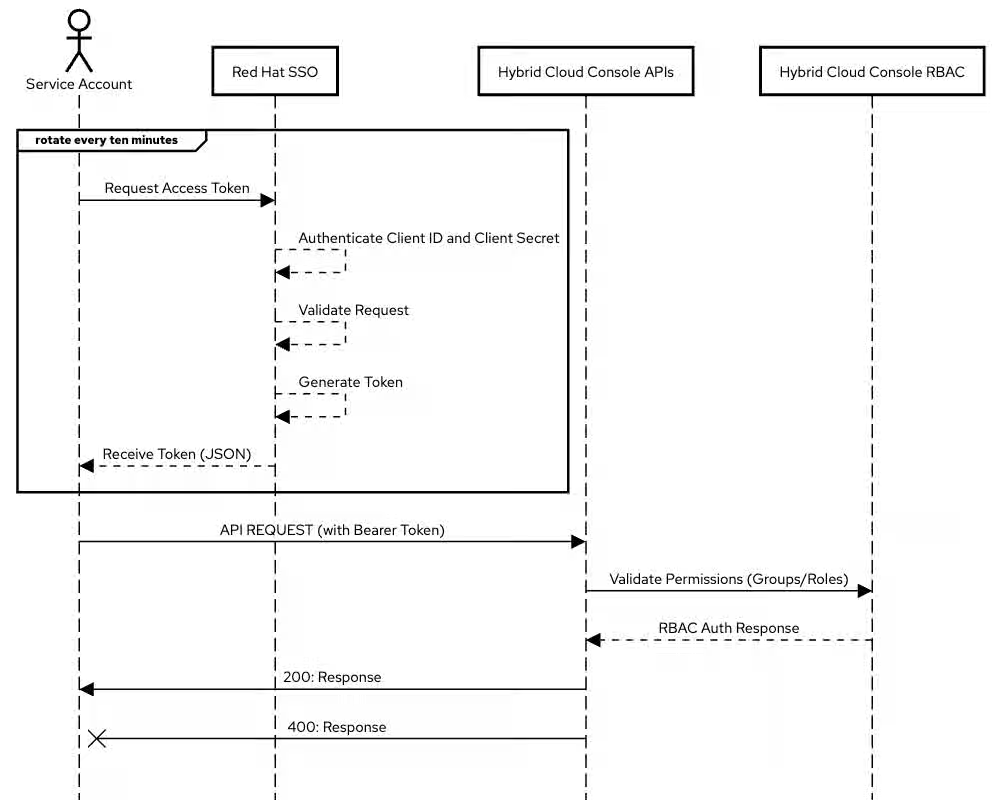
- Obtain an access token from Red Hat Single Sign-On (RH-SSO) using the Client Credentials Grant flow.
curl 'https://sso.redhat.com/auth/realms/redhat-external/protocol/openid-connect/token' \
    --data-urlencode 'grant_type=client_credentials' \
    --data-urlencode 'client_id=XXXXX' \
    --data-urlencode 'client_secret=YYYYY' \
    --data-urlencode 'scope=openid api.iam.service_accounts'
- Red Hat SSO will respond with a JSON object containing an access token. This access token can then be used to make authenticated requests to APIs. The following is an example of this call using Ingress API:
curl 'https://console.redhat.com/api/ingress/v1' \
    --header 'Accept: application/json' \
    --header "Authorization: Bearer ${ACCESS_TOKEN}"
Please note: Access tokens will expire after fifteen (15) minutes. The expiration is included within the JSON response. The process of obtaining an access token needs to be repeated approximately every ten (10) minutes so that the token is rotated prior to expiration per Content from datatracker.ietf.org is not included.rfc 4.1.4 standards
- See the image below for an overview of this process.
Step 5: Test and Verify
After making the necessary changes, thoroughly test your API integration to ensure it functions with the Service Account credentials and that the associated User Access roles and permissions work as expected.
Thank you
We understand that security is essential and are dedicated to providing you with the most reliable and protected service possible.
For Red Hat Insights Users
For information on the deprecation of basic authentication and the registration of RHEL Hosts, see
How to switch from Basic Auth to Certificate Authentication for Red Hat Insights