Network Fact Gathering & Reporting - Solution Guide
Overview
Every automation journey begins by exploring a few simple automated tasks. In this use case, we'll walk through a simple network automation use case to help you gather facts about your network which can be exported for compliance reporting. For purposes of this article, we will be demonstrating the automation of Cisco IOS devices, but this automation could easily be applied to Arista, Juniper or other network components supported by various Ansible Content Collections.
Operational impact: None
Business value drivers
- Increased productivity
- Support for compliance
Technical value drivers
- Increased network visibility
- Simplified compliance reporting
Recommended demo and self-paced labs:
- This content is not included.Demo: Execute a network report
- This content is not included.Demo: Network automation
- This content is not included.Self-paced lab: network automation
Prerequisites
This solutions guide assumes a working knowledge of YAML, Ansible Playbooks, the Ansible VS Code extension, execution environments, Ansible navigator, and Git. If you are new to Ansible Automation Platform, we strongly recommend the [free Red Hat technical overview course](https://www.redhat.com/en/services/training/do007-ansible-essentials-simplicity-automation-technical-overview) or these learning paths:
- This content is not included.Foundations of Ansible
- This content is not included.YAML essentials for Ansible
- This content is not included.Get started with Ansible Playbooks
- This content is not included.Get started with the Ansible VS Code extension
- This content is not included.Get started with Ansible builder
- Content from docs.ansible.com is not included.Building an execution environment
- This content is not included.Get started with Ansible navigator
The Ansible Content Collections referenced in this guide can be found in the This content is not included.Red Hat Hybrid Cloud Console, which is available to current subscribers. Not currently an Ansible Automation Platform customer? Sign up for a This content is not included.free 60-day trial.
Featured Ansible Content Collections
- This content is not included.Red Hat Certified Content Collection for Cisco IOS
- This content is not included.Ansible validated content for network backups
Ansible / Ansible Automation Platform features used
- Ansible Playbooks
- Ansible builder / execution environments
- Ansible navigator
- Automation hub
- Automation job templates
Other:
- Github
Step 1: Network fact gathering
- Use This content is not included.thenetwork.ios.facts.facts utility provided in the This content is not included.Cisco IOS certified collection to create a playbook and save to the Git repository for your project.
---
- name: Gather information from routers
  hosts: cisco
  gather_facts: yes
  tasks:
    - name: Gather router facts
      cisco.ios.ios_facts:
      register: cisco_facts

    - name: Display router facts
      ansible.builtin.debug:
        var: cisco_facts
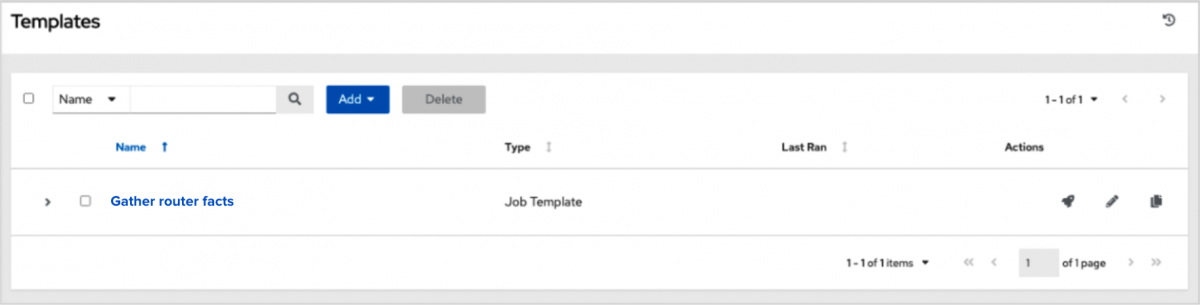
- Create a job template using your project. Save your job template as Network configuration update, then select Launch to run the template.
Step 2: Export network facts to a report or create dynamic documentation
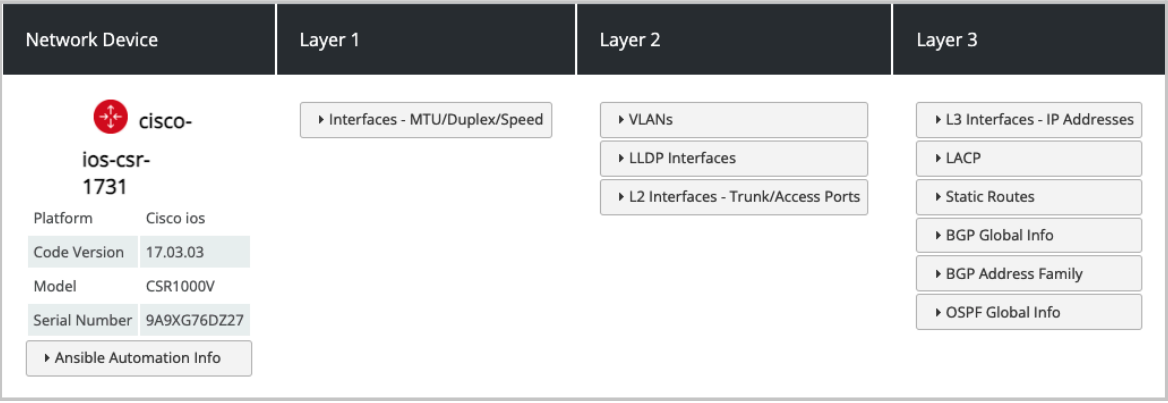
- From here, you can export your data to a reporting tool such as Splunk, Grafana, etc., use a Jinja2 template to publish via HTML, or create Content from youtu.be is not included.simple dynamic documentation / dashboard:
Next Steps:
- Learn how to back up your Cisco network devices, then make some basic configuration updates.