Get started with EDA (Ansible Rulebook) - Solution Guide
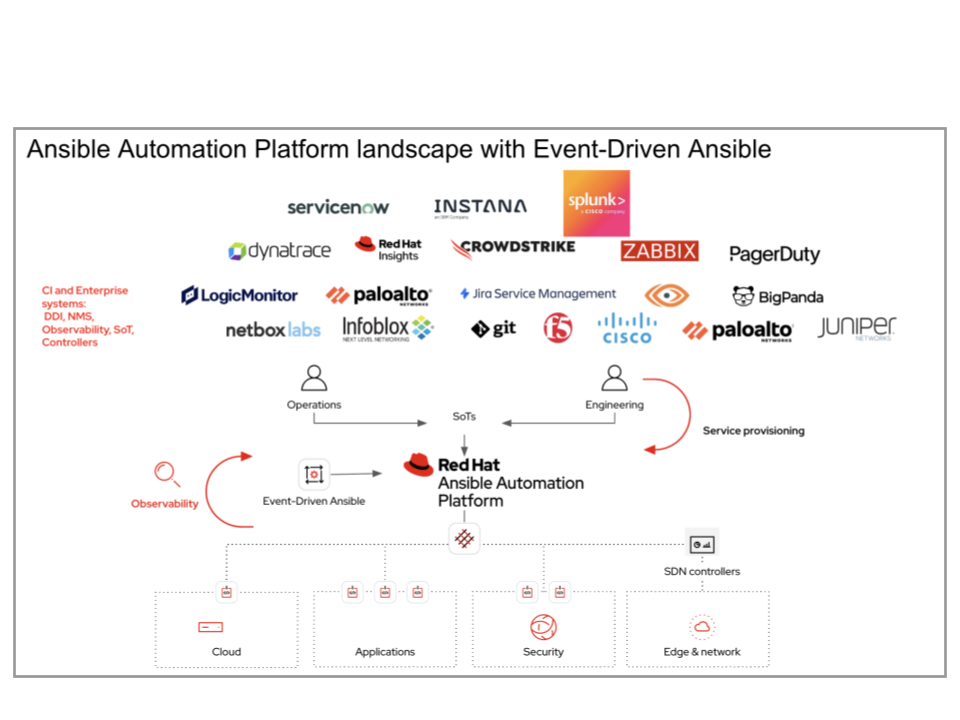
## Overview This guide introduces the fundamentals of ansible-rulebook of Event-Driven Ansible, a key automation capability of Red Hat Ansible Automation Platform (AAP). You will learn how it works, including event sources and rulebooks, that enable the platform to act as the “connective tissue” between changing environmental conditions and your automated response. We will demonstrate how to work with webhook and Kafka sources, providing practical examples of how to design rules for real-time alerts. These examples serve as a foundation for production-ready scenarios, such as ticket enrichment and automated remediation for low severity issues, which can be further enhanced using Event Streams for secure, multi-rulebook activations. ### Operational Impact: High. ### Business value Drivers:
- Automate responses to changing IT conditions : Trigger immediate, predefined actions – from ticket enrichment and fact gathering to automated remediation (restarting containers or rotating certificates).
- Enable more resilient systems: Shift teams from reactive troubleshooting to proactive management, reducing mean time to resolution (MTTR) and ensuring systems stay in compliance. Enable teams to focus on key priorities by automating tasks such as fact gathering and enabling faster remediation.
- Integrates diverse event sources: Utilizes certified and validated source plugins (webhook and Kafka) for system integration.
- Webhook is used primarily for development and testing, and Event Streams provide a way to securely connect multiple webhooks especially in production.
- Kafka and event buses are recommended for production environments to add scale and performance.
- Facilitates seamless integration: Leverage Ansible Content Collections specifically for Event-Driven Ansible to integrate with existing systems. Partners also develop add-on integrations in their own user interfaces to provide a simpler user experience.
- Enhances connectivity: Event Streams is an Event-Driven Ansible enhancement to webhook events, providing advanced capabilities like authentication and internal routing.
- Improves workflows: Facilitates “closed-loop” automation by communicating automated remediations to tools such as observability tools or employing AI to help with analysis and troubleshooting.
- This content is not included.Getting started with EDA and ansible-rulebook
- Content from youtu.be is not included.YouTube Video: Splunk with event streams
- This content is not included.Splunk ITSI and Event Driven Ansible arcade
- This content is not included.Event-Driven Ansible Controller 2.5 up and running
- Content from youtu.be is not included.YouTube Video: Getting started with EDA and Ansible Rulebooks
#Install ansible-rulebook using pip
pip3 install ansible-rulebook

#Install the necessary collection
ansible-galaxy collection install ansible.eda
You can also just use the container:
podman pull quay.io/ansible/ansible-rulebook:latest
- Event sources - third party data about changing conditions across your environment. These can be observability tools, monitoring tools, or perhaps even log data aggregated through a solution like Kafka or Grafana.
- Rulebooks with rules - While Ansible Automation Platform can use playbooks to specify sequential actions, you should use rulebooks to integrate via events. Rulebooks are conditions that are evaluated for the alert to determine if the alert should receive the specified action.
- Event-Driven Ansible controller - Part of Ansible Automation Platform subscription, this component is a decisioning engine that receives alerts, matches to the right rulebook and executes decisioning (via the rules in the rulebook) to determine whether an action is warranted.
- Automation controller - finally when the decision process is complete an action is required, the rulebook action request is sent to Ansible controller for action. The action can be a playbook that is called, or a workflow to orchestrate a sequence of jobs.
-
Ansible Rulebooks rely on three essential components that work together to enable even-driven automation.
- Source - The sources of our events come from source plugins. These plugins define where we are listening for events and monitoring system activity.
- Condition - The conditional statement in the rulebook allows us to match specific criteria on which we want to trigger a response. These act as filters to determine when actions should be executed.
- Action - The action is our response once the condition has been met from the event source. This can include triggering Ansible Modules, playbooks, templates, workflow templates and other actions.
-
Red Hat’s ansible.eda collection provides the most common generic integrations via source plugins:
- Kafka - Receives events via a kafka topic.
- Webhook - Receives events via a webhook
- Below is a sample Rulebook and it defines the source, the condition, and the action:
#webhook-example.yml
#in YAML

# Source: Listens for POST requests on port 5000
sources:
  - ansible.eda.webhook:
      host: 0.0.0.0
      port: 5000

# Condition: Triggers only on this exact message
rules:
  - name: Say Hello
    condition: event.body.message == "Ansible is super cool"
    # Action: Executes this playbook
    action:
      run_playbook:
        name: say-what.yml
- We can now look at the playbook we want to trigger from this condition:
#say-what.yml
#in YAML

- name: What?
  hosts: localhost
  gather_facts: no
  tasks:
    - name: Print a message
      ansible.builtin.debug:
        msg: "The secret message was received! Running remediation now."
- Run the rulebook using the ansible-rulebook command. The flashing cursor indicates it is ready to receive events.
ansible-rulebook --rulebook webhook-example.yml -i inventory.yml
It's important to note that this is the expected behavior for ansible-rulebook. Ansible-rulebook will continue to listen to the event source and process each event through the rulebook as the event payload is processed.
Now we will test for two scenarios.
- Test 1: Non-matching Message
Use curl to send a message that will not match the condition. The event will be received, but no action will be triggered.
curl -H 'Content-Type: application/json' -d "{\"message\": \"Ansible is alright\"}" 127.0.0.1:5000/endpoint
## ansible-rulebook event printout

** 2026-01-05 10:33:33.234156 [received event] *****************************************************************************************
Ruleset: Listen for events on a webhook
Event:
{'meta': {'endpoint': 'endpoint',
          'headers': {'Accept': '*/*',
                      'Content-Length': '33',
                      'Content-Type': 'application/json',
                      'Host': '127.0.0.1:5000',
                      'User-Agent': 'curl/7.76.1'},
          'received_at': '2026-01-05T15:33:33.232702Z',
          'source': {'name': 'ansible.eda.webhook',
                     'type': 'ansible.eda.webhook'},
          'uuid': 'd94199a8-8b85-4298-a162-04ad43f58e16'},
 'payload': {'message': 'Ansible is alright'}}
****************************************************************************************************************************************
- Test 2: Matching Message
Use curl to send a message that matches the condition: “Ansible is super cool”
curl -H 'Content-Type: application/json' -d "{\"message\": \"Ansible is super cool\"}" 127.0.0.1:5000/endpoint
## ansible-rulebook event printout with triggered action


** 2026-01-05 10:34:32.270993 [received event] *****************************************************************************************
Ruleset: Listen for events on a webhook
Event:
{'meta': {'endpoint': 'endpoint',
          'headers': {'Accept': '*/*',
                      'Content-Length': '36',
                      'Content-Type': 'application/json',
                      'Host': '127.0.0.1:5000',
                      'User-Agent': 'curl/7.76.1'},
          'received_at': '2026-01-05T15:34:32.269974Z',
          'source': {'name': 'ansible.eda.webhook',
                     'type': 'ansible.eda.webhook'},
          'uuid': 'fe58dbba-3a95-4c02-848a-d66a065fc3a8'},
 'payload': {'message': 'Ansible is super cool'}}
****************************************************************************************************************************************

PLAY [say thanks] **************************************************************

TASK [debug] *******************************************************************
ok: [localhost] => {
    "msg": "Thank you, my friend!"
}

PLAY RECAP *********************************************************************
localhost                  : ok=1    changed=0    unreachable=0    failed=0    skipped=0    rescued=0    ignored=0
** Note: Ensure the message text matches exactly, including punctuation and capitalization, as the condition performs an exact string comparison.
Observe the output in the ansible-rulebook terminal. It should now show the debug message from the say-what.yml playbook, confirming the action was executed.
Step 1: Examine the Kafka Rulebook
The rulebook defines the Kafka source, the message condition and the action to be taken.
** Note that the rules and actions often remain similar to the webhook example, but the source block must be reconfigured to connect to the Kafka cluster and listen to a specific topic.
# kafka-example.yml


# Source: Configures the connection to the Kafka topic
sources:
  - ansible.eda.kafka:
      host: broker:9092 # The Kafka broker address
      topic: eda-topic  # The topic to subscribe to

rules:
  - name: Trigger on 'Ansible is cool'
    # Condition: Looks for a JSON payload containing the exact message
    condition: event.message.message == "Ansible is cool"
    # Action: Executes the remediation playbook
    action:
      run_playbook:
        name: say-what.yml
The action playbook executes upon condition fulfillment:
# say-what.yml

- name: What?
  hosts: localhost
  gather_facts: no
  tasks:
    - name: Print a message
      ansible.builtin.debug:
        msg: "The secret message was received! Running remediation now."
Step 2: Start the Rulebook Engine
We will start the rulebook engine to listen for events and then use a Kafka producer client to generate test messages.
Start ansible-rulebook using the Kafka rulebook. It will connect to the broker and wait for messages.
ansible-rulebook --rulebook kafka-example.yml -i inventory.yml --print-events
Now ansible-rulebook is actively listening to the eda-topic
Step 3: Initialize the Kafka Producer
From the kafka tab, connect to your Kafka container/broker and start the console producer client which will allow you to send messages to the topic.
$ oc rsh broker
$ kafka-console-producer --bootstrap-server broker:9092 --topic eda-topic

# You will see an interactive > prompt where you can type your message. Press enter after each message to send it to the topic.
Step 4: Test Message Processing
- Test 1: Non-matching message
From the kafka tab, send a message using the client started in the previous step.
The following message should not trigger a response from ansible-rulebook.
{"message":"Ansible is good"}


## ansible-rulebook output:

** 2026-01-05 10:50:15.924625 [received event]
Ruleset: Read messages from a kafka topic and act on them
Event:
{'body': {'message': 'Ansible is good'},
 'meta': {'headers': {},
          'received_at': '2026-01-05T15:50:15.924233Z',
          'source': {'name': 'ansible.eda.kafka', 'type': 'ansible.eda.kafka'},
          'uuid': 'b0614851-1de7-4e9b-8380-872cae93a8b2'}}
Observe how the message is read from the topic, but the condition fails, and no action is triggered in the ansible-rulebook terminal.
- Test 2: Matching message
From the kafka tab, send a message using the running Kafka client that will match the conditions in the active rulebook.
{"message":"Ansible is cool"}


## ansible-rulebook output:


** 2026-01-05 10:51:04.574127 [received event]
Ruleset: Read messages from a kafka topic and act on them
Event:
{'body': {'message': 'Ansible is cool'},
 'meta': {'headers': {},
          'received_at': '2026-01-05T15:51:04.573954Z',
          'source': {'name': 'ansible.eda.kafka', 'type': 'ansible.eda.kafka'},
          'uuid': '0d456110-99fc-403e-b777-c3e20f769335'}}
*********************************

PLAY [say thanks] **************************************************************

TASK [debug] *******************************************************************
ok: [localhost] => {
    "msg": "Thank you, my friend!"
}

PLAY RECAP *********************************************************************
localhost                  : ok=1    changed=0    unreachable=0    failed=0    skipped=0    rescued=0    ignored=0
Observe how the message is read, the condition is satisfied, and the playbook is executed, printing the debug message.
Step 5: Working with Dynamic Event Data
The rulebook automatically passes the entire Kafka message payload to the executed playbook, enabling dynamic automation.
Send a message that includes additional data, such as a sender's name:
- Message Sent via Producer:
{"message":"Ansible is cool", "sender":"Nuno!"}


** 2026-01-05 10:52:58.280278 [received event]
Ruleset: Read messages from a kafka topic and act on them
Event:
{'body': {'message': 'Ansible is cool', 'sender': 'Nuno'},
 'meta': {'headers': {},
          'received_at': '2026-01-05T15:52:58.280004Z',
          'source': {'name': 'ansible.eda.kafka', 'type': 'ansible.eda.kafka'},
          'uuid': '4ec73844-252e-4771-9176-945fefa5200b'}}
*********************************

PLAY [say thanks] **************************************************************

TASK [debug] *******************************************************************
ok: [localhost] => {
    "msg": "Thank you, Nuno!"
}

PLAY RECAP *********************************************************************
localhost                  : ok=1    changed=0    unreachable=0    failed=0    skipped=0    rescued=0    ignored=0
When the playbook runs, it can access this additional data through the variable ansible_eda.event. This means you can use the sender field to customize an email notification or log a specific ticket detail directly within your playbook.
Now that you have mastered the basics of event-driven automation, you can explore more advanced workflows.
- Explore additional source plugins for your specific use cases, such as the Alertmanager plugin for integrating with monitoring systems.
- Create custom conditions with more complex logic or multiple event variables to help with your specific use cases.
- Develop multi-step playbooks for comprehensive, real-world automation workflows (e.g., triage, log ticket, remediate).