Creating your own JBoss ON agent plug-in to manage the HelloWorld MXBean deployed to JBoss EAP 6
The JMX server agent plug-in included in the JBoss ON distribution is used as the base for other agent plug-ins that manage or monitor resources exposed in a JVM's management bean server. The JMX server plug-in can also be extended to monitor user-defined management beans (MBeans) without writing any Java code.
This article will provide an example of how to define a custom agent plug-in derived from the JMX server plug-in without writing any Java code and will demonstrate the components necessary for packaging and deploying the final custom agent plug-in.
The concepts described can be adapted to work with just about any management beans deployed to a JVM. The JVM can be that of a JBoss EAP server or any standalone JVM that exposes a JSR 160 compliant JMX server.
Prerequisites
This article only focuses on the necessary steps to implement a custom plug-in that is derived from the existing JMX server agent plug-in. The custom plug-in's purpose is to expose MBean attributes and operations to a JBoss ON system. If you are not familiar with agent plug-ins and custom plug-in development, you should first refer to the Writing Custom Plug-ins guide found in the JBoss ON product documentation set. You should familiarize yourself with the agent plug-in descriptor--also referred to as rhq-plugin.xml--and its contents.
For the purpose of this article, the MBean that will be used is the Content from www.jboss.org is not included.Helloworld MBean provided by the JBoss EAP Quickstart example found in the Content from www.jboss.org is not included.Developer Materials on the Content from www.jboss.org is not included.JBossDeveloper site.
Defining the plug-in descriptor
As with all agent plug-ins, a descriptor is required that tells the JBoss ON system what the plug-in's capabilities are and defines the plug-in's resource types. For the purpose of this example, we will only be defining resource types for our custom plug-in. Its capabilities are already defined and implemented by the JMX server plug-in itself and our plug-in will simply inherit those capabilities.
To start out, we need to create a new file named rhq-plugin.xml. The JBoss ON system will expect this file to be located in our plug-in archive's META-INF directory. To ensure that our files are organized in a manner that is consistent with the plug-in layout, we will first create the META-INF directory in our project work space.
mkdir META-INF
We can then create the rhq-plugin.xml file inside the META-INF directory. This can be done using your favorite text or XML editor or IDE. The first line of the new file should contain the XML declaration and character encoding being used.
<?xml version="1.0" encoding="UTF-8" ?>
Next, we will define the plugin opening element and all of its attributes.
<plugin name="QuickstartsJMXMBean"
    displayName="Quickstarts JMX MBean"
    description="A custom plug-in that can be used to manage or
        monitor Management Beans provided from the JBoss Quickstarts
        project."
    version="1.0"
    xmlns:xsi="http://www.w3.org/2001/XMLSchema-instance"
    xmlns="urn:xmlns:rhq-plugin"
    xmlns:c="urn:xmlns:rhq-configuration">
The attribute name value is the programmatic name for our plug-in while displayName and description are used in elements of the JBoss ON user-interface (UI) to provide user friendly names and descriptions of the plug-in's purpose.
Next, we define the depends element and its attributes.
<depends plugin="JMX" useClasses="true" />
The depends element is how we tell the JBoss ON system that our plug-in inherits the capabilities and classes of another plug-in. In this case, we use the plugin attribute to specify the JMX plug-in. JMX is the programmatic name assigned to the JMX server agent plug-in. The useClasses attribute indicates that our custom plug-in will be using the JMX server agent plug-in's classes and therefore its implementation of the JBoss ON agent plug-in API.
We can now close our plugin element.
</plugin>
Our rhq-plugin.xml file should now look like this:
<?xml version="1.0" encoding="UTF-8" ?>

<plugin name="QuickstartsJMXMBean"
    displayName="Quickstarts JMX MBean"
    description="A custom plug-in that can be used to manage or
        monitor Management Beans provided from the JBoss Quickstarts
        project."
    version="1.0"
    xmlns:xsi="http://www.w3.org/2001/XMLSchema-instance"
    xmlns="urn:xmlns:rhq-plugin"
    xmlns:c="urn:xmlns:rhq-configuration">

    <depends plugin="JMX" useClasses="true" />
</plugin>
At this point, our custom plug-in won't do anything as it doesn't define any resource types.
Defining resource types for our MBeans
The plug-in descriptor must define one or more resource types. In the case of our plug-in, we will define a resource type for each management bean we want to support. The type definition will tell the JBoss ON system what plug-in code to execute for each one of the capabilities our resources will support. Because we are not actually writing any code but instead using the capabilities provided by the JMX server agent plug-in, our resource type definitions will refer to code provided by the JMX server plug-in.
The Helloworld MBean quickstart only provides one MBean interface. Therefore we only need to define one service in our custom plug-in.
To define our service we will use the service element and its attributes. The service element needs to be inserted into our plug-in descriptor as a child-element of our already define plugin element.
    ...
    <depends plugin="JMX" useClasses="true" />

    <service name="HelloWorld MXBean"
        description="An MBean that implements the IHelloWorldMXBean interface found in the JBoss EAP Quickstarts"
        class="org.rhq.plugins.jmx.MBeanResourceComponent" discovery="org.rhq.plugins.jmx.MBeanResourceDiscoveryComponent"
        supportsManualAdd="true">
From this service definition we are defining a new resource type which will be named HelloWorld MXBean. The discovery and class attributes tell the JBoss ON system which Java objects provided by the JMX server plug-in will provide our auto and manual discovery features along with the actual domain object class that represents a managed MBean. Finally, the supportsManualAdd attribute is set to true to indicate that a user can manually add an MBean in the event that it can not be auto-discovered.
Before we can move on to defining operations and attributes provided by the MBean, we must specify our MBean's parent resource type and its connection configuration or plug-in configuration.
A parent resource type allows the JBoss ON system to determine at what level in the inventory hierarchy this resource will appear at and belongs to for the purpose of discovery and ancestor lineage. The parent resource type can be specified using the runs-inside element and its parent-resource-type element and attributes.
        <runs-inside>
            <parent-resource-type name="JMX Server" plugin="JMX"/>
        </runs-inside>
The name attribute needs to match the resource type name of the parent resource. The JMX server plug-in defines a server resource type named JMX Server and because our MBean is exposed by a JMX server this will tell the JBoss ON system that our MBean can appear as a child resource of any JMX server resource. The plugin attribute needs to match the programmatic name of the plug-in that defines the parent resource type.
We can now define our connection settings--also referred to as plug-in configuration--which will provide the JMX plug-in with the required connection information to discover and communicate with our deployed MBeans.
        <plugin-configuration>
            <c:simple-property name="objectName" readOnly="false" default="quickstarts:type=SarMXPojoHelloWorld" />
        </plugin-configuration>
Using the above configuration definition, we have defined a single configuration property which will hold a static value for objectName that represents the JMX object name of the Helloworld MBean. The attribute readOnly="false" is defined so that the object name can be changed by the user later in the event that the deployed Helloworld MBean object name changes.
We can now close our service element.
</service>
Our rhq-plugin.xml file should now look like this:
<?xml version="1.0" encoding="UTF-8" ?>

<plugin name="QuickstartsJMXMBean"
    displayName="Quickstarts JMX MBean"
    description="A custom plug-in that can be used to manage or
        monitor Management Beans provided from the JBoss Quickstarts
        project."
    version="1.0"
    xmlns:xsi="http://www.w3.org/2001/XMLSchema-instance"
    xmlns="urn:xmlns:rhq-plugin"
    xmlns:c="urn:xmlns:rhq-configuration">

    <depends plugin="JMX" useClasses="true" />

    <service name="HelloWorld MXBean"
        description="An MBean that implements the IHelloWorldMXBean interface found in the JBoss EAP Quickstarts"
        class="org.rhq.plugins.jmx.MBeanResourceComponent" discovery="org.rhq.plugins.jmx.MBeanResourceDiscoveryComponent"
        supportsManualAdd="true">

        <runs-inside>
            <parent-resource-type name="JMX Server" plugin="JMX"/>
        </runs-inside>

        <plugin-configuration>
            <c:simple-property name="objectName" readOnly="false" default="quickstarts:type=SarMXPojoHelloWorld" />
        </plugin-configuration>
    </service>
</plugin>
If we were to deploy a custom plug-in using this plug-in descriptor, a Helloworld MBean deployed to a JMX server resource could be discovered. Although we have not defined any operations or other attributes for our MBean, the JBoss ON system would collect and report availability information for the MBean.
Defining resource operations and metrics provided by our MBean
The Helloworld MBean implements an operation named sayHello. Although we do not have to define the sayHello operation in our resource type to monitor the MBean, the point of this article is to demonstrate how you can expose your management operations from your own MBeans. In the Helloworld MBean the sayHello operation simply returns a string that contains the value of the WelcomeMessage attribute in a message form. For example, by default this operation would return Welcome String!. This is because the default value for WelcomeMessage is Welcome.
To define an operation for our HelloWorld MXBean resource type, we will add the operation element to our plug-in descriptor.
        <operation name="sayHello"
            displayName="Say Hello"
            description="Performs the sayHello management operation that will return a welcoming string">
            <parameters>
                <c:simple-property name="p0" type="string" description="A string to follow the WelcomeMessage attribute" />
            </parameters>
            <results>
                <c:simple-property name="operationResult" type="string" />
            </results>
        </operation>
The operation element should follow the plugin-configuration element defined earlier. Remember, we are only mapping operations provided by the Helloworld MBean to operation definitions that will allow the operation to appear in the JBoss ON system and allow the user to invoke it from the JBoss ON UI or remote API. The operation itself is implemented by the Helloworld MBean.
The Helloworld MBean provides an attribute named Count which contains a numeric value that represents the number of times the sayHello operation has been invoked since the MBean started. To expose this metric so that it can be collected and reported on by the JBoss ON system, we will use the metric element to define the Count metric definition and map it to the Count attribute provided by the Helloworld MBean.
        <metric property="Count" displayName="sayHello Invocation Count"
            defaultOn="true" defaultInterval="60000" displayType="summary" measurementType="trendsup"
            description="The number of time the sayHello operation has been invoked since the MBean was started." />
The metric element should appear immediately after the operation element. To properly map the Count attribute to the metric definition, value specified for the metric attribute property must match the actual attribute name defined by the Helloworld MBean.
The other attributes defined by the metric element provide additional details about how the metric value should be used and stored in the JBoss ON system. Because the Count attribute will only increase after the MBean is started, the trendsup measurementType is specified. This will result in two metrics being available in the JBoss ON system for this resource. One will be the actual value returned by the most recent read of the Count attribute of the MBean while the other will be a per minute metric. This will allow you to see how fast the value has grown over time.
Our rhq-plugin.xml file should now look like this:
<?xml version="1.0" encoding="UTF-8" ?>

<plugin name="QuickstartsJMXMBean"
    displayName="Quickstarts JMX MBean"
    description="A custom plug-in that can be used to manage or
        monitor Management Beans provided from the JBoss Quickstarts
        project."
    version="1.0"
    xmlns:xsi="http://www.w3.org/2001/XMLSchema-instance"
    xmlns="urn:xmlns:rhq-plugin"
    xmlns:c="urn:xmlns:rhq-configuration">

    <depends plugin="JMX" useClasses="true" />

    <service name="HelloWorld MXBean"
        description="An MBean that implements the IHelloWorldMXBean interface found in the JBoss EAP Quickstarts"
        class="org.rhq.plugins.jmx.MBeanResourceComponent" discovery="org.rhq.plugins.jmx.MBeanResourceDiscoveryComponent"
        supportsManualAdd="true">

        <runs-inside>
            <parent-resource-type name="JMX Server" plugin="JMX"/>
        </runs-inside>

        <plugin-configuration>
            <c:simple-property name="objectName" readOnly="false" default="quickstarts:type=SarMXPojoHelloWorld" />
        </plugin-configuration>

        <operation name="sayHello"
            displayName="Say Hello"
            description="Performs the sayHello management operation that will return a welcoming string">
            <parameters>
                <c:simple-property name="p0" type="string" description="A string to follow the WelcomeMessage attribute" />
            </parameters>
            <results>
                <c:simple-property name="operationResult" type="string" />
            </results>
        </operation>

        <metric property="Count" displayName="sayHello Invocation Count"
            defaultOn="true" defaultInterval="60000" displayType="summary" measurementType="trendsup"
            description="The number of time the sayHello operation has been invoked since the MBean was started." />
    </service>
</plugin>
Defining resource configuration provided by our MBean
The Helloworld MBean provides one configuration attribute named WelcomeMessage which contains a string that will be used by the sayHello operation. To expose this configuration property and allow it to be viewed and updated from the JBoss ON system, we will use the resource-configuration element to define the WelcomeMessage configuration property.
        <resource-configuration>
            <c:simple-property name="WelcomeMessage" type="string" description="This text will be used by the sayHello operation" default="Welcome" />
        </resource-configuration>
The resource-configuration element should appear immediately after the metric element. The updated rhq-plugin.xml file should now look like this:
<?xml version="1.0" encoding="UTF-8" ?>

<plugin name="QuickstartsJMXMBean"
    displayName="Quickstarts JMX MBean"
    description="A custom plug-in that can be used to manage or
        monitor Management Beans provided from the JBoss Quickstarts
        project."
    version="1.0"
    xmlns:xsi="http://www.w3.org/2001/XMLSchema-instance"
    xmlns="urn:xmlns:rhq-plugin"
    xmlns:c="urn:xmlns:rhq-configuration">

    <depends plugin="JMX" useClasses="true" />

    <service name="HelloWorld MXBean"
        description="An MBean that implements the IHelloWorldMXBean interface found in the JBoss EAP Quickstarts"
        class="org.rhq.plugins.jmx.MBeanResourceComponent" discovery="org.rhq.plugins.jmx.MBeanResourceDiscoveryComponent"
        supportsManualAdd="true">

        <runs-inside>
            <parent-resource-type name="JMX Server" plugin="JMX"/>
        </runs-inside>

        <plugin-configuration>
            <c:simple-property name="objectName" readOnly="false" default="quickstarts:type=SarMXPojoHelloWorld" />
        </plugin-configuration>

        <operation name="sayHello"
            displayName="Say Hello"
            description="Performs the sayHello management operation that will return a welcoming string">
            <parameters>
                <c:simple-property name="p0" type="string" description="A string to follow the WelcomeMessage attribute" />
            </parameters>
            <results>
                <c:simple-property name="operationResult" type="string" />
            </results>
        </operation>

        <metric property="Count" displayName="sayHello Invocation Count"
            defaultOn="true" defaultInterval="60000" displayType="summary" measurementType="trendsup"
            description="The number of time the sayHello operation has been invoked since the MBean was started." />

        <resource-configuration>
            <c:simple-property name="WelcomeMessage" type="string" description="This text will be used by the sayHello operation" default="Welcome" />
        </resource-configuration>
    </service>
</plugin>
Packaging our custom JBoss ON agent plug-in
Packaging our plug-in can be done using any ZIP utility that produces a JAR compatible format. This could be the jar tool that is provided with a JDK or using the zip utility provided by your platform.
For the JBoss ON system to be able to discover our plug-in descriptor we need to create a JAR file that contains the META-INF directory and the META-INF/rhq-plugin.xml file. For example:
zip -r /tmp/jboss-on-quickstarts-mxbeans-plugin.jar META-INF
This should create an archive with the following contents:
Archive:  /tmp/jboss-on-quickstarts-mxbeans-plugin.jar
  Length      Date    Time    Name
---------  ---------- -----   ----
        0  05-30-2014 14:39   META-INF/
     2158  05-30-2014 14:39   META-INF/rhq-plugin.xml
---------                     -------
     2158                     2 files
Once we have created the JAR file that represents our custom JMX agent plug-in, it can be deployed to a JBoss ON system.
Deploying our custom JBoss ON agent plug-in to a JBoss ON system
As with all agent plug-ins, you need to install them into the JBoss ON server before they can be made available in your JBoss ON system. This can be done from the agent plug-ins configuration administration page of the JBoss ON UI.
- From the administration page, select Agent Plug-ins.
- At the bottom of the page, select the Browse... button next to the Upload Plugin field.
- Locate and select the agent plug-in JAR you created. For example
/tmp/jboss-on-quickstarts-mxbeans-plugin.jar. - Select the Upload button to upload your plug-in to the JBoss ON server.
- Select the Scan For Updates button to trigger the JBoss ON server to load the plug-in.
Now that the plug-in is loaded into the JBoss ON system, the JBoss ON agent(s) will need to be restarted so that they will discover the updated plug-in. When the agent starts up, it checks for new, removed, and updated plug-ins.
Testing our custom JBoss ON agent plug-in with the Helloworld MBean
Assuming that you have already deployed the Helloworld MBean to a JBoss EAP server and deployed your custom plug-in JAR to your JBoss ON system, you are now ready to discover your MBeans.
Because our MBean runs inside a JMX server we will first need to import a JMX server resource which connects to the JMX server provided by JBoss EAP 6. If you are not familiar with importing a JMX server resource, please see Red Hat Knowledge Solution 340093 for details. For the purpose of this article we will assume that you are using a JBoss EAP standalone server installation with its HTTP management interface bound to 127.0.0.1 and using the default port of 9999.
- From the platform where your JBoss EAP server is running, navigate to the platform resource's child inventory page.
- Select the Import button drop-down and select JMX Server.
- Set Type to JSR 160.
- Set Connector Address to
service:jmx:remoting-jmx://127.0.0.1:9999. - Set Install URI to the full path of the
<JBOSS_HOME>directory. For example,/opt/jboss/jboss-eap/jboss-eap-6.2.0.GA. - Set Principal to the user name of the management user. For example,
admin. - Set Credentials to the password of the management user. For example,
secret. - Set Additional Class Path Entries the complete path of the
jboss-client.jarfile. For example,/opt/jboss/jboss-eap/jboss-eap-6.2.0.GA/bin/client/jboss-client.jar.
Also, include any additional JAR files or directories containing classes necessary to communicate with your JBoss EAP server. Multiple items can be separated by a comma. For example,/opt/jboss/jboss-eap/jboss-eap-6.2.0.GA/bin/client/jboss-client.jar,/opt/jboss/jboss-eap/jboss-eap-6.2.0.GA/modules/system/layers/base/org/jboss/sasl/main/jboss-sasl-1.0.3.Final-redhat-1.jar - Select the Finish button.
Once the JMX server has been imported the agent will perform a service discovery on it. If your JMX server resource had previously been imported, you may need to manually invoke a service discovery on your platform resource for the Helloworld MBean to be discovered. Service discovery is also performed upon agent start-up and once every 24-hours.
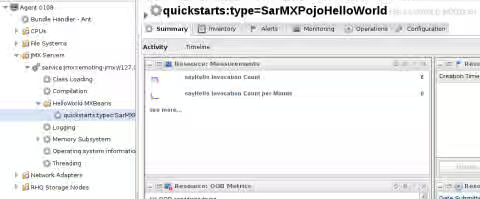
After service discovery has completed, you should find a new grouping node named HelloWorld MXBeans under your JMX server resource.
Updating our custom JBoss ON agent plug-in
Plug-in updates can be done by modifying the existing plug-in descriptor to include new services, operations, and attributes.
NOTE: Making changes to existing configuration, operation, metric, or resource type names can result in loss of resource types and history. Be very careful when making changes to existing resource type.
Currently our plug-in will only support auto discovery of one MBean in the JBoss EAP server. This is because the object name is hard-coded as quickstarts:type=SarMXPojoHelloWorld. However, let's say that the Helloworld MBean is extended to include a additional identification information in its objectName value. For example, quickstarts:type=SarMXPojoHelloWorld,id=AppOne. This would then allow for multiple MBeans to be deployed using the same type while using the value following the id attribute to make the MBean object name unique.
To illustrate this we will add a new resource type to our existing plug-in called HelloWorld MXBean Dynamic.
    <service name="HelloWorld MXBean Dynamic"
        description="An MBean that implements the IHelloWorldMXBean interface found in the JBoss EAP Quickstarts"
        class="org.rhq.plugins.jmx.MBeanResourceComponent" discovery="org.rhq.plugins.jmx.MBeanResourceDiscoveryComponent"
        supportsManualAdd="true">

        <runs-inside>
            <parent-resource-type name="JMX Server" plugin="JMX"/>
        </runs-inside>

        <plugin-configuration>
            <c:simple-property name="objectName" readOnly="true" default="quickstarts:type=SarMXPojoHelloWorld,id=%uniqueid%" />
            <c:simple-property name="nameTemplate" default="{uniqueid} HelloWorld MBean" />
            <c:simple-property name="descriptionTemplate" default="HelloWorld MXBean {uniqueid}"/>
            <c:simple-property name="uniqueid" type="string" description="An identifier that can be used to make this HelloWorld MXBean unique compared to others"/>
        </plugin-configuration>

        <operation name="sayHello"
            displayName="Say Hello"
            description="Performs the sayHello management operation that will return a welcoming string">
            <parameters>
                <c:simple-property name="p0" type="string" description="A string to follow the WelcomeMessage attribute" />
            </parameters>
            <results>
                <c:simple-property name="operationResult" type="string" />
            </results>
        </operation>

        <metric property="Count" displayName="sayHello Invocation Count"
            defaultOn="true" defaultInterval="60000" displayType="summary" measurementType="trendsup"
            description="The number of time the sayHello operation has been invoked since the MBean was started." />

        <resource-configuration>
            <c:simple-property name="WelcomeMessage" type="string" description="This text will be used by the sayHello operation" default="Welcome" />
        </resource-configuration>
    </service>
The service element used in our new resource type is just copied from the existing HelloWorld MXBean service. The only difference is the service name attribute value and the plugin-configuration element.
Once we have added the new resource type definition to our existing plug-in descriptor we also want to update our plug-in's version definition. This makes it clear that this is a new version of our existing plug-in.
...
<plugin name="QuickstartsJMXMBean"
    displayName="Quickstarts JMX MBean"
    description="A custom plug-in that can be used to manage or
        monitor Management Beans provided from the JBoss Quickstarts
        project."
    version="1.1"
    xmlns:xsi="http://www.w3.org/2001/XMLSchema-instance"
    xmlns="urn:xmlns:rhq-plugin"
    xmlns:c="urn:xmlns:rhq-configuration">
...
In this case we changed version="1.0" to version="1.1". Once we save our changes the updated plug-in descriptor should look like this:
<?xml version="1.0" encoding="UTF-8" ?>

<plugin name="QuickstartsJMXMBean"
    displayName="Quickstarts JMX MBean"
    description="A custom plug-in that can be used to manage or
        monitor Management Beans provided from the JBoss Quickstarts
        project."
    version="1.1"
    xmlns:xsi="http://www.w3.org/2001/XMLSchema-instance"
    xmlns="urn:xmlns:rhq-plugin"
    xmlns:c="urn:xmlns:rhq-configuration">

    <depends plugin="JMX" useClasses="true" />

    <service name="HelloWorld MXBean"
        description="An MBean that implements the IHelloWorldMXBean interface found in the JBoss EAP Quickstarts"
        class="org.rhq.plugins.jmx.MBeanResourceComponent" discovery="org.rhq.plugins.jmx.MBeanResourceDiscoveryComponent"
        supportsManualAdd="true">

        <runs-inside>
            <parent-resource-type name="JMX Server" plugin="JMX"/>
        </runs-inside>

        <plugin-configuration>
            <c:simple-property name="objectName" readOnly="false" default="quickstarts:type=SarMXPojoHelloWorld" />
        </plugin-configuration>

        <operation name="sayHello"
            displayName="Say Hello"
            description="Performs the sayHello management operation that will return a welcoming string">
            <parameters>
                <c:simple-property name="p0" type="string" description="A string to follow the WelcomeMessage attribute" />
            </parameters>
            <results>
                <c:simple-property name="operationResult" type="string" />
            </results>
        </operation>

        <metric property="Count" displayName="sayHello Invocation Count"
            defaultOn="true" defaultInterval="60000" displayType="summary" measurementType="trendsup"
            description="The number of time the sayHello operation has been invoked since the MBean was started." />

        <resource-configuration>
            <c:simple-property name="WelcomeMessage" type="string" description="This text will be used by the sayHello operation" default="Welcome" />
        </resource-configuration>
    </service>

    <service name="HelloWorld MXBean Dynamic"
        description="An MBean that implements the IHelloWorldMXBean interface found in the JBoss EAP Quickstarts"
        class="org.rhq.plugins.jmx.MBeanResourceComponent" discovery="org.rhq.plugins.jmx.MBeanResourceDiscoveryComponent"
        supportsManualAdd="true">

        <runs-inside>
            <parent-resource-type name="JMX Server" plugin="JMX"/>
        </runs-inside>

        <plugin-configuration>
            <c:simple-property name="objectName" readOnly="true" default="quickstarts:type=SarMXPojoHelloWorld,id=%uniqueid%" />
            <c:simple-property name="nameTemplate" default="{uniqueid} HelloWorld MBean" />
            <c:simple-property name="descriptionTemplate" default="HelloWorld MXBean {uniqueid}"/>
            <c:simple-property name="uniqueid" type="string" description="An identifier that can be used to make this HelloWorld MXBean unique compared to others"/>
        </plugin-configuration>

        <operation name="sayHello"
            displayName="Say Hello"
            description="Performs the sayHello management operation that will return a welcoming string">
            <parameters>
                <c:simple-property name="p0" type="string" description="A string to follow the WelcomeMessage attribute" />
            </parameters>
            <results>
                <c:simple-property name="operationResult" type="string" />
            </results>
        </operation>

        <metric property="Count" displayName="sayHello Invocation Count"
            defaultOn="true" defaultInterval="60000" displayType="summary" measurementType="trendsup"
            description="The number of time the sayHello operation has been invoked since the MBean was started." />

        <resource-configuration>
            <c:simple-property name="WelcomeMessage" type="string" description="This text will be used by the sayHello operation" default="Welcome" />
        </resource-configuration>
    </service>
</plugin>
We can now repackage our plug-in JAR and deploy it to the JBoss ON system in the same manner we did the first time.