Release Notes and Known Issues
Highlighted features in Red Hat Development Suite 2.0
Abstract
Chapter 1. About Red Hat Development Suite
Red Hat Development Suite 2.0 includes several Red Hat products such as Red Hat JBoss Developer Studio 11.0 and Red Hat Container Development Kit 3.1, as well as some dependencies for each of these products. Kompose is now included as a component in Red Hat Development Suite 2.0.
Support information for Red Hat Development Suite 2.0 is as follows:
- Both the Online and Bundled installers are supported for Windows 7, 8, and 10.
- Both the Online and Bundled installers are supported for macOS. These installers run on macOS 10.9 or newer.
- Supported for Red Hat Enterprise Linux 7 using the standard package management system.
A user who wants to download and use Red Hat Development Suite must become a member of the Red Hat Developer Program. Sign up for the program here: This content is not included.Red Hat Developer Program.
Chapter 2. Installation Options
Red Hat Development Suite 2.0 includes the following installation options:
Windows-only Installers (Supported)
- An Installer that has an initial download of 1 GB and includes Red Hat Container Development Kit, Red Hat JBoss Developer Studio , OpenJDK, and Cygwin for installation. Red Hat JBoss Fuse Tooling, Red Hat JBoss Fuse on JBoss EAP, Red Hat JBoss Fuse on Apache Karaf, Red Hat JBoss Enterprise Application Platform, VirtualBox and Kompose are not included in the installer and have to be downloaded during the installation time.
- An Online Installer that is a 60 MB download and downloads the required components during the installation process.
macOS-only Installers (Supported)
- An Installer that has an initial download of 1 GB and includes Red Hat Container Development Kit, Red Hat JBoss Developer Studio, OpenJDK and Cygwin for installation. Red Hat JBoss Fuse Tooling, Red Hat JBoss Fuse on JBoss EAP, Red Hat JBoss Fuse on Apache Karaf, Red Hat JBoss Enterprise Application Platform, VirtualBox and Kompose are not included in the installer and have to be downloaded during the installation time.
- An Online Installer that is a 60 MB download and downloads the required components during the installation process.
Red Hat Enterprise Linux
- Red Hat Development Suite uses RPM packages to install Red Hat Container Development Kit, Red Hat JBoss Developer Studio, Red Hat JBoss Enterprise Application Platform, and Kompose.
Chapter 3. What Is New in Red Hat Development Suite?
3.1. Red Hat Tools
The following Red Hat Development tools are newly added in Red Hat Development Suite 2.0 on Windows and macOS platform:
- Red Hat JBoss Enterprise Application Platform 7.0
- Red Hat JBoss Fuse Tooling 10.0
- Red Hat JBoss Fuse on JBoss EAP 6.4
- Red Hat JBoss Fuse on Apache Karaf 6.3
3.2. Component versions
Red Hat Development Suite 2.0 has the following version updates:
Table 3.1. Component Details
| Included Product | Windows | macOS | Red Hat Enterprise Linux |
|---|---|---|---|
| Red Hat JBoss Enterprise Application Platform 7.0 | ✔ | ✔ | ✔ |
| Red Hat JBoss Developer Studio 11.0 | ✔ | ✔ | ✔ |
| Red Hat Container Development Kit 3.1 | ✔ | ✔ | ✔ |
| Kompose 1.0.0 | ✔ | ✔ | ✔ |
| Red Hat JBoss Fuse Tooling 10.0 | ✔ | ✔ | ✖ |
| Red Hat JBoss Fuse on JBoss EAP 6.4 | ✔ | ✔ | ✖ |
| Red Hat JBoss Fuse on Apache Karaf 6.3 | ✔ | ✔ | ✖ |
| OpenJDK 1.8.0_141 | ✔ | ✖ | ✖ |
| Oracle Java SE | ✖ | ✔ | ✖ |
| Cygwin 2.9.0 | ✔ | ✖ | ✖ |
Red Hat Development Suite 2.0 supports the following hypervisiors:
Table 3.2. Hypervisior Details
| Windows | macOS | Red Hat Enterprise Linux |
|---|---|---|
| Hyper-V, VirtualBox 5.1.24 | VirtualBox 5.1.24 | KVM |
3.3. Red Hat Enterprise Linux Prerequisites
The following prerequisites must be met on Red Hat Enterprise Linux:
- Enable the rhel-7-server-devtools-rpms repository on Red Hat Enterprise Linux server or enable the rhel-7-workstation-devtools-rpms repository on Red Hat Enterprise Linux workstation.
- Enable the rhel-server-rhscl-7-rpms repository
3.4. Startup time improvements
The time required to start up the Installer is three times faster than previous versions.
3.5. User Interface
Red Hat Development Suite 2.0 includes several user interface changes. The installation steps and user interface changes are:
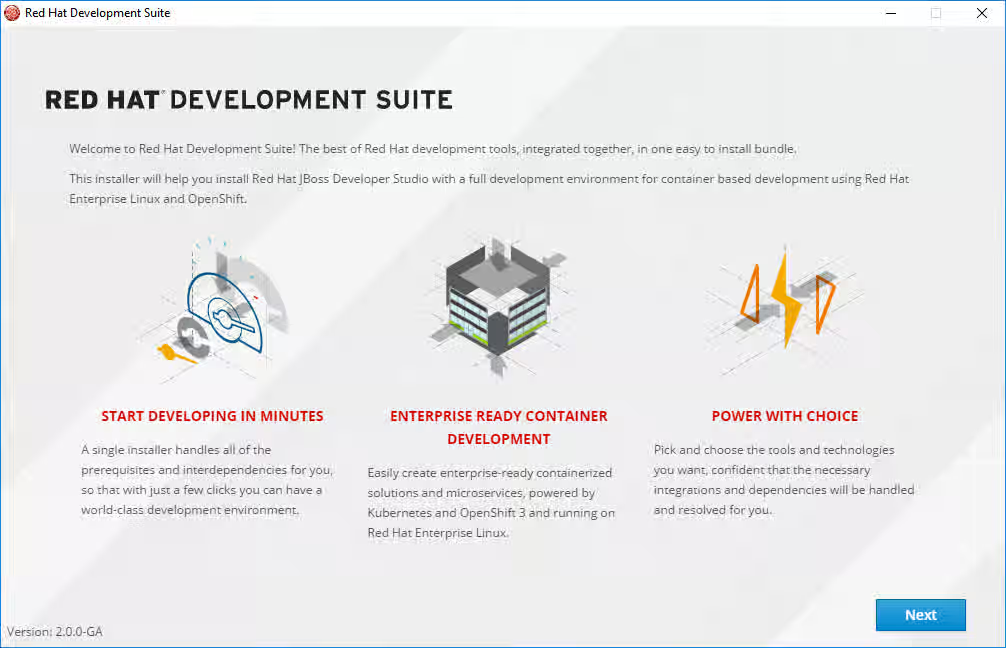
At the Welcome screen, click next to continue:
Figure 3.1. Welcome
- At the Target Folder screen, add a path to the target directory for the Red Hat Development Suite installation. Click Next to continue.
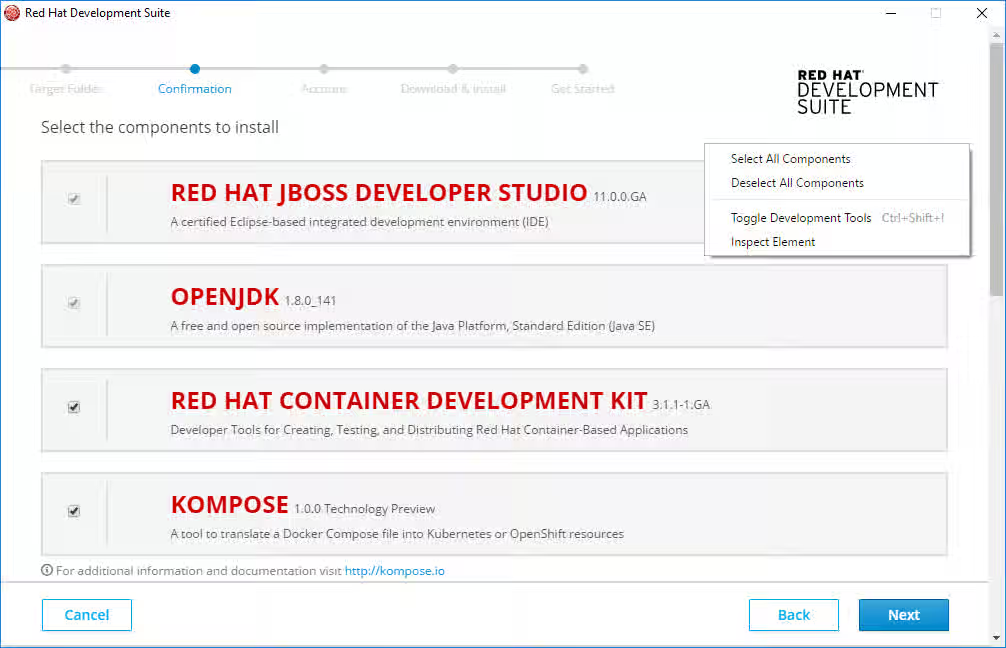
The Confirmation screen lists the components that the Red Hat Development Suite can download and install. Right-click the Confirmation screen to open the context menu and Select All Components. Click Next to continue.
Figure 3.2. Confirmation
If Red Hat products are selected for installation,
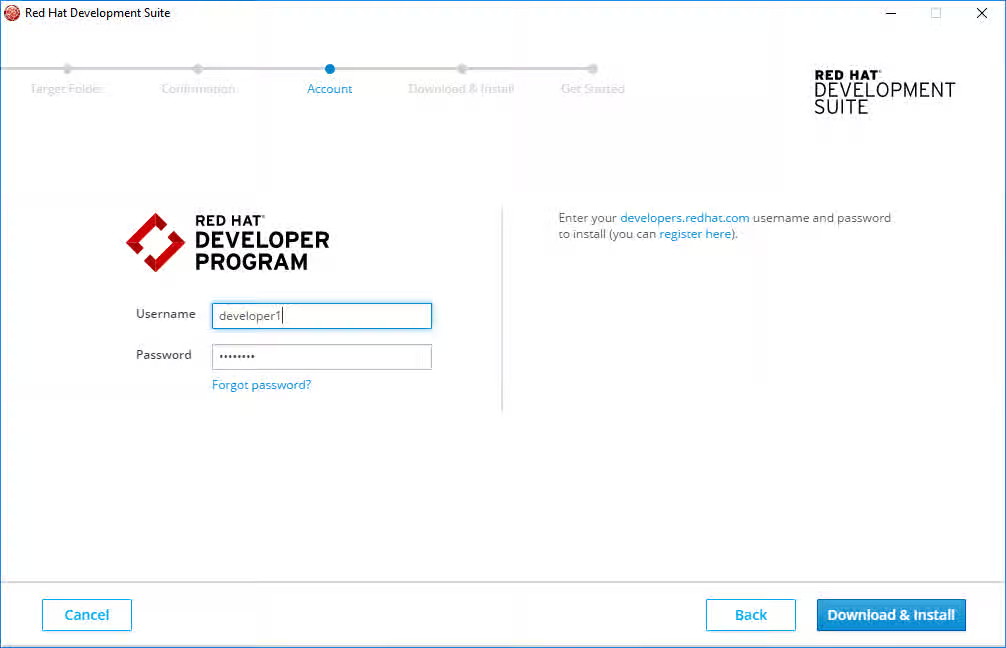
Enter existing Red Hat Developer login credentials at the Account screen. Click Download & Install to continue.
Figure 3.3. Account
- After credentials are verified, the installer downloads and installs the selected components.
If any of the tools (Kompose, Cygwin, VirtualBox, OpenJDK) are selected for installation,
- The installer downloads and installs the selected components.
3.6. Uninstalling Red Hat Development Suite on Microsoft Windows
Red Hat Development Suite can be uninstalled from the Control Panel.
3.7. Disable Windows dialog message
The Windows dialog message stating "This program might not have installed correctly" is no longer displayed when Red Hat Development Suite is cancelled before completing the installation.
3.8. User permissions
The current user must have access to /usr/local/bin/ on macOS.
3.9. Passwords
After installation, the admin console password can be changed for JBoss EAP and JBoss Fuse run times.
-
To reset the password for JBoss Fuse on Apache Karaf, update the following file with the new password:
${targetfolder}\fuseplatformkaraf\etc\users.properties -
To reset the password for Red Hat JBoss Enterprise Application Platform and for Red Hat JBoss Fuse on JBoss EAP, run the script located in
$JBoss_HOME/bin/add-user.sh(for Red Hat Enterprise Linux) or$JBoss_HOME\bin\add-user.sh(for Windows).
Chapter 4. Known Issues
4.1. Known Issues
Red Hat Development Suite 2.0 has the following known issues:
- Content from issues.jboss.org is not included.JBDS-4485 - Deselected components get selected during second detection run
- Content from issues.jboss.org is not included.JBDS-4404 - DevSuite 1.4 Installer hung during install waiting for cygwin
- Content from issues.jboss.org is not included.JBDS-3983 - Development Suite Installer should work behind proxy
- Content from issues.jboss.org is not included.JBDS-4209 - Request for Administrator credentials should be shown once
- Content from issues.jboss.org is not included.JBDS-3827 - DevStudio installation fails when (windows) user has non-ascii chars in the name
- Content from issues.jboss.org is not included.JBDS-3956 - Installer should let to update deteched aravle virtualbox
- Content from issues.jboss.org is not included.JBDS-4376 - Uninstaller for Mac
- Content from issues.jboss.org is not included.JBDS-4369 - Provide a .exe for uninstaller on Windows
- Content from issues.jboss.org is not included.JBDS-4341 - Detect pending reboot and ask to reboot before continue with installation
Chapter 5. Next Steps
Try the Red Hat Development Suite installer using the following instructions: Red Hat Development Suite 2.0 Installation Guide.
If you have already installed Red Hat Development Suite, start using it with these instructions: Getting Started with Container and Cloud-based Development.