Release Notes and Known Issues
Highlighted features in Red Hat Development Suite 2.2
Abstract
Chapter 1. About Red Hat Development Suite 2.2
Red Hat Development Suite 2.2 is an installer that includes several components such as Red Hat JBoss Developer Studio 11.2.0 and Red Hat Container Development Kit 3.3.0, as well as some dependencies for each of these products.
Red Hat Development Suite is supported on the following platforms:
- Windows 7, 8, and 10
- macOS 10.9 or newer
- Red Hat Enterprise Linux 7
A user who wants to download and use Red Hat Development Suite must become a member of the Red Hat Developer Program. Sign up for the program here: This content is not included.Red Hat Developer Program.
1.1. Red Hat Development Suite Installation options
1.1.1. Red Hat Development Suite as an Online Installer
You can download Red Hat Development Suite as an online installer for Windows and macOS. The online installer downloads the required components during the installation process and is approximately 60 MB.
1.1.2. Red Hat Development Suite as a Bundled Installer
You can download Red Hat Development Suite as a bundled installer for Windows and macOS that has an initial download of approximately 1 GB and includes the following tools:
- Red Hat Container Development Kit
- Red Hat JBoss Developer Studio
- OpenJDK
- Cygwin
1.1.3. Red Hat Development Suite with the Standard Package Management System
Red Hat Enterprise Linux uses RPM packages to install Red Hat Container Development Kit, Red Hat JBoss Developer Studio, Red Hat JBoss Enterprise Application Platform, and Kompose.
Chapter 2. What Is New in Red Hat Development Suite 2.2?
2.1. Technology Preview
Eclipse Che 5.0 is now included as a Technology Preview feature in Red Hat Development Suite.
For more information on Red Hat Technology Preview features support scope, see Technology Preview Features Support Scope.
2.2. New Components
Red Hat Development Suite 2.2 includes the following new components on Windows and macOS:
- Red Hat Application Migration Kit Plugin for Eclipse 4.0.0
- Eclipse Che 5.0 (Technology Preview)
- Red Hat JBoss Developer Studio Central Repository 11.2.0
- AngularJS for Web Tools 3.8.100
- Eclipse Checkstyle 8.0.0
- JBoss Business Process and Rules Tools 7.5.0
- Subclipse 4.2.3
2.3. Updated Component Versions
Red Hat Development Suite 2.2 has the following version updates:
- Red Hat JBoss Developer Studio 11.2.0
- Red Hat Container Development Kit 3.3.0
- Red Hat JBoss Fuse Tooling 10.2.0
- Kompose 1.7.0 (Technology Preview)
- Red Hat JBoss Enterprise Application Platform 7.1.0
Table 2.1 Components Details shows a list of components that are updated this release and their supported platforms. See Red Hat Development Suite Installation Guide for a full list of components.
Table 2.1. Component Details
| Updated Components | Windows | macOS | Red Hat Enterprise Linux |
|---|---|---|---|
| Red Hat JBoss Developer Studio 11.2.0 | ✔ | ✔ | ✔ |
| Red Hat Container Development Kit 3.3.0 | ✔ | ✔ | ✔ |
| Red Hat JBoss Fuse Tooling 10.2.0 | ✔ | ✔ | ✖ |
| Kompose 1.7.0 (Technology Preview) | ✔ | ✔ | ✔ |
| Red Hat JBoss Enterprise Application Platform 7.1.0 | ✔ | ✔ | ✔ |
2.4. Enhanced User Interface
Red Hat Development Suite 2.2 includes several new user interface changes. See Red Hat Development Suite 2.2 Installation Guide for detailed installation instructions.
2.4.1. Welcome Window Allows Download of Latest Installer
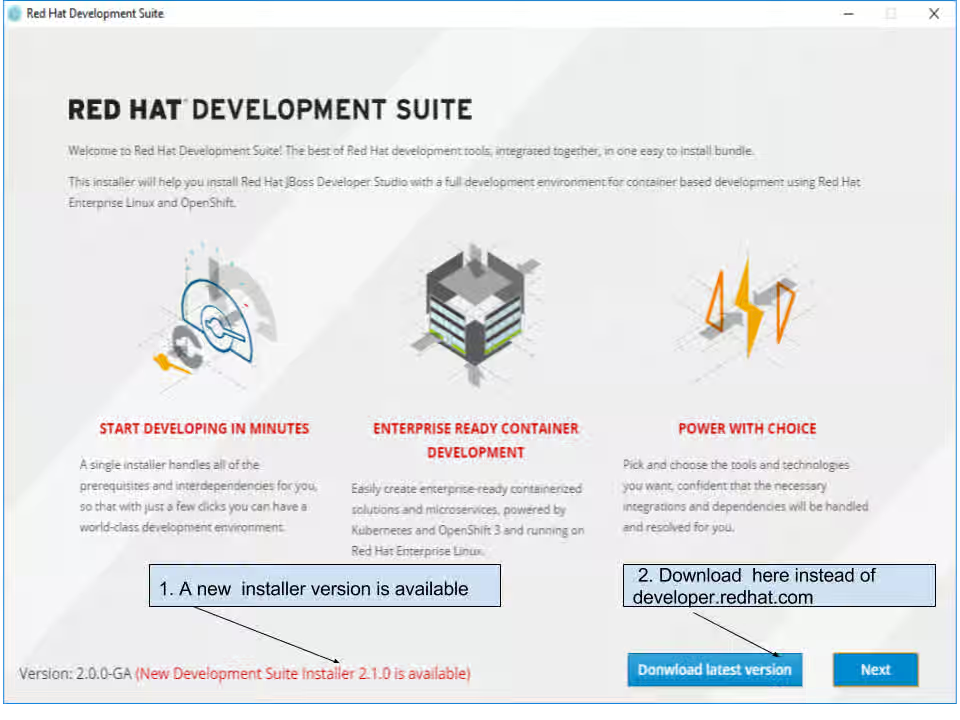
The Welcome window now shows if a newer version of the installer is available or if the installer is up to date. If a newer version of the installer is available you can download the latest version of the installer from the Welcome window.
Figure 2.1. Welcome
2.4.2. Channels Added to the Selection Window
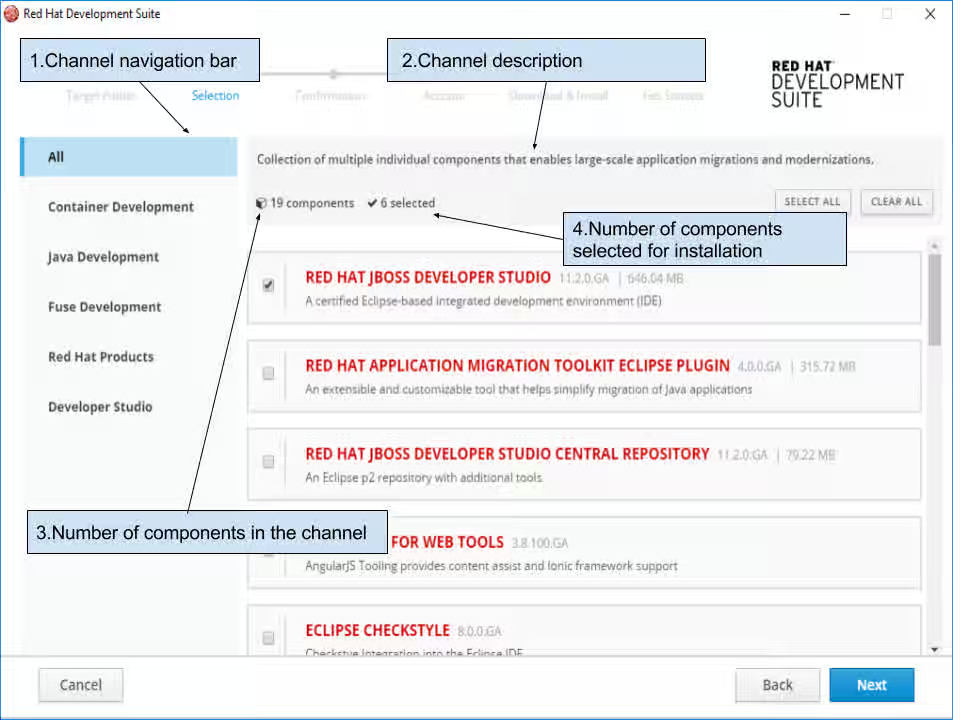
You can now select components for installation by channel. The following channels are available on the Selection window:
- Container Development
- Java Development
- Fuse Development
- Red Hat Products
- Developer Studio
- All
Click a channel to view the channel description, the number of components, the number of selected components and a list of components in the channel.
You can click Select All to select all components in the channel for installation, or click Clear All button to clear all components. You can also select an individual component in the channel by clicking the check box or by clicking in any location in the component bar.
Figure 2.2. Selection
2.5. New Path for the Target Directory
The target installation path has changed in Red Hat Development Suite 2.2. The new path for the target directory for Windows installation is '%PROGRAMFILES%/DevelopmentSuite'.
2.6. New Message for Locked Folder
You may get a folder that is locked in this scenario:
- Install Red Hat Development Suite
- Install Red Hat JBoss Developer Studio and start using Red Hat JBoss Developer Studio
- Uninstall Red Hat Development Suite from the Windows control panel before closing Red Hat JBoss Developer Studio
The PowerShell-based uninstaller now reports a message that shows the locked folder.
DevSuite folder 'C:\Program Files\DevelopmentSuite\devstudio' is locked by running program or file opened in editor. Please close all running tools/editors and try again.
DevSuite folder 'C:\Program Files\DevelopmentSuite\jdk8' is locked by running program or file opened in editor. Please close all running tools/editors and try again.
Press any key to exit
Chapter 3. Known Issues
Red Hat Development Suite issues are now tracked in Content from github.com is not included.GitHub.
3.1. Fixed Issues
- Content from issues.jboss.org is not included.JBDS-4485 - Deselected components get selected during second detection run
3.2. Known Issues
Red Hat Development Suite 2.2 has the following known issues:
- Content from github.com is not included.#1151 - DevSuite Installer hung during install waiting for cygwin
- Content from github.com is not included.#1052 - DevSuite Installer should work behind proxy
- Content from github.com is not included.#1110 - Request for Administrator credentials should be shown once
- Content from github.com is not included.#1129 - DevStudio installation fails when (Windows) user has non-ascii chars in the name
- Content from github.com is not included.#1128 - Installer should update detected Virtualbox
- Content from github.com is not included.#1158 - MacOS install should use .dmg
- Content from github.com is not included.#1029 - Provide a .exe for uninstaller on Windows
- Content from github.com is not included.#1109 - Detect pending reboot and ask to reboot before continue with installation
- Content from github.com is not included.#1094 - Loss of window focus causes duplicate check for installed components
- Content from github.com is not included.#1171 - Installer does not support SOCKS proxy
Chapter 4. Next Steps
Try the Red Hat Development Suite installer using the following instructions: Red Hat Development Suite 2.2 Installation Guide.
If you have already installed Red Hat Development Suite, start using it with these instructions: This content is not included.Getting Started with Container and Cloud-based Development.