Deploying into Spring Boot
Building and running Spring Boot applications in standalone mode
Abstract
Chapter 1. Getting Started with Spring Boot standalone
1.1. About Spring Boot standalone deployment mode
In standalone deployment mode, a Spring Boot application is packaged as a Jar file and run directly inside the Java Virtual Machine (JVM). This approach to packaging and running the application is consistent with the microservices philosophy, where a service is packaged with the minimum set of requirements. The Spring Boot application can be run directly using the java command with the -jar option. For example:
java -jar SpringBootApplication.jar
Where Spring Boot provides the main class for the executable Jar. The following elements are required for building a Spring Boot standalone application in Fuse:
The Fuse Bill of Materials (BOM) — defines a carefully curated set of dependencies from the Red Hat Maven repository. The BOM exploits Maven’s dependency management mechanism to define the appropriate versions of Maven dependencies.
Note: Only the dependencies defined in the Fuse BOM are supported by Red Hat.
- The Spring Boot Maven Plugin — implements the build process for a standalone Spring Boot application in Maven. This plugin is responsible for packaging your Spring Boot application as an executable Jar file.
1.2. Deploying into Spring Boot 2
In addition to Spring Boot 1, you also have the option of deploying into Spring Boot 2.
For details about the OpenShift mode of deployment, see the Fuse on OpenShift Guide.
For more information on all of the differences between Spring Boot 1 and Spring Boot 2, see Content from github.com is not included.Spring Boot’s Migration Guide and Content from github.com is not included.Spring Boot 2 Release Notes.
1.3. New Camel Components for Spring Boot 2
Spring Boot 2 supports Camel version 2.23 and thus supports some new camel components that are not available for Spring Boot 1:
New Camel Components for Spring Boot 2
- as2-component
- aws-iam-component
- fhir-component
- google-calendar-stream-component
- google-mail-stream-component
- google-sheets-component
- google-sheets-stream-component
- ipfs-component
- kubernetes-hpa-component
- kubernetes-job-component
- micrometer-component
- mybatis-bean-component
- nsq-component
- rxjava2
- service-component
- spring-cloud-consul
- spring-cloud-zookeeper
- testcontainers-spring
- testcontainers
- web3j-component
Chapter 2. Using Fuse boosters
Red Hat Fuse provides the following boosters to help you get started with Fuse applications and demonstrate useful components:
- Section 2.2, “Build and run the Circuit Breaker booster” - An example of enabling a distributed application to cope with interruptions to network connectivity and temporary unavailability of backend services.
- Section 2.3, “Build and run the Externalized Configuration booster” - An example of how to externalize configuration for an Apache Camel route.
- Section 2.4, “Build and run the REST API booster” - An example that introduces the mechanics of interacting with a remote (exposed by Apache Camel) service using the HTTP protocol.
Prerequisites To build and run the booster demonstrations, install the following prerequisites:
- A supported version of the Java Developer Kit (JDK). See the Supported Configurations page for details.
- Apache Maven 3.3.x or later. See the Maven Content from maven.apache.org is not included.Download page.
2.1. Generating your booster project
Fuse booster projects exist to help developers get started with running standalone applications. The instructions provided here guide you through generating one of those booster projects, the Circuit Breaker booster. This exercise demonstrates useful components of the Fuse on Spring Boot.
The Content from github.com is not included.Netflix/Hystrix circuit breaker enables distributed applications to handle interruptions to network connectivity and temporary unavailability of backend services. The basic idea of the circuit breaker pattern is that the loss of a dependent service is detected automatically and an alternative behavior can be programmed, in case the backend service is temporarily unavailable.
The Fuse circuit breaker booster consists of two related services:
-
A
nameservice, the backend service that returns a name to greet. -
A
greetingsservice, the frontend service that invokes thenameservice to get a name and then returns the string,Hello, NAME.
In this booster demonstration, the Hystrix circuit breaker is inserted between the greetings service and the name service. If the backend name service becomes unavailable, the greetings service can fall back to an alternative behavior and respond to the client immediately, instead of being blocked while it waits for the name service to restart.
Prerequisites
- You must have access to the This content is not included.Red Hat Developer Platform.
- You must have a supported version of the Java Developer Kit (JDK). See the Supported Configurations page for details.
- You must have Content from maven.apache.org is not included.Apache Maven 3.3.x or later.
Procedure
- Navigate to This content is not included.https://developers.redhat.com/launch.
Click START.
The launcher wizard prompts you to log in to your Red Hat account.
- Click the Log in or register button and then log in.
- On the Launcher page, click the Deploy an Example Application button.
- On the Create Example Application page, type the name, fuse-circuit-breaker, in the Create Example Application as field.
- Click Select an Example.
In the Example dialog, select the Circuit Breaker option. A Select a Runtime dropdown menu appears.
- From the Select a Runtime dropdown, select Fuse.
-
From the version dropdown menu, select 7.7 (Red Hat Fuse) (do not select the
2.21.2 (Community)version). - Click Save.
- On the Create Example Application page, click Download.
-
When you see the Your Application is Ready dialog, click
Download.zip. Your browser downloads the generated booster project (packaged as a ZIP file). - Use an archive utility to extract the generated project to a convenient location on your local file system.
2.2. Build and run the Circuit Breaker booster
The Content from github.com is not included.Netflix/Hystrix circuit breaker component enables distributed applications to cope with interruptions to network connectivity and temporary unavailability of backend services. The basic idea of the circuit breaker pattern is that the loss of a dependent service is detected automatically and an alternative behavior can be programmed, in case the backend service is temporarily unavailable.
The Fuse circuit breaker booster consists of two related services:
- A name service, which returns a name to greet
-
A greetings service, which invokes the name service to get a name and then returns the string,
Hello, NAME.
In this demonstration, the Hystrix circuit breaker is inserted between the greetings service and the name service. If the name service becomes unavailable, the greetings service can fall back to an alternative behavior and respond to the client immediately, instead of blocking or timing out while it waits for the name service to restart.
Prerequisites
- you have completed the steps mentioned in the Section 2.1, “Generating your booster project” section.
Procedure
Follow these steps to build and run the Circuit breaker booster project:
Open a shell prompt and build the project from the command line, using Maven:
cd PROJECT_DIR
mvn clean package
Open a new shell prompt and start the name service, as follows:
cd name-service
mvn spring-boot:run -DskipTests -Dserver.port=8081
As Spring Boot starts up, you should see some output like the following:
...
2017-12-08 15:44:24.223  INFO 22758 --- [           main] o.a.camel.spring.SpringCamelContext      : Total 1 routes, of which 1 are started
2017-12-08 15:44:24.227  INFO 22758 --- [           main] o.a.camel.spring.SpringCamelContext      : Apache Camel 2.20.0 (CamelContext: camel-1) started in 0.776 seconds
2017-12-08 15:44:24.234  INFO 22758 --- [           main] org.jboss.fuse.boosters.cb.Application   : Started Application in 4.137 seconds (JVM running for 4.744)
Open a new shell prompt and start the greetings service, as follows:
cd greetings-service
mvn spring-boot:run -DskipTests
As Spring Boot starts up, you should see some output like the following:
...
2017-12-08 15:46:58.521  INFO 22887 --- [           main] o.a.c.c.s.CamelHttpTransportServlet      : Initialized CamelHttpTransportServlet[name=CamelServlet, contextPath=]
2017-12-08 15:46:58.524  INFO 22887 --- [           main] s.b.c.e.t.TomcatEmbeddedServletContainer : Tomcat started on port(s): 8080 (http)
2017-12-08 15:46:58.536  INFO 22887 --- [           main] org.jboss.fuse.boosters.cb.Application   : Started Application in 6.263 seconds (JVM running for 6.819)
The greetings service exposes a REST endpoint at the URL,
Content from localhost is not included.http://localhost:8080/camel/greetings.Go to Content from localhost is not included.http://localhost:8080
When you open this page, it invokes the Greeting Service:
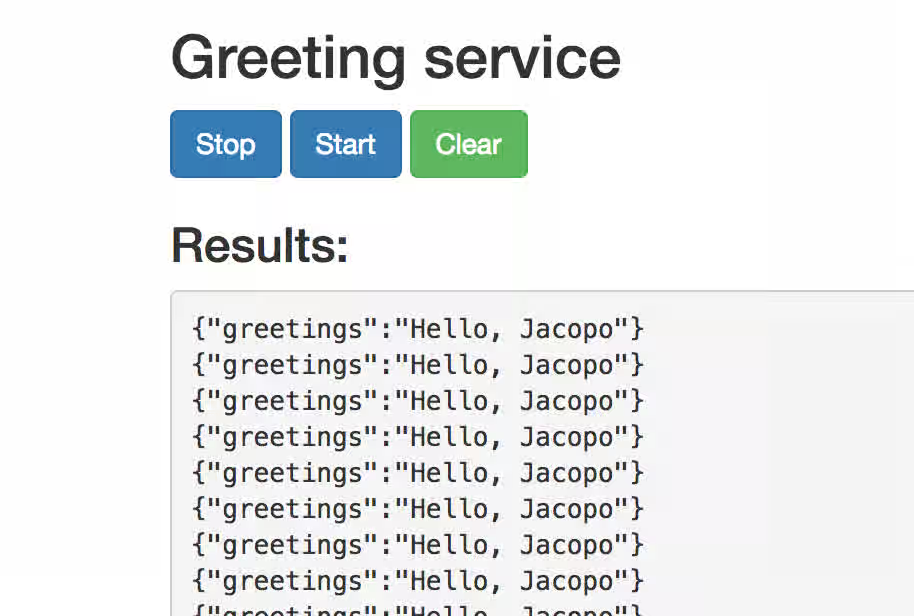
This page also provides a link to the Hystrix dashboard, which monitors the state of the circuit breaker.
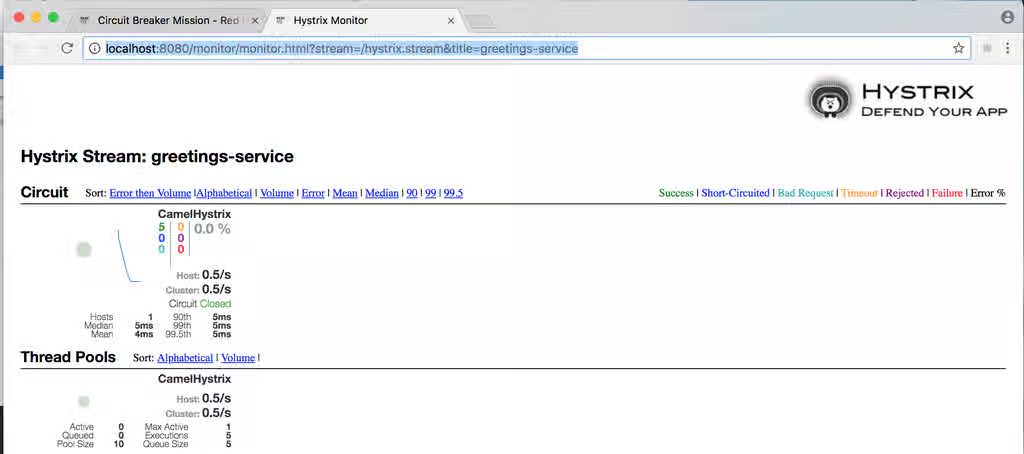
To demonstrate the circuit breaker functionality provided by Camel Hystrix, kill the backend name service by pressing Ctrl+C while in the window of the shell prompt where the name service is running.
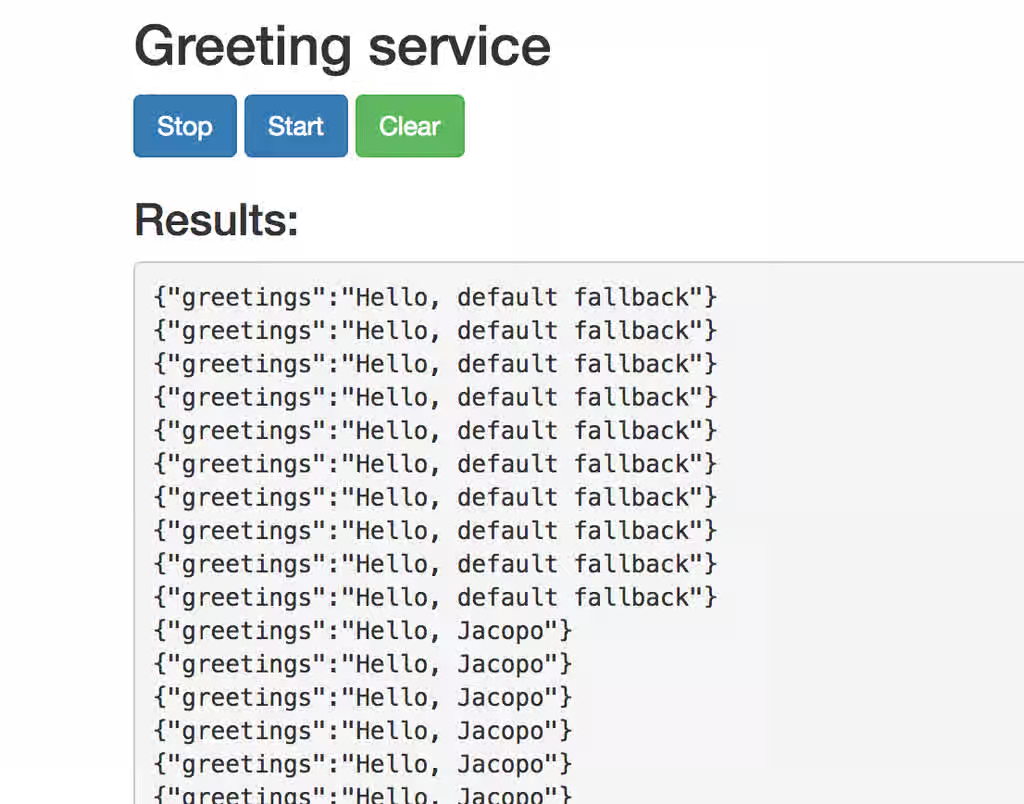
Now that the name service is unavailable, the circuit breaker kicks in to prevent the greetings service from hanging when it is invoked.
Observe the changes in the Hystrix Monitor dashboard and in the Greeting Service output:
2.3. Build and run the Externalized Configuration booster
The Externalized Configuration booster provides an example of how to externalize configuration for an Apache Camel route. For Spring Boot standalone deployments, the configuration data is stored in an application.properties file.
For Fuse on OpenShift deployments, the configuration data is stored in a ConfigMap object.
Prerequisites
- you have completed the steps mentioned in the Section 2.1, “Generating your booster project” section.
Procedure
After you follow the Section 2.1, “Generating your booster project” steps for the Externalized Configuration mission, follow these steps to build and run the Externalized Configuration booster as a standalone project on your local machine:
- Download the project and extract the archive on your local filesystem.
Build the project:
cd PROJECT_DIR
mvn clean package
Run the service:
mvn spring-boot:run
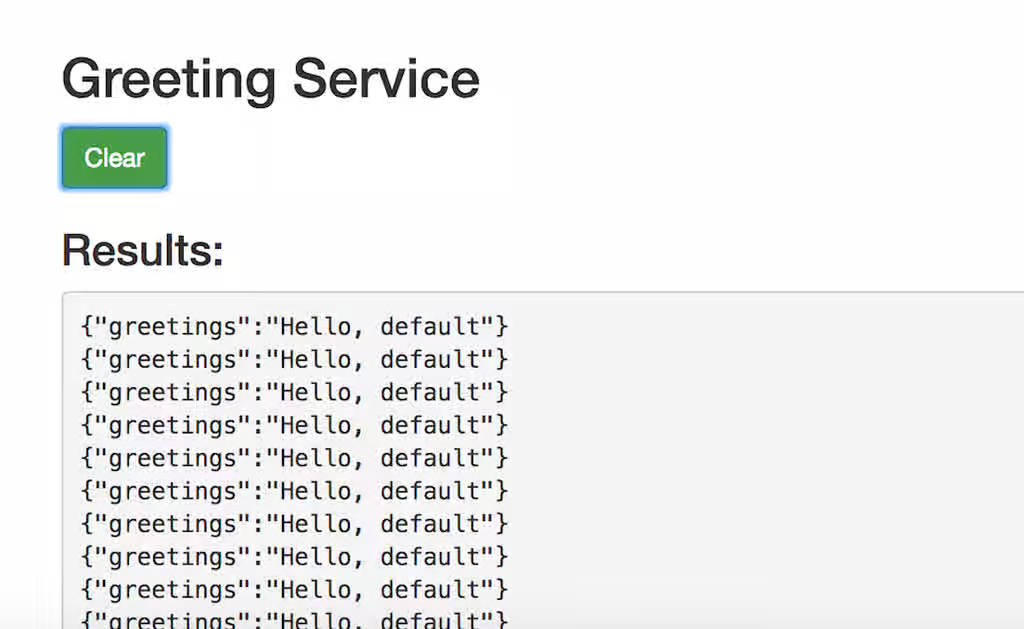
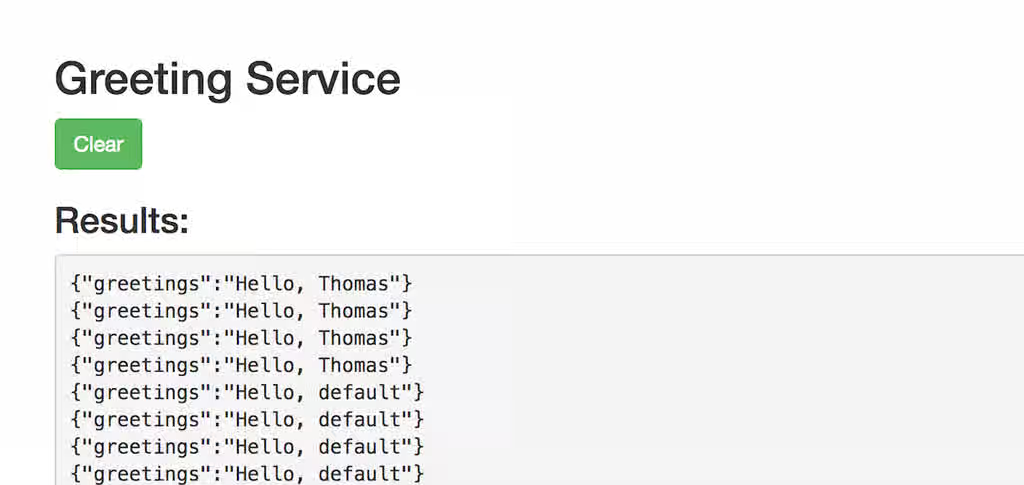
Open a web browser to Content from localhost is not included.http://localhost:8080. This page invokes a Greeting Service every 5 seconds. The Greetings Service responds by using the
booster.nameToGreetvaluefrom thetarget/classes/application.propertiesfile.The Greeting Service prints a greeting to “default” every five seconds:
Modify the
booster.nameToGreetvalue:-
Open the
target/classes/application.propertiesfile in an editor. Change the value of the
booster.nameToGreetvaluefrom default to another value, for example Thomas:booster.nameToGreetvalue=Thomas
-
Open the
- In the Terminal window, stop the service by pressing CTRL+C.
Run the service again:
mvn spring-boot:run
In the web browser, return to the Content from localhost is not included.http://localhost:8080 page to view the changed value in the Greeting Service’s results window.
2.4. Build and run the REST API booster
The REST API Level 0 mission shows how to map business operations to a remote procedure call endpoint over HTTP by using a REST framework. This mission corresponds to Level 0 in the Richardson Maturity Model.
The REST API booster introduces the mechanics of interacting with a remote (exposed by Apache Camel) service using the HTTP protocol. By using this Fuse booster, you can quickly prototype and flexibly design a REST API.
Use this booster to:
-
Execute an HTTP GET request on the
camel/greetings/{name}endpoint. This request produces a response in JSON format with a payload ofHello, $name!(where$nameis replaced by the value of the URL parameter from the HTTP GET request). -
Change the value of the URL
{name}parameter to see the changed value reflected in the response. - View the REST API’s Swagger page.
Prerequisites
- you have completed the steps mentioned in the Section 2.1, “Generating your booster project” section.
Procedure
Follow these steps to build and run the REST API booster as a standalone project on your local machine:
- Download the project and extract the archive on your local filesystem.
Build the project:
cd PROJECT_DIR
mvn clean package
Run the service:
mvn spring-boot:run
- Open a web browser to: Content from localhost is not included.http://localhost:8080
To execute the example HTTP GET request, click the camel/greetings/{name} button.
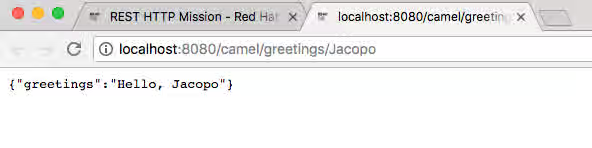
A new web browser window opens with the
localhost:8080/camel/greetings/JacopoURL. The default value of the URL{name}parameter is Jacopo.The JSON response appears in the browser window:
To change the value of the
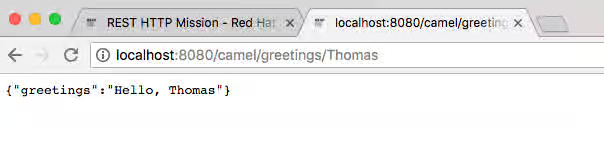
{name} `parameter, change the URL. For example, to change the name to Thomas, use this URL: `localhost:8080/camel/greetings/Thomas.The updated JSON response appears in the browser window:
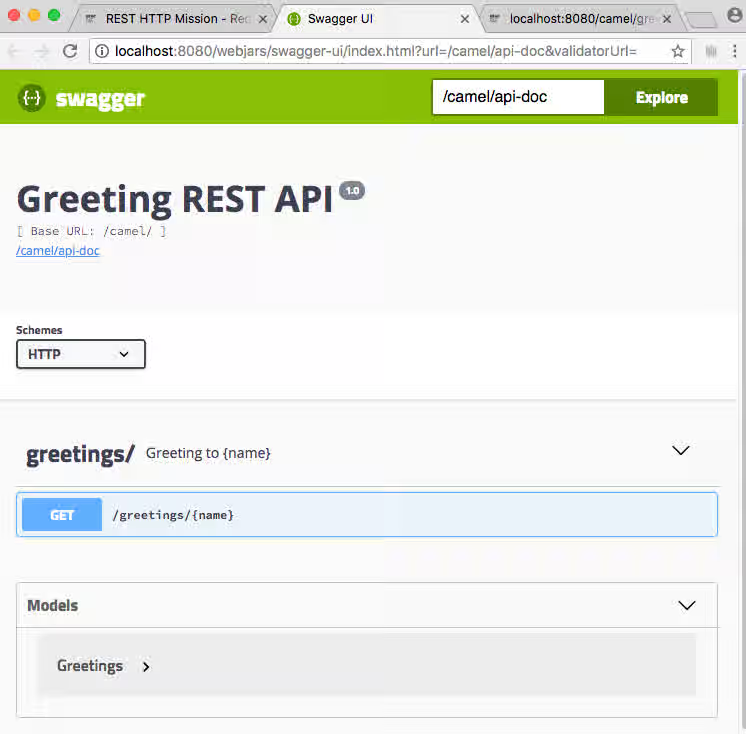
To view the REST API’s Swagger page, click the API Swagger page button.
The API swagger page opens in a browser window.
Chapter 3. Building with Maven
The standard approach to developing applications for Spring Boot in Fuse is to use the Apache Maven build tool and to structure your source code as a Maven project. Fuse provides Maven quickstarts to get you started quickly and many of the Fuse build tools are provided as Maven plug-ins. For this reason, it is highly recommended that you adopt Maven as the build tool for Spring Boot projects in Fuse.
3.1. Generating a Maven project
Fuse provides a selection of quickstarts, based on Maven archetypes, which you can use to generate an initial Maven project for a Spring Boot application. To prevent you from having to remember the location information and versions for various Maven archetypes, Fuse provides tooling to help you generate Maven projects for standalone Spring Boot projects.
3.1.1. Project generator at developers.redhat.com/launch
The quickest way to get started with Spring Boot standalone in Fuse is to navigate to This content is not included.developers.redhat.com/launch and follow the instructions for the Spring Boot standalone runtime, to generate a new Maven project. After following the on-screen instructions, you will be prompted to download an archive file, which contains a complete Maven project that you can build and run locally.
3.1.2. Fuse tooling wizard in Developer Studio
Alternatively, you can download and install Red Hat JBoss Developer Studio (which includes Fuse Tooling). Using the Fuse New Integration Project wizard, you can generate a new Spring Boot standalone project and continue to develop inside the Eclipse-based IDE.
3.2. Using Spring Boot BOM
After creating and building your first Spring Boot project, you will soon want to add more components. But how do you know which versions of the Maven dependencies to add to your project? The simplest (and recommended) approach is to use the relevant Bill of Materials (BOM) file, which automatically defines all of the version dependencies for you.
3.2.1. BOM file for Spring Boot
The purpose of a Content from maven.apache.org is not included.Maven Bill of Materials (BOM) file is to provide a curated set of Maven dependency versions that work well together, preventing you from having to define versions individually for every Maven artifact.
Ensure you are using the correct Fuse BOM based on the version of Spring Boot you are using (Spring Boot 1 or Spring Boot 2).
The Fuse BOM for Spring Boot offers the following advantages:
- Defines versions for Maven dependencies, so that you do not need to specify the version when you add a dependency to your POM.
- Defines a set of curated dependencies that are fully tested and supported for a specific version of Fuse.
- Simplifies upgrades of Fuse.
Only the set of dependencies defined by a Fuse BOM are supported by Red Hat.
3.2.2. Incorporate the BOM file
To incorporate a BOM file into your Maven project, specify a dependencyManagement element in your project’s pom.xml file (or, possibly, in a parent POM file), as shown in the examples for both Spring Boot 2 and Spring Boot 1 below:
Spring Boot 2 BOM
<?xml version="1.0" encoding="UTF-8" standalone="no"?>
<project ...>
  ...
  <properties>
    <project.build.sourceEncoding>UTF-8</project.build.sourceEncoding>

    <!-- configure the versions you want to use here -->
    <fuse.version>7.11.1.fuse-sb2-7_11_1-00022-redhat-00002</fuse.version>
  </properties>

  <dependencyManagement>
    <dependencies>
      <dependency>
        <groupId>org.jboss.redhat-fuse</groupId>
        <artifactId>fuse-springboot-bom</artifactId>
        <version>${fuse.version}</version>
        <type>pom</type>
        <scope>import</scope>
      </dependency>
    </dependencies>
  </dependencyManagement>
  ...
</project>
Spring Boot 1 BOM
<?xml version="1.0" encoding="UTF-8" standalone="no"?>
<project ...>
  ...
  <properties>
    <project.build.sourceEncoding>UTF-8</project.build.sourceEncoding>

    <!-- configure the versions you want to use here -->
    <fuse.version>7.11.1.fuse-sb2-7_11_1-00022-redhat-00002</fuse.version>
  </properties>

  <dependencyManagement>
    <dependencies>
      <dependency>
        <groupId>org.jboss.redhat-fuse</groupId>
        <artifactId>fuse-springboot-bom</artifactId>
        <version>${fuse.version}</version>
        <type>pom</type>
        <scope>import</scope>
      </dependency>
    </dependencies>
  </dependencyManagement>
  ...
</project>
After specifying the BOM using the dependency management mechanism, it is possible to add Maven dependencies to your POM without specifying the version of the artifact. For example, to add a dependency for the camel-hystrix component, you would add the following XML fragment to the dependencies element in your POM:
<dependency>
  <groupId>org.apache.camel</groupId>
  <artifactId>camel-hystrix-starter</artifactId>
</dependency>
Note how the Camel artifact ID is specified with the -starter suffix — that is, you specify the Camel Hystrix component as camel-hystrix-starter, not as camel-hystrix. The Camel starter components are packaged in a way that is optimized for the Spring Boot environment.
3.2.3. Spring Boot Maven plugin
The Spring Boot Maven plugin is provided by Spring Boot and it is a developer utility for building and running a Spring Boot project:
-
Building — create an executable Jar package for your Spring Boot application by entering the command
mvn packagein the project directory. The output of the build is placed in thetarget/subdirectory of your Maven project. -
Running — for convenience, you can run the newly-built application with the command,
mvn spring-boot:start.
To incorporate the Spring Boot Maven plugin into your project POM file, add the plugin configuration to the project/build/plugins section of your pom.xml file, as shown in the following example.
Example
<?xml version="1.0" encoding="UTF-8" standalone="no"?>
<project ...>
  ...
  <properties>
    <project.build.sourceEncoding>UTF-8</project.build.sourceEncoding>

    <!-- configure the versions you want to use here -->
    <fuse.version>7.11.1.fuse-sb2-7_11_1-00022-redhat-00002</fuse.version>

  </properties>
  ...
  <build>
    <plugins>
      <plugin>
        <groupId>org.jboss.redhat-fuse</groupId>
        <artifactId>spring-boot-maven-plugin</artifactId>
        <version>${fuse.version}</version>
        <executions>
          <execution>
            <goals>
              <goal>repackage</goal>
            </goals>
          </execution>
        </executions>
      </plugin>
    </plugins>
  </build>
  ...
</project>Chapter 4. Running Apache Camel application in Spring Boot
The Apache Camel Spring Boot component automatically configures Camel context for Spring Boot. Auto-configuration of the Camel context automatically detects the Camel routes available in the Spring context and registers the key Camel utilities such as producer template, consumer template, and the type converter as beans. The Apache Camel component includes a Spring Boot starter module that allows you to develop Spring Boot applications by using starters.
4.1. Introduction to the Camel Spring Boot component
Every Camel Spring Boot application must use the dependencyManagement element in the project’s pom.xml to specify the productized versions of the dependencies. These dependencies are defined in the Red Hat Fuse BOM and are supported for the specific version of Red Hat Fuse. You can omit the version number attribute for the additional starters so as not to override the versions from BOM. See Content from github.com is not included.quickstart pom for more information.
Example
<dependencyManagement>
	<dependencies>
		<dependency>
			<groupId>org.jboss.redhat-fuse</groupId>
			<artifactId>fuse-springboot-bom</artifactId>
			<version>${fuse.version}</version>
			<type>pom</type>
			<scope>import</scope>
		</dependency>
	</dependencies>
</dependencyManagement>
The camel-spring-boot jar contains with the spring.factories file which allows you to add that dependency to your classpath so Spring Boot will automatically configure Camel context.
4.2. Introduction to the Camel Spring Boot starter module
Starters are the Apache Camel modules that are intended to be used in Spring Boot applications. There is a camel-xxx-starter module for each Camel component (with a few exceptions listed in the Section 4.3, “List of the Camel components that do not have starter modules” section).
Starters meet the following requirements:
- Allow auto-configuration of the component by using the native Spring Boot configuration system which is compatible with IDE tooling.
- Allow auto-configuration of data formats and languages.
- Manage transitive logging dependencies to integrate with the Spring Boot logging system.
- Include additional dependencies and align transitive dependencies to minimize the effort of creating a working Spring Boot application.
Each starter has its own integration test in tests/camel-itest-spring-boot, that verifies the compatibility with the current release of Spring Boot.
For more details, see link: Content from github.com is not included.Apache Camel Spring-Boot examples.
4.3. List of the Camel components that do not have starter modules
The following components do not have starter modules because of compatibility issues:
- camel-blueprint (intended for OSGi only)
- camel-cdi (intended for CDI only)
- camel-core-osgi (intended for OSGi only)
- camel-ejb (intended for JEE only)
- camel-eventadmin (intended for OSGi only)
-
camel-ibatis (
camel-mybatis-starteris included) - camel-jclouds
-
camel-mina (
camel-mina2-starteris included) - camel-paxlogging (intended for OSGi only)
-
camel-quartz (
camel-quartz2-starteris included) - camel-spark-rest
-
camel-openapi-java (
camel-openapi-java-starteris included)
4.4. Using Camel Spring Boot starter
Apache Camel provides a starter module that allows you to quickly get started developing Spring Boot applications.
Procedure
Add the following dependency to your Spring Boot pom.xml file:
<dependency> <groupId>org.apache.camel</groupId> <artifactId>camel-spring-boot-starter</artifactId> </dependency>Add the classes with your Camel routes as shown in the snippet below. Once these routes are added to the class path the routes are started automatically.
package com.example; import org.apache.camel.builder.RouteBuilder; import org.springframework.stereotype.Component; @Component public class MyRoute extends RouteBuilder { @Override public void configure() throws Exception { from("timer:foo") .to("log:bar"); } }Optional. To keep the main thread blocked so that Camel stays up, do one of the following.
-
Include the
spring-boot-starter-webdependency, Or add
camel.springboot.main-run-controller=trueto yourapplication.propertiesorapplication.ymlfile.You can customize the Camel application in the
application.propertiesorapplication.ymlfile withcamel.springboot.* properties.
-
Include the
Optional. To refer to a custom bean by using the bean’s ID name, configure the options in the
src/main/resources/application.properties(or theapplication.yml) file. The following example shows how the xslt component refers to a custom bean by using the bean ID.Refer to a custom bean by the id
myExtensionFactory.camel.component.xslt.saxon-extension-functions=myExtensionFactory
Then create the custom bean using Spring Boot @Bean annotation.
@Bean(name = "myExtensionFactory") public ExtensionFunctionDefinition myExtensionFactory() { }Or, for a Jackson ObjectMapper, in the
camel-jacksondata-format:camel.dataformat.json-jackson.object-mapper=myJacksonMapper
4.5. About Camel context auto-configuration for Spring Boot
Camel Spring Boot auto-configuration provides a CamelContext instance and creates a SpringCamelContext. It also initializes and performs shutdown of that context. This Camel context is registered in the Spring application context under camelContext bean name and you can access it like other Spring bean. You can access the camelContext as shown below.
Example
@Configuration
public class MyAppConfig {

  @Autowired
  CamelContext camelContext;

  @Bean
  MyService myService() {
    return new DefaultMyService(camelContext);
  }

}4.6. Auto-detecting Camel routes in Spring Boot Applications
Camel auto-configuration collects all the RouteBuilder instances from the Spring context and automatically injects them into the CamelContext. This simplifies the process of creating a new Camel route with the Spring Boot starter. You can create the routes as follows:
Example
Add the @Component annotated class to your classpath.
@Component
public class MyRouter extends RouteBuilder {

  @Override
  public void configure() throws Exception {
    from("jms:invoices").to("file:/invoices");
  }

}
Or create a new route RouteBuilder bean in your @Configuration class.
@Configuration
public class MyRouterConfiguration {

  @Bean
  RoutesBuilder myRouter() {
    return new RouteBuilder() {

      @Override
      public void configure() throws Exception {
        from("jms:invoices").to("file:/invoices");
      }

    };
  }

}4.7. Configuring Camel properties for Camel Spring Boot auto-configuration
Spring Boot auto-configuration connects to the Spring Boot external configuration such as properties placeholders, OS environment variables, or system properties with Camel properties support.
Procedure
Define the properties either in the
application.propertiesfile:route.from = jms:invoices
Or set the Camel properies as the system properties, for example:
java -Droute.to=jms:processed.invoices -jar mySpringApp.jar
Use the configured properties as placeholders in Camel route as follows.
@Component
public class MyRouter extends RouteBuilder {

  @Override
  public void configure() throws Exception {
    from("{{route.from}}").to("{{route.to}}");
  }

}
4.8. Configuring custom Camel context
To perform operations on the CamelContext bean created by Camel Spring Boot auto-configuration, register a CamelContextConfiguration instance in your Spring context.
Procedure
Register an instance of
CamelContextConfigurationin the Spring context as shown below.@Configuration public class MyAppConfig { ... @Bean CamelContextConfiguration contextConfiguration() { return new CamelContextConfiguration() { @Override void beforeApplicationStart(CamelContext context) { // your custom configuration goes here } }; } }
The CamelContextConfiguration and beforeApplicationStart(CamelContext) methods are called before the Spring context is started, so the CamelContext instance that is passed to this callback is fully auto-configured. You can add many instances of CamelContextConfiguration into your Spring context and all of them will be executed.
4.9. Disabling JMX in the auto-configured CamelContext
To disable JMX in the auto-configured CamelContext, you can use the camel.springboot.jmxEnabled property as JMX is enabled by default.
Procedure
Add the following property to your
application.propertiesfile and set it tofalse:camel.springboot.jmxEnabled = false
4.10. Injecting auto-configured consumer and producer templates into Spring-managed beans
Camel auto-configuration provides pre-configured ConsumerTemplate and ProducerTemplate instances. You can inject them into your Spring-managed beans.
Example
@Component
public class InvoiceProcessor {

  @Autowired
  private ProducerTemplate producerTemplate;

  @Autowired
  private ConsumerTemplate consumerTemplate;
  public void processNextInvoice() {
    Invoice invoice = consumerTemplate.receiveBody("jms:invoices", Invoice.class);
    ...
    producerTemplate.sendBody("netty-http:http://invoicing.com/received/" + invoice.id());
  }

}By default consumer templates and producer templates come with the endpoint cache sizes set to 1000. You can change these values by setting the following Spring properties to the desired cache size, for example:
camel.springboot.consumerTemplateCacheSize = 100
camel.springboot.producerTemplateCacheSize = 200
4.11. About the auto-configured TypeConverter in the Spring context
Camel auto-configuration registers a TypeConverter instance named typeConverter in the Spring context.
Example
@Component
public class InvoiceProcessor {

  @Autowired
  private TypeConverter typeConverter;

  public long parseInvoiceValue(Invoice invoice) {
    String invoiceValue = invoice.grossValue();
    return typeConverter.convertTo(Long.class, invoiceValue);
  }

}4.12. Spring type conversion API bridge
Spring consist of a powerful Content from docs.spring.io is not included.type conversion API. Spring API is similar to the Camel Content from camel.apache.org is not included.type converter API. Due to the similarities between the two APIs Camel Spring Boot automatically registers a bridge converter (SpringTypeConverter) that delegates to the Spring conversion API. This means that out-of-the-box Camel will treat Spring Converters similar to Camel.
This allows you to access both Camel and Spring converters using the Camel TypeConverter API, as shown below:
Example
@Component
public class InvoiceProcessor {

  @Autowired
  private TypeConverter typeConverter;

  public UUID parseInvoiceId(Invoice invoice) {
    // Using Spring's StringToUUIDConverter
    UUID id = invoice.typeConverter.convertTo(UUID.class, invoice.getId());
  }

}
Here, Spring Boot delegates conversion to the Spring’s ConversionService instances available in the application context. If no ConversionService instance is available, Camel Spring Boot auto-configuration creates an instance of ConversionService.
4.13. Disabling type conversions features
To disable the Camel Spring Boot type conversion features, set the camel.springboot.typeConversion property to false. When this property is set to false, the auto-configuration does not register a type converter instance and does not enable the delegation of type conversion to the Spring Boot type conversion API.
Procedure
To disable the type conversion features of Camel Spring Boot component, set the
camel.springboot.typeConversionproperty tofalseas shown below:camel.springboot.typeConversion = false
4.14. Adding XML routes to the classpath for auto-configuration
By default, the Camel Spring Boot component auto-detects and includes the Camel XML routes that are in the classpath in the camel directory. You can configure the directory name or disable this feature using the configuration option.
Procedure
Configure the Camel Spring Boot XML routes in the classpath as follows.
// turn off
camel.springboot.xmlRoutes = false
// scan in the com/foo/routes classpath
camel.springboot.xmlRoutes = classpath:com/foo/routes/*.xml
NoteThe XML files should define the Camel XML route elements and not
CamelContextelements, for example:<routes xmlns="http://camel.apache.org/schema/spring"> <route id="test"> <from uri="timer://trigger"/> <transform> <simple>ref:myBean</simple> </transform> <to uri="log:out"/> </route> </routes>
Using Spring XML files
To use Spring XML files with the <camelContext>, you can configure a Camel context in the Spring XML file or in the application.properties file. To set the name of the Camel context and turn on the stream caching, add the following in the application.properties file:
camel.springboot.name = MyCamel
camel.springboot.stream-caching-enabled=true
4.15. Adding XML Rest-DSL Routes for auto-configuration
The Camel Spring Boot component auto-detects and embeds the Camel Rest-DSL XML routes that are added in the classpath under the camel-rest directory. You can configure the directory name or disable this feature using the configuration option.
Procedure
Configure the Camel Spring Boot Rest-DSL XML routes in the classpath as follows.
// turn off
camel.springboot.xmlRests = false
// scan in the com/foo/routes classpath
camel.springboot.xmlRests = classpath:com/foo/rests/*.xml
NoteThe Rest-DSL XML files should define the Camel XML REST elements and not
CamelContextelements, for example:<rests xmlns="http://camel.apache.org/schema/spring"> <rest> <post uri="/persons"> <to uri="direct:postPersons"/> </post> <get uri="/persons"> <to uri="direct:getPersons"/> </get> <get uri="/persons/{personId}"> <to uri="direct:getPersionId"/> </get> <put uri="/persons/{personId}"> <to uri="direct:putPersionId"/> </put> <delete uri="/persons/{personId}"> <to uri="direct:deletePersionId"/> </delete> </rest> </rests>
4.16. Testing with Camel Spring Boot
When Camel runs on the Spring Boot, Spring Boot automatically embeds Camel and all its routes, which are annotated with @Component. When testing with Spring Boot use @SpringBootTest instead of @ContextConfiguration to specify which configuration class to use.
When you have multiple Camel routes in different RouteBuilder classes, the Camel Spring Boot component automatically embeds all these routes when running the application. Hence, when you wish to test routes from only one RouteBuilder class you can use the following patterns to include or exclude which RouteBuilders to enable:
- java-routes-include-pattern: Used for including RouteBuilder classes that match the pattern.
- java-routes-exclude-pattern: Used for excluding RouteBuilder classes that match the pattern. Exclude takes precedence over include.
Procedure
Specify the
includeorexcludepatterns in your unit test classes as properties to@SpringBootTestannotation, as shown below:@RunWith(CamelSpringBootRunner.class) @SpringBootTest(classes = {MyApplication.class); properties = {"camel.springboot.java-routes-include-pattern=**/Foo*"}) public class FooTest {In the
FooTestclass, the include pattern is**/Foo*, which represents an Ant style pattern. Here, the pattern starts with a double asterisk, which matches with any leading package name./Foo*means the class name must start with Foo, for example, FooRoute.Run the test using the following maven command:
mvn test -Dtest=FooTest
4.17. Using Spring Boot, Apache Camel and external messaging brokers
Fuse uses external messaging brokers. See Supported Configurations for more information about the supported broker, client and Camel component combinations.
The Camel component must be connected to the JMS connection-factory. The example below shows how to connect the camel-amqp component to a JMS connection-factory.
import org.apache.activemq.jms.pool.PooledConnectionFactory;
import org.apache.camel.component.amqp.AMQPComponent;
import org.apache.qpid.jms.JmsConnectionFactory;
...

AMQPComponent amqpComponent(AMQPConfiguration config) {
       JmsConnectionFactory qpid = new JmsConnectionFactory(config.getUsername(), config.getPassword(), "amqp://"+ config.getHost() + ":" + config.getPort());
       qpid.setTopicPrefix("topic://");

       PooledConnectionFactory factory = new PooledConnectionFactory();
       factory.setConnectionFactory(qpid);

AMQPComponent amqpcomp = new AMQPComponent(factory);Appendix A. Preparing to use Maven
This section gives a brief overview of how to prepare Maven for building Red Hat Fuse projects and introduces the concept of Maven coordinates, which are used to locate Maven artifacts.
A.1. Preparing to set up Maven
Maven is a free, open source, build tool from Apache. Typically, you use Maven to build Fuse applications.
Procedure
- Download the latest version of Maven from the Content from maven.apache.org is not included.Maven download page.
Ensure that your system is connected to the Internet.
While building a project, the default behavior is that Maven searches external repositories and downloads the required artifacts. Maven looks for repositories that are accessible over the Internet.
You can change this behavior so that Maven searches only repositories that are on a local network. That is, Maven can run in an offline mode. In offline mode, Maven looks for artifacts in its local repository. See Section A.3, “Using local Maven repositories”.
A.2. Adding Red Hat repositories to Maven
To access artifacts that are in Red Hat Maven repositories, you need to add those repositories to Maven’s settings.xml file. Maven looks for the settings.xml file in the .m2 directory of the user’s home directory. If there is not a user specified settings.xml file, Maven uses the system-level settings.xml file at M2_HOME/conf/settings.xml.
Prerequisite
You know the location of the settings.xml file in which you want to add the Red Hat repositories.
Procedure
In the settings.xml file, add repository elements for the Red Hat repositories as shown in this example:
<?xml version="1.0"?>
<settings>

  <profiles>
    <profile>
      <id>extra-repos</id>
      <activation>
        <activeByDefault>true</activeByDefault>
      </activation>
      <repositories>
       <repository>
            <id>redhat-ga-repository</id>
            <url>https://maven.repository.redhat.com/ga</url>
            <releases>
                <enabled>true</enabled>
            </releases>
            <snapshots>
                <enabled>false</enabled>
            </snapshots>
        </repository>
        <repository>
            <id>redhat-ea-repository</id>
            <url>https://maven.repository.redhat.com/earlyaccess/all</url>
            <releases>
                <enabled>true</enabled>
            </releases>
            <snapshots>
                <enabled>false</enabled>
            </snapshots>
        </repository>
        <repository>
          <id>jboss-public</id>
          <name>JBoss Public Repository Group</name>
          <url>https://repository.jboss.org/nexus/content/groups/public/</url>
        </repository>
      </repositories>
      <pluginRepositories>
        <pluginRepository>
            <id>redhat-ga-repository</id>
            <url>https://maven.repository.redhat.com/ga</url>
            <releases>
                <enabled>true</enabled>
            </releases>
            <snapshots>
                <enabled>false</enabled>
            </snapshots>
        </pluginRepository>
        <pluginRepository>
            <id>redhat-ea-repository</id>
            <url>https://maven.repository.redhat.com/earlyaccess/all</url>
            <releases>
                <enabled>true</enabled>
            </releases>
            <snapshots>
                <enabled>false</enabled>
            </snapshots>
        </pluginRepository>
        <pluginRepository>
          <id>jboss-public</id>
          <name>JBoss Public Repository Group</name>
          <url>https://repository.jboss.org/nexus/content/groups/public</url>
        </pluginRepository>
      </pluginRepositories>
    </profile>
  </profiles>

  <activeProfiles>
    <activeProfile>extra-repos</activeProfile>
  </activeProfiles>

</settings>A.3. Using local Maven repositories
If you are running the Apache Karaf container without an Internet connection, and you need to deploy an application that has dependencies that are not available offline, you can use the Maven dependency plug-in to download the application’s dependencies into a Maven offline repository. You can then distribute this customized Maven offline repository to machines that do not have an Internet connection.
Procedure
In the project directory that contains the
pom.xmlfile, download a repository for a Maven project by running a command such as the following:mvn org.apache.maven.plugins:maven-dependency-plugin:3.1.0:go-offline -Dmaven.repo.local=/tmp/my-project
In this example, Maven dependencies and plug-ins that are required to build the project are downloaded to the
/tmp/my-projectdirectory.Edit the
etc/org.ops4j.pax.url.mvn.cfgfile to setorg.ops4j.pax.url.mvn.offlineto true. This enables offline mode:## # If set to true, no remote repository will be accessed when resolving artifacts # org.ops4j.pax.url.mvn.offline = true
- Distribute this customized Maven offline repository internally to any machines that do not have an Internet connection.
A.4. About Maven artifacts and coordinates
In the Maven build system, the basic building block is an artifact. After a build, the output of an artifact is typically an archive, such as a JAR or WAR file.
A key aspect of Maven is the ability to locate artifacts and manage the dependencies between them. A Maven coordinate is a set of values that identifies the location of a particular artifact. A basic coordinate has three values in the following form:
groupId:artifactId:version
Sometimes Maven augments a basic coordinate with a packaging value or with both a packaging value and a classifier value. A Maven coordinate can have any one of the following forms:
groupId:artifactId:version
groupId:artifactId:packaging:version
groupId:artifactId:packaging:classifier:version
Here are descriptions of the values:
- groupdId
-
Defines a scope for the name of the artifact. You would typically use all or part of a package name as a group ID. For example,
org.fusesource.example. - artifactId
- Defines the artifact name relative to the group ID.
- version
-
Specifies the artifact’s version. A version number can have up to four parts:
n.n.n.n, where the last part of the version number can contain non-numeric characters. For example, the last part of1.0-SNAPSHOTis the alphanumeric substring,0-SNAPSHOT. - packaging
-
Defines the packaged entity that is produced when you build the project. For OSGi projects, the packaging is
bundle. The default value isjar. - classifier
- Enables you to distinguish between artifacts that were built from the same POM, but have different content.
Elements in an artifact’s POM file define the artifact’s group ID, artifact ID, packaging, and version, as shown here:
<project ... >
  ...
  <groupId>org.fusesource.example</groupId>
  <artifactId>bundle-demo</artifactId>
  <packaging>bundle</packaging>
  <version>1.0-SNAPSHOT</version>
  ...
</project>
To define a dependency on the preceding artifact, you would add the following dependency element to a POM file:
<project ... >
  ...
  <dependencies>
    <dependency>
      <groupId>org.fusesource.example</groupId>
      <artifactId>bundle-demo</artifactId>
      <version>1.0-SNAPSHOT</version>
    </dependency>
  </dependencies>
  ...
</project>
It is not necessary to specify the bundle package type in the preceding dependency, because a bundle is just a particular kind of JAR file and jar is the default Maven package type. If you do need to specify the packaging type explicitly in a dependency, however, you can use the type element.
Appendix B. Spring Boot Maven plugin
Spring Boot Maven plugin provides the Spring Boot support in Maven and allows you to package the executable jar or war archives and run an application in-place.
B.1. Spring Boot Maven plugin goals
The Spring Boot Maven plugin includes the following goals:
-
spring-boot:runruns your Spring Boot application. -
spring-boot:repackagerepackages your.jarand.warfiles to be executable. -
spring-boot:startandspring-boot:stopboth are used to manage the lifecycle of your Spring Boot application. -
spring-boot:build-infogenerates build information that can be used by the Actuator.
B.2. Using Spring Boot Maven plugin
You can find general instructions on how to use the Spring Boot Plugin at: Content from docs.spring.io is not included.https://docs.spring.io/spring-boot/docs/current/maven-plugin/reference/htmlsingle/#using. The following examples illustrates the usage of the spring-boot-maven-plugin for Spring Boot.
For more information on Spring Boot Maven Plugin, refer the Content from docs.spring.io is not included.https://docs.spring.io/spring-boot/docs/current/maven-plugin/reference/htmlsingle/ link.
B.2.1. Using Spring Boot Maven plugin for Spring Boot 2
The following example illustrates the usage of the spring-boot-maven-plugin for Spring Boot 2.
Example
<project>
  <modelVersion>4.0.0</modelVersion>

  <groupId>com.redhat.fuse</groupId>
  <artifactId>spring-boot-camel</artifactId>
  <version>1.0-SNAPSHOT</version>

    <properties>
        <project.build.sourceEncoding>UTF-8</project.build.sourceEncoding>
        <project.reporting.outputEncoding>UTF-8</project.reporting.outputEncoding>

        <!-- configure the Fuse version you want to use here -->
        <fuse.bom.version>7.11.1.fuse-sb2-7_11_1-00022-redhat-00002</fuse.bom.version>

        <!-- maven plugin versions -->
        <maven-compiler-plugin.version>3.7.0</maven-compiler-plugin.version>
        <maven-surefire-plugin.version>2.19.1</maven-surefire-plugin.version>
    </properties>


    <build>
        <defaultGoal>spring-boot:run</defaultGoal>

        <plugins>
            <plugin>
                <groupId>org.jboss.redhat-fuse</groupId>
                <artifactId>spring-boot-maven-plugin</artifactId>
                <version>${fuse.bom.version}</version>
                <executions>
                    <execution>
                        <goals>
                            <goal>repackage</goal>
                        </goals>
                    </execution>
                </executions>
            </plugin>
        </plugins>
    </build>

    <repositories>
        <repository>
            <id>redhat-ga-repository</id>
            <url>https://maven.repository.redhat.com/ga</url>
            <releases>
                <enabled>true</enabled>
            </releases>
            <snapshots>
                <enabled>false</enabled>
            </snapshots>
        </repository>
        <repository>
            <id>redhat-ea-repository</id>
            <url>https://maven.repository.redhat.com/earlyaccess/all</url>
            <releases>
                <enabled>true</enabled>
            </releases>
            <snapshots>
                <enabled>false</enabled>
            </snapshots>
        </repository>
    </repositories>

    <pluginRepositories>
        <pluginRepository>
            <id>redhat-ga-repository</id>
            <url>https://maven.repository.redhat.com/ga</url>
            <releases>
                <enabled>true</enabled>
            </releases>
            <snapshots>
                <enabled>false</enabled>
            </snapshots>
        </pluginRepository>
        <pluginRepository>
            <id>redhat-ea-repository</id>
            <url>https://maven.repository.redhat.com/earlyaccess/all</url>
            <releases>
                <enabled>true</enabled>
            </releases>
            <snapshots>
                <enabled>false</enabled>
            </snapshots>
        </pluginRepository>
    </pluginRepositories>
</project>B.2.2. Using Spring Boot Maven plugin for Spring Boot 1
The following example illustrates the usage of the spring-boot-maven-plugin for Spring Boot 1.
Example
<project>
  <modelVersion>4.0.0</modelVersion>

  <groupId>com.redhat.fuse</groupId>
  <artifactId>spring-boot-camel</artifactId>
  <version>1.0-SNAPSHOT</version>

    <properties>
        <project.build.sourceEncoding>UTF-8</project.build.sourceEncoding>
        <project.reporting.outputEncoding>UTF-8</project.reporting.outputEncoding>

        <!-- configure the Fuse version you want to use here -->
        <fuse.bom.version>7.11.1.fuse-sb2-7_11_1-00022-redhat-00002</fuse.bom.version>

        <!-- maven plugin versions -->
        <maven-compiler-plugin.version>3.7.0</maven-compiler-plugin.version>
        <maven-surefire-plugin.version>2.19.1</maven-surefire-plugin.version>
    </properties>


    <build>
        <defaultGoal>spring-boot:run</defaultGoal>

        <plugins>
            <plugin>
                <groupId>org.jboss.redhat-fuse</groupId>
                <artifactId>spring-boot-maven-plugin</artifactId>
                <version>${fuse.bom.version}</version>
                <executions>
                    <execution>
                        <goals>
                            <goal>repackage</goal>
                        </goals>
                    </execution>
                </executions>
            </plugin>
        </plugins>
    </build>

    <repositories>
        <repository>
            <id>redhat-ga-repository</id>
            <url>https://maven.repository.redhat.com/ga</url>
            <releases>
                <enabled>true</enabled>
            </releases>
            <snapshots>
                <enabled>false</enabled>
            </snapshots>
        </repository>
        <repository>
            <id>redhat-ea-repository</id>
            <url>https://maven.repository.redhat.com/earlyaccess/all</url>
            <releases>
                <enabled>true</enabled>
            </releases>
            <snapshots>
                <enabled>false</enabled>
            </snapshots>
        </repository>
    </repositories>

    <pluginRepositories>
        <pluginRepository>
            <id>redhat-ga-repository</id>
            <url>https://maven.repository.redhat.com/ga</url>
            <releases>
                <enabled>true</enabled>
            </releases>
            <snapshots>
                <enabled>false</enabled>
            </snapshots>
        </pluginRepository>
        <pluginRepository>
            <id>redhat-ea-repository</id>
            <url>https://maven.repository.redhat.com/earlyaccess/all</url>
            <releases>
                <enabled>true</enabled>
            </releases>
            <snapshots>
                <enabled>false</enabled>
            </snapshots>
        </pluginRepository>
    </pluginRepositories>
</project>