Using Service Interconnect
Creating an application network with the CLI and YAML
Abstract
Chapter 1. Skupper overview
Hybrid clouds enable organizations to combine on-premises, private cloud, and public cloud resources. While such a solution provides many benefits, it also presents a unique challenge: enabling these resources to communicate with each other.
Skupper provides a solution to this challenge with an Application Network that simply and securely connects applications running in different network locations.
1.1. Application Networks
Skupper solves multi-cluster communication challenges through something called a Virtual Application Network or just application network. To understand the value of Skupper, it is helpful to first understand what an application network is.
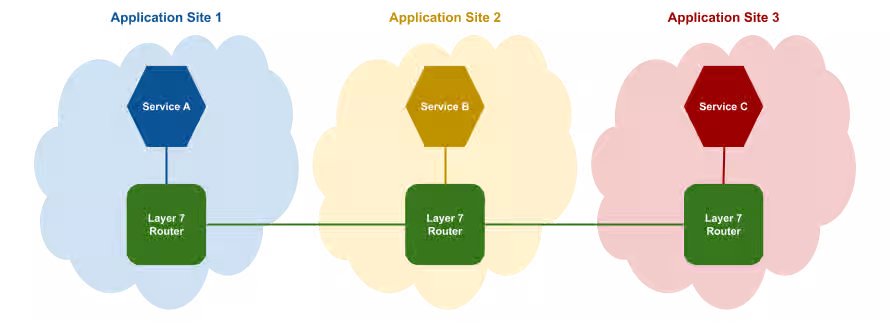
An application network connects the applications and services in your hybrid cloud into a virtual network so that they can communicate with each other as if they were all running in the same site. In this diagram, an application network connects three services, each of which is running in a different cloud:
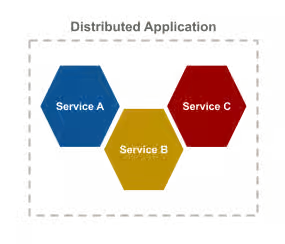
In essence, the application network connects the services in a distributed application with a microservice architecture.
Application networks are able to provide connectivity across the hybrid cloud by using Skupper routers.
1.2. Skupper routers
Skupper routers form the backbone of an application network in the same way that conventional network routers form the backbone of a VPN. However, instead of routing IP packets between network endpoints, Skupper routers route messages between application endpoints.
Application services
An application service represents an endpoint, or destination in the application network. When an application sends a communication to an service, the Skupper routers distribute the communication to any other application in the application network that has the same service.
For example, in this diagram, Service B sends a message with an application service to its local application router. Service A and Service C are subscribed to the same service, so the application router routes copies of the message through the application network until they arrive at each destination.
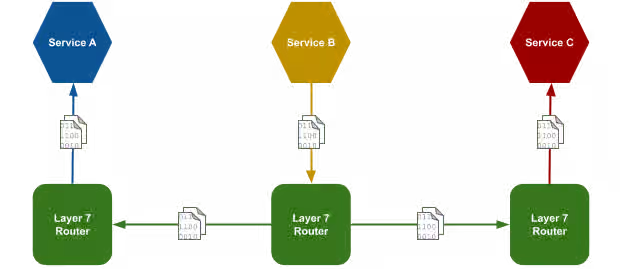
In the diagram, skupper-router is a container or systemd process that acts as a software router for service communication.
Application networks provide multiple routing patterns, so communications can be distributed in anycast (balanced or closest) or multicast patterns.
1.3. Skupper
Skupper is an open source tool for creating application networks in Kubernetes or Linux. By using Skupper, you can create a distributed application consisting of microservices running in different sites.
This diagram illustrates a Skupper network that connects three services running in three different sites:
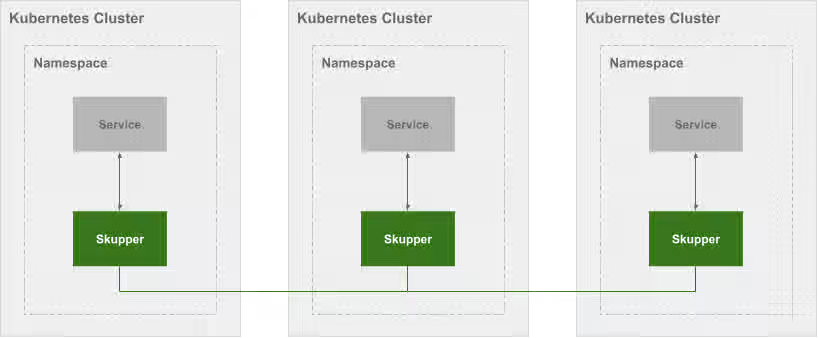
In a Skupper network, each namespace contains a Skupper instance. When these Skupper instances connect, they continually share information about the services that each instance exposes. This means that each Skupper instance is always aware of every service that has been exposed to the Skupper network, regardless of the namespace in which each service resides.
Once a Skupper network is formed across Kubernetes namespaces, any of the services in those namespaces can be exposed (through annotation) to the Skupper network. When a service is exposed, Skupper creates proxy endpoints to make that service available on each namespace in the Skupper network.
Chapter 2. Skupper security
Skupper securely connects your services with TLS authentication and encryption. See how Skupper enables you to deploy your application securely across Kubernetes clusters.
Security challenges in the cloud
Moving an application to the cloud raises security risks. Either your services must be exposed to the public internet, or you must adopt complex layer 3 network controls like VPNs, firewall rules, and access policies.
Increasing the challenge, layer 3 network controls do not extend easily to multiple clusters. These network controls must be duplicated for each cluster.
Built-in network isolation
Skupper provides default, built-in security that scales across clusters and clouds. In a Skupper network, the connections between Skupper routers are secured with mutual TLS using a private, dedicated certificate authority (CA). Each router is uniquely identified by its own certificate.
This means that the Skupper network is isolated from external access, preventing security risks such as lateral attacks, malware infestations, and data exfiltration.
Chapter 3. Skupper connectivity
Skupper represents a new approach to connecting services across multiple Kubernetes clusters. See how Skupper can give you the flexibility to deploy your services where you need them.
One cluster
Kubernetes services provide a virtual network address for each element of your distributed application. Service "A" can contact service "B", "B" can contact "C", and so on.
But if you want to deploy your application across multiple clusters, your options are limited. You have to either expose your services to the public internet or set up a VPN.
Skupper offers a third way. It connects clusters to a secure application network, also known as a virtual application network (VAN). It uses that network to forward local service traffic to remote clusters.
Secure hybrid cloud communication
Deploy your application across public and private clusters.
You can host your database on a private cluster and retain full connectivity with services running on the public cloud. All communication is secured by mutual TLS authentication and encryption.
Edge-to-edge connectivity
Distribute application services across geographic regions.
You can connect multiple retail sites to a central office. Once connected, each edge location can contact any other edge. You can add and remove sites on demand.
Scale up and out
Build large, robust networks of connected clusters.
Chapter 4. Skupper routing
Skupper uses routing keys and ports to connect servers and clients. See how the power of application-layer addressing can bring new capabilities to your applications.
Multi-cluster services
Deploy a single logical service across multiple clusters.
Skupper can route requests to instances of a single service running on multiple clusters. If a provider or data center fails, the service instances running at unaffected sites can scale to meet the need and maintain availability.
Dynamic load balancing
Balance requests across clusters according to service capacity.
The Skupper network has cross-cluster visibility. It can see which services are already loaded and which have spare capacity, and it directs requests accordingly.
You can assign a cost to each inter-cluster connection. This enables you to configure a preference for one resource over another. If demand is normal, you can keep all traffic on your private cloud. If demand peaks, you can dynamically spill over to public cloud resources.
Reliable networks
Skupper uses redundant network paths and smart routing to provide highly available connectivity at scale.
Chapter 5. Skupper load balancing and failover
Skupper enables load balancing and failover across servers located across the application network. Specifically, Skupper balances active TCP connections across workloads deployed in distinct sites. If a workload at one site becomes unavailable, traffic is automatically rerouted to available sites. For example, if you deploy the same backend code on two sites and expose the backend on the application network, concurrent requests from a third site to the backend service are processed by both sites.
In an application network, the routing algorithm attempts to use the path with the lowest total cost from client to target server.
Understanding link cost
Link cost is a configurable value when creating links between sites. In the earlier example, the link cost from the client to each server is the same by default (1). However, if one server is more powerful and has better latency, it processes TCP requests more quickly, resulting in more traffic being directed to that server. Skupper determines the perceived cost with the context of knowing the configured cost and the current number of open TCP connections and directs traffic to the server with the lowest cost.
- Local workloads have a link cost of 0.
- If connecting to a workload requires traversing two or more links, the total of all link costs constitutes the link cost.
📌 NOTE Traffic load is based on the number of concurrent TCP connections, so 'round robin' behavior should not be expected.
Using Skupper load balancing to achieve failover
You can configure the network so that a specific location handles all traffic until failure. After failure at that location, all traffic is handled by a different location. To achieve this behavior, you set the cost from the client to the backup server high, for example 9999, as described in {cost-link}.
📌 NOTE Link cost is configured for all services between two sites. It is currently not possible to set different costs for distinct services.
Chapter 6. Overview of Skupper CLI on Kubernetes
You can use the skupper CLI on Kubernetes after installing the Skupper controller to configure sites, links and services.
The Skupper CLI is designed to generate and consume standard resources, ensuring that a sites, links and services configured using the CLI are identical to those configured directly through YAML.
- Create sites
- Link sites (requires that one site has link access enabled)
- Expose and consume services
Chapter 7. Creating a site on Kubernetes using the Skupper CLI
Using the skupper command-line interface (CLI) allows you to create and manage sites from the context of the current namespace.
A typical workflow is to create a site, link sites together, and expose services to the application network.
7.1. Checking the Skupper CLI
Installing the skupper command-line interface (CLI) provides a simple method to get started with Skupper.
- Follow the instructions for Content from skupper.io is not included.Installing Skupper.
Verify the installation.
skupper version

COMPONENT               VERSION
cli                     {skupper_cli_version}
7.2. Creating a simple site using the CLI on Kubernetes
Prerequisites
-
The
skupperCLI is installed. - The Skupper controller is running on the Kubernetes cluster.
Procedure
Check that the
SKUPPER_PLATFORMenvironment is unset or set tokubernetes.-
kubernetes- default -
podman -
docker -
linux
-
Create a site on Kubernetes:
skupper site create <site-name> --namespace <namespace>
Specifying the namespace is not required if the context is set to the namespace where you want to create the site. For example:
skupper site create my-site

Waiting for status...
Site "my-site" is ready.
There are many options to consider when creating sites using the CLI, see Content from skupperproject.github.io is not included.CLI Reference, including frequently used options.
For example
--enable-link-accessIf enabled, this option allows you create tokens and link to this site. By default, this option is disabled but you can change the setting later
skupper site update --enable-link-access.--timeout <time>You can add the timeout option to specify the maximum time for the CLI wait for the site status to report
ready.skupper site create my-site --timeout 2m
The timeout option does not stop the site from being created, but if the site is not ready, the following is output:
Site "my-site" is not yet ready: Pending
You can check the status of the site at any time using
skupper site status.By default, the router CPU allocation is BestEffort as described in Content from kubernetes.io is not included.Pod Quality of Service Classes and this might affect performance under network load. To configure site resources, see Setting site resources.
7.3. Deleting a site using the CLI on Kubernetes
Prerequisites
-
The
skupperCLI is installed.
Procedure
Change context to the namespace where the site was created, for example:
kubectl config set-context --current --namespace west
Enter the following command to delete a site:
skupper site delete
Chapter 8. Linking sites on Kubernetes using the Skupper CLI
Using the Skupper command-line interface (CLI) allows you to create links between sites. The link direction is not significant, and is typically determined by ease of connectivity. For example, if east is behind a firewall, linking from east to west is the easiest option.
Once sites are linked, services can be exposed and consumed across the application network without the need to open ports or manage inter-site connectivity.
8.1. Linking sites using a token
A token provides a secure method to link sites. By default, a token can only be used once and must be used within 15 minutes to link sites. This procedure describes how to issue a token from one site and redeem that token on another site to create a link.
Prerequisites
- Two sites
-
At least one site with
enable-link-accessenabled.
To link sites, you create a token on one site and redeem that token on the other site to create the link.
Procedure
On the site where you want to issue the token, make sure link access is enabled:
skupper site update --enable-link-access
Create a token:
skupper token issue <filename>
where
<filename>is the name of a YAML file that is saved on your local filesystem.This file contains a key and the location of the site that created it.
📌 NOTE Access to this file provides access to the application network. Protect it appropriately. A token can be restricted by any combination of:
Time - prevents token reuse after a specified period.
For example, to allow a token to be used for 1 hour after it is issued:
skupper token issue build/west.yaml --expiration-window 60m
Usage - prevents creating multiple links from a single token.
For example, to allow a token to be used 3 times:
skupper token issue output/west.yaml --redemptions-allowed 3
All inter-site traffic is protected by mutual TLS using a private, dedicated certificate authority (CA). A token is not a certificate, but is securely exchanged for a certificate during the linking process.
Redeem the token on a different site to create a link:
skupper token redeem <filename>
where
<filename>is the name of a YAML file that is saved on your local filesystem.Check the status of the link:
skupper link status
You might need to issue the command multiple times before the link is ready:
$ skupper link status
NAME                                            STATUS  COST    MESSAGE
west-12f75bc8-5dda-4256-88f8-9df48150281a       Pending 1       Not Operational
$ skupper link status
NAME                                            STATUS  COST    MESSAGE
west-12f75bc8-5dda-4256-88f8-9df48150281a       Ready   1       OK
You can now expose services on the application network.
There are many options to consider when linking sites using the CLI, see Content from skupperproject.github.io is not included.CLI Reference, including frequently used options.
8.2. Linking sites using a link resource
An alternative approach to linking sites using tokens is to create a link resource YAML file using the CLI, and to apply that resource to another site.
Prerequisites
- Two sites
-
At least one site with
enable-link-accessenabled.
To link sites, you create a link resource YAML file on one site and apply that resource on the other site to create the link.
Procedure
On the site where you want to create a link , make sure link access is enabled:
skupper site update --enable-link-access
Create a
linkresource YAML file:skupper link generate > <filename>
where
<filename>is the name of a YAML file that is saved on your local filesystem.Apply the
linkresource YAML file on a different site to create a link:kubectl apply -f <filename>
where
<filename>is the name of a YAML file that is saved on your local filesystem.Check the status of the link:
skupper link status
You might need to issue the command multiple times before the link is ready:
$ skupper link status
NAME                                            STATUS  COST    MESSAGE
west-12f75bc8-5dda-4256-88f8-9df48150281a       Pending 1       Not Operational
$ skupper link status
NAME                                            STATUS  COST    MESSAGE
west-12f75bc8-5dda-4256-88f8-9df48150281a       Ready   1       OK
You can now expose services on the application network.
There are many options to consider when linking sites using the CLI, see Content from skupperproject.github.io is not included.CLI Reference, including frequently used options.
Chapter 9. Exposing services on the application network using the CLI
After creating an application network by linking sites, you can expose services from one site using connectors and consume those services on other sites using listeners. A routing key is a string that matches one or more connectors with one or more listeners. For example, if you create a connector with the routing key backend, you need to create a listener with the routing key backend to consume that service.
This section assumes you have created and linked at least two sites.
9.1. Creating a connector using the CLI
A connector binds a local workload to listeners in remote sites. Listeners and connectors are matched using routing keys.
For more information about connectors, see Content from skupperproject.github.io is not included.Connector concept.
Procedure
Create a workload that you want to expose on the network, for example:
kubectl create deployment backend --image quay.io/skupper/hello-world-backend --replicas 3
Create a connector:
skupper connector create <name> <port> [--routing-key <name>]
For example:
skupper connector create backend 8080 --workload deployment/backend
Check the connector status:
skupper connector status
For example:
$ skupper connector status
NAME    STATUS  ROUTING-KEY     SELECTOR        HOST    PORT    HAS MATCHING LISTENER    MESSAGE
backend Pending backend         app=backend             8080    false   No matching listeners
📌 NOTE By default, the routing key name is set to the name of the connector. If you want to use a custom routing key, set the
--routing-keyto your custom name.
There are many options to consider when creating connectors using the CLI, see Content from skupperproject.github.io is not included.CLI Reference, including frequently used options.
Additional information
If you need to expose a service from another namespace, you must use YAML as described in Creating a connector for a different namespace using YAML.
9.2. Creating a listener using the CLI
A listener binds a local connection endpoint to connectors in remote sites. Listeners and connectors are matched using routing keys.
For more information about listeners. see Content from skupperproject.github.io is not included.Listener concept.
Procedure
- Identify a connector that you want to use. Note the routing key of that connector.
Create a listener:
skupper listener create <name> <port> [--routing-key <name>]
For example:
$ skupper listener create backend 8080
Waiting for create to complete...
Listener "backend" is ready
Check the listener status:
skupper listener status
For example:
$ skupper listener status
NAME    STATUS  ROUTING-KEY     HOST    PORT    MATCHING-CONNECTOR      MESSAGE
backend Ready   backend         backend 8080    true                    OK
📌 NOTE There must be a
MATCHING-CONNECTORfor the service to operate. By default, the routing key name is the listener name. If you want to use a custom routing key, set the--routing-keyto your custom name.
There are many options to consider when creating connectors using the CLI, see Content from skupperproject.github.io is not included.CLI Reference, including frequently used options.
Chapter 10. Overview of using YAML CLI on Kubernetes
You can use YAML on Kubernetes after installing the Skupper controller to
- Create sites
- Link sites (requires that one site has link access enabled)
- Expose and consume services
Chapter 11. Creating a site on Kubernetes using YAML
Using YAML allows you to create and manage sites from the context of the current namespace.
A typical workflow is to create a site, link sites together, and expose services to the application network.
11.1. Creating a simple site on Kubernetes using YAML
You can use YAML to create and manage Skupper sites.
Prerequisites
- The Skupper controller is running on the Kubernetes cluster.
Procedure
Create a site CR YAML file named
my-site.yaml, for example:apiVersion: skupper.io/v2alpha1 kind: Site metadata: name: my-site namespace: west
This YAML creates a site named
my-sitein thewestnamespace. Specifying the namespace is not required if the context is set to the namespace where you want to create the site.If you need to link to this site, enable link access:
apiVersion: skupper.io/v2alpha1 kind: Site metadata: name: my-site namespace: west spec: linkAccess: default
Create the site:
kubectl apply -f my-site.yaml
Check the status of the site:
kubectl get site
You might need to issue the command multiple times before the site is ready:
$ kubectl get site
NAME   STATUS    SITES IN NETWORK   MESSAGE
west   Pending                      containers with unready status: [router kube-adaptor]
$ kubectl get site
NAME   STATUS   SITES IN NETWORK   MESSAGE
west   Ready    1                  OK
You can now link this site to another site to create an application network.
By default, the router CPU allocation is BestEffort as described in Content from kubernetes.io is not included.Pod Quality of Service Classes and this might affect performance under network load. Consider setting resources as described in Setting site resources.
There are many options to consider when creating sites using YAML, see the Content from skupperproject.github.io is not included.YAML Reference, including frequently used options.
11.2. Setting site resources
You can configure the Skupper Router and Kube Adaptor components with minimum and maximum CPU and memory resources by defining sizing models using ConfigMaps.
Increasing the number of routers does not improve network performance. An incoming router-to-router link is associated with just one active router. Additional routers do not receive traffic while that router is responding.
Prerequisites
- The Skupper V2 controller is running in your cluster.
You have determined the router CPU allocation you require.
Consider the following CPU allocation options:
Router CPU Description 1
Helps avoid issues with BestEffort on low resource clusters
2
Suitable for production environments
5
Maximum performance
Procedure
Create a sizing ConfigMap in the same namespace where your Skupper V2 controller is running.
The following example defines a sizing configuration named
mediumwith 2 CPU cores suitable for production:apiVersion: v1 kind: ConfigMap metadata: name: sizing-medium labels: skupper.io/site-sizing: "medium" annotations: skupper.io/default-site-sizing: "true" data: router-cpu-limit: "2" router-memory-limit: 1024MiThe Skupper controller selects ConfigMaps based on the presence of a
skupper.io/site-sizinglabel. The label’s value serves as an internal identifier for that particular sizing configuration.To designate a sizing model as the default for all sites managed by your Skupper V2 controller instance, annotate the ConfigMap with
skupper.io/default-site-sizing: "true".A sizing ConfigMap can define the following fields:
-
router-cpu-request -
router-cpu-limit -
router-memory-request -
router-memory-limit -
adaptor-cpu-request -
adaptor-cpu-limit -
adaptor-memory-request -
adaptor-memory-limit
NoteIf only the
limitfield is defined, Kubernetes will also set therequestwith the same value. If this is not what you want, make sure to set the respectiverequestfield with a smaller value.-
Determine the controller namespace. Depending on your installation method, the controller namespace may be
skupper,openshift-operators, or have a different name. You can check that you have chosen the correct namespace by running:kubectl get pods
Confirm that the skupper controller pod is running in the namespace.
Apply the ConfigMap in the controller namespace:
kubectl apply -f sizing-medium.yaml
Assign the sizing configuration to a site by setting the
spec.settings.sizefield in the site resource:apiVersion: skupper.io/v2alpha1 kind: Site metadata: name: my-site spec: settings: size: mediumVerify the resource limits have been applied by inspecting the
skupper-routerdeployment:kubectl get deployment skupper-router -o json | jq .spec.template.spec.containers[].resources
The output should look like:
{
  "limits": {
    "cpu": "1",
    "memory": "1Gi"
  },
  "requests": {
    "cpu": "500m",
    "memory": "512Mi"
  }
}
You can define multiple sizing configurations using separate ConfigMaps. Only one ConfigMap should be annotated as the default (skupper.io/default-site-sizing: "true").
Chapter 12. Linking sites on Kubernetes using YAML
Once sites are linked, services can be exposed and consumed across the application network without the need to open ports or manage inter-site connectivity.
Terminology:
- Connecting site: The site that initiates the link connection.
- Listening site: The site receives the link connection.
The link direction is not significant, and is typically determined by ease of connectivity. For example, if east is behind a firewall and west is a cluster on the public cloud, linking from east to west is the easiest option.
12.1. Linking sites using AccessGrant and AccessToken resources
Prerequisites
- Two sites
The listening site must have
link-accessenabled. For example:apiVersion: skupper.io/v2alpha1 kind: Site metadata: name: west namespace: west spec: linkAccess: default
To link sites, you create
AccessGrantandAccessTokenresources on the listening site and apply theAccessTokenresource on the connecting site to create the link.
AccessGrant is a permission on a listening site that allows redemption of access tokens to create links. The component it gives permission to is the GrantServer which is a HTTPS server that ultimately sets up the link.
The GrantServer provides a URL, a secret code, and a cert that are bundled together to form an AccessToken. The number of times an AccessToken can be redeemed and how long it remains active are both configurable. On OpenShift, the GrantServer is exposed by a Route, while other systems use a LoadBalancer to make it accessible.
AccessToken is short-lived, usually single-use credential that contains the AccessGrant URL, secret code and a cert to establish a secure connection to the GrantServer. A connecting site redeems this token for a Link resource to establish a link to the listening site.
Procedure
On the listening site, for example
westnamespace, create anAccessGrantresource:apiVersion: skupper.io/v2alpha1 kind: AccessGrant metadata: name: grant-west spec: redemptionsAllowed: 2 # default 1 expirationWindow: 25m # default 15m
For example, if you created
accessgrant.yaml, apply and check status:kubectl apply -f accessgrant.yaml kubectl get accessgrants NAME REDEMPTIONS ALLOWED REDEMPTIONS MADE EXPIRATION STATUS MESSAGE grant-west 20 20 2025-10-15T12:33:04Z Ready OK
On the listening site, populate environment variables to allow token generation:
URL="$(kubectl get accessgrant grant-west -o template --template '{{ .status.url }}')" CODE="$(kubectl get accessgrant grant-west -o template --template '{{ .status.code }}')" CA_RAW="$(kubectl get accessgrant grant-west -o template --template '{{ .status.ca }}')"These environment variable settings support the next step of generating the token.
- URL is the URL of the GrantServer
- CODE is the secret code to access the GrantServer
- CA_RAW is the cert required to establish a HTTPS connection to the GrantServer
On the listening site, create a token YAML file:
cat > token.yaml <<EOF
apiVersion: skupper.io/v2alpha1
kind: AccessToken
metadata:
  name: token-to-west
spec:
  code: "$(printf '%s' "$CODE")"
  ca: |-
$(printf '%s\n' "$CA_RAW" | sed 's/^/    /')
  url: "$(printf '%s' "$URL")"
EOF
where
token.yamlis the name of the YAML file that is saved on your local filesystem.📌 NOTE Access to this file provides access to the application network. Protect it appropriately.
-
Securely transfer the
token.yamlfile to context of the connecting site. If you have both sites available from your terminal session, this step is not required. On the connecting site, apply the token and check status:
kubectl apply -f token.yaml
kubectl get accesstokens
NAME            URL                                                                REDEEMED   STATUS   MESSAGE
token-to-west   https://10.110.160.132:9090/87426fa9-5623-49af-a612-47d33b7a4200   true       Ready    OK
The GrantServer has validated the AccessToken and redeemed it for a
Linkresource. The connecting site usesLinkresource to establish an mTLS connection between routers.On the connecting site, check link status:
kubectl get link
NAME            STATUS   REMOTE SITE   MESSAGE
token-to-west   Ready    my-site       OK
Chapter 13. Exposing services on the application network using YAML
After creating an application network by linking sites, you can expose services from one site using connectors and consume those services on other sites using listeners. A routing key is a string that matches one or more connectors with one or more listeners. For example, if you create a connector with the routing key backend, you need to create a listener with the routing key backend to consume that service.
This section assumes you have created and linked at least two sites.
13.1. Creating a connector using YAML
A connector binds a local workload to listeners in remote sites. Listeners and connectors are matched using routing keys.
There are many options to consider when creating connectors using YAML, see Content from skupperproject.github.io is not included.Connector resource.
Procedure
Create a workload that you want to expose on the network, for example:
kubectl create deployment backend --image quay.io/skupper/hello-world-backend --replicas 3
Create a connector resource YAML file:
apiVersion: skupper.io/v2alpha1
kind: Connector
metadata:
  name: backend
  namespace: east
spec:
  routingKey: backend
  selector: app=backend
  port: 8080
This creates a connector in the
eastsite and exposes thebackenddeployment on the network on port 8080. You can create a listener on a different site using the matching routing keybackendto address this service.To create the connector resource:
kubectl apply -f <filename>
where
<filename>is the name of a YAML file that is saved on your local filesystem.Check the connector status:
kubectl get connector
For example:
NAME    STATUS  ROUTING-KEY     SELECTOR        HOST    PORT    HAS MATCHING LISTENER    MESSAGE
backend Pending backend         app=backend             8080    false   No matching listeners
📌 NOTE By default, the routing key name is set to the name of the connector. If you want to use a custom routing key, set the
--routing-keyto your custom name.
There are many options to consider when creating connectors using YAML, see Content from skupperproject.github.io is not included.CLI Reference, including frequently used options.
13.2. Creating a listener using YAML
A listener binds a local connection endpoint to connectors in remote sites. Listeners and connectors are matched using routing keys.
For more information about listeners. see Content from skupperproject.github.io is not included.Listener concept.
Procedure
- Identify a connector that you want to use. Note the routing key of that connector.
Create a listener resource YAML file:
apiVersion: skupper.io/v2alpha1
kind: Listener
metadata:
  name: backend
  namespace: west
spec:
  routingKey: backend
  host: east-backend
  port: 8080
This creates a listener in the
westsite and matches with the connector that uses the routing keybackend. It also creates a service namedeast-backendexposed on port 8080 in the current namespace.To create the connector resource:
kubectl apply -f <filename>
where
<filename>is the name of a YAML file that is saved on your local filesystem.Check the listener status:
kubectl get listener
For example:
NAME      ROUTING KEY   PORT   HOST           STATUS   HAS MATCHING CONNECTOR   MESSAGE
backend   backend       8080   east-backend   Ready    true                     OK
📌 NOTE There must be a
MATCHING-CONNECTORfor the service to operate.
There are many options to consider when creating listeners using YAML, see Content from skupperproject.github.io is not included.Listener resource.
13.3. Creating a connector for a different namespace using YAML
A connector binds a local workload to listeners in remote sites.
If you create a site in one namespace and need to expose a service in a different namespace, use this procedure to create an attached connector in the other namespace and an AttachedConnectorBinding in the site namespace.
- An attached connector is a connector in a peer namespace, that is, not the site namespace.
- The AttachedConnectorBinding is a binding to an attached connector in a peer namespace and is created in the site namespace.
- Creating attached connectors requires that Skupper is deployed cluster wide.
Procedure
Create a workload that you want to expose on the network in a non-site namespace, for example:
kubectl create deployment backend --image quay.io/skupper/hello-world-backend --replicas 3 --namespace attached
Create an AttachedConnector resource YAML file in the same namespace:
apiVersion: skupper.io/v2alpha1
kind: AttachedConnector
metadata:
  name: backend
  namespace: attached
spec:
  siteNamespace: skupper
  selector: app=backend
  port: 8080
To create the AttachedConnector resource:
kubectl apply -f <filename>
where
<filename>is the name of a YAML file that is saved on your local filesystem.Create an AttachedConnectorBinding resource YAML file in the site namespace:
apiVersion: skupper.io/v2alpha1
kind: AttachedConnectorBinding
metadata:
  name: backend
  namespace: east
spec:
  connectorNamespace: attached
  routingKey: backend
To create the AttachedConnectorBinding resource:
kubectl apply -f <filename>
where
<filename>is the name of a YAML file that is saved on your local filesystem.Check the AttachedConnectorBinding status from the context of the site namespace:
kubectl get AttachedConnectorBinding
For example:
NAME      ROUTING KEY   CONNECTOR NAMESPACE   STATUS   HAS MATCHING LISTENER
backend   backend       attached              Ready    true
There are many options to consider when creating connectors using YAML, see Content from skupperproject.github.io is not included.Connector resource.
Chapter 14. Overview of Skupper CLI on local systems
This is a Technology Preview feature.
Technology Preview features are not supported with Red Hat production service level agreements (SLAs) and might not be functionally complete. Red Hat does not recommend using them in production. These features provide early access to upcoming product features, enabling customers to test functionality and provide feedback during the development process. For more information about the support scope of Red Hat Technology Preview features, see Technology Preview Features Support Scope.
- Create sites
- Link sites (requires that one site has link access enabled)
- Expose and consume services
Chapter 15. Creating a site on a local system using the Skupper CLI
Using the skupper command-line interface (CLI) allows you to create and manage Skupper sites from the context of the current user.
A typical workflow is to create a site, link sites together, and expose services to the application network.
A local system includes Docker, Podman or Linux system.
If you require more than one site, specify a unique namespace when using skupper, for example skupper --namespace second-site ....
15.1. Checking the Skupper CLI and environment
Installing the skupper command-line interface (CLI) provides a simple method to get started with Skupper.
- Follow the instructions for Content from skupper.io is not included.Installing Skupper.
Verify the installation.
skupper version COMPONENT VERSION cli {skupper_cli_version}For podman sites:
Make sure the Podman socket is available. To enable it:
systemctl --user enable --now podman.socket
Enable lingering to ensure the site persists over logouts:
loginctl enable-linger <username>
15.2. Creating a simple site using the CLI on local systems
Prerequisites
-
The
skupperCLI is installed.
Procedure
Set the
SKUPPER_PLATFORMfor type of site you want to install:-
podman -
docker -
linux
-
Install the controller for Podman and Docker sites:
skupper system install
This runs a container to support site, link and service operations. This feature is not available on Linux local system sites (systemd).
Create a site:
skupper site create <site-name>
For example:
skupper site create my-site

Waiting for status...
Site "my-site" is ready.
While the site is created, the site is not running at this point. To run the site:
skupper system start
By default, all sites are created with the namespace default. On non-Kubernetes sites, you can create multiple sites per-user by specifying a namespace, for example you can create multiple sites with different platforms as follows:
skupper site create systemd-site -p linux -n linux-ns
skupper site create docker-site -p docker -n docker-ns
15.3. Deleting a site using the CLI on local systems
Prerequisites
-
The
skupperCLI is installed.
Procedure
Enter the following command to delete a site:
skupper site delete <sitename>
skupper system stop
You can also uninstall the controller after deleting all existing sites:
skupper system uninstall
15.4. Creating a site bundle using the CLI on local systems
Sometimes, you might want to create all the configuration for a site and apply it automatically to a remote host. To support this, Skupper allows you create a .tar.gz file with all the required files and an install.sh script to start the remote site.
Prerequisites
-
The
skupperCLI is installed. The CLI is not required on the remote site.
Procedure
Set the
SKUPPER_PLATFORMfor type of site you want to install:-
podman -
docker -
linux
-
Install the controller for Podman and Docker sites:
skupper system install
This runs a container to support site, link and service operations. This feature is not available on Linux local system sites (systemd).
Create a site:
skupper site create <site-name>
For example:
skupper site create remote-site

Waiting for status...
Site "remote-site" is ready.
While the site is created, the site is not running and that is not a requirement for this usecase.
Create the bundle:
skupper system generate-bundle remote-site
The output shows the location of the generated
.tar.gzfile, for example:Site "remote-site" has been created (as a distributable bundle) Installation bundle available at: /home/user/.local/share/skupper/bundles/remote-site.tar.gz Default namespace: default Default platform: podman
Transfer the bundle file to the remote location and uncompress the file in an appropriate location:
tar -xzvf remote-site.tar.gz
Start the site:
install.sh
The site is now running, you can verify with
skupper site statusif the CLI is installed at that location.
Chapter 16. Linking sites on local systems using the Skupper CLI
Using the Skupper command-line interface (CLI) allows you to create links between sites. The link direction is not significant, and is typically determined by ease of connectivity. For example, if east is behind a firewall, linking from east to west is the easiest option.
Once sites are linked, services can be exposed and consumed across the application network without the need to open ports or manage inter-site connectivity.
A local system includes Docker, Podman or Linux system.
In this release, the CLI does not support issuing tokens for local systems. However, you can redeem tokens on a local system, and you can create and use 'link' resources.
16.1. Linking to Kubernetes sites using a token
A token provides a secure method to link sites. By default, a token can only be used once and must be used within 15 minutes to link sites. This procedure describes how to issue a token from a Kubernetes site and redeem that token on a local system site to create a link.
Prerequisites
- A local system site and a Kubernetes site.
-
A Kubernetes site with
enable-link-accessenabled.
To link sites, you create a token on the Kubernetes site and redeem that token on the local system site to create the link.
Procedure
On the Kubernetes site where you want to issue the token, make sure link access is enabled:
skupper site update --enable-link-access
Create a token:
skupper token issue <filename>
where
<filename>is the name of a YAML file that is saved on your local filesystem.This file contains a key and the location of the site that created it.
📌 NOTE Access to this file provides access to the application network. Protect it appropriately. A token can be restricted by any combination of:
Time - prevents token reuse after a specified period.
For example, to allow a token to be used for 1 hour after it is issued:
skupper token issue build/west.yaml --expiration-window 60m
Usage - prevents creating multiple links from a single token.
For example, to allow a token to be used 3 times:
skupper token issue output/west.yaml --redemptions-allowed 3
All inter-site traffic is protected by mutual TLS using a private, dedicated certificate authority (CA). A token is not a certificate, but is securely exchanged for a certificate during the linking process.
Redeem the token on a local system site to create a link:
skupper token redeem <filename>
where
<filename>is the name of a YAML file that is saved on your local filesystem.Check the status of the link:
skupper link status
You might need to issue the command multiple times before the link is ready:
$ skupper link status
NAME                                            STATUS  COST    MESSAGE
west-12f75bc8-5dda-4256-88f8-9df48150281a       Pending 1       Not Operational
$ skupper link status
NAME                                            STATUS  COST    MESSAGE
west-12f75bc8-5dda-4256-88f8-9df48150281a       Ready   1       OK
You can now expose services on the application network.
There are many options to consider when linking sites using the CLI, see Content from skupperproject.github.io is not included.CLI Reference, including frequently used options.
16.2. Linking sites using a link resource
An alternative approach to linking sites using tokens is to create a link resource YAML file using the CLI, and to apply that resource to another site.
Prerequisites
- Two sites
-
At least one site with
enable-link-accessenabled.
To link sites, you create a link resource YAML file on one site and apply that resource on the other site to create the link.
Procedure
On the site where you want to create a link , make sure link access is enabled:
skupper site update --enable-link-access
skupper site reload
Create a
linkresource YAML file:skupper link generate > <filename>
where
<filename>is the name of a YAML file that is saved on your local filesystem.Apply the
linkresource YAML file on a different site to create a link:skupper system apply -f <filename>
where
<filename>is the name of a YAML file that is saved on your local filesystem.Check the status of the link:
skupper link status
You might need to issue the command multiple times before the link is ready:
$ skupper link status
NAME                                            STATUS  COST    MESSAGE
west                                            Pending 1       Not Operational
$ skupper link status
NAME                                            STATUS  COST    MESSAGE
west                                            Ready   1       OK
You can now expose services on the application network.
There are many options to consider when linking sites using the CLI, see Content from skupperproject.github.io is not included.CLI Reference, including frequently used options.
Chapter 17. Exposing services on the application network using the CLI
After creating an application network by linking sites, you can expose services from one site using connectors and consume those services on other sites using listeners. A routing key is a string that matches one or more connectors with one or more listeners. For example, if you create a connector with the routing key backend, you need to create a listener with the routing key backend to consume that service.
This section assumes you have created and linked at least two sites.
17.1. Creating a connector using the CLI
A connector binds a local workload to listeners in remote sites. Listeners and connectors are matched using routing keys.
For more information about connectors see Content from skupperproject.github.io is not included.Connector concept
Prerequisites
-
The
skupperCLI is installed. -
The
SKUPPER_PLATFORMenvironment variable is set to one of *podman,dockerorlinux.
Procedure
- Create a server that you want to expose on the network. For example, run a HTTP server on port 8080.
Create a connector:
skupper connector create <name> <port> [--routing-key <name>]
For example:
skupper connector create my-server 8080 --host localhost
Check the connector status:
skupper connector status
For example:
$ skupper connector status
NAME		STATUS	ROUTING-KEY	HOST		PORT
my-server	Ok	my-server	localhost	8081
📌 NOTE By default, the routing key name is set to the name of the connector. If you want to use a custom routing key, set the
--routing-keyto your custom name.Apply the configuration using:
skupper system reload
There are many options to consider when creating connectors using the CLI, see Content from skupperproject.github.io is not included.CLI Reference, including frequently used options.
17.2. Creating a listener using the CLI
A listener binds a local connection endpoint to connectors in remote sites. Listeners and connectors are matched using routing keys.
Prerequisites
-
The
skupperCLI is installed. -
The
SKUPPER_PLATFORMenvironment variable is set to one of *podman,dockerorlinux.
Procedure
- Identify a connector that you want to use. Note the routing key of that connector.
Create a listener:
skupper connector create <name> <port> [--routing-key <name>]
For example:
$ skupper listener create my-server 8080
File written to /home/user/.local/share/skupper/namespaces/default/input/resources/Listener-backend.yaml
Apply the configuration using:
skupper system reload
Check the listener status:
skupper listener status
For example:
$ skupper listener status
NAME		STATUS	ROUTING-KEY	HOST		PORT
my-server	Ok	my-server	localhost	8081
📌 NOTE There must be a matching connector for the service to operate. By default, the routing key name is the listener name. If you want to use a custom routing key, set the
--routing-keyto your custom name.
There are many options to consider when creating connectors using the CLI, see Content from skupperproject.github.io is not included.CLI Reference, including frequently used options.
Chapter 18. Overview of using YAML on local systems
This is a Technology Preview feature.
Technology Preview features are not supported with Red Hat production service level agreements (SLAs) and might not be functionally complete. Red Hat does not recommend using them in production. These features provide early access to upcoming product features, enabling customers to test functionality and provide feedback during the development process. For more information about the support scope of Red Hat Technology Preview features, see Technology Preview Features Support Scope.
- Create sites
- Link sites (requires that one site has link access enabled)
- Expose and consume services
Chapter 19. Creating a site on local systems using YAML
Using YAML allows you to create and manage sites on Docker, Podman and Linux.
A typical workflow is to create a site, link sites together, and expose services to the application network.
If you require more than one site, specify a unique namespace when using skupper, for example skupper --namespace second-site ....
19.1. Creating a simple site on local systems using YAML
You can use YAML to create and manage Skupper sites.
Prerequisites
-
The
skupperCLI is installed.
Procedure
Create a site CR YAML file named
my-site.yamlin an empty directory, for example,local:apiVersion: skupper.io/v2alpha1 kind: Site metadata: name: my-site
This YAML creates a site named
my-sitein thedefaultnamespace.Create the site:
skupper system setup --path ./local
Skupper attempts to process any files in the
localdirectory. Typically, you create all resources you require for a site before runningskupper system setup.Check the status of the site:
skupper site status
You might need to issue the command multiple times before the site is ready:
NAME    STATUS  MESSAGE
default Ready   OK
You can now link this site to another site to create an application network.
There are many options to consider when creating sites using YAML, see Content from skupperproject.github.io is not included.YAML Reference, including frequently used options.
Chapter 20. Linking sites on local systems using YAML
Using a link resource YAML file allows you to create links between sites. The link direction is not significant, and is typically determined by ease of connectivity. For example, if east is behind a firewall, linking from east to west is the easiest option.
Once sites are linked, services can be exposed and consumed across the application network without the need to open ports or manage inter-site connectivity.
The procedures below describe linking an existing site. Typically, it is easier to configure a site, links and services in a set of files and then create a configured site by placing all the YAML files in a directory, for example local and then using the following command to
20.1. Linking sites using a link resource
An alternative approach to linking sites using tokens is to create a link resource YAML file using the CLI, and to apply that resource to another site.
Prerequisites
- A local system site
-
A Kubernetes site with
enable-link-accessenabled.
To link sites, you create a link resource YAML file on one site and apply that resource on the other site to create the link.
Procedure
On the site where you want to create a link , make sure link access is enabled:
skupper site update --enable-link-access
Create a
linkresource YAML file:skupper link generate > <filename>
where
<filename>is the name of a YAML file that is saved on your local filesystem.Apply the
linkresource YAML file on a local system site to create a link:mv <filename> ~/.local/share/skupper/namespaces/default/input/resources/ skupper system setup --force
where
<filename>is the name of a YAML file that is saved on your local filesystem.The path shown is specific to the
defaultnamespace. If you are configuring a different namespace, use that name instead.The site is recreated and you see some of the internal resources that are not affected, for example:
Sources will be consumed from namespace "default"
2025/03/09 22:43:14 WARN certificate will not be overwritten path=~/.local/share/skupper/namespaces/default/runtime/issuers/skupper-local-ca/tls.crt
2025/03/09 22:43:14 WARN certificate will not be overwritten path=~/.local/share/skupper/namespaces/default/runtime/issuers/skupper-local-ca/tls.key
2025/03/09 22:43:14 WARN certificate will not be overwritten path=~/.local/share/skupper/namespaces/default/runtime/issuers/skupper-local-ca/ca.crt
2025/03/09 22:43:14 WARN certificate will not be overwritten path=~/.local/share/skupper/namespaces/default/runtime/issuers/skupper-site-ca/tls.crt
2025/03/09 22:43:14 WARN certificate will not be overwritten path=~/.local/share/skupper/namespaces/default/runtime/issuers/skupper-site-ca/tls.key
2025/03/09 22:43:14 WARN certificate will not be overwritten path=~/.local/share/skupper/namespaces/default/runtime/issuers/skupper-site-ca/ca.crt
2025/03/09 22:43:15 WARN certificate will not be overwritten path=~/.local/share/skupper/namespaces/default/runtime/issuers/skupper-service-ca/tls.crt
2025/03/09 22:43:15 WARN certificate will not be overwritten path=~/.local/share/skupper/namespaces/default/runtime/issuers/skupper-service-ca/tls.key
2025/03/09 22:43:15 WARN certificate will not be overwritten path=~/.local/share/skupper/namespaces/default/runtime/issuers/skupper-service-ca/ca.crt
Check the status of the link:
skupper link status
The output shows the link name:
$ skupper link status
NAME            STATUS
link-west       Ok
You can now expose services on the application network.
Chapter 21. Exposing services on the application network using YAML
After creating an application network by linking sites, you can expose services from one site using connectors and consume those services on other sites using listeners. A routing key is a string that matches one or more connectors with one or more listeners. For example, if you create a connector with the routing key backend, you need to create a listener with the routing key backend to consume that service.
This section assumes you have created and linked at least two sites.
21.1. Creating a connector using YAML
A connector binds a local workload to listeners in remote sites. Listeners and connectors are matched using routing keys.
For more information about connectors see Content from skupperproject.github.io is not included.Connector concept
Procedure
Create a workload that you want to expose on the network, for example:
kubectl create deployment backend --image quay.io/skupper/hello-world-backend --replicas 3
Create a connector resource YAML file:
apiVersion: skupper.io/v2alpha1
kind: Connector
metadata:
  name: backend
  namespace: east
spec:
  routingKey: backend
  selector: app=backend
  port: 8080
This creates a connector in the
eastsite and exposes thebackenddeployment on the network on port 8080. You can create a listener on a different site using the matching routing keybackendto address this service.To create the connector resource:
kubectl apply -f <filename>
where
<filename>is the name of a YAML file that is saved on your local filesystem.Check the connector status:
kubectl get connector
For example:
NAME    STATUS  ROUTING-KEY     SELECTOR        HOST    PORT    HAS MATCHING LISTENER    MESSAGE
backend Pending backend         app=backend             8080    false   No matching listeners
📌 NOTE By default, the routing key name is set to the name of the connector. If you want to use a custom routing key, set the
--routing-keyto your custom name.
There are many options to consider when creating connectors using YAML, see Content from skupperproject.github.io is not included.CLI Reference, including frequently used options.
21.2. Creating a listener using YAML
A listener binds a local connection endpoint to connectors in remote sites. Listeners and connectors are matched using routing keys.
Procedure
- Identify a connector that you want to use. Note the routing key of that connector.
Create a listener resource YAML file:
apiVersion: skupper.io/v2alpha1
kind: Listener
metadata:
  name: backend
  namespace: west
spec:
  routingKey: backend
  host: east-backend
  port: 8080
This creates a listener in the
westsite and matches with the connector that uses the routing keybackend. It also creates a service namedeast-backendexposed on port 8080 in the current namespace.To create the connector resource:
kubectl apply -f <filename>
where
<filename>is the name of a YAML file that is saved on your local filesystem.Check the listener status:
kubectl get listener
For example:
NAME      ROUTING KEY   PORT   HOST           STATUS   HAS MATCHING CONNECTOR   MESSAGE
backend   backend       8080   east-backend   Ready    true                     OK
📌 NOTE There must be a
MATCHING-CONNECTORfor the service to operate.
There are many options to consider when creating connectors using YAML, see Content from skupperproject.github.io is not included.CLI Reference, including frequently used options.
Chapter 22. Using the Skupper console
You can use the Skupper console to monitor and troubleshoot your application network. The console provides a visual overview of the sites, links, services, and communication metrics.
Prerequisites
- Access to an Kubernetes cluster with Network Observer installed.
- A site is created in a namespace
Procedure
- Change context to the site namespace.
If you are using the OpenShift console:
- Navigate to → .
- Choose Red Hat Service Interconnect Network Observer Operator from the list of available Operators, and then click .
If you are not using the OpenShift console:
Create a file named
network-observer.yamlwith the following CR:apiVersion: observability.skupper.io/v2alpha1 kind: NetworkObserver metadata: name: networkobserver-sample namespace: west spec: {}Change the namespace value to match the site namespace.
Apply the CR YAML:
$ kubectl apply -f network-observer.yaml
Determine the console URL:
kubectl get --namespace west -o jsonpath="{.spec.host}" route networkobserver-sample-network-observer- Navigate to the console.
22.1. Configuring the Network observer
Currently the primary purpose of the Network Observer is to provide a console for monitoring your application network. This section describes advanced configuration.
- Change context to a site namespace.
Apply a CR to create the Network Observer instance
The following CR shows the supported parameters that you can use to configure the Network observer instance:
apiVersion: observability.skupper.io/v2alpha1 kind: NetworkObserver metadata: name: networkobserver-sample namespace: west spec: # Resource requests and limits resources: requests: cpu: "250m" memory: "4Gi" limits: cpu: "1" memory: "8Gi" # Authentication strategies auth: # strategy is one of none, basic, or openshift strategy: "openshift" openshift: # createCookieSecret - # for the openshift oauth2 proxy. createCookieSecret: true # cookieSecretName name of the session cookie secret. cookieSecretName: "" # Service account for openshift auth serviceAccount: create: true nameOverride: ""See the table below for explanation of the parameters.
Verify the configuration, enter:
oc describe networkobserver networkobserver-sample -n west
Note that the parameters listed in output, not related to the CR above, are not configurable.
Parameters reference
The following table describes the configuration parameters:
| Parameter | Type | Description / Implications |
|---|---|---|
|
| String | The minimum CPU guaranteed to the Network observer. Increase this if the console feels sluggish under high network load. |
|
| String | The initial memory allocation. 4Gi is the recommended minimum for medium-sized networks. |
|
| String | The maximum CPU the Network observer can consume. |
|
| String | The upper bound of memory. If memory usage exceeds this limit, the pod is terminated due to insufficient memory. |
|
| String |
Defines how users log in. Options: |
|
| Boolean |
When |
|
| Boolean |
When |
Troubleshooting
If you are concerned about Network Observer resources, consider using standard techniques to monitor those resources. The following example demonstrates how to configure a Prometheus alert that triggers when memory usage exceeds 90% of the defined limit.
apiVersion: monitoring.coreos.com/v1
kind: PrometheusRule
metadata:
  name: network-observer-memory-alert
  namespace: west
spec:
  groups:
  - name: network-observer.rules
    rules:
    - alert: NetworkObserverHighMemory
      expr: |
        (container_memory_working_set_bytes{namespace="west", container="network-observer"}
        /
        kube_pod_container_resource_limits{namespace="west", container="network-observer", resource="memory"}) > 0.9
      for: 5m
      labels:
        severity: warning
      annotations:
        summary: "Network Observer pod in namespace {{ $labels.namespace }} is using > 90% of its memory limit."
        description: "Pod {{ $labels.pod }} is currently using {{ $value | humanizePercentage }} of its memory limit."