How to search with the Satellite 6 REST API
Environment
- Red Hat Enterprise Linux
- Satellite 6
Issue
- How to search with the
Satellite 6 REST API
Resolution
-
Documentation on using the Satellite 6 API is here:
This content is not included.This content is not included.https://access.redhat.com/documentation/en-US/Red_Hat_Satellite/6.0/html-single/API_Guide/index.html -
The official docs have examples of using the API in scripts:
This content is not included.This content is not included.https://access.redhat.com/documentation/en-US/Red_Hat_Satellite/6.0/html/API_Guide/chap-Examples.html -
Further examples can be found on the Content from theforeman.org is not included.upstream Foreman site, eg Content from theforeman.org is not included.here and Content from blog.theforeman.org is not included.here
Examples using cURL
-
For example, for searching for a particular hosts, more info can be found here:
This content is not included.This content is not included.https://access.redhat.com/documentation/en-US/Red_Hat_Satellite/6.0/html-single/API_Guide/index.html#List_all_Hosts -
Be aware that if you use the -s (silent) option, Curl does not output any error messages.
With silent, you will still get output, but when developing your API commands, it will be helpful to see all output.
# man curl
Silent or quiet mode. Don't show progress meter or error messages.  Makes Curl mute.
- If running with -k (insecure option), you need to ensure that the user name is included, and that you use HTTPS:
curl -X GET -k -u admin https://satellite6.example.com/api/v2/hosts/satellite6.example.com/facts

{
  "total": 100,
  "subtotal": 1,
  "page": 1,
  "per_page": 20,
  "search": " host = satellite6.example.com ",
  "sort": {
    "by": null,
    "order": null
  },
  "results": {"satellite6.example.com ":{"macaddress":"xx:xx:xx:xx:xx:xx","macaddress_eth0":"xx:xx:xx:xx:xx:xx","bios_release_date":"01/01/2007","bios_version":"0.5.1","uptime_days":"1","augeasversion":"1.0.0","swapsize_mb":"1000.00","swapsize":"1000.00 MB","network_eth0":"xx.xx.xx.xx","ipaddress":"xx.xx.xx.xx","ipaddress_eth0":"xx.xx.xx.xx","blockdevice_sr0_size":"1073741312","network_lo":"127.0.0.0","ipaddress_lo":"127.0.0.1","mtu_eth0":"1500","uptime_seconds":"160427","facterversion":"1.7.6","rubyversion":"1.8.7","uptime":"1 day","blockdevice_vda_size":"214748364800"}}
- To get info for host satellite6.example.com:
$  curl -X GET -s -k -u admin:password https://satellite6.example.com/api/v2/hosts/satellite6.example.com | python -mjson.tool
{
    "all_puppetclasses": [],
    "architecture_id": 1,
    "architecture_name": "x86_64",
    "build": false,
    "capabilities": [
        "build"
    ],
    "certname": "satellite6.example.com",
    "comment": null,
    "compute_profile_id": null,
...
- To get all facts for host satellite6.example.com:
$ curl -X GET -s -k -u admin:password https://satellite6.example.com/api/v2/hosts/satellite6.example.com/facts | python -mjson.tool
{
...
    "results": {
        "satellite6.example.com": {
            "augeasversion": "1.0.0",
            "bios_release_date": "01/01/2007",
            "bios_version": "0.5.1",
            "blockdevice_sr0_size": "1073741312",
            "facterversion": "1.7.6",
            ...
}
- To find all hosts matching the pattern example:
$ curl -X GET -s -k -u admin:password https://satellite6.example.com/api/v2/hosts?search=example | python -mjson.tool
{
    ...
    "results": [
        {
            "name": "satellite6.example.com",
            ...
        }
    ],
    "search": "example",
}
- To find all hosts in the environment production:
$ curl -X GET -s -k -u admin:password https://satellite6.example.com/api/v2/hosts?search=environment=production | python -mjson.tool
{
    ...
    "results": [
        {
            "environment_name": "production",
            "name": "satellite6.example.com",
            ...
        }
    ],
    "search": "environment=production",
}
- To find all hosts with a model name RHEV Hypervisor:
$ curl -X GET -s -k -u admin:password https://satellite6.example.com/api/v2/hosts?search=model=\"RHEV+Hypervisor\" | python -mjson.tool
{
    ...
    "results": [
        {
            "model_id": 1,
            "model_name": "RHEV Hypervisor",
            "name": "satellite6.example.com",
            ...
        }
    ],
    "search": "model=\"RHEV Hypervisor\"",
Example using Python
- A python equivalent to the above cURL examples could be something like this:
$ cat sat6api.py
#!/usr/bin/python
import json
import sys
try:
    import requests
except ImportError:
    print "Please install the python-requests module."
    sys.exit(-1)

SAT_API = 'https://satellite6.example.com/api/v2/'
USERNAME = "admin"
PASSWORD = "password"
SSL_VERIFY = False   # Ignore SSL for now

def get_json(url):
    # Performs a GET using the passed URL location
    r = requests.get(url, auth=(USERNAME, PASSWORD), verify=SSL_VERIFY)
    return r.json()

def get_results(url):
    jsn = get_json(url)
    if jsn.get('error'):
        print "Error: " + jsn['error']['message']
    else:
        if jsn.get('results'):
            return jsn['results']
        elif 'results' not in jsn:
            return jsn
        else:
            print "No results found"
    return None

def display_all_results(url):
    results = get_results(url)
    if results:
        print json.dumps(results, indent=4, sort_keys=True)

def display_info_for_hosts(url):
    hosts = get_results(url)
    if hosts:
        for host in hosts:
            print "ID: %-10d Name: %-30s IP: %-20s OS: %-30s" % (host['id'], host['name'], host['ip'], host['operatingsystem_name'])

def main():
    host = 'satellite6.example.com'
    print "Displaying all info for host %s ..." % host
    display_all_results(SAT_API + 'hosts/' + host)

    print "Displaying all facts for host %s ..." % host
    display_all_results(SAT_API + 'hosts/%s/facts' % host)

    host_pattern = 'example'
    print "Displaying basic info for hosts matching pattern '%s'..." % host_pattern
    display_info_for_hosts(SAT_API + 'hosts?search=' + host_pattern)

    environment = 'production'
    print "Displaying basic info for hosts in environment %s..." % environment
    display_info_for_hosts(SAT_API + 'hosts?search=environment=' + environment)

    model = 'RHEV Hypervisor'
    print "Displaying basic info for hosts with model name %s..." % model
    display_info_for_hosts(SAT_API + 'hosts?search=model="' + model + '"')

if __name__ == "__main__":
    main()
- And the output looks something like this:
$ ./sat6api.py
Displaying all info for host satellite6.example.com ...
{
    "all_puppetclasses": [],
    "architecture_id": 1,
    "architecture_name": "x86_64",
    "build": false,
    "capabilities": [
        "build"
    ],
    "certname": "satellite6.example.com",
    "comment": null,
...
}
Displaying all facts for host satellite6.example.com ...
{
    "satellite6.example.com": {
        "augeasversion": "1.0.0",
        "bios_release_date": "01/01/2007",
        "bios_version": "0.5.1",
        "blockdevice_sr0_size": "1073741312",
        "facterversion": "1.7.6",
        "ipaddress": "10.64.9.87",
        "ipaddress_eth0": "10.64.9.87",
...
    }
}
Displaying basic info for hosts matching pattern 'example'...
ID: 1          Name: satellite6.example.com         IP: 10.64.9.87           OS: RHEL Server 6.5
Displaying basic info for hosts in environment production...
ID: 1          Name: satellite6.example.com         IP: 10.64.9.87           OS: RHEL Server 6.5
Displaying basic info for hosts with model name RHEV Hypervisor...
ID: 1          Name: satellite6.example.com         IP: 10.64.9.87           OS: RHEL Server 6.5
Other searchable terms
-
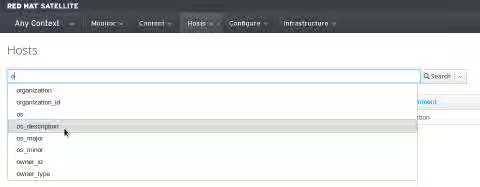
For other search fields, the searchable terms can be found via the Satellite WebUI by using the Filter textbox, like so:
-
For example, to search for Hosts by their operating system, use the Filter textbox and find that the search term for operating systems is os_description and can be used like so:
$ curl -s -k -u admin:password https://satellite6.example.com/api/v2/hosts?search=os_description=\"RHEL+Server+6.5\" | python -mjson.tool
{
    ...
    "results": [
        {
            "name": "satellite6.example.com",
            "operatingsystem_id": 1,
            "operatingsystem_name": "RHEL Server 6.5",
            ...
        }
    ],
    "search": "os_description=\"RHEL Server 6.5\"",
}
For more KB articles/solutions related to Red Hat Satellite 6.x API Issues, please refer to the Red Hat Satellite Consolidated Troubleshooting Article for Red Hat Satellite 6.x API Issues
This solution is part of Red Hat’s fast-track publication program, providing a huge library of solutions that Red Hat engineers have created while supporting our customers. To give you the knowledge you need the instant it becomes available, these articles may be presented in a raw and unedited form.