How to sync Repositories on Red Hat Satellite 6?
Environment
- Red Hat Satellite 6
Issue
- How to sync Repositories on Red Hat Satellite 6?
Resolution
-
Refer to the "Importing (Red Hat) Content" section of the Red Hat Satellite 6 Content Management Guide to sync product content on Red Hat Satellite:
-
In the following image, after you have uploaded the manifest, you can go to the menu:
content -> Red Hat Repositories.
Note: The products shown on the Enabling Red Hat Repositories page are dependent on the subscription manifest content.
If a required Red Hat Repository is not available on this page, consult the manifest or the Red Hat Customer Portal.
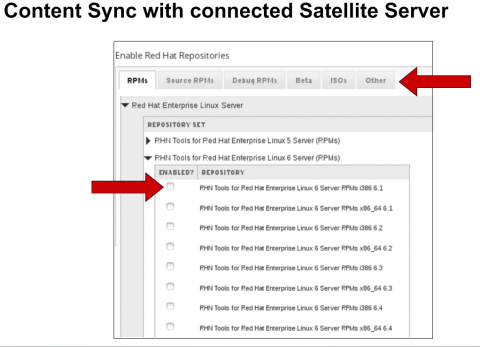
- Once the manifest has been been completed, you can go to:
1 . Content -> Sync Status
The repositories that were enabled in the previous step, will show up as item ready to be synchronized.
2 . Click the arrow next to the product name, to see available content then select the content that is to be synchronized.
3 . Then click the Synchronize Now button to being the sync.
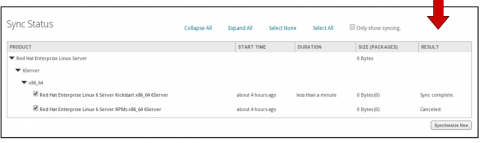
For more KB articles/solutions related to Red Hat Satellite 6.x Repository Issues, please refer to the Red Hat Satellite Consolidated Troubleshooting Article for Red Hat Satellite 6.x Repository Issues.
Diagnostic Steps
Confirming the synchronisation
- If the status on your gui (Content -> Sync Status ), is still showing as running, you can confirm that the synchronisation is running by checking the file sizes being incremented.
# watch df /var
Filesystem           1K-blocks     Used Available Use% Mounted on
/dev/mapper/vg-lv_root
                      51475068 38689712  10163916  80% /
- If for any reason the filesize has stopped incrementing, one solution would be to remove the task and resynch them again. The first step being, rebooting the server.
This solution is part of Red Hat’s fast-track publication program, providing a huge library of solutions that Red Hat engineers have created while supporting our customers. To give you the knowledge you need the instant it becomes available, these articles may be presented in a raw and unedited form.