Satellite 6.1 and newer now requires the use of the Satellite Tools repositories which replaces the use of Red Hat Common for client libraries
Environment
Red Hat Satellite 6.1 and newer
Incompatible versions:
katello-agent-1.5.
gofer-1.3.
Required versions:
katello-agent-2.2.3+
gofer-2.6.1+
Issue
Users utilizing Red Hat Satellite 6.1 should no longer be using the 'Red Hat Common' repositories for client libraries including Puppet, katello-agent and others.
Satellite 6.1 and newer is not compatible with the versions of katello-agent contained within the Red Hat Common repositories and users will see errors attempting to use the agent from Red Hat Common (rh-common) repositories.
Resolution
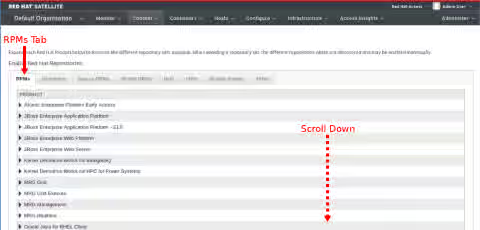
Users need to use the new Satellite Tools repositories. It may be required to update/refresh your manifest before these new repositories appear. Instructions for refreshing your manifest can be found below in the FAQ section. Next, find and enable these repositories under the "[RPMs]" tab on the Red Hat Repositories page.
Click the the RPMs tab, then scroll down.
Select Red Hat Enterprise Linux Server.

Choose the Red Hat Satellite Tools repository for your Red Hat Enterprise Linux version.

Root Cause
With the release of Red Hat Satellite 6.1, the location of the supporting tools for Satellite 6 such as katello-agent & puppet have moved from the current location of RH-Common to the Satellite Tools repository.
Why was this change made?
To provide additional flexibility with regards to responding to security and bugfix errata, the Satellite components have been moved to a repository that can be refreshed with newer content independently of other products.
Where can I find this new repository?
Within the Satellite 6.1 user interface:
- Select Content->Red Hat Repositories
- Select the RPMs tab.
- Expand the Red Hat Enterprise Linux Server product
- Expand the Red Hat Satellite Tools 6.1 repository for the required operating system version and architecture: Example: Red Hat Satellite Tools 6.1 (for RHEL7 Server)(RPMs)
- Enable the repository for synchronization by selecting the checkbox next to its name
Diagnostic Steps
Frequently Asked Questions (FAQ)
-
Q: Why do I not see the Satellite Tools repository on the RPMs tab in the UI?
-
A: Ensure that you have an updated manifest. Either select [Refresh Manifest] under the Content-> Red Hat Subscriptions menu, or alternatively, regenerate your manifest via the This content is not included.Satellite page in the Customer Portal. Additional information on manually regenerating your manifest can be found in the This content is not included.Satellite 6.1 Installation Guide, section 4.1
-
Q: How do I verify that my subscription manifest has access to the Satellite tools repositories?
-
A: Verifying that your subscription manifest has access to the Satellite tools repositories can be done with the rct command:
$rct cat-manifest manifest.zip | grep sat-tools
		/content/beta/rhel/server/5/5Server/$basearch/sat-tools/6/debug
		/content/beta/rhel/server/5/5Server/$basearch/sat-tools/6/os
		/content/beta/rhel/server/5/5Server/$basearch/sat-tools/6/source/SRPMS
		/content/beta/rhel/server/6/6Server/$basearch/sat-tools/6/debug
		/content/beta/rhel/server/6/6Server/$basearch/sat-tools/6/os
		/content/beta/rhel/server/6/6Server/$basearch/sat-tools/6/source/SRPMS
		/content/beta/rhel/server/7/$basearch/sat-tools/6/debug
		/content/beta/rhel/server/7/$basearch/sat-tools/6/os
		/content/beta/rhel/server/7/$basearch/sat-tools/6/source/SRPMS
		/content/dist/rhel/server/5/5Server/$basearch/sat-tools/6.1/debug
		/content/dist/rhel/server/5/5Server/$basearch/sat-tools/6.1/os
		/content/dist/rhel/server/5/5Server/$basearch/sat-tools/6.1/source/SRPMS
		/content/dist/rhel/server/6/6Server/$basearch/sat-tools/6.1/debug
		/content/dist/rhel/server/6/6Server/$basearch/sat-tools/6.1/os
		/content/dist/rhel/server/6/6Server/$basearch/sat-tools/6.1/source/SRPMS
		/content/dist/rhel/server/7/7Server/$basearch/sat-tools/6.1/debug
		/content/dist/rhel/server/7/7Server/$basearch/sat-tools/6.1/os
		/content/dist/rhel/server/7/7Server/$basearch/sat-tools/6.1/source/SRPMS
This solution is part of Red Hat’s fast-track publication program, providing a huge library of solutions that Red Hat engineers have created while supporting our customers. To give you the knowledge you need the instant it becomes available, these articles may be presented in a raw and unedited form.