Absolute Timers that Expire at Midnight UTC May Fire Early When the Leap Second is Inserted
Environment
- Kernels that support NOHZ contain this issue; this includes all released kernels in:
- Red Hat Enterprise Linux 6 running kernels before 2.6.32-642.el6.
- Red Hat Enterprise Linux 7 running kernels before kernel-3.10.0-327.el7.
Issue
- Absolute timers that expire at midnight UTC may fire early when the leap second is inserted.
Resolution
- RHEL6 users should install kernel-2.6.32-642.el6 from RHSA-2016:0855 or a newer version.
- RHEL7 users should install kernel-3.10.0-327.el7 from RHSA-2015:2152 or a newer version.
Workarounds: Note that each application may have specific workarounds outside of the ones below; however, these will need to be discussed with the application vendor. Both of the following workarounds require application changes:
Option 1: Adjust the application to use Relative Timers instead of Absolute Timers.
Option 2: If an Absolute Timer must be used then set this for a time other than 00:00:00 UTC.
Note: Previous workarounds listed included setting ntpd in slew mode, via the -x flag, or disabling ntpd; however, after further investigation with our engineering teams it has been discovered that with these methods, Absolute Timers may potentially fire a second early. This is due to the system time still being off by one second compared to world UTC time, which has had the leap second added. Regardless, Red Hat recommends keeping ntpd, or another time synchronization mechanism, enabled during this time to prevent time from drifting.
Root Cause
The CLOCK_REALTIME clock source provides a reference to the absolute time on Linux. This clock source is based on UTC (Coordinated Universal Time), that is the world wide clock reference - or the "wall clock" time. Occasionally, UTC must be synchronized to the solar mean time, and that is done by the insertion or removal of one second on UTC. This is known as a leap second. The Linux kernel provides support for leap seconds, and a leap second insertion is schedule to happen on June 30, 2015 at 23:59:59.
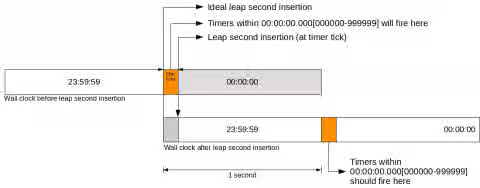
In order to insert a second at 23:59:59 of the day June 30, 2015, the Linux kernel will repeat the last second of this day. Using nanosecond precision, the following ideal transition in time will occur on June 30, 2015: 23:59:59.999999999 -> 23:59:59.000000000. In fact, that is a theoretical transition, as the system may suffer latencies that will make this transition occur a little bit later. In fact, this delay always occurs.
The leap second insertion is handled by the periodic timer tick, that occurs at each millisecond on RHEL. However, the Linux kernel no longer has its periodic time tick synchronized to the CLOCK_REALTIME millisecond boundary. As a side effect, the leap second insertion will not occur at the second boundary, but within the first millisecond after the 23:59:59.999999999. Thus, in the worst case the leap second insertion will occur at July 1st, 00:00:00.000999999, causing the following transition in time: July 1st, 00:00:00.000999999 -> June 30, 23:59:59.000999999.
This delay is an expected side effect of the Linux leap second implementation. And its precision is a trade off on leap second precision versus clock operations performance. Nevertheless, an unexpected behaviour was found as a side effect of this imprecision.
As Linux supports high resolution timers with nanoseconds precision, timers programmed using CLOCK_REALTIME set to an absolute time that is within the first millisecond on July 1st, 2015, will be fired during this imprecision range. In practice, these timers will fire one second before it should, as shown in the above Illustration.
Potential Impact
- This issue will only occur if an Absolute Timer is in use on a RHEL 6 or 7 kernel; when the leap second is inserted the Timer may fire before the clock is stepped back, resulting in the timer being one second off.
Absolute vs. Relative Timers
- The kernel timers are structures used to schedule execution of a function (a timer handler) at a particular time in the future; usually the timers are programmed to be triggered in a relative fashion. For example, "30 microseconds from now"; however, timers can be set to trigger on a absolute time too. For example, "June 30 09:00p EST". Note that this is not a best practice, but is a supported usage. This issue may only occur when an absolute timer is used.
Diagnostic Steps
Am I using CLOCK_REALTIME absolute timers?
It is possible to check if an application is using absolute CLOCK_REALTIME timers by code inspection. For example, you can check if your applications uses timer_create API with CLOCK_REALTIME clockid, and the timer_settime API with TIMER_ABSTIME mode by searching for these functions on your application:
	timer_create(CLOCK_REALTIME, NULL, &timerid);

	timer_settime(timerid, TIMER_ABSTIME, &its, NULL);
For further information on this interface see man 2 timer_create and man 2 timer_settime.
It is worth to note that there are other functions that can create absolute timers using the CLOCK_REALTIME, directly or indirectly, and that turns the code inspection a difficult task.
Nevertheless, It is also possible to check it by using kernel events. The kernel event timer:hrtimer_init shows the timers initialization, along with its clockid and mode. So it is possible to check which applications are using CLOCK_REALTIME timers on ABSTIME mode using perf and ftrace.
For example, to capture all these events on a system, run the following command, pressing ^C to stop the capture:
# perf record -e timer:hrtimer_init --filter "clockid == 0 && mode == 0" -a
And then run the following command to see the events:
    # perf script
         firefox 13267 [003] 13970.983582: timer:hrtimer_init: hrtimer=0xffff88008553bce8 clockid=CLOCK_REALTIME mode=HRTIMER_MODE_ABS
         firefox 13264 [001] 13970.988224: timer:hrtimer_init: hrtimer=0xffff88027e913ce8 clockid=CLOCK_REALTIME mode=HRTIMER_MODE_ABS
         firefox 13267 [003] 13970.992983: timer:hrtimer_init: hrtimer=0xffff88008553bce8 clockid=CLOCK_REALTIME mode=HRTIMER_MODE_ABS
         firefox 13267 [003] 13970.993109: timer:hrtimer_init: hrtimer=0xffff88008553bce8 clockid=CLOCK_REALTIME mode=HRTIMER_MODE_ABS
         firefox 13267 [003] 13970.993261: timer:hrtimer_init: hrtimer=0xffff88008553bce8 clockid=CLOCK_REALTIME mode=HRTIMER_MODE_ABS
	[...]
It is also possible to capture for only one application, for example the following command will capture these timers for the reproducer presented in the Testing section:
    # perf record -e timer:hrtimer_init --filter "clockid == 0 && mode == 0" ./leap-a-day -s
       [app output]
    #  perf script
       leap-a-day  2595 [001] 13279.625385: timer:hrtimer_init: hrtimer=0xffff8802d93a0248 clockid=CLOCK_REALTIME mode=HRTIMER_MODE_ABS
       leap-a-day  2595 [001] 13279.625390: timer:hrtimer_init: hrtimer=0xffff8802d93a0248 clockid=CLOCK_REALTIME mode=HRTIMER_MODE_ABS
       leap-a-day  2595 [001] 13279.625392: timer:hrtimer_init: hrtimer=0xffff8802a1edfe78 clockid=CLOCK_REALTIME mode=HRTIMER_MODE_ABS
       leap-a-day  2595 [000] 13293.125763: timer:hrtimer_init: hrtimer=0xffff8802a1edfe78 clockid=CLOCK_REALTIME mode=HRTIMER_MODE_ABS
It is also possible to capture where in the code an application is initializing a timer by using the option -g in the above perf record command lines.
Testing
Running this test on an affected kernel will reproduce the issue and will adjust the system's time. Due to these reasons Red Hat strongly recommends running this test in a non-production environment to avoid any issues. This test is simply to illustrate the issue; whether or not it will occur is dependent on the applications in use on the system and whether or not they use absolute timers.
To reproduce follow the below steps:
-
Disable all the applications that may change system time. For example
ntpdandchronyd. -
Download the
leap-a-day.tar.bz2tarball attached to this document. -
Extract the contents of the tarball:
# tar -jxvf leap-a-day.tar.bz2 -
Compile the reproducer:
# gcc -o leap-a-day -lrt leap-a-day.c -
Ensure the reproducer is executable:
# chmod a+x leap-a-day -
Run the reproducer with -s argument:
# ./leap-a-day -s -
That is the expected output of the reproducer in the absence of the problem:
     #  ./leap-a-day -s
     Setting time to speed up testing
     This runs continuously. Press ctrl-c to stop
     ...
     Setting time to Wed Jun 17 20:59:50 2015
     Scheduling leap second for Wed Jun 17 21:00:00 2015
     Setting timer for Wed Jun 17 21:00:00 2015
     Wed Jun 17 20:59:57 2015 +    154 us (0)	TIME_INS
     Wed Jun 17 20:59:57 2015 + 500380 us (0)	TIME_INS
     Wed Jun 17 20:59:58 2015 +    604 us (0)	TIME_INS
     Wed Jun 17 20:59:58 2015 + 500830 us (0)	TIME_INS
     Wed Jun 17 20:59:59 2015 +   1047 us (0)	TIME_INS
     Wed Jun 17 20:59:59 2015 + 501256 us (0)	TIME_INS
     Wed Jun 17 20:59:59 2015 +   1437 us (1)	TIME_OOP
     Wed Jun 17 20:59:59 2015 + 501600 us (1)	TIME_OOP
     Wed Jun 17 21:00:00 2015 +    100 us (1)	TIME_WAIT - TIMER FIRED
     Wed Jun 17 21:00:00 2015 +    197 us (1)	TIME_WAIT
     Wed Jun 17 21:00:00 2015 + 500360 us (1)	TIME_WAIT
     Wed Jun 17 21:00:01 2015 +    570 us (1)	TIME_WAIT
     Wed Jun 17 21:00:01 2015 + 500776 us (1)	TIME_WAIT
     Wed Jun 17 21:00:02 2015 +    973 us (1)	TIME_WAIT
      Leap complete
In the above example, a leap second was scheduled for Jun 17 21:00:00 2015, and a absolute timer to Jun 17 21:00:00 2015 as well.
The status TIME_INS means that a leap second insertion is scheduled. Then the status changes to TIME_OOP during a leap second insertion, and finally the status changes to TIME_WAIT after the leap second insertion. The expected behavior is the TIMER FIRED event occur after the end of the leap second insertion, in the TIME_WAIT status.
Now lets see one example where the BUG occurs:
    ./leap-a-day -s
    Setting time to speed up testing
    This runs continuously. Press ctrl-c to stop

    Setting time to Wed Jun 17 20:59:50 2015
    Scheduling leap second for Wed Jun 17 21:00:00 2015
    Setting timer for Wed Jun 17 21:00:00 2015
    Wed Jun 17 20:59:57 2015 +     61 us (0)	TIME_INS
    Wed Jun 17 20:59:57 2015 + 500158 us (0)	TIME_INS
    Wed Jun 17 20:59:58 2015 +    208 us (0)	TIME_INS
    Wed Jun 17 20:59:58 2015 + 500302 us (0)	TIME_INS
    Wed Jun 17 20:59:59 2015 +    391 us (0)	TIME_INS
    Wed Jun 17 20:59:59 2015 + 500479 us (0)	TIME_INS
    Wed Jun 17 21:00:00 2015 +     15 us (0)	TIME_INS - TIMER FIRED
    Error: Incorrect NTP state?
    Wed Jun 17 21:00:00 2015 +     56 us (0)	TIME_INS
    Wed Jun 17 20:59:59 2015 + 500125 us (1)	TIME_OOP
    Wed Jun 17 21:00:00 2015 +    206 us (1)	TIME_OOP
    Wed Jun 17 21:00:00 2015 + 500288 us (1)	TIME_WAIT
    Wed Jun 17 21:00:01 2015 +    374 us (1)	TIME_WAIT
    Wed Jun 17 21:00:01 2015 + 500460 us (1)	TIME_WAIT
    Wed Jun 17 21:00:02 2015 +    551 us (1)	TIME_WAIT
    Leap complete
    Errors observed
In this example, the timer fired before the insertion of the leap second, while in the TIME_INS status. The reproducer noticed the problem and exited with error.
This solution is part of Red Hat’s fast-track publication program, providing a huge library of solutions that Red Hat engineers have created while supporting our customers. To give you the knowledge you need the instant it becomes available, these articles may be presented in a raw and unedited form.