How to monitor the health of a Satellite 6 system
Environment
- Red Hat Satellite 6.2 and below.
- Note: for Satellite 6.3 and above, use the
foreman-maintain health checkcommand.
- Note: for Satellite 6.3 and above, use the
Issue
- How to check the health of Satellite 6.2 and below?
- What are the services and processes that are required to monitor on a Red Hat Satellite Server 6.1?
Resolution
There are a number of services that need to be monitored on a Satellite 6.2 or Satellite Capsule system (not all of the services may be running on a Satellite Capsule):
mongod.service
qpidd.service
qdrouterd.service
tomcat.service
elasticsearch          (only applicable for satellite-6.1 and its minor release)
foreman-proxy.service
pulp_celerybeat.service
pulp_resource_manager.service
pulp_workers.service
httpd.service
foreman-tasks.service
puppet.service
goferd.service (in case of external Capsule or Sat registered to itself)
Health Check via script
# cd /tmp/
# git clone https://github.com/boogiespook/sat6_healthCheck.git
# cd /tmp/sat6_healthCheck
# ./sat6_healthCheck.sh

The Output should look like the following, below is a snippet that shows the uptime, details and cpu's.

#######################################
    Satellite 6 Health Check Report
#######################################

 + System Details:
 - Hostname         : satellite.example.com
 - IP Address       : xx.xx.xx.xx/26
 - Kernel Version   : 2.6.32-573.3.1.el6.x86_64
 - Uptime           : 46 min
 - Last Reboot Time : 2015-11-06 03:24
 - Red Hat Release  : Red Hat Enterprise Linux Server release 6.7 (Santiago)
 + CPU: %usr
   ---------
 - CPU0 :
 - CPU1 :
 - CPU2 :
 - CPU3 :
 - CPU4 :
 - CPU5 :
 - CPU6 :
 - CPU7 :
Health Check via manual process
Verify Network Connectivity
Check FQDN, Domain and Shortname connections. As part of the This content is not included.installation requirements on part 1.4 we need to check also if the satellite server has
full forward and reverse dns resolution.
# for i in " $(hostname -f)" " $(hostname -d)" " $(hostname -s)";do  ping -c1 $i;done

PING yourSatellite.example.com  (192.168.xxx.xxx)56(84) bytes of data.
64 bytes from yourSatellite.example.com (192.168.xxx.xxx): icmp_seq=1 ttl=64 time=0.033 ms

--- yourSatellite.example.com ping statistics ---
1 packets transmitted, 1 received, 0% packet loss, time 0ms
rtt min/avg/max/mdev = 0.033/0.033/0.033/0.000 ms
PING example.com ( (192.168.xxx.xxx) 56(84) bytes of data.
64 bytes from 192.168.xxx.xxx: icmp_seq=1 ttl=50 time=179 ms

--- example.com ping statistics ---
1 packets transmitted, 1 received, 0% packet loss, time 180ms
rtt min/avg/max/mdev = 179.673/179.673/179.673/0.000 ms
PING yourSatellite.example.com (192.168.xxx.xxx) 56(84) bytes of data.
64 bytes from yourSatellite.example.com (192.168.xxx.xxx): icmp_seq=1 ttl=64 time=0.016 ms

--- yourSatellite.example.com ping statistics ---
1 packets transmitted, 1 received, 0% packet loss, time 0ms
rtt min/avg/max/mdev = 0.016/0.016/0.016/0.000 ms
- To check for reverse resolution.
host $(hostname -f)
Check connection to CDN Network
# ping cdn.redhat.com
# traceroute cdn.redhat.com

If ping is blocked, we use http to check the connection.
# curl -Sv cdn.redhat.com

--------------- able to connect to cdn ------------------
* About to connect() to cdn.redhat.com port 80 (#0)
*   Trying 173.223.172.251... connected
* Connected to cdn.redhat.com (173.223.172.251) port 80 (#0)
> GET / HTTP/1.1
> User-Agent: curl/7.19.7 (x86_64-redhat-linux-gnu) libcurl/7.19.7 NSS/3.16.2.3 Basic ECC zlib/1.2.3 libidn/1.18 libssh2/1.4.2
> Host: cdn.redhat.com
> Accept: */*
>
< HTTP/1.1 301 Moved Permanently
< Server: AkamaiGHost
< Content-Length: 0
< Location: https://cdn.redhat.com/
< Date: Mon, 08 Jun 2015 15:54:20 GMT
< X-Cache: TCP_MISS from a104-71-131-23.deploy.akamaitechnologies.com (AkamaiGHost/7.2.2-15351100) (-)
< Connection: keep-alive
< EJ-HOST: Not_Set
< X-Akamai-Request-ID: 21a432bc
<
* Connection #0 to host cdn.redhat.com left intact
The 302 message here is a normal redirection to the secure (HTTPS) connection to the CDN.
Check to see if the required ports are listening
# ss -ltn  | egrep  ":80 |:8080 |:5671 |:443 |:8140 |:9090 "
LISTEN     0      128                      :::443                     :::*

LISTEN     0      5                         *:9090                     *:*
LISTEN     0      10                       :::5671                    :::*
LISTEN     0      10                        *:5671                     *:*
LISTEN     0      128                      :::8140                    :::*
LISTEN     0      128                      :::80                      :::*
LISTEN     0      100                      :::8080                    :::*
Disk Space Check
Check there is at least 20 gig of space available in /var directory to perform future synchronizations.
Please note that if you are to download a major release (e.g. RHEL 6 Server), you will require a minimum of 20Gig per release.
- For Red Hat Enterprise Linux 6
# df -k /var/lib | awk '/[[:digit:]]+%/ { if ($3 > 20971520) { print "Space OK:", $3, "Kilobytes" } else { print $3, "Kilobytes is insufficient for a channel download"; } }'
- For Red Hat Enterprise Linux 7
# df -k /var/lib | awk '/[[:digit:]]+%/ { if ($4 > 20971520) { print "Space OK:", $4, "Kilobytes" } else { print $4, "Kilobytes is insufficient for a channel download"; } }'
Check the status of the major services
# hammer ping

[Foreman] username: admin
[Foreman] password for admin:
candlepin:
    Status:          ok
    Server Response: Duration: 1468ms
candlepin_auth:
    Status:          ok
    Server Response: Duration: 74ms
pulp:
    Status:          ok
    Server Response: Duration: 46ms
pulp_auth:
    Status:          ok
    Server Response: Duration: 135ms
elasticsearch:
    Status:          ok
    Server Response: Duration: 82ms
foreman_tasks:
    Status:          ok
    Server Response: Duration: 1ms
- Check the Service Status that katello requires (Satellite 6.4)
# foreman-maintain service status
Running Status Services
================================================================================
Get status of applicable services:
Displaying the following service(s):

rh-mongodb34-mongod, postgresql, qdrouterd, qpidd, squid, pulp_celerybeat, pulp_resource_manager, pulp_streamer, pulp_workers, smart_proxy_dynflow_core, tomcat, dynflowd, goferd, httpd, puppetserver, foreman-proxy
\ displaying rh-mongodb34-mongod

--- OMMITED OUTPUT ---

Dec 19 01:54:01 temsat.acme.local smart-proxy[3748]: - -> /pulp/status/disk_usage
Dec 19 11:32:46 temsat.acme.local smart-proxy[3748]: temsat.acme.local - - [19/Dec/2018:11:32:46 -02] "GET /features HTTP/1.1" 200 91
Dec 19 11:32:46 temsat.acme.local smart-proxy[3748]: - -> /features
Dec 19 11:33:09 temsat.acme.local smart-proxy[3748]: temsat.acme.local - - [19/Dec/2018:11:33:09 -02] "GET /features HTTP/1.1" 200 91
Dec 19 11:33:09 temsat.acme.local smart-proxy[3748]: - -> /features
/ All services are running                                            [OK]
--------------------------------------------------------------------------------
- Check the Service Status that katello requires (Satellite 6.3 or earlier)
# katello-service status
tomcat6 (pid 1802) is running...                           [  OK  ]
mongod (pid  2315) is running...
listening on 127.0.0.1:27017
connection test successful
qpidd (pid  1960) is running...
elasticsearch (pid  1611) is running...
celery init v10.0.
Using config script: /etc/default/pulp_resource_manager
node resource_manager (pid 2462) is running...
celery init v10.0.
Using config script: /etc/default/pulp_workers
node reserved_resource_worker-0 (pid 2544) is running...
node reserved_resource_worker-1 (pid 2576) is running...
celery init v10.0.
Using configuration: /etc/default/pulp_workers, /etc/default/pulp_celerybeat
pulp_celerybeat (pid 2381) is running.
httpd (pid  1902) is running...
dynflow_executor is running.
dynflow_executor_monitor is running.
Puppet check
# puppet agent -t
Warning: Setting manifest is deprecated in puppet.conf.
   (at /usr/lib/ruby/site_ruby/1.8/puppet/settings.rb:1095:in `issue_deprecations')
Warning: Setting modulepath is deprecated in puppet.conf.
   (at /usr/lib/ruby/site_ruby/1.8/puppet/settings.rb:1095:in `issue_deprecations')
Warning: Setting config_version is deprecated in puppet.conf.
   (at /usr/lib/ruby/site_ruby/1.8/puppet/settings.rb:1095:in `issue_deprecations')
Info: Retrieving plugin
Error: /File[/var/lib/puppet/lib]: Could not evaluate: Could not retrieve information from environment production source(s) puppet://yourSatellite.example.com.example.com/plugins
Info: Caching catalog for yourSatellite.example.com
Info: Applying configuration version '1433583565'
Notice: Finished catalog run in 0.36 seconds
Check Candlepin
# curl -k https://localhost:8443/candlepin/status
{"result":true,"version":"0.9.49.9","rulesVersion":"5.16","release":"1","standalone":true,"timeUTC":"2016-02-03T19:25:12.529+0000","managerCapabilities":["cores","ram","instance_multiplier","derived_product","cert_v3","guest_limit","vcpu"],"rulesSource":"DEFAULT"}
- Verify the version returned above matches the version installed on the satellite
# rpm -qa | grep candlepin
candlepin-0.9.49.9-1.el7.noarch
Verify SSL version and connectivity via port 443
# openssl s_client -connect $(hostname -f):443 -state | grep -i "handshake"
SSL_connect:before/connect initialization
SSL_connect:SSLv2/v3 write client hello A
SSL_connect:SSLv3 read server hello A
depth=1 C = US, ST = North Carolina, L = Raleigh, O = SomeOrg, OU = SomeOrgUnit, CN = YourFqdn.com
verify error:num=19:self signed certificate in certificate chain
verify return:0
SSL_connect:SSLv3 read server certificate A
SSL_connect:SSLv3 read server key exchange A
SSL_connect:SSLv3 read server certificate request A
SSL_connect:SSLv3 read server done A
SSL_connect:SSLv3 write client certificate A
SSL_connect:SSLv3 write client key exchange A
SSL_connect:SSLv3 write change cipher spec A
SSL_connect:SSLv3 write finished A
SSL_connect:SSLv3 flush data
SSL_connect:SSLv3 read server session ticket A
SSL_connect:SSLv3 read finished A
- We can see from the output that we're using SSLv3 to read and write.
If there is connection issues, you will receive errors like below.
write:errno=104
- Check to see if there is any certificate errors with ssl3 or tls
# openssl s_client -connect $(hostname -f):443 -tls1 | egrep -i "handshake|verify"

depth=1 C = US, ST = North Carolina, L = Raleigh, O = Katello, OU = SomeOrgUnit, CN = YourFqdn.com
verify error:num=19:self signed certificate in certificate chain
verify return:0
SSL handshake has read 23052 bytes and written 301 bytes
    Verify return code: 19 (self signed certificate in certificate chain)

# openssl s_client -connect $(hostname -f):443  -ssl3 | egrep -i "handshake|verify"
Check the logs
- If the Satellite 6 is passing all of the health checks and issues are still occurring then check the server logs by enabling debug logging:
Red Hat Satellite 6: key log files and how to enable debug logging (Foreman, Katello, Puppet, Pulp, Candlepin, Hammer, etc.) - In some situations, the logs may not report the error, if that occurs you could turn on debugging mode for many of the Satellite components. Debugging mode are listed in the above solution.
Check for any paused/pending tasks
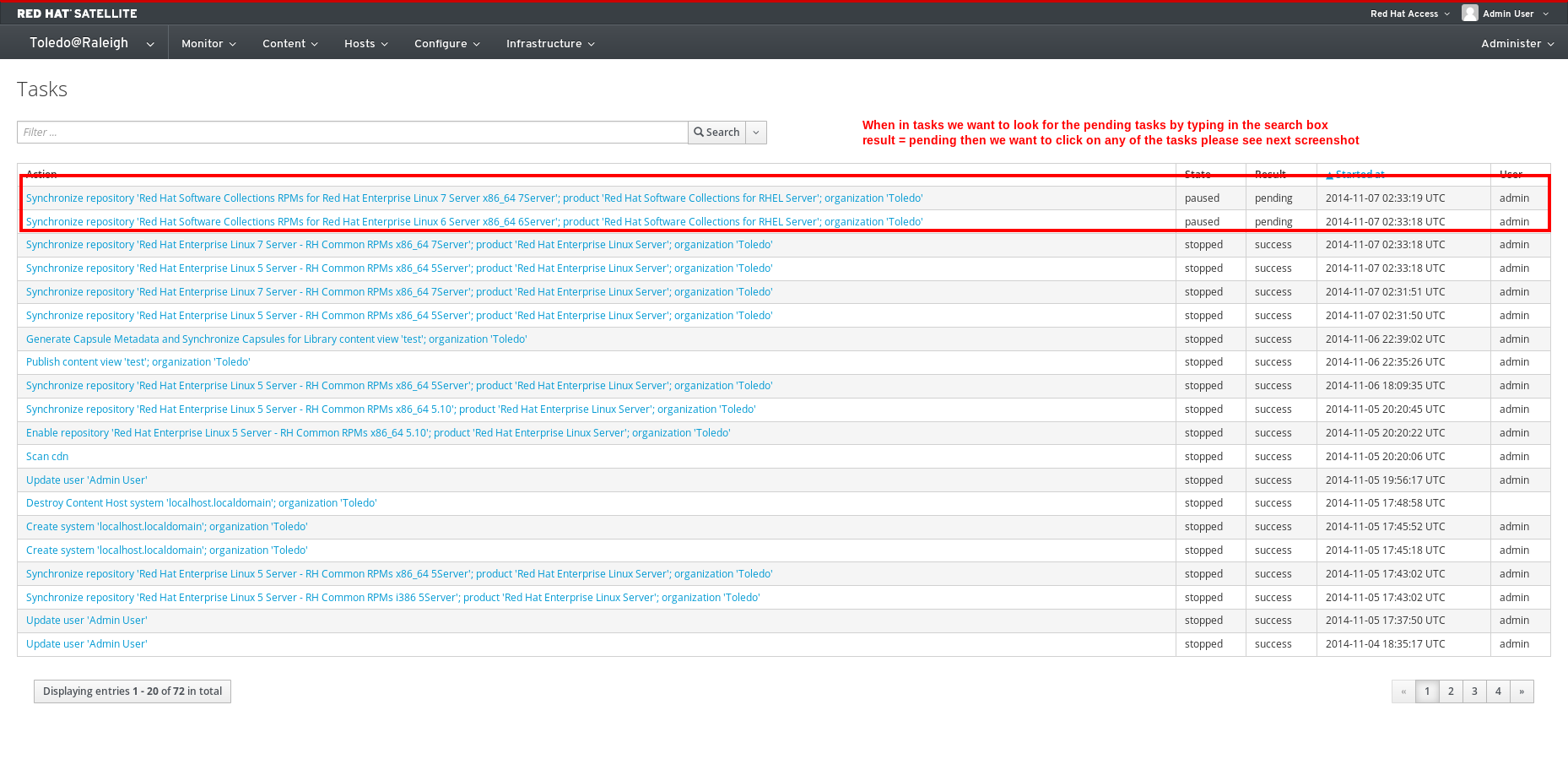
- If you see any tasks that are in a paused state, please open a support ticket to identify the issue why the tasks are not running before the upgrade.
You may also try to resume the tasks with:
# hammer task list --search "state=paused"
Will only show show just the paused ones

# hammer task resume --search "state=paused"
This should resume all these paused tasks were seeing in the db.
Foreman Rake
- Using the power of foreman rake, run the
foreman-rake -Tto list all available options, (-P to list the dependencies)
Note
The majority of the rake tasks listed with -T are not applicable to a production install (eg. katello:test is for testing source code in a development environment).
- foreman-rake katello:clean_backend_objects --trace - find and attempt to repair mismatches between katello objects and backend services (such as content host mismatch between katello and candlepin)
- foreman-rake katello:reindex --trace - recreate the
elasticsearchdatabase that is used for searching many of the katello objects (content hosts, subscriptions, etc.)
This solution is part of Red Hat’s fast-track publication program, providing a huge library of solutions that Red Hat engineers have created while supporting our customers. To give you the knowledge you need the instant it becomes available, these articles may be presented in a raw and unedited form.