How do I install Red Hat Enterprise Linux 5 to boot from SAN using device-mapper-multipath?
Environment
- Red Hat Enterprise Linux 5
Issue
- It is often desirable to install the operating system to a device on a Storage Area Network (SAN) instead of local disk storage for maximum reliability. In addition,
device-mapper-multipathprovides the ability to access the device through multiple paths, increasing redundancy and/or throughput. There are several steps one must take when installing Red Hat Enterprise Linux 5 to boot from SAN withdevice-mapper-multipath.
Resolution
Prerequisite
The system and fibre Host Bus Adapter (HBA) must both support and be properly configured to boot from SAN. Review the documentation or contact the vendor of the hardware for details.
Note
To ensure that anaconda installs GRUB to the multipath device (and not to local storage) it is acceptable and recommended to disable local storage controllers in the BIOS so that anaconda and the operating system are not aware of the local storage. However for the purpose of this document local storage is enabled as can be seen in the example screenshots.
Note
These instructions assume that /dev/mapper/mpath0 will be the target for installation and will be the only device supporting the root filesystem. If more than one multipath device is utilized during installation additional steps may be required.
1. Boot using anaconda option mpath
When booting from the the installation media (CD/DVD) or pxelinux environment it is necessary to append the anaconda option mpath in order for anaconda to install to and configure the OS for booting from SAN with multipath. For example the boot: might look like the following:
boot: linux mpath vnc console=ttyS0,9600n8
This will boot the default kernel image with multipath support and start a VNC (remote) install. In addition the console option will send the console output to a serial port for logging or control over a console server.
Note
In order to properly configure multipath booting from SAN, options must be configured that are only available via a graphical install of the operating system or through a kickstart install. A graphical install can be performed while sitting in front of a system with a video card that is connected to a monitor, through the use of the "vnc" option as shown in this example, or through the use of remote access tools such as an IP KVM or a vendor-provided remote management/access card.
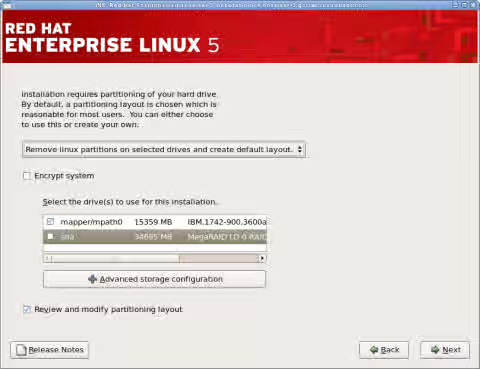
2. Unselect the local storage disk(s) and select the multipath devices only
In addition to selecting the mpath devices to install to it is required to also select Review and modify partioning layout. Without selecting this setting anaconda will not display the GRUB configuration screen.
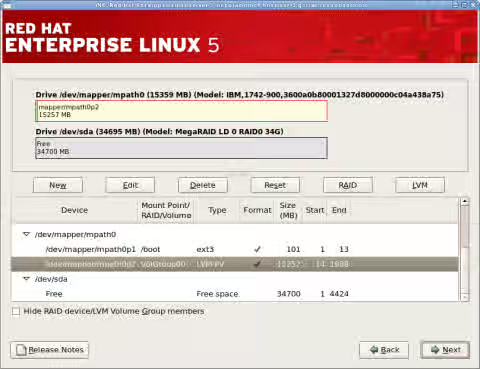
3. Review the partioning layout.
Ensure the OS will only be installed on multipath devices. The following example shows the local storage is unused.
4. Select Configure advanced boot loader options
With this option on the next page anaconda will allow configuration of where GRUB should be installed. By default anaconda uses the first disk the BIOS presents to the OS.
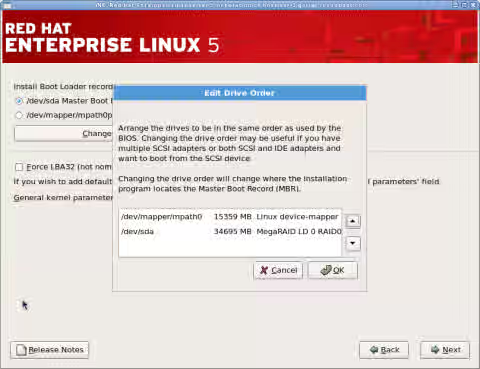
5. Change Drive Order
Click Change Drive Order if /dev/mapper/mpath0 isn't listed as the first disk. After highlighting mpath0, use the arrows on the right side to move it to the top of the list and click OK.
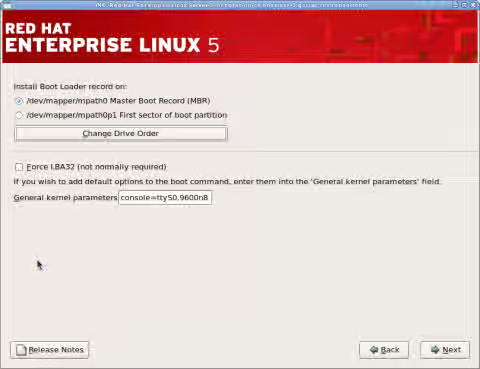
6. Install Boot Loader on Master Boot Record(MBR) of multipath device
Select Install boot loader record on /dev/mapper/mpath0 Master Boot Record (MBR)
7. Continue install normally
The above installation configurations are the only specific changes required to install Red Hat Enterprise Linux 5 to boot from SAN with device-mapper-multipath.
This solution is part of Red Hat’s fast-track publication program, providing a huge library of solutions that Red Hat engineers have created while supporting our customers. To give you the knowledge you need the instant it becomes available, these articles may be presented in a raw and unedited form.