What are the performance benchmarking tools available for Red Hat Ceph Storage?
Environment
- Red Hat Ceph Storage
Issue
- What are the performance benchmarking tools available for Red Hat Ceph Storage?
Resolution
Disclaimer : Following sections of this article contains some external links and packages , which are not maintained by Red Hat. The information contains in such links can change without any notice.Please use information present here as a informative reference and at your own discretion. Note: The ideas in the article are based on Content from www.sebastien-han.fr is not included.Sebastian Han's blog post 🔗 , Content from telekomcloud.github.io is not included.TelekomCloud's blog post 🔗 and Content from tracker.ceph.com is not included.Ceph upstream wiki 🔗 .
-
This guide will describe some of the tools that can be used to benchmark a Ceph Cluster. The results of these test can be shared on a Red Hat support case along with the Architecture diagram and other environment details for verifying whether the cluster gives an optimum performance.
-
The Ceph benchmarking can be split in to the following
- Baseline Performance Statistics
- Benchmark a Ceph Storage Cluster
- Benchmark a Ceph Block Device
- Benchmark a Ceph Object Gateway
1. Baseline Performance Statistics
Fundamentally, benchmarking is all about comparison. It is difficult to know the Ceph cluster is performing below unless it is not identified, what its maximum possible performance is. So, before start benchmarking a cluster, It is needed to obtain baseline performance statistics for the two main components of the Ceph infrastructure ; the disks and the network.
i. Benchmarking disks
The simplest way to benchmark disk is with dd. Use the following command to read and write a file, remembering to add the oflag parameter to bypass the disk page cache:
shell> dd if=/dev/zero of=here bs=1G count=1 oflag=direct
Note the last statistic provided, which indicates disk performance in MB/sec. Perform this test for each disk in the cluster, note down the results.
ii. Benchmark Network
Another key factor affecting Ceph cluster performance is network thoroughput. A good tool for this is iperf, which uses a client-server connection to measure TCP and UDP bandwidth.
Install the iperf tool by running (Available from the EPEL repository)
yum install iperf
Then, on one of the nodes, start the iperf server using the following command:
shell> iperf -s
On another node, start the client with the following command, remembering to use the IP address of the node hosting the iperf server:
shell> iperf -c <ip address of the iperf server>
Example :
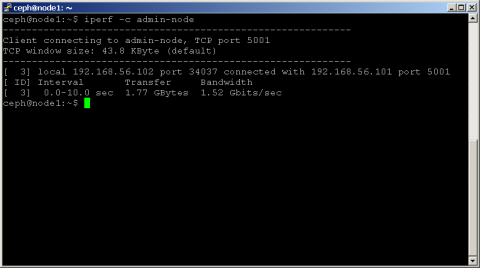
Note: The bandwidth statistic in Mbits/sec, as this indicates the maximum throughput supported by the network.
Perform this test between all the nodes in the cluster and note down the results.
As the baseline benchmarking numbers are noted, move further to check the performance of Ceph cluster to verify whether it is delivering a good performance as compared to the baseline benchmarking numbers.
NOTE: Before running any of the benchmarks in subsequent sections, drop all caches using a command like this:
shell> sudo echo 3 | sudo tee /proc/sys/vm/drop_caches && sudo sync
2. Benchmark a Ceph Storage Cluster
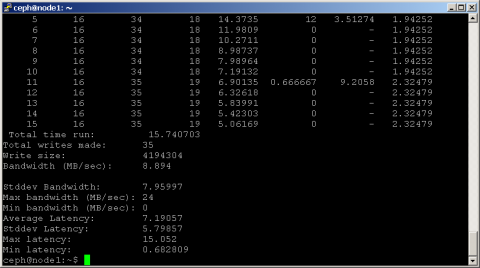
Ceph includes the rados bench command, designed specifically to benchmark a RADOS storage cluster. To use it, create a storage pool and then use rados bench to perform a write benchmark, as shown below.
The rados bench command is included with Ceph.
   shell> ceph osd pool create scbench 100 100
   shell> rados bench -p scbench 10 write --no-cleanup
This creates a new pool named scbench and then performs a write benchmark for 10 seconds. Notice the --no-cleanup option, which leaves behind some data. The output gives a good indicator of how fast the cluster can write data.
Example output of rados bench
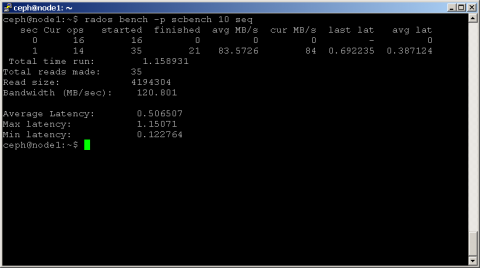
Two types of read benchmarks are available seq for sequential reads and rand for random reads.
To perform a read benchmark, use the commands below:
   shell> rados bench -p scbench 10 seq
   shell> rados bench -p scbench 10 rand
Example output
Also add the -t parameter to increase the concurrency of reads and writes (defaults to 16 threads), or the -b parameter to change the size of the object being written (defaults to 4 MB). It's also a good idea to run multiple copies of this benchmark against different pools, to see how performance changes with multiple clients.
Once the data is collected , compare the cluster read and write statistics with the disk-only benchmarks performed earlier, identify how much of a performance gap exists (if any), and start looking for reasons.
To clean up the benchmark data left behind by the write benchmark run
shell> rados -p scbench cleanup
3. Benchmark a Ceph Block Device
To check the performance of Ceph block devices, there are two tools available. Ceph already includes the rbd bench command, but the popular third party I/O benchmarking tool Content from git.kernel.dk is not included.fio, which now comes with built in support for RADOS block devices.
Before using either of these two tools, though, create a block device using the commands below:
   shell> ceph osd pool create rbdbench 100 100
   shell> rbd create image01 --size 1024 --pool rbdbench
   shell> sudo rbd map image01 --pool rbdbench --name client.admin
   shell> sudo /sbin/mkfs.ext4 -m0 /dev/rbd/rbdbench/image01
   shell> sudo mkdir /mnt/ceph-block-device
   shell> sudo mount /dev/rbd/rbdbench/image01 /mnt/ceph-block-device
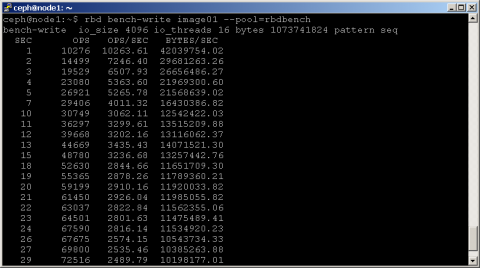
The rbd bench-write command generates a series of sequential writes to the image and measure the write throughput and latency. Here's an example:
For benchmarking using fio , An example rbd.fio template is included with the fio source code, which performs a 4K random write test against a RADOS block device via librbd. Remember to update the template with the correct names for the pool and device, as shown below.
   [global]
   ioengine=rbd
   clientname=<client_name>
   pool=<pool_name>
   rbdname=<image_name>
   rw=randwrite
   bs=4k
   [rbd_iodepth32]
   iodepth=32
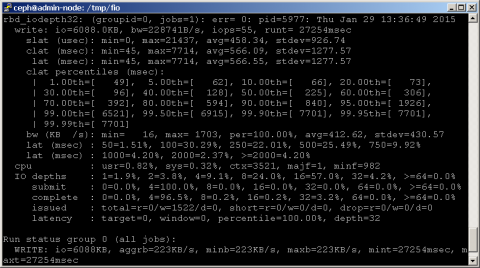
Then, run fio as follows:
shell> fio examples/rbd.fio
An example output
4. Benchmark a Ceph Object Gateway
When it comes to benchmarking the Ceph object gateway, look no further than swift-bench, the benchmarking tool included with OpenStack Swift. The swift-bench tool tests the performance of a Ceph cluster by simulating client PUT and GET requests and measuring their performance.
To install swift-bench use pip install swift && pip install swift-bench
To use swift-bench, create a gateway user and subuser, as shown below:
   shell> sudo radosgw-admin user create --uid="benchmark" --display-name="benchmark"
   shell> sudo radosgw-admin subuser create --uid=benchmark --subuser=benchmark:swift
--access=full
   shell> sudo radosgw-admin key create --subuser=benchmark:swift --key-type=swift
--secret=guessme
   shell> radosgw-admin user modify --uid=benchmark --max-buckets=0
Next, create a configuration file for swift-bench on a client host, as below. Remember to update the authentication URL to reflect the Ceph object gateway and to use the correct user name and credentials.
   [bench]
   auth = http://gateway-node/auth/v1.0
   user = benchmark:swift
   key = guessme
   auth_version = 1.0
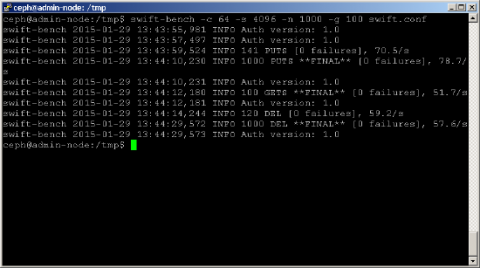
Run a benchmark as below. Use the -c parameter to adjust the number of concurrent connections (this example uses 64) and the -s parameter to adjust the size of the object being written (this example uses 4K objects). The -n and -g parameters control the number of objects to PUT and GET respectively.
shell> swift-bench -c 64 -s 4096 -n 1000 -g 100 /tmp/swift.conf
An example output
It is possible to see a variation of performance from the other test here because it depends on the below factors
i. The level of replication (and latency overhead)
ii. Full data journal writes (offset in some situations by journal data coalescing)
iii. fsync on the OSDs to guarantee data safety
iv. Metadata overhead for keeping data stored in RADOS
v. Latency overhead (network, ceph, etc) makes readahead more important
This solution is part of Red Hat’s fast-track publication program, providing a huge library of solutions that Red Hat engineers have created while supporting our customers. To give you the knowledge you need the instant it becomes available, these articles may be presented in a raw and unedited form.