How do I boot using an alternate / previous / older kernel?
Environment
- Red Hat Enterprise Linux 9
- Red Hat Enterprise Linux 8
- Red Hat Enterprise Linux 7
- Red Hat Enterprise Linux 6
- Red Hat Enterprise Linux 5
Issue
- I installed a new kernel with
yumand am now experiencing issues, how can I boot into an alternate / previous / older kernel?
Resolution
Temporarily Boot To An Alternative Kernel
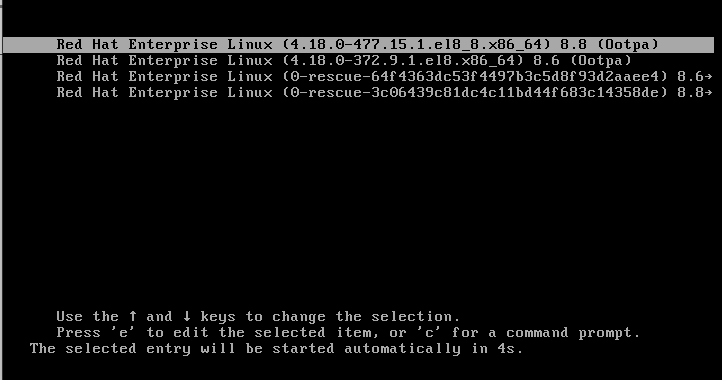
- As the system is booting, you should be presented with a message similar to the following:
Press any key to enter the menu

Booting Red Hat Enterprise Linux (3.10.0-1062.4.1.el7.x86_64) in 3 seconds...
- At this stage, if you press/send any key, you will be placed into the
GNU Grubmenu. Here you will be able to use the arrow keys to select and boot into any kernels that are installed on your system. Highlight the previous kernel and press/sendEnterto boot using that kernel.
Configure GRUB To Consistently Boot To An Alternative Kernel
- Please refer to the following solution to persistently change the default kernel: How do I change the default kernel in GRUB that is loaded at startup?
Root Cause
-
Running
yum updatemay install a new kernel that will be the new default kernel. -
Kernels supplied by Red Hat will add an entry automatically to the installed bootloader. It is still possible to boot to a previously installed kernel or modify
/etc/grub.confto specify which kernel to load automatically. -
To prevent
yum updatefrom updating or installing a new kernel, see the following solution:
Diagnostic Steps
-
Check
unameoutput for the current kernel version -
Check
/var/log/yum.logto see if the kernel has recently been updated -
Check
/boot/grub/grub.conffor the default kernel
This solution is part of Red Hat’s fast-track publication program, providing a huge library of solutions that Red Hat engineers have created while supporting our customers. To give you the knowledge you need the instant it becomes available, these articles may be presented in a raw and unedited form.