"jboss-ejb3.xml" validation errors in JBoss Developer Studio
Environment
- JBoss Developer Studio (JBDS)
- 7
- 8
- 9
- Red Hat JBoss Enterprise Application Platform (EAP)
- 6
Issue
We've seen xml validation errors in JBoss Developer Studio (JBDS)
- cvc-elt.1: Cannot find the declaration of element 'jboss'.
And:
Referenced file contains errors (jar:file:PATH-TO-jbdevstudio/studio/plugins/org.jboss.tools.as.catalog_a.b.c.Final-x-y-z.jar!/schema/xsd/jboss-ejb3-2_0.xsd). For more information, right click on the message in the Problems View and select "Show Details..."

Referenced file contains errors (jar:file:PATH-TO-jbdevstudio/studio/plugins/org.jboss.tools.as.catalog_a.b.c.Final-x-y-z.jar!/schema/xsd/jboss-ejb3-spec-2_0.xsd). For more information, right click on the message in the Problems View and select "Show Details..."
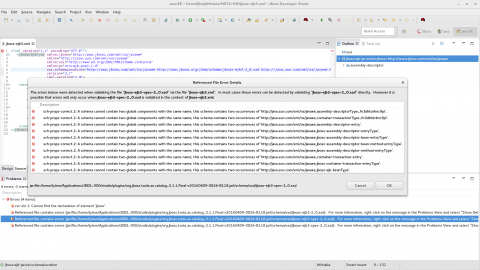
After clicking on "Show Details..." menu item, an window pops up with some errors:
sch-props-correct.2: A schema cannot contain two global components with the same name; this schema contains two occurrences of 'http://java.sun.com/xml/ns/javaee,...'.
like below:
Resolution
-
Check and confirm xml file content
Follow these document / example pages below to check and confirm the xml file content: -
Known issue on "jboss-ejb3.xml" validation
There is a known issue documented in page Content from github.com is not included.Known Issues for JBoss EAP Quickstarts. And there are a few bugzilla reports This content is not included.Bug 1193543 / This content is not included.Bug 1192591 for this issue. As stated in this page, these errors can be safely ignored.Known Issues for JBoss EAP Quickstarts ...... XML Problem: Referenced file contains errors (jar:file:PATH-TO-jbdevstudio/studio/plugins/org.jboss.tools.as.catalog_3.0.0.Final-v20141016-1911-B95.jar!/schema/xsd/jboss-ejb3-2_0.xsd). For more information, right click on the message in the Problems View and select "Show Details..." ...... XML Problem: Referenced file contains errors (jar:file:/PATH-TO-jbdevstudio/studio/plugins/org.jboss.tools.as.catalog_3.0.1.Final-v20141209-0156-B106.jar!/schema/xsd/jboss-ejb3-spec-2_0.xsd). For more information, right click on the message in the Problems View and select "Show Details..." You can ignore this error. This is a known issue with the jboss-ejb3-spec-2_0.xsd schema file. See https://bugzilla.redhat.com/show_bug.cgi?id=1193543.
Root Cause
- "cvc-elt.1: Cannot find the declaration of element 'jboss'." error is caused by incorrect tag / elements inside the xml file.
- "Referenced file contains errors..." error message is a known issue that can be ignored safely.
This solution is part of Red Hat’s fast-track publication program, providing a huge library of solutions that Red Hat engineers have created while supporting our customers. To give you the knowledge you need the instant it becomes available, these articles may be presented in a raw and unedited form.