Deploy customized SCAP policies with Satellite 6.x
Environment
Red Hat Satellite 6.x
Issue
Red Hat Enterprise Linux 7 comes with openscap and scap-security-guide packages that enable users to set their systems to be compliant with security standards such as PCI-DSS, USGCB, STIG, … In many cases users need to customize these policies, select or deselect rules, change values such as password length, … SCAP Workbench from the scap-workbench package is graphical user interface tool suitable for customizing the policies. After customization is done, the user will have two files for deployment - the original source datastream and the customization file with changes. These can be deployed using the oscap tool or SCAP Workbench but Satellite 6.1 only allows to use one file at a time. In this article we will explore how to deploy customized (also known as tailored) security policies with Satellite 6.x.
Resolution
SCAP terminology
- Benchmark file - XML file containing security rule metadata, also known as the XCCDF file.
- Source datastream - XML file combining various SCAP resources into a single file. Preferred method of storing SCAP content.
- Profile - Selects a subset of rules in a benchmark, sets values. Contained in the Benchmark or Tailoring file.
- Tailoring / Customization - Use an existing profile and modify it to form a new profile suitable for our use-case.
- Tailoring file - XML file where custom profiles are stored.
Read more about the OpenSCAP Satellite 6.1 feature.
Customization / tailoring file
To better understand the problem, let us look at what the tailoring file contains. Following are contents of a tailoring file I saved from SCAP Workbench after customizing the PCI-DSS profile and selecting one extra rule.
<?xml version="1.0" encoding="UTF-8"?>
<xccdf:Tailoring xmlns:xccdf="http://checklists.nist.gov/xccdf/1.2" id="xccdf_scap-workbench_tailoring_default">
	<xccdf:benchmark href="/usr/share/xml/scap/ssg/content/ssg-rhel7-ds.xml"/>
	<xccdf:version time="2016-06-02T11:04:09">1</xccdf:version>
	<xccdf:Profile id="xccdf_org.ssgproject.content_profile_pci-dss_customized" extends="xccdf_org.ssgproject.content_profile_pci-dss">
		<xccdf:title xmlns:xhtml="http://www.w3.org/1999/xhtml" xml:lang="en-US">PCI-DSS v3 Control Baseline for Red Hat Enterprise Linux 7 [CUSTOMIZED]</xccdf:title>
		<xccdf:description xmlns:xhtml="http://www.w3.org/1999/xhtml" xml:lang="en-US">This is a *draft* profile for PCI-DSS v3</xccdf:description>
		<xccdf:select idref="xccdf_org.ssgproject.content_rule_accounts_passwords_pam_faillock_interval" selected="true"/>
	</xccdf:Profile>
</xccdf:Tailoring>
Manually inserting the profile into the datastream
The first option is to take the Profile from the tailoring file and insert it into the XCCDF benchmark. Let us copy the entire This content is not included.xccdf:Profile element into the clipboard.
If we look at a source datastream file things get a lot more complicated. There are catalogs, checklists, checks, extended components and all sorts of other things. Let us assume that our datastream only contains one XCCDF Benchmark. We first need to find it. Look for the This content is not included.xccdf:Benchmark element. Keep in mind that the XML namespace prefixes may differ depending on where you got the content.
<ds:component id="scap_org.open-scap_comp_ssg-rhel7-xccdf-1.2.xml" timestamp="2016-05-05T15:25:09">
<Benchmark xmlns="http://checklists.nist.gov/xccdf/1.2" id="xccdf_org.ssgproject.content_benchmark_RHEL-7" resolved="1" xml:lang="en-US" style="SCAP_1.2">
<status date="2016-05-05">draft</status>
<title xml:lang="en-US">Guide to the Secure Configuration of Red Hat Enterprise Linux 7</title>
<description xml:lang="en-US">This guide presents a catalog of
...
We have found the Benchmark! That’s the hardest part of this whole operation. We now need to find a good place to insert the Profile element. The best place to insert tailored profiles is after the last Profile in the benchmark. This ensures that the profiles they are derived from are loaded first.
<refine-value idref="xccdf_org.ssgproject.content_value_var_accounts_maximum_age_login_defs" selector="60"/>
<refine-value idref="xccdf_org.ssgproject.content_value_var_accounts_minimum_age_login_defs" selector="1"/>
<refine-value idref="xccdf_org.ssgproject.content_value_var_accounts_tmout" selector="10_min"/>
</Profile>
… INSERT PROFILE HERE …
<Group id="xccdf_org.ssgproject.content_group_intro">
<title xml:lang="en-US">Introduction</title>
<description xml:lang="en-US">
Insert the Profile, make sure you add the namespace declaration if necessary, save the file and we are done! We can now upload this file to Satellite 6 and use our customized profile.
Use a script to merge a datastream and a tailoring file
Use the attached script to merge the source datastream and the tailoring file from SCAP Workbench.
Example usage:
./combine-tailoring.py /usr/share/xml/scap/ssg/content/ssg-rhel7-ds.xml ssg-rhel7-ds-tailoring.xml --output ssg-rhel7-ds-merged.xml
Use the combined source datastream in Satellite 6.x
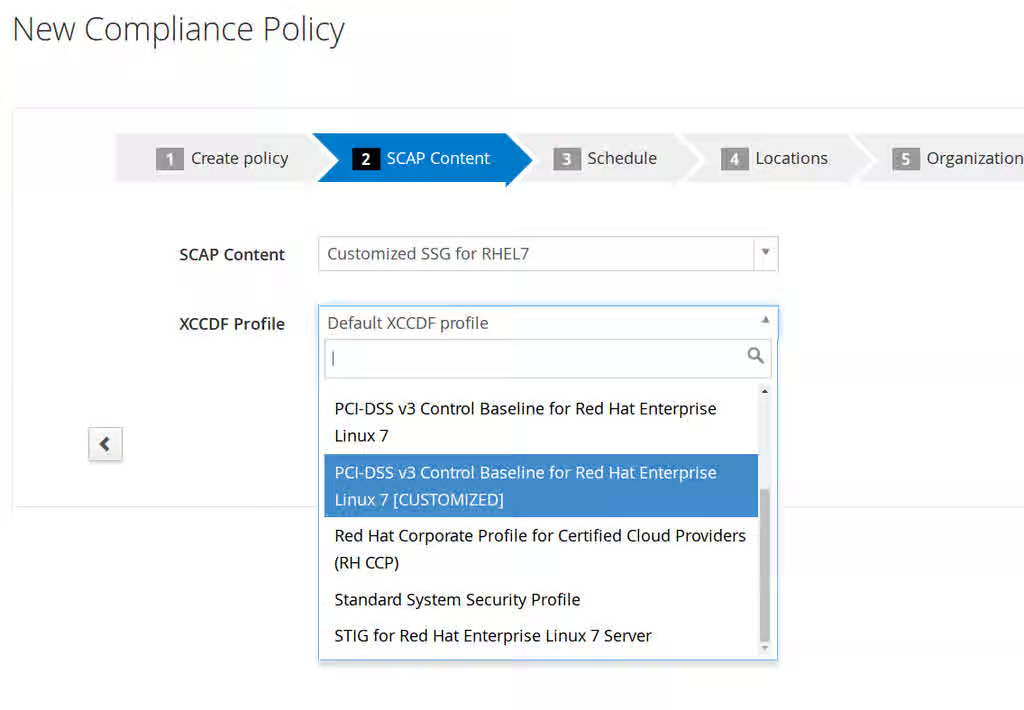
The ssg-rhel7-ds-merged.xml can be uploaded to Satellite 6.x, the customized profile will show up in the profile selector dialog.
Tailoring file support in Satellite 6.x
The workflow in this article should serve as a workaround before tailoring support is implemented in Satellite 6.x. Check solution 2159621 for future progress.
Root Cause
Red Hat Satellite 6.1 and 6.2 do not support tailoring files yet. This feature is planned for future releases.
This solution is part of Red Hat’s fast-track publication program, providing a huge library of solutions that Red Hat engineers have created while supporting our customers. To give you the knowledge you need the instant it becomes available, these articles may be presented in a raw and unedited form.