Enabling networking in rescue environment without chrooting
Environment
- Red Hat Enterprise Linux [ALL] (Under Rescue Environment)
Issue
- A sosreport was generated.
- Networking was not enabled during the inital Rescue Environment setup.
Resolution
Note: RHEL 10 network should automatically enable when booting with ISO in rescue mode. If the network is not enabled automatically in RHEL 10, please follow the manual steps below.
Manually enable networking
Use the suite of ip commands from the iproute package:
ip linkwill show available devices that are connected to your system.

You will need to determine which interface should be used depending upon the ip address range that is exposed to each interface
For example, if you wanted to activate the eth0 device, run:
# ip link set dev eth0 up
- Confirm that the device is up by using
ip link:
- Add an ip address to the device in the form of
# ip addr add <ip address>/<netmask> dev <device>
For example, if you wanted to add the ip address of 192.168.122.250 with a subnet of 255.255.255.0, which is a CIDR of 24, to device eth0 run:
# ip addr add 192.168.122.250/24 dev eth0
- Validate that the right ip address was assigned by using
ip a
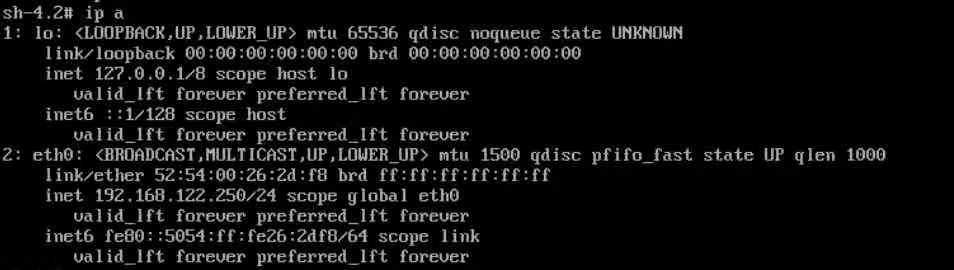
- Add a default route if you need to transfer the sosreport to a host on a different subnet or directly to Red Hat.
You can add a default route to the device in the form of # ip route add default via <gateway ip address>.
For example, if you wanted to add the default route 192.168.122.1, run:
# ip route add default via 192.168.122.1
- Validate that the right route was assigned by using
ip route:

- You can now choose to transfer the sosreport to a different system or use the methods specified in the following article:
Where to upload sosreport for Technical Support to analyze data ?
If you are unable to transfer the sosreport to a different system using scp and/or rsync, please refer to the following article:
Transferring a sosreport from a system when rsync/scp is not an option.
Note:
If bonded interfaces are required, please use How to configure a bonding in rescue mode?
- You can enable the SSH service in rescue mode to access the server from a remote environment.
How to enable SSH Service and configure network in the rescue mode?
Root Cause
If IP addresses are not defined during the inital Rescue Environment setup, the IP addresses will have to be assigned later.
This solution is part of Red Hat’s fast-track publication program, providing a huge library of solutions that Red Hat engineers have created while supporting our customers. To give you the knowledge you need the instant it becomes available, these articles may be presented in a raw and unedited form.