How to check which Node Tuning profiles are applied on every node
Environment
- OpenShift Container Platform
- 4.x
Issue
About the Node Tuning Operator
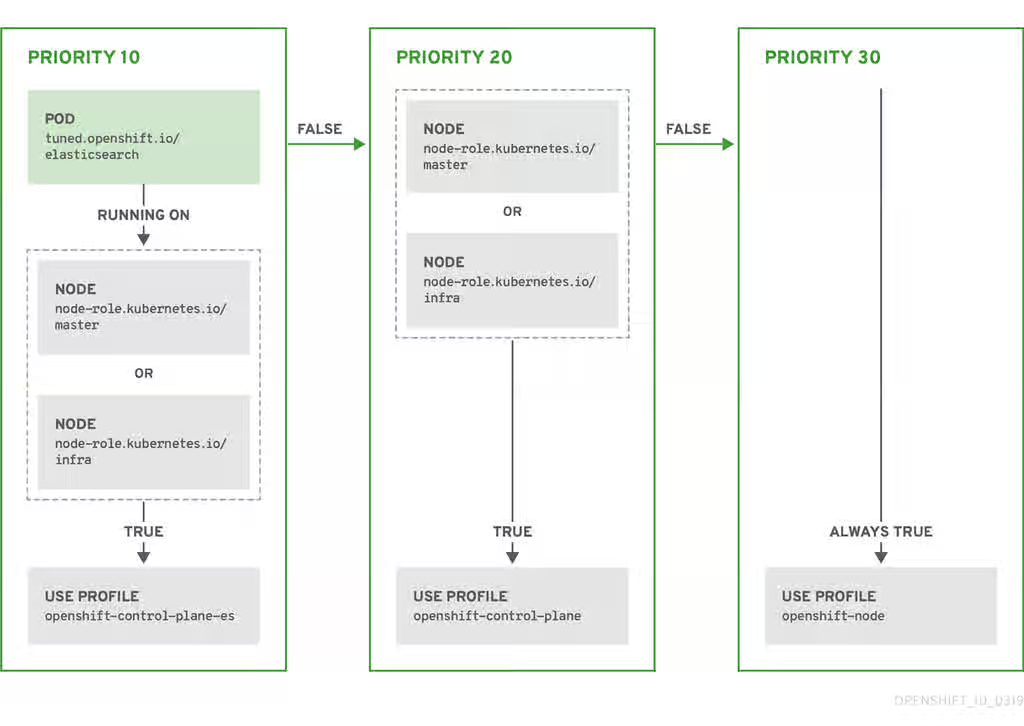
The Node Tuning Operator helps you manage node-level tuning by orchestrating the tuned daemon. The majority of high-performance applications require some level of kernel tuning. The Node Tuning Operator provides a unified management interface to users of node-level sysctls and more flexibility to add custom tuning, which is currently a Technology Preview feature, specified by user needs. The Operator manages the containerized tuned daemon for OpenShift Container Platform as a Kubernetes DaemonSet. It ensures the custom tuning specification is passed to all containerized tuned daemons running in the cluster in the format that the daemons understand. The daemons run on all nodes in the cluster, one per node.
NOTE: This Operator is part of a standard OpenShift Container Platform installation in version 4.1 and later.
Resolution
- Check which
tunedpods are running on eachnode:
$ oc get pods -n openshift-cluster-node-tuning-operator -o wide
NAME                                            READY   STATUS    RESTARTS   AGE    IP             NODE                                         NOMINATED NODE   READINESS GATES
cluster-node-tuning-operator-599489d4f7-k4hw4   1/1     Running   0          6d2h   10.129.0.76    ip-10-0-145-113.eu-west-3.compute.internal   <none>           <none>
tuned-2jkzp                                     1/1     Running   1          6d3h   10.0.145.113   ip-10-0-145-113.eu-west-3.compute.internal   <none>           <none>
tuned-g9mkx                                     1/1     Running   1          6d3h   10.0.147.108   ip-10-0-147-108.eu-west-3.compute.internal   <none>           <none>
tuned-kbxsh                                     1/1     Running   1          6d3h   10.0.132.143   ip-10-0-132-143.eu-west-3.compute.internal   <none>           <none>
tuned-kn9x6                                     1/1     Running   1          6d3h   10.0.163.177   ip-10-0-163-177.eu-west-3.compute.internal   <none>           <none>
tuned-vvxwx                                     1/1     Running   1          6d3h   10.0.131.87    ip-10-0-131-87.eu-west-3.compute.internal    <none>           <none>
tuned-zqrwq                                     1/1     Running   1          6d3h   10.0.161.51    ip-10-0-161-51.eu-west-3.compute.internal    <none>           <none>
- Extract the
profileapplied from eachpodand match them against previous list:
$ for i in `oc get pods -n openshift-cluster-node-tuning-operator | cut -d " " -f1 | grep tuned`; do echo "" && echo "*** $i ***" && oc logs pod/$i -n openshift-cluster-node-tuning-operator | grep applied; done

*** tuned-2jkzp ***
2019-09-20 13:53:35,368 INFO     tuned.daemon.daemon: static tuning from profile 'openshift-control-plane' applied

*** tuned-g9mkx ***
2019-09-20 14:07:17,089 INFO     tuned.daemon.daemon: static tuning from profile 'openshift-node' applied
2019-09-20 15:56:29,005 INFO     tuned.daemon.daemon: static tuning from profile 'openshift-node-es' applied
2019-09-20 16:00:19,006 INFO     tuned.daemon.daemon: static tuning from profile 'openshift-node' applied
2019-09-20 16:00:48,989 INFO     tuned.daemon.daemon: static tuning from profile 'openshift-node-es' applied

*** tuned-kbxsh ***
2019-09-20 13:53:30,565 INFO     tuned.daemon.daemon: static tuning from profile 'openshift-node' applied
2019-09-20 15:56:30,199 INFO     tuned.daemon.daemon: static tuning from profile 'openshift-node-es' applied

*** tuned-kn9x6 ***
2019-09-20 14:10:57,123 INFO     tuned.daemon.daemon: static tuning from profile 'openshift-node' applied
2019-09-20 15:56:28,757 INFO     tuned.daemon.daemon: static tuning from profile 'openshift-node-es' applied

*** tuned-vvxwx ***
2019-09-20 14:11:44,932 INFO     tuned.daemon.daemon: static tuning from profile 'openshift-control-plane' applied

*** tuned-zqrwq ***
2019-09-20 14:07:40,246 INFO     tuned.daemon.daemon: static tuning from profile 'openshift-control-plane' applied
Root Cause
Official documentation doesn't include this information and could be helpful.
Some relevant docs:
- Using the Node Tuning Operator
- Custom tuning specification (Tech Preview)
- Getting Started with Tuned
- Available Tuned Plug-ins
Diagnostic Steps
- How to see the default profiles:
$ oc get Tuned/default -o yaml -n openshift-cluster-node-tuning-operator
apiVersion: tuned.openshift.io/v1
kind: Tuned
metadata:
  creationTimestamp: "2019-09-18T09:42:54Z"
  generation: 1
  name: default
  namespace: openshift-cluster-node-tuning-operator
  resourceVersion: "7990"
  selfLink: /apis/tuned.openshift.io/v1/namespaces/openshift-cluster-node-tuning-operator/tuneds/default
  uid: b054fc24-d9f8-11e9-bab9-0e7f869d2710
spec:
  profile:
  - data: |
      [main]
      summary=Optimize systems running OpenShift (parent profile)
      include=${f:virt_check:virtual-guest:throughput-performance}

      [selinux]
      avc_cache_threshold=8192

      [net]
      nf_conntrack_hashsize=131072

      [sysctl]
      net.ipv4.ip_forward=1
      kernel.pid_max=>131072
      net.netfilter.nf_conntrack_max=1048576
      net.ipv4.neigh.default.gc_thresh1=8192
      net.ipv4.neigh.default.gc_thresh2=32768
      net.ipv4.neigh.default.gc_thresh3=65536
      net.ipv6.neigh.default.gc_thresh1=8192
      net.ipv6.neigh.default.gc_thresh2=32768
      net.ipv6.neigh.default.gc_thresh3=65536

      [sysfs]
      /sys/module/nvme_core/parameters/io_timeout=4294967295
      /sys/module/nvme_core/parameters/max_retries=10
    name: openshift
  - data: |
      [main]
      summary=Optimize systems running OpenShift control plane
      include=openshift

      [sysctl]
      # ktune sysctl settings, maximizing i/o throughput
      #
      # Minimal preemption granularity for CPU-bound tasks:
      # (default: 1 msec#  (1 + ilog(ncpus)), units: nanoseconds)
      kernel.sched_min_granularity_ns=10000000
      # The total time the scheduler will consider a migrated process
      # "cache hot" and thus less likely to be re-migrated
      # (system default is 500000, i.e. 0.5 ms)
      kernel.sched_migration_cost_ns=5000000
      # SCHED_OTHER wake-up granularity.
      #
      # Preemption granularity when tasks wake up.  Lower the value to
      # improve wake-up latency and throughput for latency critical tasks.
      kernel.sched_wakeup_granularity_ns=4000000
    name: openshift-control-plane
  - data: |
      [main]
      summary=Optimize systems running OpenShift nodes
      include=openshift

      [sysctl]
      net.ipv4.tcp_fastopen=3
      fs.inotify.max_user_watches=65536
    name: openshift-node
  - data: |
      [main]
      summary=Optimize systems running ES on OpenShift control-plane
      include=openshift-control-plane

      [sysctl]
      vm.max_map_count=262144
    name: openshift-control-plane-es
  - data: |
      [main]
      summary=Optimize systems running ES on OpenShift nodes
      include=openshift-node

      [sysctl]
      vm.max_map_count=262144
    name: openshift-node-es
  recommend:
  - match:
    - label: tuned.openshift.io/elasticsearch
      match:
      - label: node-role.kubernetes.io/master
      - label: node-role.kubernetes.io/infra
      type: pod
    priority: 10
    profile: openshift-control-plane-es
  - match:
    - label: tuned.openshift.io/elasticsearch
      type: pod
    priority: 20
    profile: openshift-node-es
  - match:
    - label: node-role.kubernetes.io/master
    - label: node-role.kubernetes.io/infra
    priority: 30
    profile: openshift-control-plane
  - priority: 40
    profile: openshift-node
status: {}
This solution is part of Red Hat’s fast-track publication program, providing a huge library of solutions that Red Hat engineers have created while supporting our customers. To give you the knowledge you need the instant it becomes available, these articles may be presented in a raw and unedited form.