Prometheus not able to read etcd metrics after upgrade in OCP 3
Environment
Red Hat OpenShift Container Platform (RHOCP) 3.11
Issue
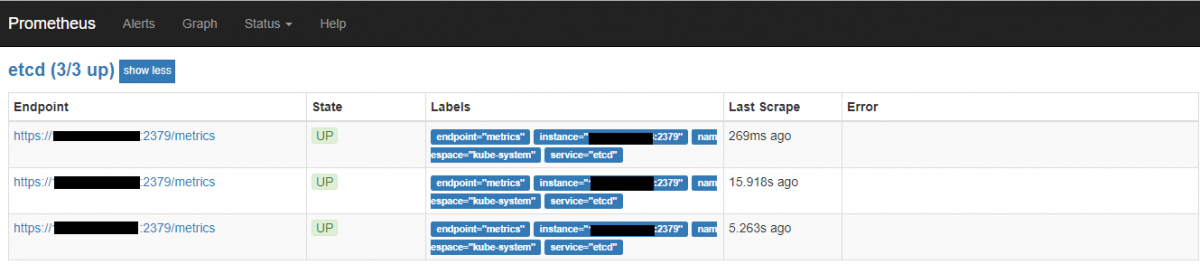
- After a cluster Openshift minor version upgrade, Prometheus is no longer able to read etcd metrics. Also, Etcd targets are shown as "DOWN" in Prometheus UI:

- The etcd monitoring targets are down with
x509: certificate signed by unknown authoritymessage on Prometheus GUI.
Resolution
-
If it doesn't exist already, create the kube-etcd-client-certs secret as described in step #9 of this procedure.
-
Add the secret to the Prometheus statefulset definition:
$ oc set volume statefulset prometheus-k8s --add --name=secret-kube-etcd-client-certs --type=secret --secret-name=kube-etcd-client-certs --mount-path=/etc/prometheus/secrets/kube-etcd-client-certs -c prometheus
- Then, redeploy the Prometheus pods:
# Take note of the amount of desired replicas:
$ oc get statefulset prometheus-k8s
# Scale it down:
$ oc scale statefulset prometheus-k8s --replicas=0
# When no promotheus pod is running, scale it back to the desired amount of replicas, I.e.:
$ oc scale statefulset prometheus-k8s --replicas=2
Wait till all the Prometheus pods are in running state, then check the etcd endpoint through the UI. They should appear as "Up":
Root Cause
Eventually, when performing upgrades between z-releases the statefulset definition for the Prometheus pod might overwritten resetting any customization made (like etcd monitoring. This, though, shouldn't remove the etcd object from the servicemonitor list.
Diagnostic Steps
Check certificate validity
- Check the issuer of etcd certificates and etcd CA:
  # for i in /etc/etcd/*.crt; do echo $i; openssl x509 -in $i -noout -dates -issuer; done
  # openssl x509 -in /etc/etcd/ca.crt -noout -issuer
- Extract the secret "kube-etcd-client-certs" from the monitoring namespace and check
the issuer for the extracted certificates from the secret:
  # oc extract secret/kube-etcd-client-certs
  # openssl x509 -in etcd-client-ca.crt -noout -issuer
  # openssl x509 -in etcd-client.crt -noout -issuer
Check if servicemonitor/etcd object exists:
$ oc get servicemonitor etcd -o yaml
apiVersion: monitoring.coreos.com/v1
kind: ServiceMonitor
metadata:
  creationTimestamp: 2019-07-15T19:58:04Z
  generation: 1
  labels:
    k8s-app: etcd
  name: etcd
  namespace: openshift-monitoring
  resourceVersion: "146140399"
  selfLink: /apis/monitoring.coreos.com/v1/namespaces/openshift-monitoring/servicemonitors/etcd
  uid: db57671b-a73a-11e9-a718-0050569e4467
spec:
  endpoints:
  - interval: 30s
    port: metrics
    scheme: https
    targetPort: 0
    tlsConfig:
      caFile: /etc/prometheus/secrets/kube-etcd-client-certs/etcd-client-ca.crt
      certFile: /etc/prometheus/secrets/kube-etcd-client-certs/etcd-client.crt
      keyFile: /etc/prometheus/secrets/kube-etcd-client-certs/etcd-client.key
  jobLabel: k8s-app
  namespaceSelector:
    matchNames:
    - kube-system
  selector:
    matchLabels:
      k8s-app: etcd
- Check kube-etcd-client-certs secret:
$ oc get secret kube-etcd-client-certs
NAME                     TYPE      DATA      AGE
kube-etcd-client-certs   Opaque    3         2h
- Check if in the Prometheus volumes is listed the
kube-etcd-client-certs.
$ oc set volumes statefulset prometheus-k8s | grep kube-etcd-client-certs
This solution is part of Red Hat’s fast-track publication program, providing a huge library of solutions that Red Hat engineers have created while supporting our customers. To give you the knowledge you need the instant it becomes available, these articles may be presented in a raw and unedited form.