RHEL yum repos fail [Errno 14] or Satellite RPM1004: Error retrieving metadata: Not found for EUS content
Environment
- Red Hat Enterprise Linux (RHEL) 6/7 EUS
- Red Hat Enterprise Linux (RHEL) 6/7 E4S (Update Solutions for SAP)
- Red Hat Enterprise Linux (RHEL) 6/7 TUS
- Red Hat Enterprise Linux (RHEL) 6/7 AUS
- Red Hat Enterprise Linux (RHEL) 8 (All Extended Update Streams)
- Red Hat Satellite 6
- Red Hat Update Infrastructure (RHUI)
Issue
- Yum repository fails with HTTP/HTTPS [Errno 14]
-
Enabling or Synchronizing fails for Red Hat Enterprise Linux Server - Extended Update Support (7Server)
RPM1004: Error retrieving metadata: Not found
Resolution
Red Hat Enterprise Linux
Note: EUS is used below as an example. This resolution applies to all extended update streams (EUS, E4S, TUS, AUS) across RHEL 6, 7 and 8.
Use subscription-manager's "release" command to set the supported EUS minor version persistently
-
To determine which releases are available:
# subscription-manager release --list -
To set a release:
# subscription-manager release --set=7.6
Release set to: 7.6

# yum clean all
Loaded plugins: product-id, rhnplugin, search-disabled-repos, subscription-manager
Cleaning repos: rhel-7-server-eus-rpms

# subscription-manager repos --list-enabled
+----------------------------------------------------------+
Available Repositories in /etc/yum.repos.d/redhat.repo
+----------------------------------------------------------+
Repo ID:   rhel-7-server-eus-rpms
Repo Name: Red Hat Enterprise Linux 7 Server - Extended Update Support (RPMs)
Repo URL:  https://cdn.redhat.com/content/eus/rhel/server/7/7.6/$basearch/os
Enabled:   1
Red Hat Satellite 6 & Red Hat Update Infrastructure
RHUI
Red Hat Update Infrastructure (RHUI) environments will need to enable and sync the minor release repositories for Extended Update Streams and ensure that the repositories are added to the client certificate, if not already.
-
RHUI Clients are required to set their release using a tool that comes with the client certificate bootstrap RPM. Please refer to the This content is not included.RHUI Documentation (Working with EUS) for more information.
# rhui-set-release --set <version>
Satellite 6
Satellite environments will no longer be able to enable or synchronize "xServer" releases of Extended Update Streams
If you already have enabled and synced this content previously, it will continue to be accessible by your content hosts, but can no longer be synced for new content.
Proper resolution and configuration for a Satellite environment:
-
Enable and sync the specific minor releases you want to offer to your content hosts, such as 'x86_64 7.7' for any given stream (ex. Red Hat Enterprise Linux Server - Extended Update Support)
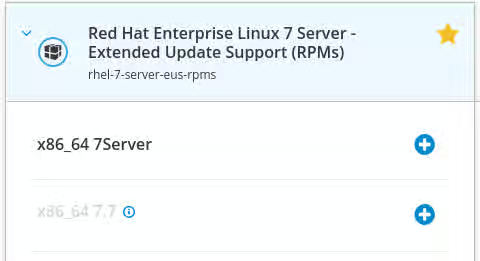
-
Configure your content hosts release to be set to the release you are syncing and offering through the Satellite Web UI, or via
subscription-manager releaseas shown above. This can be done via remote execution or other automation in your environment as well.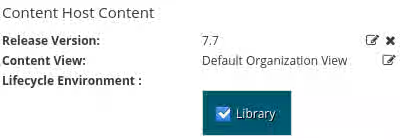
Root Cause
For non-extended update streams, the "xServer" (ex. 7Server) naming/version is used to indicate use of the latest available release.
This is not a supported path for any extended update stream available from Red Hat.
Extended Update Support (EUS) repositories must be set to a supported minor release.
The same follows for all other extended update streams available (E4S, TUS, AUS).
Please refer to the RHEL Life Cycle documentation and the This content is not included.Extended Update Support (EUS) Add-On for further details.
Diagnostic Steps
-
To see if a system is affected by this change, run the following command to check for extended streams:
# yum repolist -v | grep -e eus -e e4s -e tus -e aus
repo: downloading from remote: rhel-8-for-x86_64-baseos-eus-rpms
error: Status code: 404 for https://cdn.redhat.com/content/eus/rhel8/8/x86_64/baseos/os/repodata/repomd.xml (IP: 111.222.333.444) (https://cdn.redhat.com/content/eus/rhel8/8/x86_64/baseos/os/repodata/repomd.xml).
Any 404 indicated above, or repository as indicated with a match on 'eus', 'e4s', 'tus', or 'aus' indicates a system that needs to be configured for release for continued access to content from those repositories.
-
To check if a client is correctly configured to receive Extended Stream content, run the following check:
# subscription-manager release
Release not set
If your release is "not set" or "6Server", "7Server", "8", or any other "xServer" configuration and you are using extended support repositories, you will need to set your release as directed above.
This solution is part of Red Hat’s fast-track publication program, providing a huge library of solutions that Red Hat engineers have created while supporting our customers. To give you the knowledge you need the instant it becomes available, these articles may be presented in a raw and unedited form.