How to calculate subscription threshold or capacity for Red Hat Enterprise Linux?
Environment
- Red Hat Enterprise Linux
- Subscription Watch
Issue
- Definition and description of how to calculate capacity or threshold for Red Hat Enterprise Linux in Subscription Watch
Resolution
Subscription Watch tracks Red Hat Enterprise Linux as follows:
-
Tracks physical RHEL usage in CPU sockets, organized by architecture and variants for x86.
-
Tracks virtualized RHEL by installed socket count for standard guest subscriptions and by socket count of the hypervisor host node for virtual data center (VDC) subscriptions.
-
Tracks public cloud RHEL usage in sockets, where one instance equals one socket.
-
RHEL that is installed in support of another Red Hat product, such as Red Hat Satellite, is not tracked.
-
**Capacity is the sum of similar subscriptions across all of your contracts.**Based on this sum of your subscriptions, the maximum capacity, also known as the subscription threshold, is represented by a dashed line.
First, let's look at report from an account to see how usage, utilization, and capacity are visualized:
For this , please login to This content is not included.Subscription Watch and bring your mouse pointer to the date for which you want to see subscription-threshold as below :
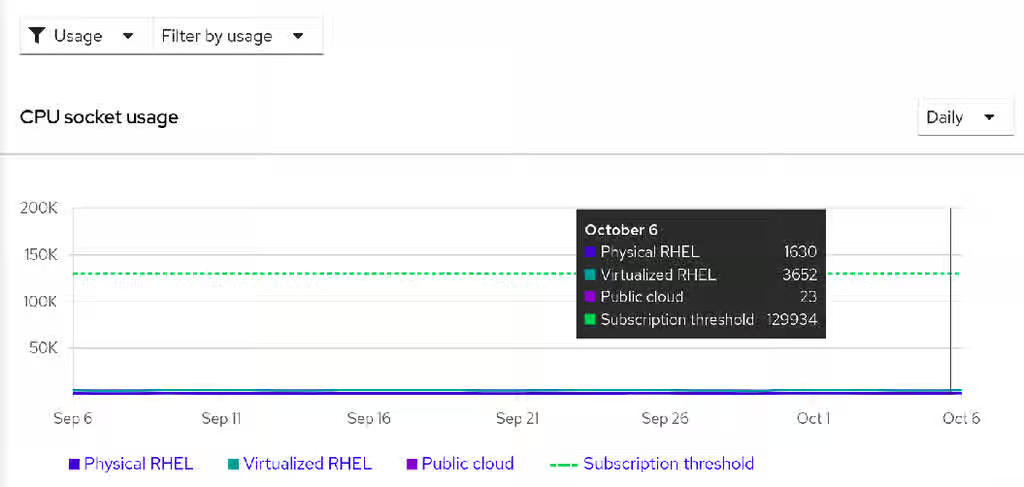
In above chart, I can see that this account has (on 6-October) a capacity (Subscription Threshold) ,which is represented by a dashed line, of 129934 sockets of RHEL, and usage of 5305 sockets of RHEL (1630 Physical, 3652 Virtual, and 23 on the Public Cloud). The utilization of RHEL is thus 4%.
For calculating threshold we tracked multiple RHEL subscriptions in our account. In this example, we will try to explain how some of these subscriptions contributed to threshold calculation which were tracked because they had Support Level as Premium/Standard so system purpose value of "production".
Red Hat Enterprise Linux Server with Smart Management, Premium (Physical or Virtual Nodes)
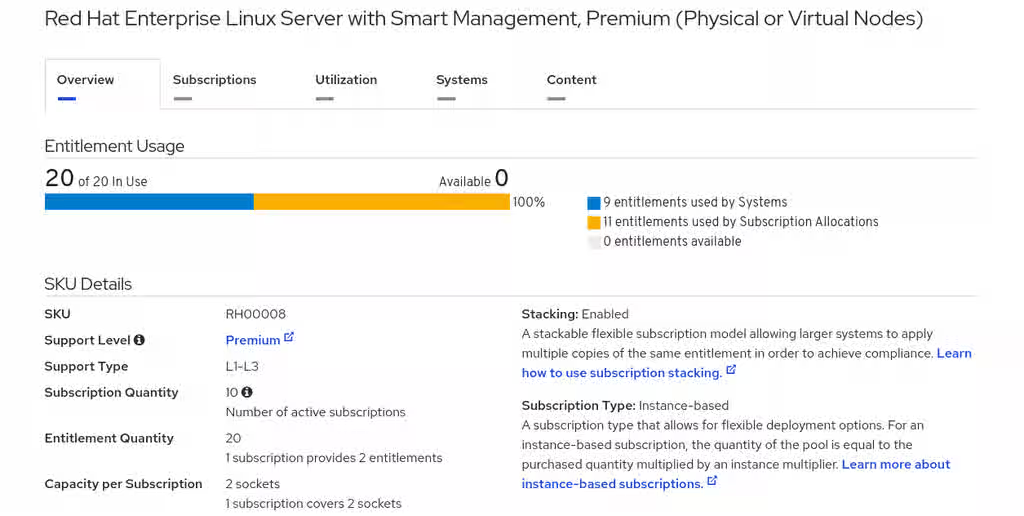
We had 10 quantity of above subscription where 1 subscription covers 2 sockets.
Hence , the contribution of Red Hat Enterprise Linux Server with Smart Management, Premium (Physical or Virtual Nodes) subscription for threshold = 10 *2
=20
Red Hat Enterprise Linux for Virtual Datacenters with Smart Management, Standard
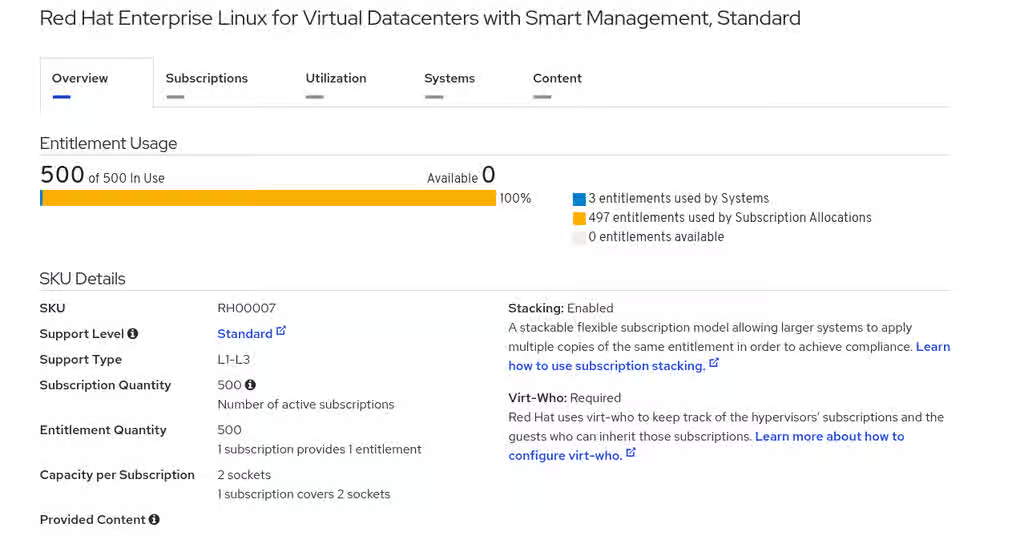
We had 500 quantity of above subscription where 1 subscription covers 2 sockets of hypervisors. Also, socket count of the hypervisor for virtual data center (VDC) subscriptions is taken into consideration.
Hence , the contribution of Red Hat Enterprise Linux for Virtual Datacenters with Smart Management, Standard
subscription for threshold = 500 *2
=1000
To calculate threshold , the socket contribution of each RHEL subscription is added to a total .
So , in above case , threshold calculations are as follows:
Threshold/Capacity = Threshold contribution of Red Hat Enterprise Linux Server with Smart Management, Premium (Physical or Virtual Nodes) + Threshold contribution of Red Hat Enterprise Linux for Virtual Datacenters with Smart Management, Standard + Threshold contribution of remaining subscriptions with system purpose value of "production".
To know the exact list of subscriptions contributing towards subscription threshold in terms of Cores/Sockets, open a case with This content is not included.Red Hat Support.
For getting better understanding of Current instances,Current instances,Usage chart etc in subscription watch, try This content is not included.Subscription management basics lab
Root Cause
How capacity or threshold calculated in Subscription Watch was unclear to customer.
Diagnostic Steps
You can check how many quantities of RHEL subscriptions are present in the account from the This content is not included.Red Hat Customer Portal
This solution is part of Red Hat’s fast-track publication program, providing a huge library of solutions that Red Hat engineers have created while supporting our customers. To give you the knowledge you need the instant it becomes available, these articles may be presented in a raw and unedited form.