Why does the GUI fail to start on my VMware virtual machine?
Environment
- Red Hat Enterprise Linux
- VMware ESXi hypervisor
- svga.vgaOnly option set to TRUE
Issue
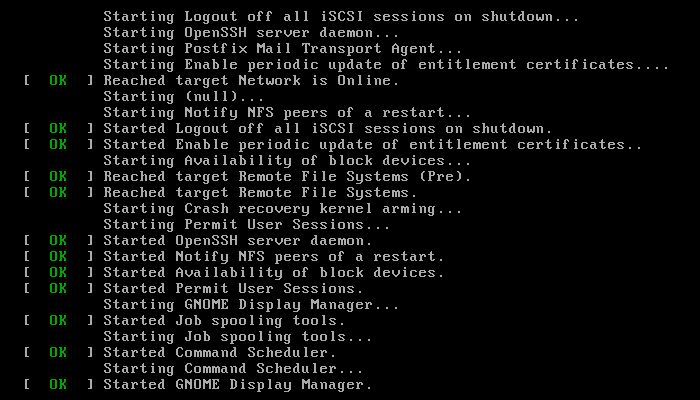
During the startup the graphical user interface does not start and the system gets stuck at a screen like this:
Resolution
If a GUI is necessary in this VM, set svga.vgaOnly to FALSE.
If a GUI is not required, configure the system to boot to multiuser mode (no GUI):
-
On RHEL-5 and RHEL-6, edit
/etc/inittaband set the default runlevel to 3id:3:initdefault: -
On RHEL-7 and RHEL-8, set the default startup target to
multi-user# systemctl set-default multi-user.target
Root Cause
Disclaimer: Links contained herein to external website(s) are provided for convenience only. Red Hat has not reviewed the links and is not responsible for the content or its availability. The inclusion of any link to an external website does not imply endorsement by Red Hat of the website or their entities, products or services. You agree that Red Hat is not responsible or liable for any loss or expenses that may result due to your use of (or reliance on) the external site or content.
According to the VMware documentation, in the “Content from techdocs.broadcom.com is not included.Reduce Memory Overhead for Virtual Machines with 3D Graphics Option” section:
“This option removes all graphics and SVGA functionality from your SVGA device, but does not remove the settings that allow BIOS to enter VGA mode.”
Diagnostic Steps
-
Use
lspcito check if the VM has a VGA adapter. It must show something like this:# lspci -vk 00:0f.0 VGA compatible controller [0300]: VMware Device [15ad:0711] (prog-if 00 [VGA controller]) Subsystem: VMware Device [15ad:0711] Control: I/O+ Mem+ BusMaster- SpecCycle- MemWINV- VGASnoop- ParErr- Stepping- SERR- FastB2B- DisINTx- Status: Cap+ 66MHz- UDF- FastB2B+ ParErr- DEVSEL=medium >TAbort- <TAbort- <MAbort- >SERR- <PERR- INTx- Region 0: I/O ports at 1070 [size=16] [virtual] Expansion ROM at c0400000 [disabled] [size=32K] Capabilities: [40] PCI Advanced Features AFCap: TP+ FLR+ AFCtrl: FLR- AFStatus: TP- -
Use the VMware administration tools to check the status of the
vga.vgaOnlyparameter.
This solution is part of Red Hat’s fast-track publication program, providing a huge library of solutions that Red Hat engineers have created while supporting our customers. To give you the knowledge you need the instant it becomes available, these articles may be presented in a raw and unedited form.