Getting started with Red Hat Enterprise Linux 5 High Availability Cluster
Environment
- Red Hat Enterprise Linux 5 Advanced Platform (Clustering)
Issue
- How do I create a cluster using Red Hat Enterprise Linux 5 Clustering?
- How to install and deploy high availability cluster in RHEL5?
Resolution
-
The first step in creating a cluster is registering the systems to Red Hat Network (RHN) and subscribing the systems to the appropriate cluster child channel.
-
Register the systems to Red Hat Network. This will need be done on all nodes:
# rhnreg_ks --username=<username> --password=<password> --profilename=<hostname> -
Subscribe the systems to the RHEL Clustering and Red Hat Enterprise Linux Cluster Storage channels:
-
Log into Customer Portal
-
Hover over the Subscriptions tab, click on Registered Systems under RHN Classic
-
Click on the system hostname
-
Click the link Alter Channel Subscriptions
-
Check the + sign next to Additional Services Channels for Red Hat Enterprise Linux 5
-
Check the box for RHEL Clustering and Red Hat Enterprise Linux Cluster Storage
-
In the lower right corner, click Change Subscriptions
-
The desired result will be as follows:

- This can also be done from the command line if the server has access to RHN:
# rhn-channel -u <username> -a -c rhel-x86_64-server-cluster-5 -c rhel-x86_64-server-cluster-storage-5
Password:
# rhn-channel -l
rhel-x86_64-server-5
rhel-x86_64-server-cluster-5
rhel-x86_64-server-cluster-storage-5
Enabling IP Ports
- either enable correct ports or disable firewall rules.
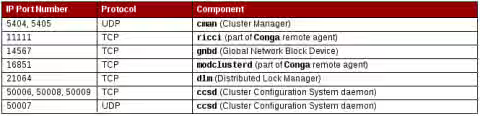
- The web interface for managing the cluster will also need the following ports open:

-
In this example we will disable the firewall:
# service iptables stop; chkconfig iptables off
SELinux
-
set to permissive or disabled.
-
This example we will disable SELinux.
# setenforce 0 -
To make this configuration change persistent, edit /etc/sysconfig/selinux
SELINUX=disabled
Install cluster package groups
-
From each node, install the cluster package groups:
# yum groupinstall 'Clustering' 'Cluster Storage' -
Note that installation of the Cluster Storage group may fail with "Warning: Group Cluster Storage does not exist". See "Cluster Storage" group not visible in "yum grouplist".
Cluster Management
-
On both nodes, start the ricci agent.
# service ricci start; chkconfig ricci on -
On the node you wish to manage the cluster from, configure and start luci:
# luci_admin init Initializing the Luci server Creating the 'admin' user Enter password: <Type password and press ENTER.> Confirm password: <Re-type password and press ENTER.> Please wait... The admin password has been successfully set. Generating SSL certificates... Luci server has been successfully initialized -
Restart the Luci service:
# service luci restart; chkconfig luci on Shutting down luci: [ OK ] Starting luci: generating https SSL certificates... done [ OK ] Please, point your web browser to https://<fqdn>:8084 to access luci -
To use the conga web interface to manage the cluster, point your browser to the link provided by the luci service and log in using the credentials created in the previous step.

- Welcome to Luci homebase:
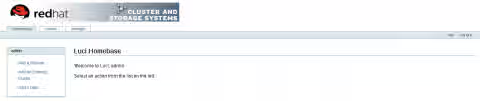
- Click on the cluster tab
- Click on Create a New Cluster
- Fill out the appropriate fields:
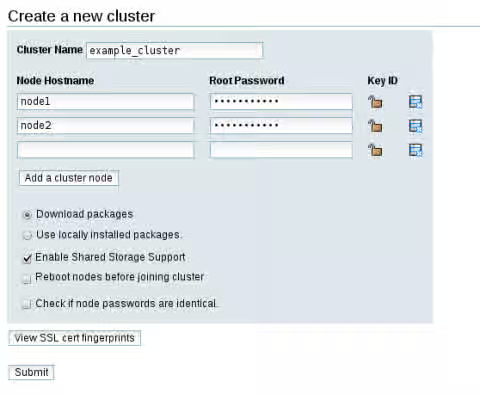
- When complete, click the Submit button to create the new cluster.
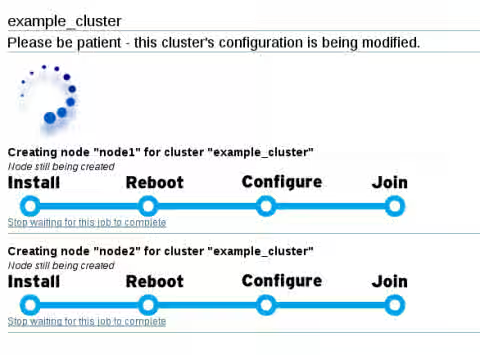
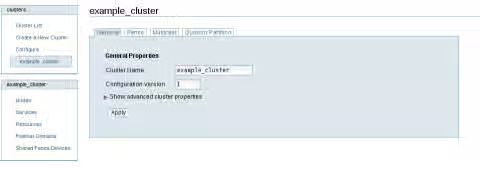
- Once complete, the cluster general properties will be displayed:
Configuring Fence Device(s)
- In this example we will use assigned fence devices in contrast to a shared fence device.
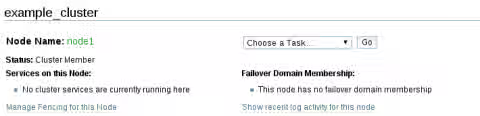
- Click on Nodes from the left navigation box
- Click on Manage Fencing for this Node as shown in the following capture:
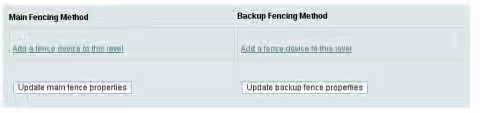
- Click Add a fence device to this level
- Fill in the required information
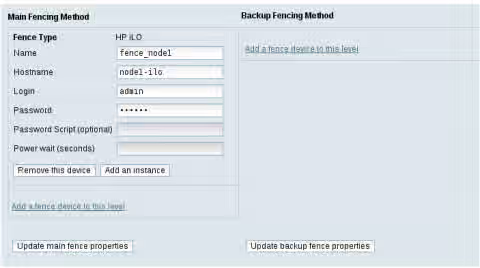
- Click Update main fence properties to apply. Repeat this step for each member of the cluster. Please note that production clusters configured without a fence device are not supported by Red Hat Production support.
Configuring a Failover Domain
- A failover domain is a named subset of cluster nodes that are eligible to run a cluster service in the event of a node failure.
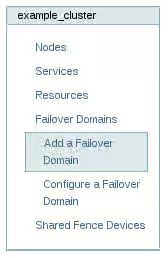
- Click on Failover Domains -> Add a Failover Domain
- The Failover Domain properties are displayed.
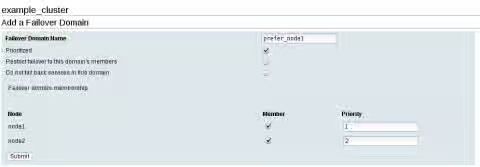
- Once done configuring the failover domain, click Submit.
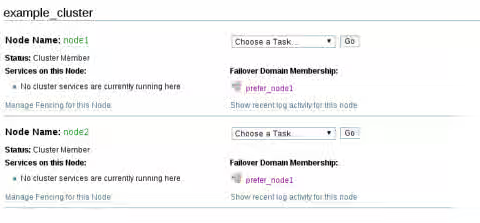
- Click Nodes from the cluster navigation menu, you will now see the configured Failover Domain:
Wrapping up
-
Check the status of the cluster:
[root@node1 ~]# clustat Cluster Status for example_cluster @ Tue Jul 5 15:00:23 2011 Member Status: Quorate Member Name ID Status ------ ---- ---- ------ node1 1 Online, Local node2 2 Online -
Ensure the cluster service is persistent:
  # chkconfig --list |grep cman
  cman                0:off     1:off     2:on     3:on     4:on     5:on     6:off
Congratulations!
This solution is part of Red Hat’s fast-track publication program, providing a huge library of solutions that Red Hat engineers have created while supporting our customers. To give you the knowledge you need the instant it becomes available, these articles may be presented in a raw and unedited form.