How can I visualize my system's NUMA topology in Red Hat Enterprise Linux?
Environment
- Red Hat Enterprise Linux 5
- Red Hat Enterprise Linux 6
- Red Hat Enterprise Linux 7
Issue
- How can I visualize my system's NUMA topology in Red Hat Enterprise Linux?
Resolution
It is possible to visualize the NUMA topology of a system using the lstopo or lstopo-no-graphics tools, provided in the hwloc package. hwloc is part of Red Hat Enterprise Linux 6 and 7. In Red Hat Enterprise Linux 5 you can get this package from EPEL : How to use Extra Packages for Enterprise Linux (EPEL) ?
Note that lstopo and other tools like it rely on hardware topology reported to the OS via the system BIOS. There are known cases where the system BIOS leaves certain fields "blank". In these cases, the kernel falls back to default values, which may result in suboptimal information. Consult your server hardware documentation for further information.
Example graphical output:
The system below is a 2-socket, 2-NUMA node server. Each physical CPU has 6 cores and a total of 24GB RAM:
- Each of the 2 NUMA nodes has 12GB RAM (12GB is physically installed in banks associated with the different nodes).
- This system has 12 cores. Each of the cores is divided into 2 "processing units" or PUs, leading the kernel/mpstat to see 24 hyperthreaded cores.
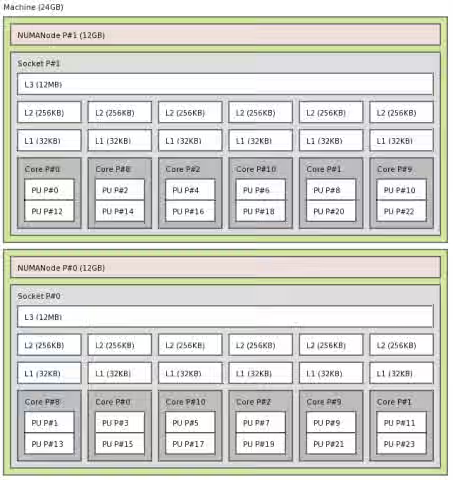
Example text output:
The example below shows the text output of lstopo-no-graphics 1.
        # lstopo-no-graphics
        Machine (24GB)
          NUMANode L#0 (P#1 12GB) + Socket L#0 + L3 L#0 (12MB)
            L2 L#0 (256KB) + L1 L#0 (32KB) + Core L#0
              PU L#0 (P#0)
              PU L#1 (P#12)
            L2 L#1 (256KB) + L1 L#1 (32KB) + Core L#1
              PU L#2 (P#2)
              PU L#3 (P#14)
            L2 L#2 (256KB) + L1 L#2 (32KB) + Core L#2
              PU L#4 (P#4)
              PU L#5 (P#16)
            L2 L#3 (256KB) + L1 L#3 (32KB) + Core L#3
              PU L#6 (P#6)
              PU L#7 (P#18)
            L2 L#4 (256KB) + L1 L#4 (32KB) + Core L#4
              PU L#8 (P#8)
              PU L#9 (P#20)
            L2 L#5 (256KB) + L1 L#5 (32KB) + Core L#5
              PU L#10 (P#10)
              PU L#11 (P#22)
          NUMANode L#1 (P#0 12GB) + Socket L#1 + L3 L#1 (12MB)
            L2 L#6 (256KB) + L1 L#6 (32KB) + Core L#6
              PU L#12 (P#1)
              PU L#13 (P#13)
            L2 L#7 (256KB) + L1 L#7 (32KB) + Core L#7
              PU L#14 (P#3)
              PU L#15 (P#15)
            L2 L#8 (256KB) + L1 L#8 (32KB) + Core L#8
              PU L#16 (P#5)
              PU L#17 (P#17)
            L2 L#9 (256KB) + L1 L#9 (32KB) + Core L#9
              PU L#18 (P#7)
              PU L#19 (P#19)
            L2 L#10 (256KB) + L1 L#10 (32KB) + Core L#10
              PU L#20 (P#9)
              PU L#21 (P#21)
            L2 L#11 (256KB) + L1 L#11 (32KB) + Core L#11
              PU L#22 (P#11)
              PU L#23 (P#23)
In a headless server, you can use the option --of ascii to have an ascii art output similar to the graphic one.
This solution is part of Red Hat’s fast-track publication program, providing a huge library of solutions that Red Hat engineers have created while supporting our customers. To give you the knowledge you need the instant it becomes available, these articles may be presented in a raw and unedited form.