How to send NMI to an Azure VM
Environment
- Red Hat Enterprise Linux
- Azure
Issue
How to send Non-Maskable Interrupt to an Azure virtual machine [instance] to generate the vmcore to troubleshoot hung issues.
Resolution
- Follow the steps in Azure Portal to send NMI to a RHEL vm
- Virtual Machines --> [go to]
Red Hat Enterprise Linuxvirtual machine- Support + troubleshooting
- Serial console
[in the command bar]keyboard icon --> Send Non-Maskable Interrupt (NMI)
- Serial console
- Support + troubleshooting
- Virtual Machines --> [go to]
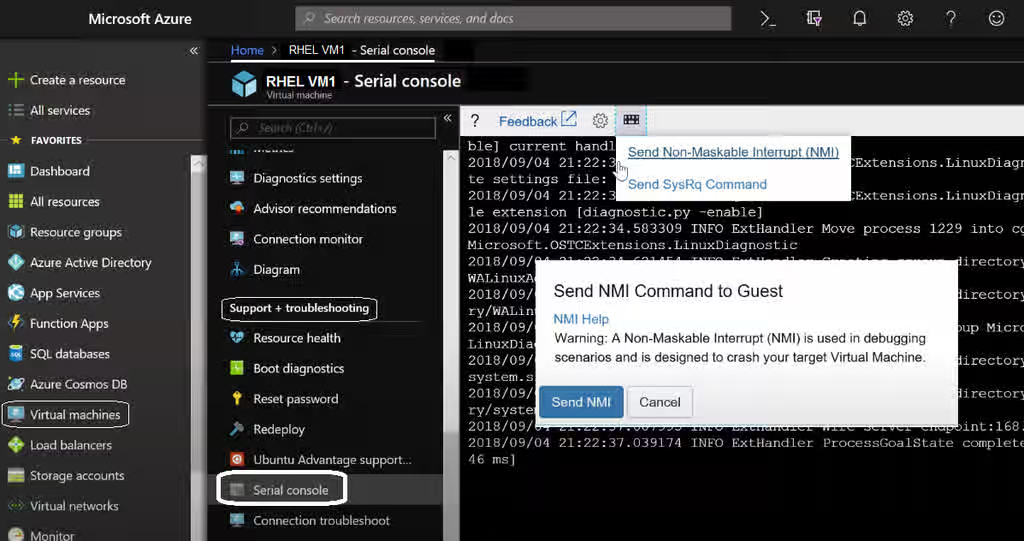
Please refer Micro Soft's document on Content from docs.microsoft.com is not included.How to use the Azure Serial Console for SysRq and NMI calls
Disclaimer: Illustration/image and links contained herein to external website(s) are provided for convenience only. Red Hat has not reviewed the links and is not responsible for the content or its availability. The inclusion of any link to an external website does not imply endorsement by Red Hat of the website or their entities, products or services. You agree that Red Hat is not responsible or liable for any loss or expenses that may result due to your use of (or reliance on) the external site or content.
Prerequisites:
-
kdump should be configured, tested and functional to issue an NMI to generate a vmcore
1. To configure kdump to capture a vmcore for Microsoft Azure virtual machines2. [Configure NMI in the system to panic/crash when NMI is pushed/sent](https://access.redhat.com/solutions/125103) 3. **To Test**: Send Non-Maskable Interrupt to an Azure virtual machine [instance] by using steps mentioned above in ***Resolution*** section
This solution is part of Red Hat’s fast-track publication program, providing a huge library of solutions that Red Hat engineers have created while supporting our customers. To give you the knowledge you need the instant it becomes available, these articles may be presented in a raw and unedited form.