How do I keep Red Hat Virtualization (RHV) host and manager certificates current?
Environment
- Red Hat Virtualization (RHV) 4.4 and newer
Issue
- My RHV SSL host and manager certificates are due to expire soon - how do I renew them?
Resolution
-
Use the Red Hat Virtualization Manager (RHV-M) administrative portal to renew host SSL certificates before they expire.
- Navigate to
Compute>Hostsand select the host to update. - Migrate all VMs away from that host.
- Click
Management>Maintenanceto put the host into Maintenance mode. - Click
Installation>Enroll Certificate.
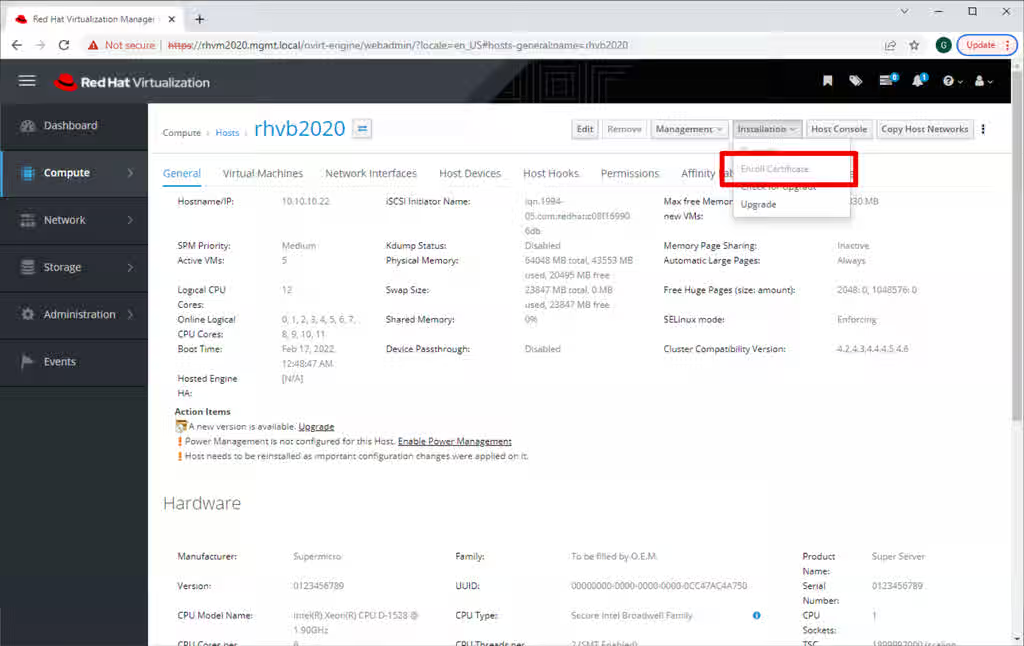
- After the enrollment finishes, activate this host. Click
Management>Activate. - If RHV host certificates expire, the manual renewal process is tedious and prone to errors. Do not let host certificates expire.
- But if they do expire, from RHV 4.4 SP1, it is possible to use the
Enroll Certificatefrom the RHV-M administrative portal when the host is inNonResponsivestatus. For versions below 4.4 SP1, see how to manually renew expired RHV host SSL certificates and then follow the steps above to properly enroll RHV host certificates.
- Navigate to
-
You must also renew RHV-M certificates
-
For Hosted Engine, put the environment into global maintenance mode. Login to an
sshor console session on a hosted-engine eligible hypervisor as root and issue this command:
# hosted-engine --set-maintenance --mode=global -
For both Hosted Engine and standalone RHV-M deployments:
- Log on to the RHV-M system as
rootfrom anssh, console, or other terminal session. - Update certificates with
# engine-setup --offline- Answer its questions appropriately or use an answers file.
- Be sure to answer the question about renewing certificates with "Y".
- With Hosted Engine, this may fail in unusual situations. See Why engine-setup fails while checking "Global Maintenance" even when the HE environment is in Maintenance mode for a solution.
- Log on to the RHV-M system as
-
For Hosted Engine, take the environment out of global maintenance mode. From your
sshor console session on a hosted-engine eligible hypervisor as root and issue this command:
# hosted-engine --set-maintenance --mode=none -
If you want to also apply updates, follow the procedure in the Upgrade Guide.
-
-
Versions of 4.4 prior to 4.4 SP1 must manually renew more certificates.
-
Find certificates not yet renewed with
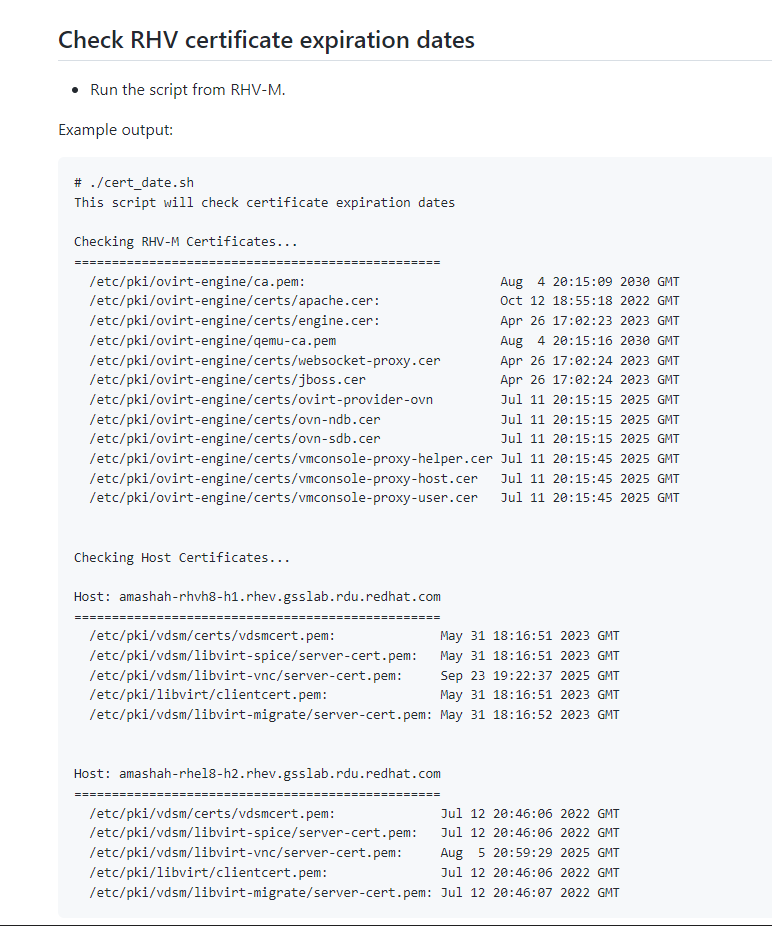
cert_date.shfrom How to check when RHV certificates expire?- Run
cert_date.shfrom a terminal session logged in as root on RHV-M. - See Diagnostic Steps below or KCS 6958665 for how to set it up.
[root@rhvm2 ~]# ./cert_date.sh This script will check certificate expiration dates Checking RHV-M Certificates... ================================================= /etc/pki/ovirt-engine/ca.pem: Jun 5 19:10:54 2032 GMT /etc/pki/ovirt-engine/certs/apache.cer: Jul 25 13:18:22 2024 GMT <- updated /etc/pki/ovirt-engine/certs/engine.cer: Jul 25 13:18:21 2024 GMT <- updated /etc/pki/ovirt-engine/qemu-ca.pem Jun 5 19:10:56 2032 GMT /etc/pki/ovirt-engine/certs/websocket-proxy.cer Jul 25 13:18:22 2024 GMT <- updated /etc/pki/ovirt-engine/certs/jboss.cer Jul 25 13:18:21 2024 GMT <- updated /etc/pki/ovirt-engine/certs/ovirt-provider-ovn Jul 11 19:10:56 2023 GMT <- not updated /etc/pki/ovirt-engine/certs/ovn-ndb.cer Jul 11 19:10:56 2023 GMT <- not updated /etc/pki/ovirt-engine/certs/ovn-sdb.cer Jul 11 19:10:56 2023 GMT <- not updated /etc/pki/ovirt-engine/certs/vmconsole-proxy-helper.cer Jul 11 19:11:23 2023 GMT <- not updated /etc/pki/ovirt-engine/certs/vmconsole-proxy-host.cer Jul 11 19:11:24 2023 GMT <- not updated /etc/pki/ovirt-engine/certs/vmconsole-proxy-user.cer Jul 11 19:11:23 2023 GMT <- not updated ...- To renew RHV-M OVN certificates, see [RHV] ovirt-provider-ovn certs aren't renewed with engine-setup.
- To renew RHV-M VMconsole-proxy certificates, see vmconsole-proxy-user certificate expired - cannot serial console.
- Run
-
Use the same cert_date.sh script to check hypervisor host certificates.
[root@rhvm2 ~]# ./cert_date.sh This script will check certificate expiration dates ... Checking Host Certificates... Host: myhost.example.com ================================================= /etc/pki/vdsm/certs/vdsmcert.pem: Jul 25 18:29:36 2024 GMT <- updated /etc/pki/vdsm/libvirt-spice/server-cert.pem: Jul 25 18:29:36 2024 GMT <- updated /etc/pki/vdsm/libvirt-vnc/server-cert.pem: Jul 9 14:17:19 2023 GMT <- not updated /etc/pki/libvirt/clientcert.pem: Jul 25 18:29:36 2024 GMT <- updated /etc/pki/vdsm/libvirt-migrate/server-cert.pem: Jul 25 18:29:37 2024 GMT <- updated- For hypervisor hosts where the libvirt certificate did not renew, login on each host as root and follow these steps to fix it.
[root@dell-r640-04 ~]# cp -p /etc/pki/vdsm/keys/vdsmkey.pem /etc/pki/vdsm/libvirt-vnc/server-key.pem
[root@dell-r640-04 ~]# cp -p /etc/pki/vdsm/certs/vdsmcert.pem /etc/pki/vdsm/libvirt-vnc/server-cert.pem
-
-
Ovirt-engine versions between 4.4.3.8 and 4.5.0 used a 398 day (13 month) certificate lifetime for all certificates. For these versions, if you wish to give new VDSM certificates a five year lifetime, follow these steps:
-
For Hosted Engine, put the environment into global maintenance mode. Login to an
sshor console session on a hosted-engine eligible hypervisor as root and issue this command:
# hosted-engine --set-maintenance --mode=global -
For both Hosted Engine and standalone RHV-M deployments, set up
ssh, console, or other terminal session to your RHV-M system. Login as root. -
Confirm the version with
rpm -qa | grep ^ovirt-engine-4 -
Update the engine configuration to generate VDSM certificates with a validity period of 5 years:
# /usr/share/ovirt-engine/dbscripts/engine-psql.sh -c "update vdc_options set option_value='1827' where option_name='VdsCertificateValidityInDays';" -
Restart the ovirt-engine service.
# systemctl restart ovirt-engine -
For Hosted Engine, take the environment out of global maintenance mode. Login to an
sshor console session on a hosted-engine eligible hypervisor as root and issue this command:
# hosted-engine --set-maintenance --mode=none
-
Root Cause
Disclaimer: Links contained herein to external website(s) are provided for convenience only. Red Hat has not reviewed the links and is not responsible for the content or its availability. The inclusion of any link to an external website does not imply endorsement by Red Hat of the website or their entities, products or services. You agree that Red Hat is not responsible or liable for any loss or expenses that may result due to your use of (or reliance on) the external site or content.
- RHV versions prior to 4.4 issued certificates with a five year lifespan.
- Earlier versions of RHV 4.4 issued certificates with a 398 day lifespan.
- RHV 4.4 SP1 changed the lifespan for internal certificates between the Engine and hypervisors to five years.
- Certificates visible to web browsers will still last 398 days per the new Mozilla certificate lifetime standard.
- 398 days = one year + one day for leap years + one month + 1 extra day = 365 + 1 + 31 + 1.
Diagnostic Steps
-
To check the validity period for new internal certificates with RHV 4.4 SP1, use
engine-config. From a terminal session to RHV-M, run:# engine-config -a 2>/dev/null | egrep 'CertificateValidity|CertExpiration' | sort CertExpirationAlertPeriodInDays: 30 version: general CertExpirationWarnPeriodInDays: 365 version: general VdsCertificateValidityInDays: 1827 version: generalThe above example also shows when RHV-M will WARN and ALERT about upcoming certificate expiry events. This only works with RHV-M 4.4 SP1.
-
To check the expiration date for existing host and Engine certificates:
- Download the cert_date.sh script. Save it as
cert_date.sh. - Copy it to a convenient directory on your RHV-M system.
- Log on to your RHV-M system as any convenient user and
cdto the directory where you savedcert_date.sh. - Make it executable
chmod 755 ./cert_date.sh - Run it on your RHV-M system.
./cert_date.sh - See the sample
cert_date.shscript output. - See KCS 6958665 for more information about the
cert_date.shscript.
- Download the cert_date.sh script. Save it as
-
If a host certificate expires,
- Virtual machine consoles for VMs on that host will fail.
- The host will show
Non-operationalin the RHV Administrative Portal. - RHV-M will be unable to manage virtual machines on this host. No migrations, no status updates, no starting new VMs or stopping old VMs.
-
If RHV-M certificates expire,
- The RHV-M and other portal websites will fail to load.
-
RHV 4.4 SP1 will send warning notifications, starting 120 days before certificate expiration. It will send error notifications starting with 30 days left.
This solution is part of Red Hat’s fast-track publication program, providing a huge library of solutions that Red Hat engineers have created while supporting our customers. To give you the knowledge you need the instant it becomes available, these articles may be presented in a raw and unedited form.