How to upgrade from DG 8.1/8.2 to DG 8.3 in DG 8 Operator
Environment
- Red Hat OpenShift Container Platform (OCP)
- 4.x
- Red Hat Data Grid (RHDG)
- 8.x
- Operator
Issue
- How to upgrade from DG 8.1 to DG 8.3 via DG Operator?
- How to migrate from DG 8.2 to DG 8.3 via DG Operator?
- How to migrate from DG 8.3 to DG 8.4 via DG Operator?
Resolution
Before doing the upgrade in production - collect a backup (to apply via restore) just in case the upgrade is unsuccessful.
In case of misbehaved upgrade: see Recovering from misbehaved upgrade section
The process to upgrade the Data Grid operator is described below, in regards to Data Grid image update (via `spec.upgrades), see Red Hat Data Grid 8.3 Data Grid Operator Guide - Chapter 6: Upgrading Data Grid Clusters.
From DG 8.1.6 Operator to the latest, edit the Subscription CR to the latest channel, Channel 8.3.x, which will bring the updates for DG 8.3 operator line of products.
Steps below are for manual approval:
- The Operator (in an old version) will be shown as "Status > Upgrade available" on the main "Installed Operators"
- Click on the Upgrade available
- Verify the InstallPlan
- Confirm
- See the Upgrade be done
In case the new version is still not the latest, the new Status will still be Upgrade available, but on the Subscription, it will show it can be accepted.
For automatic approval, when installing (an old) Data Grid Operator, its status will go straight to "Upgrading", and it will upgrade automatically to the latest.
For operators upgrade generically this is described on OCP 4.8 - OLM Upgrade Upgrading installed Operators, where the Subscription CR plays the main role on the version/version upgrade.
The upgrade will delete the previous operator and add the new one, therefore when doing the upgrade process (manual or automatic), the access for the previous operator page will return 404:Not found, for automatic installation the process to be on the latest will be considerably fast.
The solution Install DG 8 Operator via template/ocp cli command brings details in regards to the DG 8 Operator installation/uninstallation.
The main question is: Is the data persisted or in-memory only?
The two possible answers provide the following scenarios - for manual vs automatic differences, see on the next section.
| Scenario | Path | Details | Backup |
|---|---|---|---|
| Scenario 1 - data is persisted | Follow the OLM upgrade graph from 8.1 -> 8.3.1 | If it's persisted, then one will need to follow the `OLM upgrade graph from 8.1 -> 8.3.1 so that the cluster and it's state is upgraded per version. There are several OLM restrictions there's no other way with 8.1. | The data is back up on the persistence |
| Scenario 2 - no data is persisted | Follow the OLM upgrade 8.1->8.2->8.3 | If it's in-memory, there is no solution on DG 8.1. No if the data is persisted, then they can follow the 8.1->8.2->8.3 upgrade path, only three upgrade steps. | The data is not back up on the persistence |
Persistence and PV/PVC
Persistence above references the definition of persistence tag on the cache declaration. By default, the cache data is not persisted in OCP.
The data that is persistent will not vanish, and therefore, when there is no persistence and having a cache replication (from other product like EAP or RHSSO) the upgrade will shutdown the pods and data will be vanished.
Also note, the PV (and associated claim) has ephemeral data, which will vanish during the restart. For migrating PV data, see solution This content is not included.How to migrate an OCP PV's without losing data.
Downtime
There is no way to do zero-downtime upgrades prior to 8.3.7+, where Rolling Upgrade was introduced as a Tech Preview feature.
spec.
  upgrades:
    type: HotRodRolling vs Shutdown
The Rolling upgrade will do the following process:
- Create a deployment file for the manager pod and then create the manager pod
- Create a new statefulset (example-1) and deploy new DG pods (the so called mirror pods) - the copy must be 1-1 pods.
- Create new config deployment and then pod
The mirror pods must operate nominally to migrate the data from one DG pod (previous) to the other, and this is a 1-1 (old pod - new pod) operation, so if the cluster had 10 pods, other new 10 pods will be created.
Difference between DG 8 Operator set for Automatic vs Manual approval upgrade:
With automatic approval the channel will bring the latest DG operator image and on the automatic setting the cluster admin does not need to approve each one.
The only difference between Automatic and Manual approval, is that with the latter the cluster admin has to manually approve each Operator upgrade via the Openshift UI or CRs. Both modes utilize the same OLM update graph behind the scenes to determine which version of the Operator succeeds another.
DG 8.2 feature Backup/Restore CRs
From 8.2. it's possible to use the Backup/Restore CRs for the in-memory migration as above.
See solution Creating a full backup in RHDG 8.2+.
Can one just set the latest image and do the migration on the DG operator?
No, you need to update the OLM resources such as Subscription (see link on Root Cause), the handling of the channel, version, and approval methods are done in the Subscription. There is no spec.Image field analogous in the Subscription (which is an unsupported way to use a different image in the DG Operator).
Upgrade of DG 8 Operator vs DG 8 image
The process above is for the Operator upgrade. The image upgrade is described on Red Hat Data Grid 8.3 Data Grid Operator Guide - Chapter 6: Upgrading Data Grid Clusters, where one can use spec.upgrades/ spec.upgrades.type (feature of DG Operator 8.3).
The parameter spec.upgrade is related to the DG * image upgrade, which happens after the Operator has been upgraded and it is detected that a new DG image is available.
Setting up the DG Operator for a specific Operator version:
Use the Subscription yaml's startingCSV feature on the yaml to set a specific version, for example datagrid-operator.v8.2.8 and channel: 8.2.x. Whereas for DG 8.3.x versions the channel is channel: 8.3.x. Channel 8.4.x has several versions including DG 8.2 and DG 8.3x ones.
Differences
For the difference between Data Grid 8.2.x and 8.3.x operator see here.
For difference between Data Grid 8.2.x and 8.3.x see here
Recovering from misbehaved upgrade [Important]
See solution DG Operator 8 Recovering from misbehaved upgrade explaining the procedure.
In summary, the upgrade process is done by the OLM - see below - not by the DG operator itself. In a few cases, for a variety of reasons, the upgrade might misbehave and a resource might be lost (cache cr, infinispan cr) or a unstable state might occur.
To avoid this, it is very helpful to get a backup - via Backup CR or via cli command. The backup will have the cache/cache entries and can be applied via Restore (cli command or Restore CR).
To recover from those misbehaved upgrades, it might be required to delete the CRs, the project (operator's project and infinispan's cr projects), and the operator.
And finally the CRDs (which users fetch via oc api-resources -o wide | grep infinispan). The CRDs are cluster wide resources, not namespace-bounded, installed by the operator when on the upgrade.
It is not enough to just delete the operator itself - the CRDs will still stay on the /etcd.
In case the project gets stuck, see DG project does not get deleted.
In case a PVC migration is required, see Migrate persistent data to another Storage Class in DG 8 Operator in OCP 4. And more information about the PV, here: Reading DG 8 PV Data.
Root Cause
One can install the DG Operator (for instance via template) by creating a Subscription to a specific channel (8.1.x, 8.2.x, 8.3.x) and setting the OperatorGroup accordingly feeding from the CatalogSource (redhat-operators that will have the healthy or not healthy status).
Therefore, Subscriptions and InstallPlans are what drive the process from a user perspective, and the users should not need to matter with the upgrade graph, which is how OLM knows which release comes next and that is dictated by the CatalogSource.
This is summarized in the table below:
| OCP object | Purpose |
|---|---|
| OperatorGroup | Provides scope of the namespace where the DG operator will be available - the OG is not set on the Subscription, but rather the Subscription associates to the OG inside the namespace it is installed. If targetnamespace is not set so it will be cluster wide. |
| Subscription | Represents an intention to install an Operator. It is the custom resource that relates an Operator to a CatalogSource. Subscriptions describe which channel of an Operator package to subscribe to, and whether to perform updates automatically or manually. |
| InstallPlan | Defines a set of resources to be created in order to install or upgrade to a specific version of a ClusterService defined by a CSV. |
The Operator Lifecycle Manager is independent of the DG operator and applies to all Red Hat operators deployed on Openshift. See OCP 4.x - OLM Upgrading.
About OLM workflow, which also explains OLM update graph, which is not dealt directly by the user.
Also note, the coexistence of DG 8 operators with different versions is not supported in the same cluster and can/will cause issues.
When installing the channel the Operator installed will be the latest (the channel always bring the latest) and there will be two options: manual or automatic update.
Data Grid Operator upgrade with cross-site replication is not tested/supported. It has never been tested and therefore might incur in hidden problems. Also, we explained above cross-site replication may not work between versions (nor that is supported). After upgrading, user can remove/recreate the custom resource in case of misbehavior.Note about cross-site replication and DG Operator upgrade
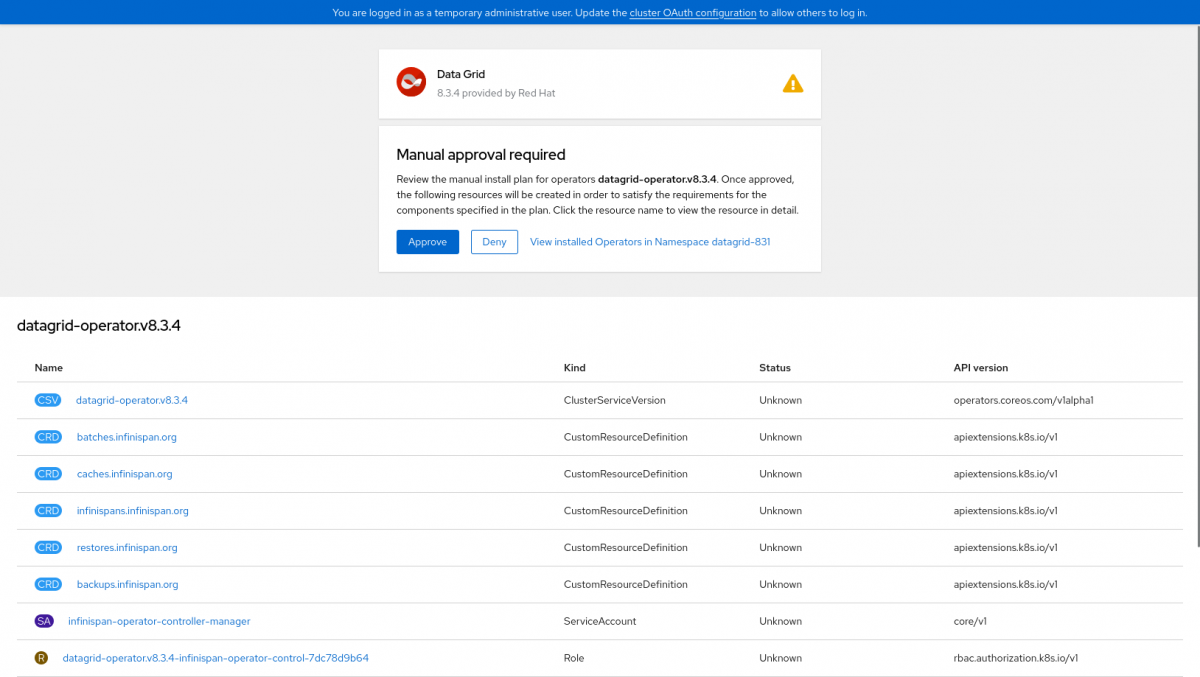
Diagnostic Steps
- See the subscription and CSV details:
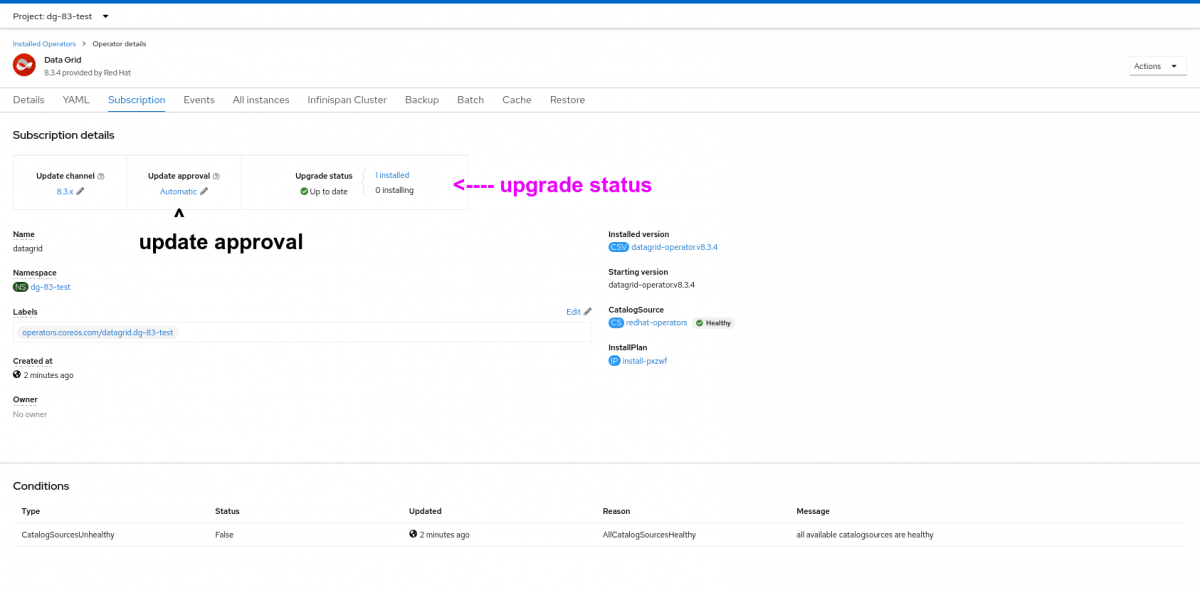
Subscription details
- See about limitations of only one version of DG Operator in the same cluster.
- See about the logs for the operator and the OLM - including the status of the Subscription, which should be Succeeded and Up to date
- For confirming the version, compare the registry's manifest list hash with the Pod details > Events > pulled image details:
Pinfinispan-operator-controller-manager-759577cb98-j792qNamespaceNSrhdg8-operator
May 17, 2022, 10:19 PM
Generated from kubelet on ci-ln-3j2hc22-72292-mf85v-worker-c-5qxl6
Successfully pulled image "registry.redhat.io/datagrid/datagrid-8-rhel8-operator@sha256:af9479f4f2c9a6f494e6684d5f7e399c463da2ebcf7f5534fc3c8c6ae2fa1651" in 973.833726ms
Compare the hash above, with the Manifest List Digest from the registry to confirm DG version:
Registry: registry.redhat.io
Repository: datagrid/datagrid-8-rhel8-operator
Manifest List Digest: sha256:af9479f4f2c9a6f494e6684d5f7e399c463da2ebcf7f5534fc3c8c6ae2fa1651
Image Manifest: ...
Troubleshooting upgrade:
Delete many Infinispan clusters as possible, then try the following process:
- Uninstall the operator completely
- Install the latest operator version
- Recreate the cross-site replication cluster (on the CR)
- Provide logs, Infinispan, Cache - see Using inspect for DG 8 troubleshooting
- See the IP message - via greping "message":
$ oc get ip -o yaml | grep message
      - message: bundle contents have not yet been persisted to installplan status
      - message: unpack job not yet started
      message: more than one operator group(s) are managing this namespace count=2
InstallPlan object
To list the installPlans, do oc get inp which will return all the install plans:
$ oc get ip
NAME            CSV                        APPROVAL    APPROVED
install-kvhkq   datagrid-operator.v8.3.3   Manual      true    <---- approved
install-l9p7w   datagrid-operator.v8.2.8   Automatic   true <---- approved
$ oc get ip install-l9p7w -o jsonpath="{.spec.approved}"
true
$ oc get ip install-l9p7w -o jsonpath="{.spec.clusterServiceVersionNames}"
[datagrid-operator.v8.2.8]
The install plan and the CSV will be on the must-gather
This solution is part of Red Hat’s fast-track publication program, providing a huge library of solutions that Red Hat engineers have created while supporting our customers. To give you the knowledge you need the instant it becomes available, these articles may be presented in a raw and unedited form.