In disconnected Clair, java image scanning is not working
Environment
- Red Hat Quay
- 3.8
Issue
- Quay images are queued and are not able to show vulnerabilities.
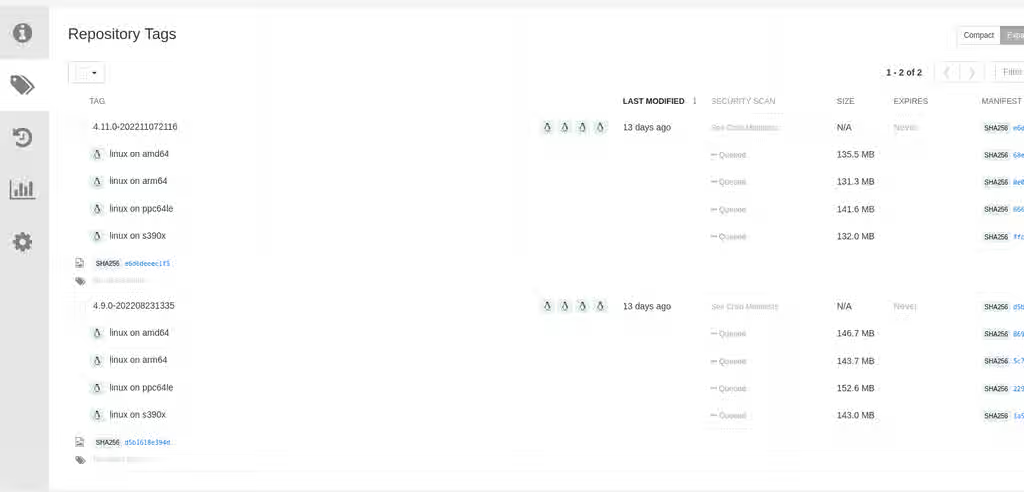
-
Clair logs show scan queued for java based images:
{"level":"warn","file":"spring-web/lib/jcip-annotations-1.0.jar","layer":"sha256:7072d1ca8cd39f2ae4fd36d5a5272e4564a06c92441bdf29185c312ff87432ee","component":"java/Scanner.Scan","version":"3","scanner":"java","manifest":"sha256:d2eed634032c3827bd36f8aae86ef6113d9f4763fbeb6ad041b1f2a3962b6b24","state":"ScanLayers","kind":"package","error":"Get \"https://search.maven.org/solrsearch/select?q=1%3A%22afba4942caaeaf46aab0b976afd57cc7c181467e%22&wt=json\": dial tcp 52.1.120.204:443: i/o timeout","time":"2023-02-08T10:46:59Z","message":"error making request"} -
If java updaters are not available offline and are causing noise in logs, can one disable the respective indexer?
Resolution
- Yes one can disable java scanning from Clair. Following steps to should help identify java images and disable scanning for them.
- Check what SHA-IDs errors out reaching to searc.maven.org(java updater). Example:
{"level":"warn","file":"spring-web/lib/jcip-annotations-1.0.jar","layer":"sha256:7072d1ca8cd39f2ae4fd36d5a5272e4564a06c92441bdf29185c312ff87432ee","component":"java/Scanner.Scan","version":"3","scanner":"java","manifest":"sha256:d2eed634032c3827bd36f8aae86ef6113d9f4763fbeb6ad041b1f2a3962b6b24","state":"ScanLayers","kind":"package","error":"Get \"https://search.maven.org/solrsearch/select?q=1%3A%22afba4942caaeaf46aab0b976afd57cc7c181467e%22&wt=json\": dial tcp 52.1.120.204:443: i/o timeout","time":"2023-02-08T10:46:59Z","message":"error making request"}
- Then run below query to know which image this SHA-ID belongs to:
  quay=# SELECT t1.username AS namespace, t2.name AS repo_name, t4.content_checksum AS sha_digest FROM "user" AS t1 INNER JOIN repository AS t2 ON t1.id = t2.namespace_user_id INNER JOIN manifestblob AS t3 on t2.id = t3.repository_id INNER JOIN imagestorage AS t4 ON t3.blob_id = t4.id WHERE t4.content_checksum = 'FULL_SHA_DIGEST';

  example:

  quay=# SELECT t1.username AS namespace, t2.name AS repo_name, t4.content_checksum AS sha_digest FROM "user" AS t1 INNER JOIN repository AS t2 ON t1.id = t2.namespace_user_id INNER JOIN manifestblob AS t3 on t2.id = t3.repository_id INNER JOIN imagestorage AS t4 ON t3.blob_id = t4.id WHERE t4.content_checksum = 'sha256:0cea90e4778f9241c20421d8c97a8d182fd0fa51e6c84210dc4b57522fc901b8';


   namespace | repo_name |                               sha_digest
  -----------+-----------+-------------------------------------------------------------------------
   redhat    | quay      | sha256:0cea90e4778f9241c20421d8c97a8d182fd0fa51e6c84210dc4b57522fc901b8
  (1 row)
- The output will contain all images with the specified SHA digest.
- Then run below command to find the base OS of the image(if it is java-based):
$ docker run image:tag /bin/bash -c "cat /etc/*release"
- To stop the java/maven indexer there is no documented steps. So try this in the development/test cluster first. Set the API request to a page that returns a 404 so it fails quickly.
  scanner:
    package:
      java:
        api: https://quay.github.io/clair404
- Replace the api with a known page that 404s. This should fail Maven indexer and turn it off for that image.
Root Cause
- As of now java scanning does not work in disconnected environment. It requires active connection to internet
Product(s)
Components
Category
Tags
This solution is part of Red Hat’s fast-track publication program, providing a huge library of solutions that Red Hat engineers have created while supporting our customers. To give you the knowledge you need the instant it becomes available, these articles may be presented in a raw and unedited form.