Set up custom tag templates in build triggers for Quay and Quay.io
Environment
Quay.io
Red Hat Quay
Issue
I want to set up a custom tag template when configuring builds in Quay/Quay.io. How do I do that?
Resolution
The "Configure tagging" section of the build trigger contains the template setup, as indicated on the following screenshot:
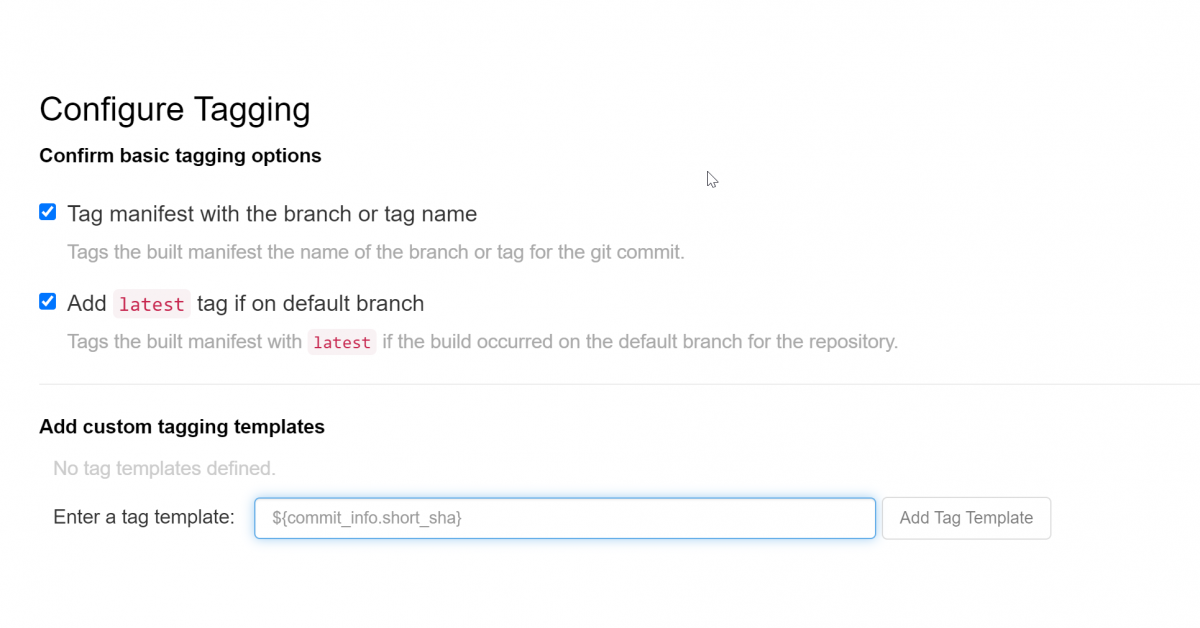
Each template must be added to the list one by one. Following options are available:
${commit}- full SHA of the issued commit${parsed_ref.branch}- branch information (if available)${parsed_ref.tag}- tag information (if available)${parsed_ref.remote}- the remote name${commit_info.date}- date when the commit was issued${commit_info.author.username}- username of the author of the commit${commit_info.short_sha}- first 7 characters of the commit SHA${committer.properties.username}- username of the committer
This list is not complete, but does contain the most useful options for tagging purposes. You can find the complete tag template schema on the following Content from github.com is not included.link.
Root Cause
By default, all built manifests will be tagged with the name of the branch or tag in which the commit occurred. To modify this default, as well as the default to add the latest tag to the build, we provide the templating tool that allows specific tagging of images based on user preference.
This solution is part of Red Hat’s fast-track publication program, providing a huge library of solutions that Red Hat engineers have created while supporting our customers. To give you the knowledge you need the instant it becomes available, these articles may be presented in a raw and unedited form.