Pipeline run fails in a disconnected Red Hat OpenShift AI (RHOAI) environment using the Elyra JupyterLab extension
Environment
- Red Hat OpenShift AI (RHOAI)
- Version: 2.8 and earlier
Issue
When running a pipeline using the Elyra JupyterLab extension in a disconnected RHOAI environment, the pipeline may fail in the following cases:
- If you execute pip install in a notebook cell, the step could fail due to missing SSL certificates for the pip host.
- If you access external storage within a notebook, the step could fail due to missing SSL certificates for your storage host.
Note: Ensure the necessary SSL certificates are available for all services. To help you identify potential issues with your SSL certificates, check the pod logs in your cluster.

Resolution
When using a data science pipeline in the data science project environment to create and execute pipelines from a Jupyter notebook, as described in This content is not included.Running a pipeline in JupyterLab, you might have SSL certificate validation issues.
Resolve the Installation of the Python package via pip
Before you execute your pipeline, perform the following steps:
- Open JupyterLab, and confirm that the JupyterLab launcher is automatically displayed.
- In the Elyra section of the JupyterLab launcher, click the Pipeline Editor tile.
- Open your pipeline in the pipeline editor.
- Right-click the relevant pipeline node and select Open Properties.
- On the Pipeline Properties tab in the right pane, go to the Environment variables section.
- Set the
PIP_INDEX_URLandPIP_TRUSTED_HOSTenvironment variables to specify the location of the Python dependencies, as shown in the following example:
 PIP_INDEX_URL: (ex: https://pypi-server.apps.example.com/simple)
 PIP_TRUSTED_HOST: (ex:pypi-server.apps.example.com)

This includes these environment variables in all the pipelines.
- Save your changes.
- Execute the pipeline.
Resolving Connection Failures to Storage
- Build a custom runtime image with your CA certificates included.
# Multi-stage build to update CA certificates
FROM <base-image>

USER root
COPY ca-certificates.crt /etc/pki/ca-trust/source/anchors/
RUN update-ca-trust extract

# Copy updated CA certificates from the builder stage
COPY --from=builder /etc/pki/ca-trust/extracted /etc/pki/ca-trust/extracted

USER 1001  # Set non-root user for container runtime
- Open JupyterLab, and confirm that the JupyterLab launcher appears.
- In the Elyra section of the JupyterLab launcher, click Pipeline Editor.
- Open your pipeline in the pipeline editor.
- In the JupyterLab left sidebar, select Runtime Images.

- Set your custom runtime images in the workbench runtime.

- Use the custom runtime image as the base for the pipeline node.
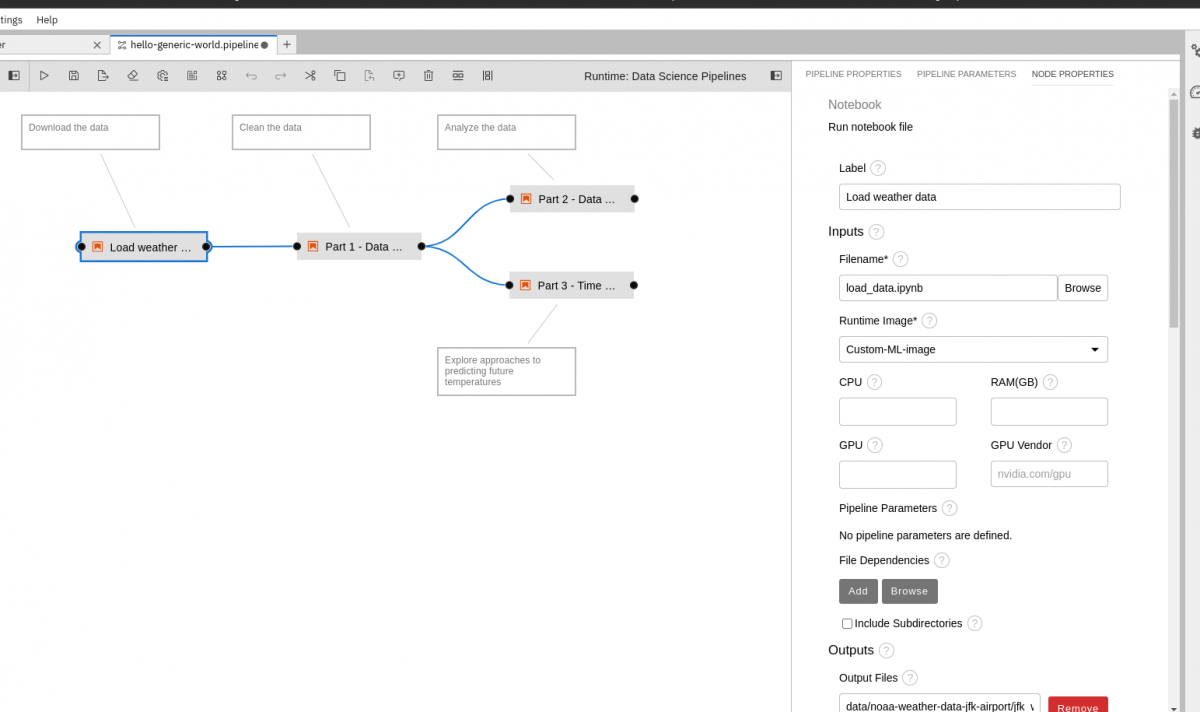
- In Pipeline properties, set the certificate path for the SSL_CERT_FILE environment variable:


SSL_CERT_FILE:/etc/pki/ca-trust/extracted/ca-certificate.crt

9. Save your changes.
10. Execute your pipeline.
Resolving SSL Connection Failures with the Python requests Module
Note: The Python
requestsmodule uses OpenSSL.
-
Set the certificate path using the
REQUESTS_CA_BUNDLEenvironment variable. -
Ensure the CA certificate is included in the custom runtime images.
-
Update pipeline properties to specify the certificate path:
REQUESTS_CA_BUNDLE: /etc/pki/trusted-ca/ca.crt

4. Save your changes and execute the pipeline.
Reason
In disconnected clusters, self-signed CA certificates are required and must be mounted onto the pipeline runtime pods. To include these certificates, inject them into the runtime images, then configure environment variables or module parameters to enable SSL requests using these certificates.
See Also:
- Executing a pipeline in a Jupyter notebook in a disconnected environment
- Object storage connection workaround with a self-signed certificate
- Installing packages from a PyPI mirror in a disconnected environment
- Object storage connection workaround for data science pipelines
Root Cause
When executing a pipeline from your notebook, the pipeline launches as a separate task, creating pods. In a disconnected cluster, these pods will fail because the runtime image attempts an external network connection. Since the service uses a self-hosted CA rather than the standard trusted CA bundle, SSL certificate validation fails, causing the issue.
This solution is part of Red Hat’s fast-track publication program, providing a huge library of solutions that Red Hat engineers have created while supporting our customers. To give you the knowledge you need the instant it becomes available, these articles may be presented in a raw and unedited form.