How to monitor Vector's per-component memory usage in RHOL
Environment
- Red Hat OpenShift Container Platform (RHOCP)
- 4
- Red Hat OpenShift Logging (RHOL)
- 5
- 6
- Vector
Issue
- How is the memory usage for the Vector's component?
- Vector is using so much memory, how can be reviewed what's the component using more memory?
- How to enable Vector's allocation memory
- How can the Vector's memory usage being monitored?
Resolution
Red Hat evaluated this request in RFE This content is not included.OBSDA-1141 and while we recognize that it is a valid request, it's not expected this to be implemented in the product in the foreseeable future. This is due to other priorities for the product and not a reflection of the request itself.
How to enable memory allocation metrics in Unmanaged status
Read the documentation section "Support policy for unmanaged Operators".
Exposing the memory allocation metrics has a high impact in the performance, not being recommended for production environments at least that needed for troubleshooting purposes.
Logging 6 configuration
In this example, the clusterLogForwarder Custom Resource (CR) name is collector and running in the namespace: openshift-logging
$ cr="collector"
$ ns="openshift-logging"
Step 1. Move the clusterLogForwarder to Unmanaged status
$ oc -n $ns patch obsclf/$cr -p '{"spec":{"managementState": "Unmanaged"}}' --type=merge
Step 2. Let's modify the clusterLogForwarder CR to add to the command to start Vector the parameter --allocation-tracing
$ oc -n $ns edit cm $cr-config
And modify the line:
exec /usr/bin/vector --config-toml /etc/vector/vector.toml
For being:
exec /usr/bin/vector --config-toml /etc/vector/vector.toml --allocation-tracing
Step 3. Restart the collector pods
$ oc delete pods -l app.kubernetes.io/instance=$cr -n $ns
Step 4. Revert to Managed status
Once finished the analysis, revert to Managed status:
$ oc -n $ns patch obsclf/$cr -p '{"spec":{"managementState": "Managed"}}' --type=merge
Logging v5 configuration
In this example, the clusterLogging Custom Resource (CR) name is instance and running in the namespace: openshift-logging
$ cr="instance"
$ ns="openshift-logging"
Step 1. Move the clusterLogging CR to Unmanaged status
$ oc -n $ns patch clusterlogging/$cr -p '{"spec":{"managementState": "Unmanaged"}}' --type=merge
Step 2. Add "--allocation-tracing" option to the command to start Vector
In Logging 5, the Vector configuration is in a secret and not in a configmap, for the clusterLogging CR instance, the secret name is collector-config
$ oc -n $ns extract secret/collector-config
run-vector.sh
vector.toml
Edit the file run-vector.sh and modify the line:
exec /usr/bin/vector --config-toml /etc/vector/vector.toml
For being:
exec /usr/bin/vector --config-toml /etc/vector/vector.toml --allocation-tracing
Recreate the secret:
$ oc -n $ns delete secret collector-config
$ oc -n $ns create secret generic collector-config --from-file=run-vector.sh --from-file=vector.toml
Step 3. Restart the collector pods
$ oc -n $ns delete pod -l app.kubernetes.io/instance=collector
Step 4. Revert to Managed status
Once finished the analysis, revert to Managed status:
$ oc -n $ns patch clusterlogging/$cr -p '{"spec":{"managementState": "Managed"}}' --type=merge
Metrics
Interactive mode
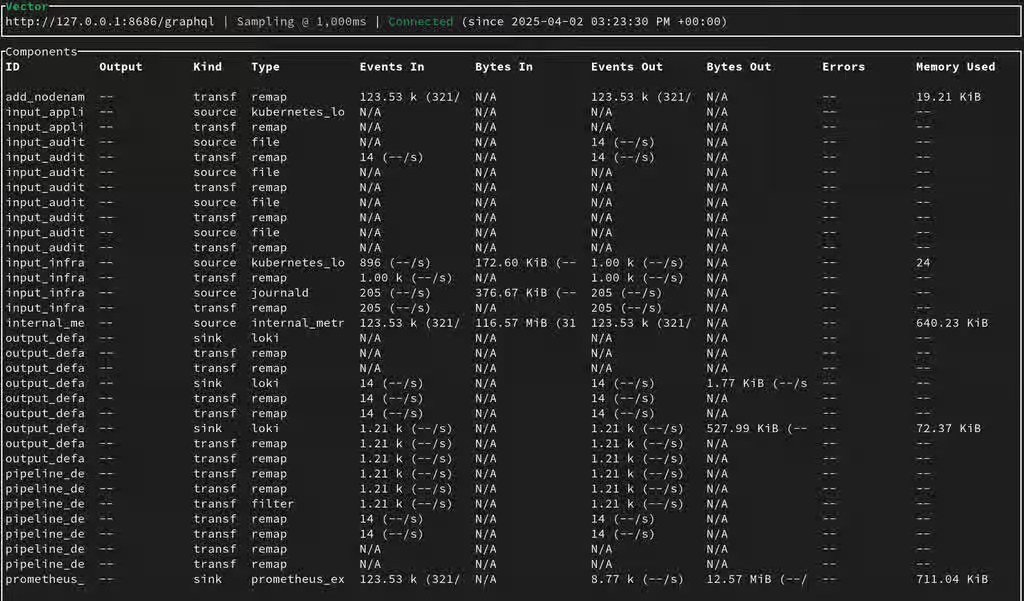
Let's enter in one of the collector pods and run the command vector top and the column Memory Used should have now values. In this example, it will be used the first collector pod:
$ pod=$(oc get pods -l app.kubernetes.io/instance=$cr -n $ns -o jsonpath='{.items[0].metadata.name}')
$ oc -n $ns rsh $pod
sh-5.1# vector top
The Memory Used metrics with vector top command run in interactive mode:
Historical data
The metrics stored in Prometheus as called:
vector_component_allocated_bytesvector_component_allocated_bytes_totalvector_component_deallocated_bytes_total
Root Cause
Starting in Vector v0.27.0, or later, of Vector, it's possible to start Vector with the option --allocation-tracing for monitoring the Vector's per component memory usage.
The first version RHOL version containing a Vector version supporting --allocation-tracing is RHOL v5.8 where the Vector version is v0.28.1.
This solution is part of Red Hat’s fast-track publication program, providing a huge library of solutions that Red Hat engineers have created while supporting our customers. To give you the knowledge you need the instant it becomes available, these articles may be presented in a raw and unedited form.