How can I tell if I have a 2013 or 2010 (or older) RHEL SKU?
Environment
Red Hat Enterprise Linux
Issue
I have been told that additional products are service level specific: included as part of Standard and/or Premium service levels and I need to find out if I have 2010 (or older) SKUs or the newer 2013 SKUs in my account
Resolution
In October 2013, Red Hat changed the way it priced and packaged Red Hat Enterprise Linux via a simpler and more flexible sales model. When you purchase Red Hat Enterprise Linux, you choose a specific product, called a "SKU" (a unique identifier for each distinct Red Hat product).
This new "2013 model" now provides the means to offer and deliver Add-Ons or additional software as part of a specific service level (for example, Standard or Premium).
Unfortunately, not all sales or renewals include the newer 2013 SKUs (for any number of reasons), and instead the older 2010 SKUs are still being purchased and used by customers. Use of the older 2010 SKUs does not enable the additional benefits provided by the newer model, and can confuse customers regarding what they think they get included as part of a subscription but do not due to the model change.
In order to determine what version SKU is in your account, you must follow the following steps:
-
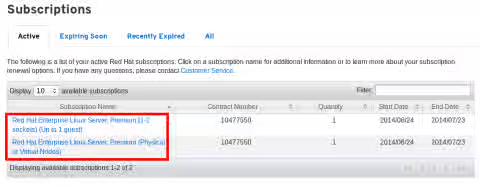
Go to the Red Hat Customer Portal via the following link, which will list all active subscriptions in your account: This content is not included.This content is not included.https://access.redhat.com/management/subscriptions
-
Select the subscription you'd like to determine the SKU for, by clicking on a subscription in the Subscription Name section. In this example, there are two active subscriptions.
-
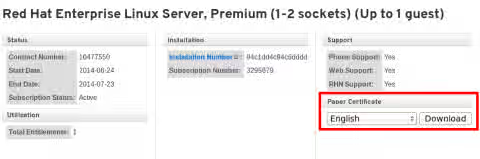
Once a subscription is selected, the individual subscription details page will be displayed. Under the Paper Certificate section, select a language and click Download. This will download a PDF to your local machine in your default downloads area.
-
Locate and open the PDF, it should contain the file name **RedhatSubscriptionCertificate.pdf"
-
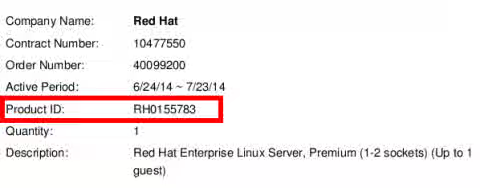
Once the the PDF is opened, locate the Product ID: section. This is the SKU, or unique identifier for the subscription purchased.
-
If the Product ID/SKU contains seven numbers after RH then this is a 2010 or older SKU. If the Product ID/SKU contains five numbers after RH then this is a 2013 SKU. In the example above, RH0155783 is a 2010 SKU, where as in the example below, RH00003 is a 2013 SKU.
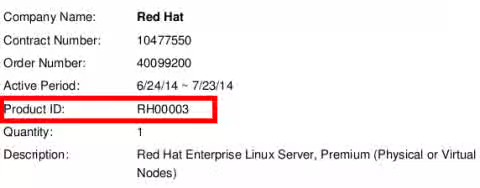
NOTE: Please disregard any additional characters after the five or seven numbers above. These are used as identifiers such as 1-year subscription renewals (RN), 3-year subscriptions (F3) or 3-year subscription renewals (F3RN) if applicable. Both 2010 and 2013 SKUs use these identifiers.
This solution is part of Red Hat’s fast-track publication program, providing a huge library of solutions that Red Hat engineers have created while supporting our customers. To give you the knowledge you need the instant it becomes available, these articles may be presented in a raw and unedited form.