Red Hat OpenStack Certification Workflow for RHEL OpenStack Platform 7
This article contains information about using the previous certification tooling and workflow to certify OpenStack plugins, drivers or OpenStack applications with RHEL OpenStack Platform 7. Existing OpenStack partners who have already commenced the certification process using the workflow documented here may continue to use this workflow for a period of 90 days.
This workflow works with Red Hat Certification application 2.0 and the latest version of the certification test suite (redhat-certification-openstack).
Red Hat will cease to support this workflow after 90 days at which point the partners will need to use the latest certification tooling and workflow.
NOTE: With the latest release of Red Hat OpenStack Certification, the certification repositories provide software packages for the latest workflow. Therefore if partners update or perform a fresh installation of packages from Red Hat certification repositories, the software packages required in the latest workflow will be installed. Existing OpenStack partners must install/upgrade to the latest version of the certification test suite (redhat-certification-openstack) and Red Hat Certification Application 2.0 to use the workflow documented in this article.
Table of Contents
- Overview
- Certification Prerequisites
- Ensure that RHEL OpenStack Platform 7 is a Supported Platform for the Plugin
- Create a Bugzilla Account and Obtain the Necessary Entitlements
- Install and Configure RHEL OpenStack Platform 7
- Ensure that your OpenStack Deployment Compulsorily Includes Network, Compute and Volume OpenStack Services
- Prepare the System-Under-Test for Certification
- Install the Required Software Packages
- Known Issues
- Certification Workflow
- Launch Red Hat Certification Web User Interface
- Run Certification Tests on the Software-Under-Test
- Submit the Test Log File for Review and Interpret Certification Results
- Re-running Red Hat OpenStack Certification Tests in Case of Failures
- Giving Feedback and Getting Help
Overview
This article is meant for engineers of Red Hat Connect for Technology Partners who need to perform the certification workflow steps to certify their plugins, drivers or OpenStack applications with Red Hat Enterprise Linux OpenStack Platform 7.
This version of the Certification Test Suite validates components that implement the OpenStack APIs for Networking, Block Storage, Object Storage, Data Processing, Identity and Image services with RHEL OpenStack Platform 7.
In addition, the Certification Test Suite certifies ISV applications which are designed to consume and implement specific OpenStack APIs and services and also ISV applications which do not consume & implement the formal documented OpenStack APIs but rely on OpenStack services.
This release of the certification also includes scenario tests. These tests log data from an OpenStack environment/deployment to validate if an OpenStack solution is deployed as per the recommended guidelines and to check how it functions in coordination with other OpenStack components. The results from these tests are used by Red Hat for providing recommendations/fixes to the partners if the situation demands.
NOTE: With the latest release of Red Hat OpenStack Certification, the certification repositories provide software packages for the latest workflow. Therefore if partners update or perform a fresh installation of packages from Red Hat certification repositories, the software packages required in the latest workflow will be installed. Existing OpenStack partners must install/upgrade to the latest version of the certification test suite (redhat-certification-openstack) and Red Hat Certification 2.0 to use the workflow documented in this article.
The following table lists the APIs and extensions for each OpenStack component/plugin supported by the certification service.
NOTE: OpenStack Block Storage backups API is not supported by the certification service.
| Supported APIs and Extensions |
|---|
| Networking |
| Block Storage |
| Object Storage |
| Data Processing |
| Identity |
| Image |
| Database |
Note: The terms OpenStack solution and software-under-test used in this article refer to OpenStack plugins, drivers or OpenStack applications.
The data/information collected by the Certification Test Suite can be classified into the following broad categories:
- Information about API usage for Networking, Block Storage, Object Storage, Data Processing, Identity and Image OpenStack services
- Configuration and diagnostics information about the test environment that includes RHEL OpenStack Platform 7, RHEL 7.x and the software-under-test
This article contains information on the following:
- The process to install the software packages that are required in the certification workflow
- The process to run certification tests on the OpenStack solution that has to be certified and submit the test logs for review
- Interpretation of the certification results and necessary follow up actions
The certification workflow allows partner engineers to provide information specific to the OpenStack solution or product that has to be certified through a Red Hat Bugzilla request. Partners can use the same Bugzilla request to interact with the certification team at Red Hat and track certification-related activities.
The partners then need to submit details of the OpenStack test environment, initiate certification test run(s) on the software-under-test and submit the test logs generated from the certification test run(s) for validation.
Certification Prerequisites
Partners must meet the following prerequisites in the order given for certification of an OpenStack solution with RHEL OpenStack Platform 7.
1. Ensure that RHEL OpenStack Platform 7 is a Supported Platform for the Plugin
Ensure that RHEL OpenStack Platform 7 is listed as a supported platform for plugins, drivers or software applications that need to be certified. Red Hat OpenStack Certification only certifies OpenStack components/solutions that are compatible to run on a specific release of RHEL OpenStack Platform for which the certification is pursued.
2. Create a Bugzilla Account and Obtain the Necessary Entitlements
Create a Red Hat Bugzilla account and send an email to openstack-certification@redhat.com with your Bugzilla username. The support team will enable the necessary permissions on the accounts, and will inform you when this process is complete.
Once the support team has fulfilled the request, verify that your Bugzilla account has the permissions for you to create a new Red Hat OpenStack certification entry better known as rhoscert_enter. In Bugzilla, click Administration > Permissions to verify that this permission is appended correctly.
You must use this Bugzilla account to create a new request for Red Hat OpenStack Certification.
To create/file a new OpenStack Certification request, complete the following steps:
- Open the link to This content is not included.Red Hat Bugzilla request page in a browser.
- In Red Hat OpenStack Certification Program Bug Entry page, complete the following steps:
- Verify that the Product field contains Red Hat OpenStack Certification
- From the Component list, select an appropriate component that you need to certify
- From the Version list, select 7.0.
- In the Summary field, enter a valid summary based on the following format:
Submit from [Vendor Name/Organization Name] for [Plugin_Name] for [Component_Name] on RHEL OpenStack Platform [Version]
Replace,
[Vendor Name/Organization Name] with the name of your organization
[Plugin_Name] with the name of the plugin/driver that has to be certified
[Component_Name] with the category of the OpenStack component that has to be certified
[Version] with the version of RHEL OpenStack Platform for which the plugin/driver has to be certified
A sample certification request summary can be: Submit from XYZ for ABC Plugin for Networking Component on RHEL OpenStack Platform 7.0 - In the Description field, provide details/answers to the questions mentioned in the Red Hat OpenStack Certification Questionnaire. The component/product details provided in the Description field should be the same as would be to any customer
Important: You must compulsorily provide answers to the questions asked in the Red Hat OpenStack Certification Questionnaire, in your bug Description field. These details help Red Hat understand your OpenStack deployment/component under test. - In the Attachment field, attach files if needed
- Click Submit Bug to submit the bug request and obtain a request number
Your certification request is submitted to Red Hat and a request number is generated for subsequent reference. The same request can be used to track all certification-related activities and for communications throughout the workflow.
Note: You need to create a Red Hat Bugzilla account and obtain the entitlement (rhoscert_enter) only once when you are pursuing the certification for the first time. Once the account and the permissions are active, you can use the same Bugzilla account for pursuing certifications for all RHEL OpenStack Platform releases.
3. Install and Configure RHEL OpenStack Platform 7
Install RHEL OpenStack Platform 7 and then install the driver or plugin that has to be certified.
Complete the following steps on your OpenStack deployment which is under test:
- Ensure you have a private (tenant) network and private subnet in your OpenStack deployment
- Create an admin tenant owned router and add the private (tenant) subnet as one of that router's interfaces in your OpenStack deployment
- Create an external (provider) network and a public subnet. Configure the external network as the above router's gateway in your OpenStack deployment
- Run the $ keystone role-create --name=Member command using the keystone command-line client to create a new keystone role named "Member".
The installation and configuration documentation for plugins, drivers or software applications that need to be certified must contain clear and concise procedures for installation and configuration of the same on RHEL OpenStack Platform 7.
After RHEL OpenStack Platform 7 is installed, read the product documentation to understand its usage and configuration.
4. Ensure that your OpenStack Deployment Compulsorily Includes Network, Compute and Volume OpenStack Services
An OpenStack deployment must compulsorily include Network, Compute and Volume OpenStack services for Red Hat scenario tests which log data from an OpenStack environment/deployment to validate if an OpenStack solution is deployed as per the recommended guidelines and to check how it functions in coordination with other OpenStack components.
Important: All the OpenStack services must be installed on the OpenStack deployment controller node on the software-under-test to run certification tests successfully. OpenStack deployment controller node hosts core services (and exposes client-facing APIs) that support major operations in the OpenStack cloud. If you used the RHEL OSP 7 director to install RHEL OpenStack Platform 7, you must compulsorily install all OpenStack services on the node where the OpenStack plugin/system-under-test is installed.
5. Prepare the System-Under-Test for Certification
Red Hat Certification channel can be used to install the packages required in the certification workflow. To enable Red Hat Certification channel, use the underlying details:
Register the System and Attach the Required Subscription
1. Run the following command to register your system using Red Hat Subscription Management:
# subscription-manager register
Type your Red Hat Network (RHN) username and your Red Hat Network (RHN) password for the username and password prompts respectively.
2. Run the following command to display the list of available subscriptions for your system:
# subscription-manager list --available
From the list of available subscriptions, search for the subscription which provides the Red Hat Certification (for RHEL Server) repository. Make a note of the subscription and its Pool ID.
Important: The Red Hat Certification (for RHEL Server) repository can be used to obtain the certification packages.
3. Run the following command to attach the subscription which provides the Red Hat Certification (for RHEL Server) repository to your system:
# subscription-manager attach --pool=[pool_ID]
Replace [pool_ID] with the Pool ID of the subscription which provides the Red Hat Certification (for RHEL Server) repository.
It is mandatory to use the correct Pool ID with the # subscription-manager attach --pool command to attach the required subscription to your system.
4. To verify the list of subscriptions your system has currently attached, at any time, run:
# subscription-manager list --consumed
Ensure that the subscription which provides the Red Hat Certification (for RHEL Server) repository is attached to your system.
Subscribe to Red Hat Certification Channel
To subscribe to Red Hat Certification channel using Red Hat Subscription Management, use the following details:
Content Name
Red Hat Certification (for RHEL 7 Server)
Content Label
rhel-7-server-cert-rpms
Run the following command to subscribe to Red Hat Certification channel:
# subscription-manager repos --enable=[reponame]
Replace [reponame] with an appropriate content label indicated above.
Note: The rhel-7-server-cert-rpms repository provides certification packages for the system-under-test configured on RHEL 7.x base operating system.
6. Install the Required Software Packages
After subscribing to Red Hat Certification channel, run the following command to install Red Hat Certification application (redhat-certification-2.0-20151117.el7) package and the Certification Test Suite (redhat-certification-openstack) package :
# yum install redhat-certification-2.0-20151117.el7 redhat-certification-openstack
The latest version of the Red Hat Certification application package is presently meant for certifications which use the new workflow.
Red Hat Certification channel provides the latest version of the Red Hat Certification application package in addition to the previous version of the package (Red Hat Certification 2.0). Therefore if partners update or perform a fresh installation of the redhat-certification package (without build information) from Red Hat Certification channel, the latest version of the redhat-certification package is installed.
Important: You must compulsorily install Red Hat Certification application (redhat-certification-2.0-20151117.el7) package and the Certification Test Suite (redhat-certification-openstack) package on your OpenStack deployment controller node on the software-under-test. All OpenStack services must also be installed on the same OpenStack deployment controller node to run the certification tests successfully. If you used the RHEL OSP 7 director to install RHEL OpenStack Platform 7, you must compulsorily install all the certification packages on the node where the OpenStack plugin/system-under-test is installed.
When you install Red Hat Certification application (redhat-certification-2.0-20151117.el7) package and the certification test suite (redhat-certification-openstack) package on the system-under-test, the required dependencies (including the sos package) are installed automatically.
Troubleshooting Tip
The latest version of the Red Hat Certification application package is presently meant for certifications which use the new workflow.
To remove the latest version of the redhat-certification package (which is not supported in this workflow) and install the correct version, run the following commands:
# rm /etc/rhcert.xml
# yum remove redhat-certification redhat-certification-backend
# yum install redhat-certification-2.0-20151117.el7
Known Issues
This release of Red Hat OpenStack Certification contains the underlying known issues:
1. Red Hat Certification web user interface can not be accessed directly on port 80 as the OpenStack Platform Dashboard service also uses port 80 by default. As a workaround, you may use any one of the following procedures to access Red Hat Certification web user interface on port 80.
Procedure: Disable the openstack-dashboard package and re-install the Red Hat Certification application (redhat-certification) package
Complete the following steps to disable the openstack-dashboard package, re-install the redhat-certification package and then configure Apache. This procedure assumes that you have successfully completed the required prerequisites.
1. Disable the openstack-dashboard package by completing the following steps:
- Display the complete list of files installed by the
openstack-dashboardpackage by running the# rpm -qi --filesbypkg openstack-dashboardcommand. Make a copy of the files displayed so that the files can be used later - Run the
# rm /etc/httpd/conf.d/15-horizon_vhost.confcommand to remove theopenstack-dashboardconfiguration file - Run the
# yum remove openstack-dashboardcommand to remove theopenstack-dashboardpackage - Run the
# service httpd restartcommand to restart the Apache HTTP server - Run the
# yum install redhat-certification-2.0-20151117.el7command to re-install theredhat-certification-2.0-20151117.el7package
2. Enable Red Hat Certification web user interface in Apache (httpd) and restart Apache.
3. Verify if Red Hat Certification web user interface is accessible on port 80 via web browser using Content from machine-ip is not included.http://machine-ip/. Replace machine-IP with the IP address of your machine. You may re-enable the OpenStack Platform Dashboard service in Apache HTTP Server after using Red Hat Certification web user interface on port 80.
Procedure: Change the port from port 80 to any other free port for the OpenStack Platform Dashboard service
Complete the following steps to change the port from port 80 to any other free port for the OpenStack Platform Dashboard service. This procedure assumes that you have successfully completed the required prerequisites.
- Change the port from port 80 to any other free port for OpenStack Platform Dashboard service by editing the /etc/httpd/conf.d/openstack-dashboard.conf file. Refer This content is not included.Product Documentation-Configure the Dashboard to Use HTTPS Section for more details.
- Restart Apache and verify if Red Hat Certification web user interface is accessible on port 80 via web browser.
2. This content is not included.BZ 1240674
The Red Hat Certification configuration file (rhcert-default.xml) in the Red Hat Certification build redhat-certification-1.0-20150622.el7.noarch (20150622), contains links to the stage instance of some certification systems.
As a consequence, partners who have the Red Hat Certification build redhat-certification-1.0-20150622.el7.noarch (20150622) installed on the system-under-test, will not be able to run certification tests and submit the test logs for validation successfully.
As a workaround, run the # rpm -qa redhat-certification command to check the version of Red Hat Certification installed on the system-under-test. If the output of the # rpm -qa redhat-certification command is redhat-certification-1.0-20150622, complete the following steps to install the appropriate build of the redhat-certification package:
1. Run the # rm /etc/rhcert.xml command to delete the old version of the redhat-certification configuration file.
2. Run the # yum remove redhat-certification command to remove the old version of the redhat-certification package.
3. Run the # yum install redhat-certification-2.0-20151117.el7 command to install the appropriate version of the redhat-certification package.
The appropriate version of the redhat-certification package is installed on the system-under-test.
Important: You must compulsorily install or upgrade to the appropriate version of the redhat-certification package before proceeding with the certification workflow steps.
3. This content is not included.BZ 1179199
In Red Hat Certification web user interface, in the Hosts Tab, the status of some hosts occasionally displays a “timed out” status because the connection between Red Hat Certification server and the server listener process terminates abruptly.
4. The advanced services in the Networking service namely FWaaS (Firewall-as-a-Service), LBaaS (Load-Balancer-as-a-Service) and VPNaaS (VPN-as-a-Service) have been split out into independent services and have their own independent repositories. As a consequence, Tempest tests around the advanced services are broken and will thereby fail.
5. This content is not included.BZ 1179200
In Red Hat Certification web user interface, in the Testing Page, the Attachments link does not immediately start the download of the attached test log file and the test log file download is initiated after some time.
6. This content is not included.BZ 1077162
VPNaaS (VPN-as-a-Service) Neutron extension is not supported on RHEL OpenStack Platform 7 at this time.
Certification Workflow
The following certification workflow describes the procedures which the partner engineer needs to complete in the order given for certification of an OpenStack deployment/system-under-test with RHEL OpenStack Platform 7:
1. Launch Red Hat Certification Web User Interface
Summary
You can run certification tests on the software-under-test and provide OpenStack deployment details using Red Hat Certification web user interface.
Red Hat Certification is a client-server application in which Red Hat Certification web user interface (client application) interacts with partner’s OpenStack deployment (server system wherein the server listener process runs) to trigger the Certification Test Suite and perform other tasks.
Important: It is mandatory to install Red Hat Certification application (redhat-certification) package and the Certification Test Suite (redhat-certification-openstack) package on your OpenStack deployment controller node on the software-under-test. For more information on installing the required packages, see Certification Prerequisites in this article.
The current version of Red Hat Certification application provides a web user interface (client application) and a command-line interface. Partners need to use the web user interface to run the Certification Test Suite (redhat-certification-openstack) and provide the deployment details.
The command-line interface can be run in the foreground along with the web user interface to check the progress of the test run after running the certification test suite. To run the command-line interface in the foreground along with the web interface, run the # rhcert-backend server daemon command.
Note: Before using the following procedure to launch Red Hat Certification web user interface, refer “Known Issues” in this article for more details.
Procedure: Launch Red Hat Certification Web User Interface
Prerequisites: Certification Prerequisites
To launch Red Hat Certification Web User Interface, complete the following steps:
1. Run the following command to start Red Hat Certification back-end server (server system) in “high” debug mode:
# rhcert-backend server start --debug=high
The above command starts Red Hat Certification back-end server and enables automatic debugging of the highest level. This mode aids quick problem resolution and recovery.
Note: Red Hat Certification back-end server can be started in three debug modes namely high, medium and low. However, it is mandatory to start the server in “high” debug mode for the desired level of debugging.
2. Launch Red Hat Certification web user interface in a browser using the IP address of your system-under-test:
Content from machine-ip is not included.http://machine-ip/
Replace machine-IP with the IP address of your machine.
2. Run Certification Tests on the Software-Under-Test
Summary
After launching Red Hat Certification web user interface, you need to run certification tests on the software-under-test.
1. If you need to certify an OpenStack plugin/driver that consumes & implements the formal documented OpenStack APIs, you must provide OpenStack deployment details, run the certification tests and then edit the auto-generated file for Tempest (tempest.conf).
You can provide OpenStack deployment details and edit the auto-generated configuration file for Tempest (tempest.conf) either using Red Hat Certification web user interface or by editing the respective configuration files directly via Red Hat Certification CLI.
After providing the required details, you need to run Tempest API tests (openstack/openstack_verify) on the software-under-test via Red Hat Certification web user interface.
2. If you need to certify an application which does not consume & implement the formal documented OpenStack APIs, but relies on OpenStack services, you need not provide OpenStack deployment details and run Tempest API tests. You can directly run a different series of tests called openstack_platform/rhel_verify via Red Hat Certification web UI.
To submit deployment details of the software-under-test (for an OpenStack plugin/driver) and trigger automated certification tests on the software-under-test (for an OpenStack plugin/driver or other applications), complete the following procedures in the order given.
Procedure: Open Red Hat Certification Testing Page
Prerequisites: Launch Red Hat Certification Web User Interface
Red Hat Certification Testing Page provides the means to trigger the certification test suite run on the software-under-test.
To launch Red Hat Certification Testing Page, complete the following steps:
- On Red Hat Certification web user interface, click Add Products.
- Fill the Add Products form using the following details:
- From the Products list, select create product on this server
- From the Ecosystem list, select OpenStack
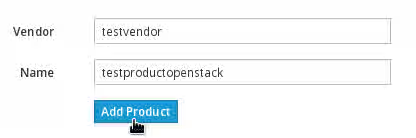
Click Next. - Type the Vendor Name in the Vendor field and the product name in the Name field. Click Add Product.
- In the Certification Page, click Add Certifications.
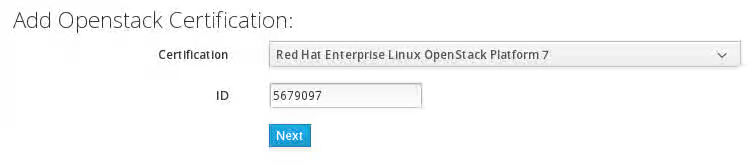
- Select Red Hat OpenStack Certification from the Certification Program list and then click Next.
- Select Red Hat Enterprise Linux OpenStack Platform 7 from the Certification list and type the ID of the OpenStack certification request created in Bugzilla in the ID field. Tip: Refer your designated email account for the ID of the OpenStack certification request created in Bugzilla.
- From the Version list, select the relevant version of RHEL on which the system-under-test is configured and then click Add. For example, if the system-under-test is configured on RHEL 7.2, select RHEL 7.2 from the Version list.
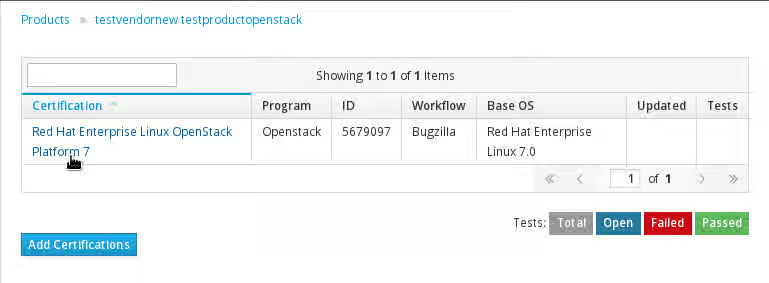
A certification entry is created for the system-under-test on Red Hat Certification Application. - Click the certification entry from the Certification Table.
- In the Testing Page, click System.
- In the Select Host Page, select the host or hostname of the system-under-test and click Test.
Result
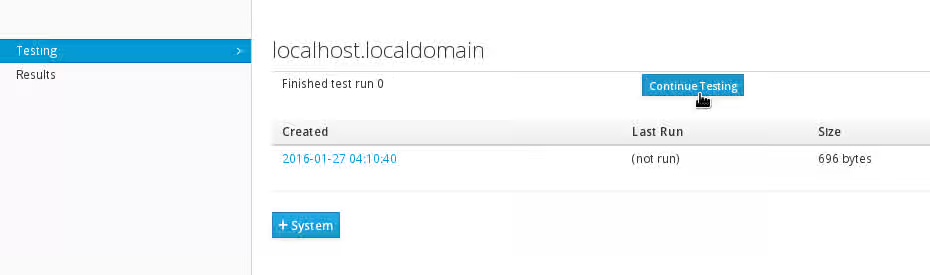
The Testing Page opens and a certification test plan is created for the system-under-test. After the certification test plan run is complete and the test plan is ready, the status column displays a “Finished test run” status and a Continue Testing button.
To run certification tests on the system-under-test, refer Procedure: Edit the Mandatory Configuration files and Run the Certification Tests (For OpenStack Components/Applications which Implement the Formal Documented OpenStack APIs) or Procedure: Run the Certification Tests (For Other Applications), whichever is applicable.
Procedure: Edit the Mandatory Configuration files and Run the Certification Tests (For OpenStack Components/Applications which Implement the Formal Documented OpenStack APIs)
Prerequisites: Launch Red Hat Certification Web User Interface
To edit the mandatory configuration files and then run the certification tests, complete the following steps. This procedure assumes that the OpenStack deployment-under-test/system-under-test consumes and implements the formal documented OpenStack APIs.
-
Navigate to the /etc/redhat-certification-openstack directory and list the files in the directory. The /etc/redhat-certification-openstack/test_config.json.sample file is a representative sample file which may be referred to provide OpenStack deployment details. The /etc/redhat-certification-openstack/tempest.conf.sample file is a representative sample file which may be referred while editing the auto-generated configuration file for Tempest.
Note: The /etc/redhat-certification-openstack directory also contains Rally configuration files (/etc/redhat-certification-openstack/rally_deployment.json.sample, /etc/redhat-certification-openstack/rally_tasks_neutron.json.sample and /etc/redhat-certification-openstack/rally_tasks_cinder.json.sample) which are meant for configuring & running Rally scenario tests for certifications against RHEL OpenStack Platform 8. These files should not be edited. -
Run the
# cp test_config.json.samplecommand to copy the test_config.json.sample file in the same directory (i.e. /etc/redhat-certification-openstack) and then rename the copied file [test_config.json.sample (copy)] to test_config.json. This step creates a renamed file called test_config.json which can be edited for deployment specific details. The /etc/redhat-certification-openstack/test_config.json file needs to be created just once when running the certification tests for the first time on a software-under-test/plugin. The /etc/redhat-certification-openstack/test_config.json file can be used as-is (for multiple test runs for a plugin) or edited as needed (for certifying a new plugin).
Note: The /etc/redhat-certification-openstack/test_config.json.sample file is a representative sample file and must not be edited directly. -
Open the /etc/redhat-certification-openstack/test_config.json file with your default editor and edit the file as follows:
- Replace Content from your_openstack is not included.http://your_openstack:5000/v2.0 with your keystone authentication URL that allows access to service endpoints
- In the "admin_username": "admin" parameter, replace “admin” with the OpenStack username of a user with admin role
- In the "admin_password": "password" parameter, replace “password” with the corresponding OpenStack password of the user with admin role
- In the “admin_tenant_name": "admin” parameter, replace “admin” with the OpenStack admin tenant name against which you need to run certification tests
Note: You must use administration/admin keystone credentials in the /etc/redhat-certification-openstack/test_config.json file. - In the "plugin_type": "blockstorage|networking|dataprocessing|objectstorage|image|database|identity" parameter, replace blockstorage|networking|dataprocessing|objectstorage|image|database|identity with the classification/category of the plugin that needs to be certified from the blockstorage|networking|dataprocessing|objectstorage|image|database|identity list
- For the “supported_apis_and_extensions" parameter, type the APIs/Extensions supported by your plugin type from the list displayed. Remove the names of the APIs/Extensions that are not supported by your plugin
Save the /etc/redhat-certification-openstack/test_config.json file with the latest changes.
The API/Extension names collected in this step are meant for certification purposes only and have no relation to the auto-generated configuration file for Tempest (/etc/redhat-certification-openstack/tempest.conf)
The ”enable_scenario_tests” parameter in the /etc/redhat-certification-openstack/test_config.json file is used to enable/disable Rally scenario tests for certifications against RHEL OpenStack Platform 8 and should NOT be edited.
-
Open Red Hat Certification Testing Page using the procedure This content is not included.Open Red Hat Certification Testing Page.
-
In the Testing Page, click Continue Testing.
-
In the Testing Page, click Run Interactive next to the openstack/openstack_verify link. Note: openstack/openstack_verify link is for running the Tempest API tests for OpenStack solutions that consume and implement the documented OpenStack APIs.
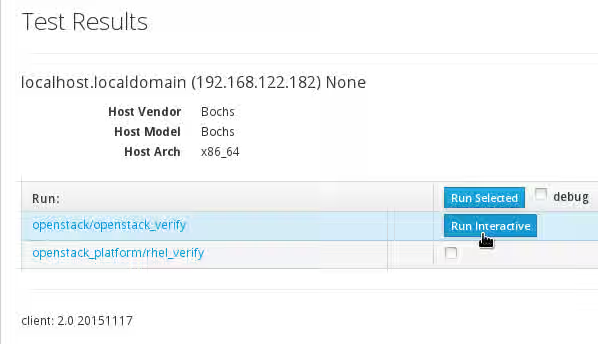
This step automatically generates a custom configuration file for Tempest (/etc/redhat-certification-openstack/tempest.conf) based on the deployment details which you provided in the /etc/redhat-certification-openstack/test_config.json file. -
It is mandatory to edit the auto-generated configuration file for Tempest (/etc/redhat-certification-openstack/tempest.conf) to run specific tests successfully. Complete the following steps to configure the system-under-test and then edit the /etc/redhat-certification-openstack/tempest.conf file:
-
For Networking Tests: To successfully run administration tests for floating_IP OpenStack networking API, run the
$ keystone role-create --name=Membercommand using the keystone command-line client to create a new keystone role named "Member" -
For Block Storage Tests: Block Storage backup tests are skipped in the certification test suite run and are not required for a successful certification. To successfully run Block Storage tests or Block Storage multiple back-end tests, complete the following steps:
- Run the following commands to create volume type in your OpenStack deployment for both back-ends and then link the volume types to back-end names in extra-specifications:``` $ cinder --os-username admin --os-tenant-name admin type-create lvm $ cinder --os-username admin --os-tenant-name admin type-key lvm set volume_backend_name=extra-specification ``` Replace **extra-specification** with the name of your extra-specification.-
Open the /etc/redhat-certification-openstack/tempest.conf file with your editor and scroll to the [volume] section. Add the following parameters under the [volume] section based on the output of the
# cinder service-listcommand:backend1_name = BACKEND_1 backend2_name = BACKEND_2 [volume-feature-enabled] multi_backend = True
-
Replace BACKEND_1 and BACKEND_2 with back-end names.
-
Open the /etc/redhat-certification-openstack/tempest.conf file with your editor and scroll to the [auth] section. Add the "allow_tenant_isolation = true" parameter under the [auth] section
-
For Object Storage Tests: To successfully run Object Storage tests, complete the following steps:
-
Run the following commands using keystone command-line client to create an alternate user and tenant named alt_{your_user_name} and alt_{your_tenant_name} respectively:
 $ keystone user-create --name=alt_{your_user_name} --pass={keystone password} --email={keystone email}
 $ keystone tenant-create --name=alt_{your_tenant_name}
In the alt_{your_user_name} and alt_{your_tenant_name} parameters, replace {your_user_name} and {your_tenant_name} with a new username and tenant name respectively. Replace {keystone password} and {keystone email} with keystone authentication credentials.
-
-
Open the /etc/redhat-certification-openstack/tempest.conf file with your editor and scroll to the [Identity] section. Add the following values for some existing parameters like alt_username, alt_password and alt_tenant_name:
alt_username = altusername
alt_password = altpassword
alt_tenant_name = alttenantname
Replace altusername, altpassword and alttenantname with the alternate username, password and tenant name created in the preceding step.
- For Data Processing Tests: To successfully run Data Processing tests, complete the following steps:
- Open the /etc/redhat-certification-openstack/tempest.conf file with your editor scroll to the [data_processing] section
- Add the catalog_type = data-processing flag under the [data_processing] section
Important: You need to edit the configuration parameters for Tempest based on the OpenStack service for which you need to certify. The auto-generated/default configuration file for Tempest (tempest.conf) is a representative sample only and must be edited as described above to run specific tests successfully.
-
Result
The configuration file for Tempest (tempest.conf) is edited as required to run specific tests like Networking (floating_IP), Block Storage, Object Storage and Data Processing tests successfully.
The Certification Test Suite (redhat-certification-openstack) is executed automatically and certification tests are run on the software-under-test.
Block Storage backup tests are skipped in the certification test suite run and are not required for a successful certification
Note: After the Certification Test Suite is executed it takes around 5-10 minutes for the completion of the certification tests. Red Hat Certification web user interface remains as-is and does not show any progress during this period. You must therefore wait for completion of the test run.
The Certification Test Suite run encompasses runs of Red Hat sosreport tool which collects configuration and diagnostics information about the system, platform and the software-under-test.
During the certification test run, the Certification Test Suite collects and logs data about the software-under-test and the entire system infrastructure. The data/logs collected include the following:
- Hostnames and IP addresses of the machines on the software-under-test
- API calls and system calls for the services that are being tested
- Configuration files required to set up and deploy OpenStack services
Procedure: Run the Certification Tests (For Other Applications)
If you need to certify an application which does not consume & implement the formal documented OpenStack APIs, but relies on OpenStack services, you can skip the Tempest API tests and directly run the other series of tests known as openstack_platform/rhel_verify.
To directly run certification tests on an application which does not implement the formal OpenStack APIs, complete the following steps. This procedure assumes that the system-under-test does not consume and implement the formal documented OpenStack APIs.
- Open Red Hat Certification Testing Page using the procedure This content is not included.Open Red Hat Certification Testing Page.
- In the Testing Page, click Continue Testing.
- In the Testing Page, select the checkbox next to the openstack_platform/rhel_verify link and then click Run Selected.
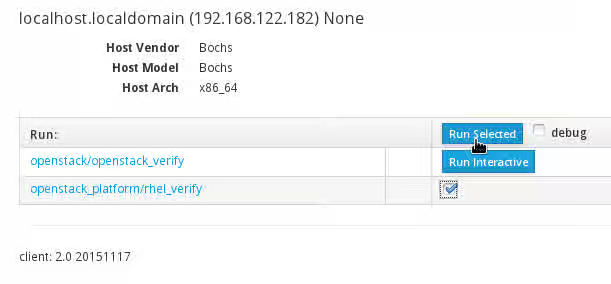
Result
The Certification Test Suite (redhat-certification-openstack) is executed automatically and certification tests are run on the software-under-test. The Certification Test Suite run in this case mainly encompasses a run of the Red Hat sosreport tool which collects configuration and diagnostics information about the system, platform and the software-under-test.
To verify the status of the certification test run after following any of the above procedures, complete the following steps:
- In Red Hat Certification web user interface, click the Server Settings tab.
- In the Registered Systems table, the Status column relevant to the host/system-under-test displays the status of the certification test run on the host.
After the certification test run is complete, Red Hat Certification web user interface stores and displays the test logs.
3. Submit the Test Log File for Review and Interpret Certification Results
Summary
The test log file collected during the certification test run must be submitted to Red Hat certification services for validation. You can use Red Hat Certification web user interface to view the test log file and perform various actions on the logs including submission of the test log file to Red Hat certification services for validation.
Important: You can choose to save the test log file on your local machine or perform other actions (save, delete, download) but it is mandatory to submit the test log file to Red Hat certification services for the certification of an OpenStack solution or product.
To view the test log file collected from the certification test run and perform an appropriate action on the log file, complete the following procedure.
Procedure: Submit the Test Log File for Validation
Prerequisites: Run Certification Tests on the Software-Under-Test
To submit the test log file for validation using Red Hat Certification web user interface, complete the following steps:
- Click the Red Hat Certification tab.
- From the Products Table, click the name of the product/system-under-test.
- From the Certification Page, click the relevant certification entry. This opens the Testing Page.
- From the action list next to the latest timestamped results link (or the link for the relevant test run), select an action and proceed with the consequent steps based on the following details:
- To submit the test log file to Red Hat certification services, select Submit. In the Submitting file Page, type your Bugzilla login username in the Catalog User Name field and type your Bugzilla password in the Catalog Password field. When you are done, click Submit
- To close the test log file and store the logs generated from the subsequent test runs in a new log file, select close. In the Close Test Results Page, click Close. To return to the previous page, click Cancel
- To save the test log file to a different Red Hat Certification server, select save. In the Save Test Results Page, in the Server Hostname field, type the hostname of the Red Hat Certification server where-in you need to transfer the log file.
Warning: If you transfer/move the test log file to a different Red Hat Certification server, you need to submit the test log file to Red Hat certification services from that server. - To download the test log file to your local machine, select download.
- To delete the test log file from the server, select delete. In the Delete Test Results Page, click Delete. To return to the previous page, click Cancel
Result
The Submit action in the above procedure submits the corresponding test log file to Red Hat certification services. The test log file is validated by Red Hat certification services and the validated test results are attached in your Bugzilla request in the form of comments.
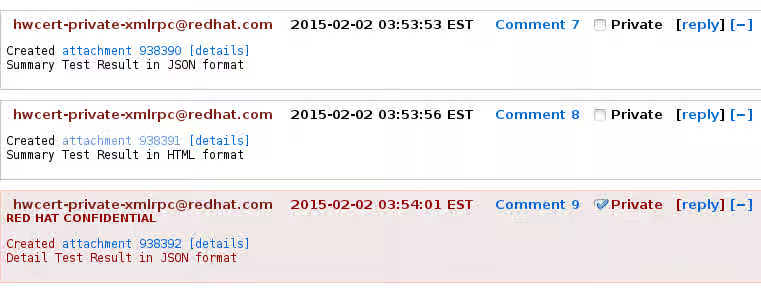
The Summary Test Result in HTML format attachment opens an OpenStack Certification Report. The report highlights how the OpenStack solution has fared on a set of Red Hat certification parameters with a PASS/FAIL status for each parameter. Each parameter which indicates a FAIL status can be further expanded for a detailed description of the failure cause(s).
The Summary Test Result in JSON format attachment opens a brief technical summary report of the certification test suite run and the Detail Test Result in JSON format attachment opens a detailed technical report on the certification test suite run.
Re-running Red Hat OpenStack Certification Tests in Case of Failures
If the OpenStack certification tests fail, you must perform the following steps to run the tests again and complete the certification process:
-
Install RHEL OpenStack Platform 7 from scratch again using the product documentation and then complete the following steps on your OpenStack deployment which is under test:
- Ensure you have a private (tenant) network and private subnet in your OpenStack deployment
- Create an admin tenant owned router and add the private (tenant) subnet as one of that router's interfaces in your OpenStack deployment
- Create an external (provider) network and a public subnet. Configure the external network as the above router's gateway in your OpenStack deployment
- Run
$ keystone role-create --name=Membercommand using the keystone command-line client to create a new keystone role named "Member"
-
Run the
# yum remove redhat-certification-2.0-20151117.el7 redhat-certification-backend-2.0-20151117.el7command and then the# rm /etc/rhcert.xmlcommand to remove theredhat-certification-2.0-20151117.el7package, theredhat-certification-backend-2.0-20151117.el7package and the associated configuration files from the system-under-test. Install Red Hat Certification application from scratch. Ensure that you install the appropriate build of theredhat-certificationpackage (redhat-certification-2.0-20151117.el7). Check the topic Known Issues for more information. -
Run the following commands to start Red Hat Certification back-end server afresh along with the listener:
 # rhcert-backend server stop
 # rhcert-backend clean all
# rhcert-backend server start --debug=high
Answer "yes" to the automatic prompts that are generated when you run the
# rhcert-backend clean allcommand. -
Launch Red Hat Certification web user interface in a browser using Content from machine-ip is not included.http://machine-ip/, replacing machine-IP with the IP address of your machine.
After launching Red Hat Certification web user interface, refer Run Certification Tests on the Software-Under-Test and Submit the Test Logs for Review and Interpret Certification Results to re-run certification tests on the OpenStack deployment which is under test and submit the test logs for review respectively.
Note: For details on step 2 and step 3 in the above procedure, refer “Certification Prerequisites” and “Launch Red Hat Certification Web User Interface” in this article respectively. Additionally, ensure that you provide a list of all the APIs supported by your driver/plugin while completing the procedures in the topic "Run Certification Tests on the Software-Under-Test"
Giving Feedback and Getting Help
To submit feedback regarding Red Hat OpenStack Certification, raise a new Red Hat Bugzilla request against the product Red Hat Certification Program and component redhat-certification providing a description of your feedback or problem(s) that you encountered in the Description field.
If you need any enhancements in the content covered in this article, you can raise a new Red Hat Bugzilla request against the product Red Hat Certification Program and component User Guide providing name of the topic(s) which must be extended in the Description field.