Satellite 6.2 Feature Overview: Lazy Sync
Overview
Satellite 6.2.3 introduces the "Lazy Sync" functionality, which provides users additional flexibility when downloading content.
Lazy sync provides a series of new download policies, which govern how content is downloaded.
Support Status
- Lazy Sync was/is included in earlier Satellite 6.2 releases (6.2.0 through 6.2.2) as a Technology Preview
- With Satellite 6.2.3, Lazy Sync will transition to Fully Supported.
Requirements
- Satellite 6.2.3 or newer RHBA-2016:2108 & RHBA-2016:2109
How does Lazy Sync work?
Lazy Sync introduces additional download policies:
| Download Policy | Details |
|---|---|
| Immediate | The default download policy for repositories. When using this policy, all content is downloaded before publishing the repository. |
| Background | A download policy that actively retrieves content units in the background after a publish has been performed. |
| On-Demand | A download policy that only saves a content unit locally after a client has requested that content unit. |
The background and on-demand policies are what are known as deferred download policies, meaning that the process of downloading content is completed after the repository is published. This allows the repository to be made available and used elsewhere (such as creating Content Views and Provisioning systems) without necessarily having all of the content downloaded.
Lazy Sync Architecture (from Content from docs.pulpproject.org is not included.Pulp's User Guide)

Deferred downloading relies on three services:
- A reverse proxy that terminates the TLS connection. In this guide Apache httpd is configured to act as the reverse proxy, but any reverse proxy that is capable of running a WSGI application should work. This service proxies the requests to the next service, a caching proxy server.
- A caching proxy server. In this guide Squid is used, but a simple Varnish configuration is also provided. This service de-duplicates client requests and caches content for Pulp to eventually save to permanent storage. It proxies requests on to the last service, the pulp_streamer
- The pulp_streamer is a streaming proxy service that translates the files in Pulp repositories to their locations in upstream repositories. This service interacts with Pulp’s core services to determine where the content is located and how to download it. It streams the content back to the client through Squid and Apache httpd as it is downloaded.
Benefits of Lazy Sync
As a Satellite user, Lazy Sync assists deployments in the following manner:
Leveraging the background policy
- Allowing a user to use a newly synced repository, while the content downloads in the background. The enables the administrator quicker setup and deployment, while still downloading all of the content such that the Satellite has it permanently. This is useful for initial deployments as well as evaluations where it may not be desired to download all of a repository's content.
Leveraging the on-demand policy
- Allowing a user to only store content requested by the clients on the Satellite & Capsule. This means that the disk space required by a Satellite or Capsule can be significantly reduced.
Comparison between immediate & on_demand policies
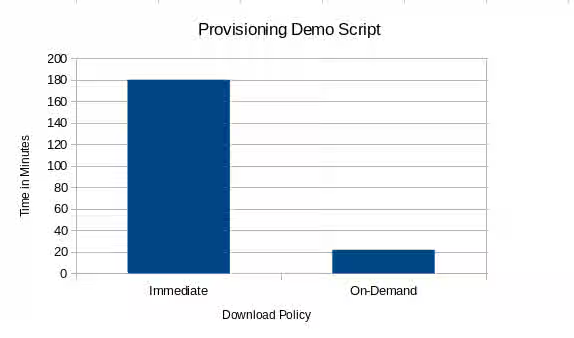
Leveraging Hammer, the Satellite CLI, the following workflow was used to build and provision systems via Satellite 6 to compare the immediate and on_demand models:
- Import subscription manifest.
- Enable & Synchronize the RHEL 7Server, 7.2 Kickstart, Satellite 6.2 Tools & Extras repositories
- Create 5 Lifecycle environments (Crash, Dev, QA, Staging, Production)
- Create one content view with the above repositories and promote it to ALL of the lifecycle environments.
- Create a RHEL7 Hostgroup with Nested Hostgroups for each of the 5 lifecycle environments listed above.
- Setup provisioning artifacts, create a compute resource and provision a system.
This workflow was designed to simulate a user setting up a new Satellite server and configuring one Operating system to be provisioned.
In our testing of this workflow, we've observed the end-to-end time to complete this workflow has been reduced from between 180-240 minutes to 22-26 minutes.
Working with Lazy Sync in Satellite 6.2.3
Repositories which support the new Download policies
Not all repository types support the new download policies. Only the yum/RPM repository types do. Repositories of type docker, file, & puppet do NOT support the background or on_demand download policies
Notes for disconnected users.
Disconnected users, whose Satellite can not reach cdn.redhat.com, may not wish to leverage the on_demand download policy. As the content that is used to populate a disconnected Satellite may not always be available, it may be advisable to only use the background or immediate download policies unless it can be guaranteed that the content used to populate the Satellite is always available.
Upgrade Notes
The default policy for Satellite 6.2 is Immediate. The default policy for new repositories can be changed by
- In the UI, Administer -> Settings -> Katello -> default_download_policy
- Via hammer, such as
hammer settings set --name default_download_policy --value immediate
Note, this does not retroactively change any existing repositories.
Changing a repositories download policy.
To change an existing repository to use a new download policy, this can be done:
- Via the UI, Content -> Products -> $PRODUCT_NAME -> $NAME_OF_REPOSITORY -> Download Policy
- via hammer, such as
hammer repository update \
 --organization Red Hat \
 --product 'Red Hat Enterprise Linux Server' \
 --name 'Red Hat Satellite Tools 6.2 for RHEL 7 Server RPMs x86_64' \
 --download-policy on_demand