Red Hat Chat Support
Red Hat has added chat as an additional support channel. This article describes support features and answers frequently asked questions.
Scope of Support
Who is eligible for chat with support?
Chat with support is available to all customers with an active support contract. Customers with a self support subscription can initiate a chat with support session; however, only issues related to the Customer Portal, Subscription Management, or entitlements will be supported.
Note: the "Chat " icon is enabled only if the customer has valid support entitlements.
What hours is chat with support available?
Chatbot is available 24x7 for English language support.
Chat with a support engineer is available during the customer's normal weekday (Monday-Friday) business hours. Chat with support engineers is not available during weekends.
Note: English chat support is available from 00:30 (GMT) on Mondays.
What is the SLA?
There are no formal SLAs. Red Hat chat with support engineers will have the goal of accepting new chat requests within 1 minute and provide ongoing responses within 2 minutes.
What languages are supported?
By Chatbot: English
By Chat Support Engineers: English and Japanese
Troubleshooting
Chat Requirements
Privacy add-ons installed on browser should be turned off
Chat support code may be identified as a tracking or advertising code by browsers extensions. On browser private mode, by default, extensions are not enabled if the user hasn't enabled them. If you don’t have any privacy add-ons enabled on browser private mode, please try to open the support chat in private mode. Otherwise, please review privacy add-ons installed on your browser.
For four major browsers, we have included instructions link to manage adds-on relevant to each browser:
FireFox: Content from support.mozilla.org is not included.Disable or remove Add-ons
Chrome: Content from support.google.com is not included.Install and manage extensions
Safari: Content from support.apple.com is not included.Get extensions to customize Safari on Mac
Microsoft Edge: Content from support.microsoft.com is not included.Add, turn off, or remove extensions in Microsoft Edge
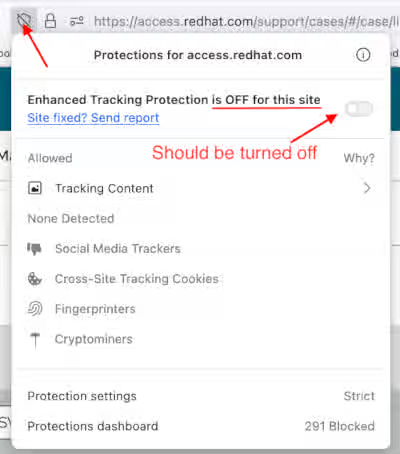
FireFox “Enhanced Tracking Protection” should be turned off
Enhanced Tracking Protection in Firefox automatically blocks trackers. Unfortunately, it recognizes support chat as a tracking code. In order to turn off enhanced protection, you need to visit access.redhat.com, click on the shield icon on the address bar and on the opened window, uncheck enhanced protection.
More Information:
Content from support.mozilla.org is not included.Content from support.mozilla.org is not included.https://support.mozilla.org/en-US/kb/enhanced-tracking-protection-firefox-desktop
Domains used by chat support should be added to network proxy allowlist
For further security, some organizations deny access to all requests but an explicit allowlist of domains. If your organization applies this auditable control, you need to ask your IT to add these domains to allowlist:
Content from *.salesforceliveagent.com is not included.https://*.salesforceliveagent.com
Content from *.service.force.com is not included.https://*.force.com
Content from gss.my.salesforce-sites.com is not included.Content from gss.my.salesforce-sites.com is not included.https://gss.my.salesforce-sites.com/
Cannot Connect to Chat Support
Chat support code is blocked
We use third party code to provide chat support. The chat support code is hosted on a domain other than redhat.com and may be blocked by network proxy or by privacy add-ons installed on browsers. For further information and the actions needed, please check these two items on chat requirements list:
- Domains used by chat support should be added to network proxy allowlist
- Privacy add-ons installed on browser should be turned off
Chat support code identified as a tracking or advertising code on browser
In order for chat support to be displayed on browsers, chat code needs to be added to browser code when the user clicks on the chat bubble. FireFox and some privacy add-ons block this action as they assume code is a tracking or advertising code. For further information and the actions needed, please check these two items on chat requirements list:
- FireFox “Enhanced Tracking Protection” should be turned off
- Privacy add-ons installed on browser should be turned off
Chat Support temporary out of service
If in the past you could access chat support successfully and nothing changed on your side, then we might have a temporary outage. Please try again later or report the issue to us by clicking on the next item.
How do I report a technical issue with chat with support?
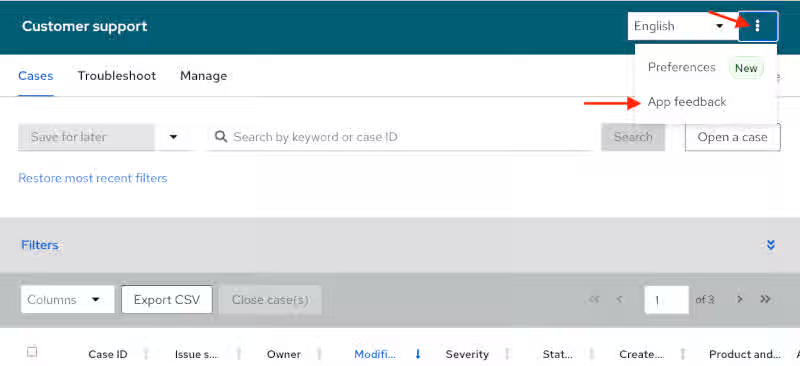
You can contact Red Hat support or simply send us feedback using app feedback form by clicking on top right three dots icon then select App feedback:
Frequently Asked Questions
How do I initiate a chat?
One can initiate a chat by clicking the chat icon ( ) in the bottom right corner of one's This content is not included.support case list or in that same spot when viewing a support case.
How do I get a copy of the chat transcript?
The chat transcript will be displayed in the chat window for the customer to copy and paste after the chat session has ended. Also, if the chat is associated with a web ticket, the chat with support engineer will copy and paste the chat transcript into a case comment.
Can I chat with the engineer working on my existing support ticket?
The chat with support channel will be monitored by a dedicated team of chat support engineers who may not monitor other support channels; therefore, the expectation is that customers will not be able to chat with the Engineer working on an existing support ticket.
Can I talk to a chat agent directly or anytime during a chat conversation?
Yes, at any time you can click on the hamburger menu next to the free text area and click on ‘Chat with an agent’.
Where can I learn more about chatbot?
Please click on the [link](https://access.redhat.com/node/6994401) to know more about chatbot.