How do I access Red Hat Enterprise Linux 6 Extended Life Cycle Support (ELS) content after Red Hat Enterprise Linux 6 transitions to Extended Life Phase?
Issue
- How do I access Red Hat Enterprise Linux 6 Extended Life Cycle Support content after Red Hat Enterprise Linux 6 transitions to Extended Life Phase?
- For information on how to access Red Hat Enterprise Linux 6 Extended Life Cycle Support content after the initial phase of Red Hat Enterprise Linux 6 ELS ends on June 30, 2024, see KCS Article 7075944.
Environment
- Red Hat Enterprise Linux Server 6
- Red Hat Subscription Manager
- Red Hat Satellite 6
- Red Hat Update Infrastructure
Resolution
On November 30, 2020, Red Hat Enterprise Linux 6 transitions from Maintenance Life Cycle 2 phase to Extended Life phase. You can read more about product life cycles here and the "FAQ: Red Hat Enterprise Linux 6 reaches End of Maintenance Phase and transitions to Extended Life Phase". At this time, Red Hat Enterprise Linux 6 content will continue to be accessible in the same way as it always has been via Red Hat Subscription Manager (RHSM), Red Hat Satellite 6, and Red Hat Update Infrastructure (RHUI)*.
If you have purchased the Red Hat Enterprise Linux Extended Life Cycle Support (ELS) Add-On offering, you will receive continued updates for Red Hat Enterprise Linux 6 via a new repository. Follow these steps to access Red Hat Enterprise Linux 6 Extended Life Cycle Support (ELS) content.
Quick Links
- Enabling Red Hat Enterprise Linux 6 ELS content with Satellite 6
- Enabling Red Hat Enterprise Linux 6 ELS content with Red Hat Update Infrastructure (RHUI)
- Connecting Red Hat Enterprise Linux 6 systems to ELS content
- Using RHEL 6 Container Images with Red Hat Enterprise Linux 6 Extended Life Cycle Repositories
Enabling Red Hat Enterprise Linux 6 Extended Life Cycle content with Satellite 6
In the case of Satellite 6, it is first required to add a subscription to your subscription manifest which provides access to the RHEL 6 ELS repositories. This may be performed from within the Satellite 6 webUI or via the Customer Portal.
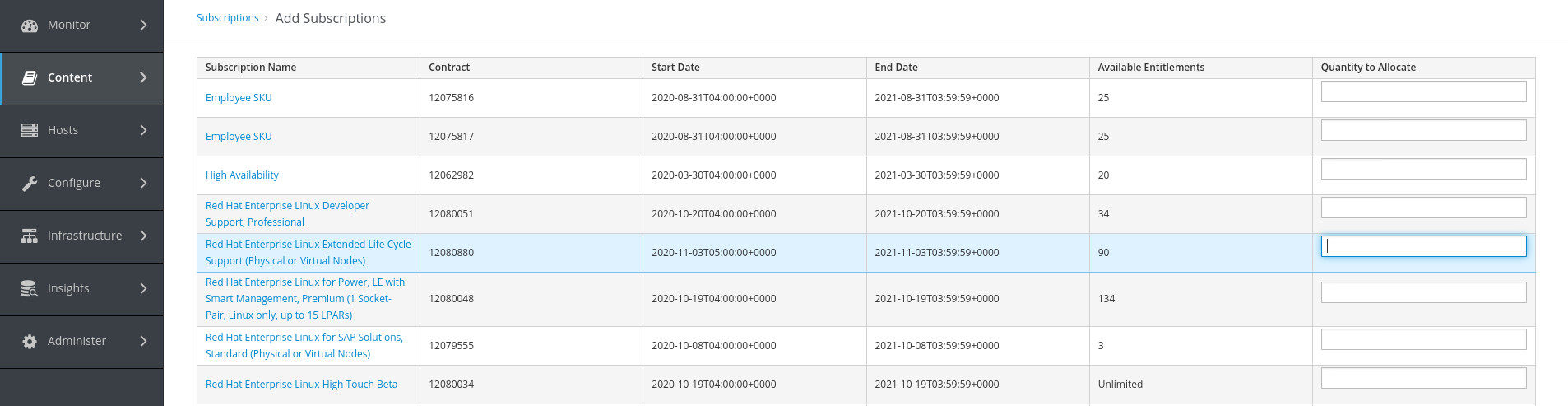
Attach a RHEL Extended Life Cycle Subscription to the Manifest via the Satellite webUI
- Navigate to the Content -> Red Hat Subscriptions page
- Click Add Subscriptions
- Locate the Red Hat Enterprise Linux Extended Life Cycle Support subscription and edit the Quantity to Allocate to reflect the number of entitlements you wish to attach to your manifest
- Click Submit
Example (click to enlarge)
Attach a RHEL Extended Life Cycle Subscription to the Manifest via the Customer Portal
- Navigate to the This content is not included.Customer Portal - Subscription Allocations page
- Click the name of the Satellite Subscription Allocation (manifest) you wish to add ELS subscriptions to
- Click the Subscriptions tab
- Click the Add Subscriptions button
- Find the RHEL Extended Life Cycle Support subscription in the list, then change its Entitlement Quantity to the desired number of entitlements you wish to add to this allocation.
- Click Submit to save the entitlement quantity changes your manifest.
Finally, to synchronize the subscription allocation changes made in the Customer Portal to the Satellite 6 manifest, perform the following from within the Satellite's webUI:
- Navigate to the Content -> Red Hat Subscriptions page
- Click Manage Manifest
- Click Refresh Manifest
NOTE: If you already have the RHEL ELS subscription attached to your Satellite, a manifest refresh is still required to allow the subscription to obtain the new products and repositories on your Satellite. Please follow steps 7-9 above to refresh your manifest and continue with the steps below to enable and synchronize.
Synchronize RHEL 6 Extended Life Cycle Content to the Satellite 6 Server
Once the ELS subscription has been attached to the Satellite's subscription manifest, the repositories which provide access to this content must be *enabled* and then *synchronized*.
Enable the RHEL 6 Extended Life Cycle Repository
- Navigate to the Content -> Red Hat Repositories page
- To quickly locate the desired repositories, enter "Red Hat Enterprise Linux 6 Extended Life Cycle" into the text search box
- Click the repository name to expand architecture options, then click the + button next to the desired architecture to enable
Example (click to enlarge)
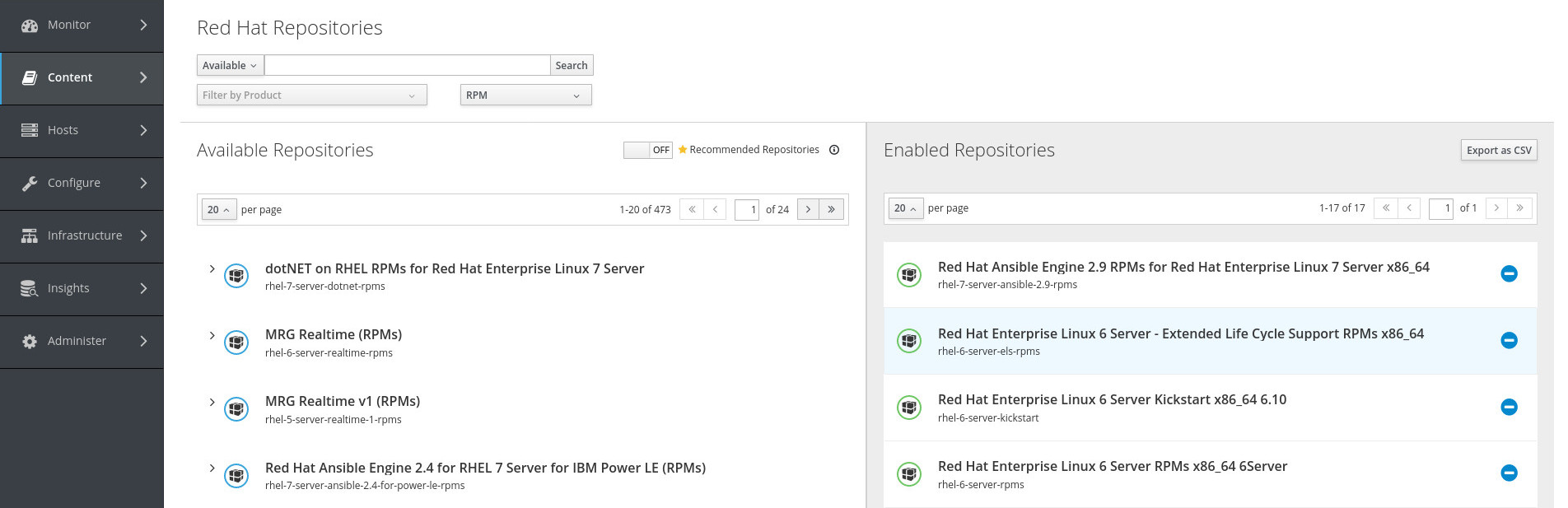
The repository is now enabled and ready to be synchronized.
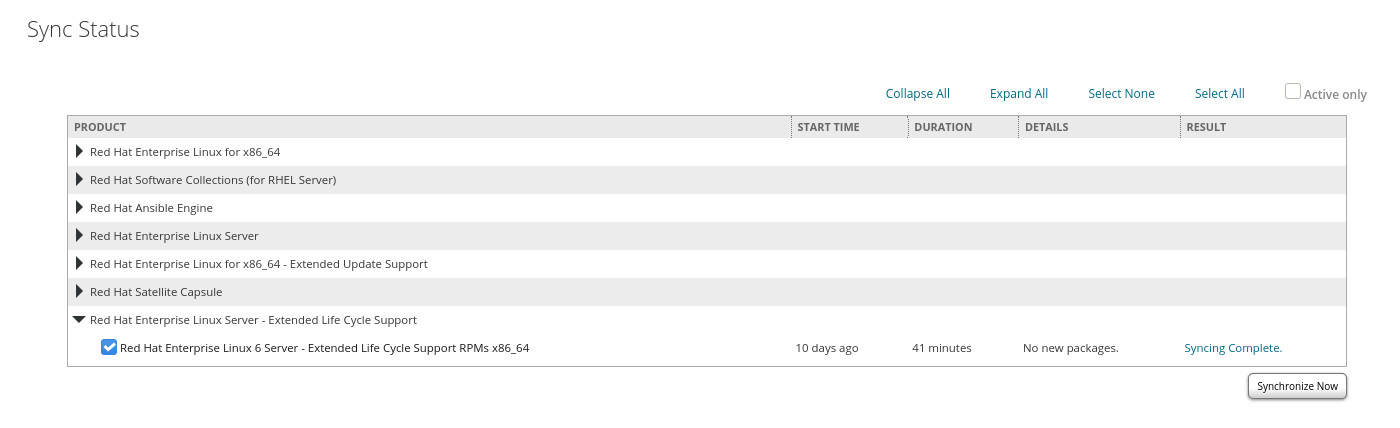
Synchronize the RHEL 6 Extended Life Cycle repository
- Navigate to the Content -> Sync Status page
- Expand Red Hat Enterprise Linux - Extended Life Cycle Support -> Red Hat Enterprise Linux 6 Server - Extended Life Cycle Support (RPMs) -> 6Server -> select architecture
- Click the box next to the enabled repository
- Click Synchronize Now
Example (click to enlarge)
Once the repository has fully synchronized, additional steps are required to include this repository in a Content View to be presented to content hosts. Please refer to the Red Hat Satellite 6 Content Management Guide for further details.
Connecting Red Hat Enterprise Linux 6 systems to ELS content via Satellite 5
Satellite 5 reached End of Life on May 31, 2020 and is no longer a supported solution for accessing Red Hat content.
Enabling Red Hat Enterprise Linux 6 Extended Life Cycle content with Red Hat Update Infrastructure (RHUI)
*Note: Red Hat’s Certified Cloud & Service Provider (CCSP) Partners control what channels and packages are delivered through their service. See this Knowledgebase article for the most current information regarding what channels are available.
Register a RHEL 6 Extended Life Cycle Subscription in RHUI
- Ensure the Red Hat Update Infrastructure and RHEL Add-Ons for Providers is attached to the RHUA server by locating the name of the subscription in the output of the
subscription-manager list --consumed | grep 'Subscription Name'command:
# subscription-manager list --consumed | grep 'Subscription Name'
Subscription Name:   Red Hat Update Infrastructure and RHEL Add-Ons for Providers
- Refresh the subscriptions to ensure all new products are added to the subscription with the
subscription-manager refreshcommand:
# subscription-manager refresh
1 local certificate has been deleted.
All local data refreshed
- Navigate to the rhui-manager user interface with the command
rhui-manager - Type
smto select manage Red Hat subscriptions - Type
dto select unregister a Red Hat subscription in RHUI - Enter the number shown beside the Red Hat Update Infrastructure and RHEL Add-Ons for Providers
- Press
cafter selecting the subscription, followed byyto confirm - Type
rto select register a Red Hat subscription in RHUI - Enter the number shown beside the Red Hat Update Infrastructure and RHEL Add-Ons for Providers (this is your subscription for RHEL 6 Extended Life Cycle content)
- Press
cafter selecting the subscription, followed byyto confirm
This procedure will remove the currently consumed subscription and add the newly refreshed subscription from subscription-manager to the RHUA server.
Add the RHEL 6 Extended Life Cycle Repository in RHUI
- From the
rhui-manageruser interface, execute^to navigate to the Red Hat Update Infrastructure Management Tool home screen - Enter
rto select manage repositories - Enter
ato add a new Red Hat content repository - Wait for the Red Hat Update Infrastructure Management Tool to determine the entitled repositories, this might take several minutes
- When the Red Hat Update Infrastructure Management Tool prompts for a selection method, press
2to select the By Product method - Enter the number listed beside the RHEL 6 Server - Extended Life Cycle Support RPMs repository
- Press
cwhen your are finished, followed byyto confirm - Check that the correct repository has been added by pressing
lto access the list of repositories currently managed by the RHUI screen
Synchronize the RHEL 6 Extended Life Cycle Repository in RHUI
- From the
rhui-manageruser interface, execute^to navigate to the Red Hat Update Infrastructure Management Tool home screen - Enter
sto select synchronization status and scheduling - Enter
srto select sync an individual repository immediately - Select the repository and press
cto confirm, followed byyto proceed - Enter
drto select display repo sync summary
Connecting Red Hat Enterprise Linux 6 Systems to ELS Content
Important: ELS subscription is an addon subscription that requires the attachment of an active RHEL Server subscription to be present on the system to utilize the RHEL 6 ELS content.
First, ensure that the system has a valid RHEL 6 Server entitlement attached to the system (for product id 69, status needs to be subscribed):
# subscription-manager list | grep -e 'Product ID:' -e 'Status:'
Example output:
# subscription-manager list | grep -e 'Product ID:' -e 'Status:'
Product ID:     69
Status:         Subscribed
Note: For Satellites using Simple Content Access (SCA), your output may differ from the above. Please ensure you have both a subscription for RHEL Server and RHEL Server ELS attached to the Satellite manifest to ensure content access to your RHEL Server ELS eligible clients.
Note: For Customer Portal registered systems set your release version as seen in the next command and simply enable the repository
Next, ensure that the system is using 6Server as its release version, as ELS content is only released for the 6Server
# subscription-manager release --set 6Server
Next, find your ELS subscription:
# subscription-manager list --all --available
+-------------------------------------------+
    Available Subscriptions
+-------------------------------------------+
Subscription Name: Red Hat Enterprise Linux Extended Life Cycle Support (Physical or Virtual Nodes)
Provides:          Red Hat Enterprise Linux Server - Extended Life Cycle Support
SKU:               RH00270
Contract:          11260534
Pool ID:           8a99f9835a4887e0015a685ef286223d
Available:         90
Suggested:         1
Service Level:     Layered
Service Type:      L1-L3
Subscription Type: Instance Based
Ends:              12/30/2022
System Type:       Physical
Note the Pool ID above, and attach the subscription:
# subscription-manager attach --pool 8a99f9835a4887e0015a685ef286223d
Successfully attached a subscription for: Red Hat Enterprise Linux Extended Life Cycle Support (Physical or Virtual Nodes)
Finally, enable the RHEL 6 Extended Life Cycle RPM repository and disable RHEL 6 RPM repository: {#els6repo}
# subscription-manager repos --enable rhel-6-server-els-rpms
Repo 'rhel-6-server-els-rpms' is enabled for this system.

# subscription-manager repos --disable=rhel-6-server-rpms
Repository 'rhel-6-server-rpms' is disabled for this system.
Using RHEL 6 Container Images with Red Hat Enterprise Linux 6 Extended Life Cycle Repositories
Please refer to this KCS to see an example of building a custom RHEL 6 image using the RHEL 6 ELS repository.