What’s new with Ansible Automation Platform 2.0: Updated private automation hub
What’s new with Ansible Automation Platform 2.0: Updated private automation hub
Red Hat Ansible Automation Platform 2.0 is now available as an early access to customers. For more information please refer to the Ansible Automation Platform 2.0 Early Access Homepage, or skip to the This content is not included.Red Hat Ansible Automation Platform installation guide.
Ansible Automation Platform 2.0 is the next evolution in automation from Red Hat’s trusted enterprise technology experts. We are excited to announce that the Ansible Automation Platform 2.0 release includes This content is not included.private automation hub 4.3. Private automation hub provides automation developers the ability to collaborate and publish their own automation content and streamline delivery of Ansible code within their organization.
Private automation hub in Ansible Automation Platform 2.0 primarily delivers support for automation execution environments. Execution environments are a standardized way to define, build and distribute the environments that the automation runs in. In a nutshell, automation execution environments are container images that allow for easier administration of Ansible by the platform administrator. If you are unfamiliar with execution environments please refer to this blog written by Technical Marketing manager Anshul Behl.
Private automation hub will serve as the on-premises execution environment container image repository for customers who wish to use this feature, aimed at customers who run the platform on physical or virtual environments. Ansible Automation Platform will seamlessly integrate with private automation hub for publishing and pulling execution environment container images.
Who uses private automation hub?
Private automation hub is intended for curating automation content from creators and making it seamlessly accessible to operators . Execution environments make it simple to package everything into turnkey automation and private automation hub makes it easy to share these execution environments to other developers or operators for production use cases across your organization. Automation controller can sync directly to private automation hub and pull curated execution environments to use and provide governance around what is available.
The intended persona is the administrator or operator that is in charge of curating and distributing automation content across an organization. This is commonly referred to as a distribution engineer or a release engineer. If there was a venn diagram between your content creator and your operator/administrator, private automation hub is geared for the person that interacts in both circles (or could sit in either box depending on your organization structure).
- Automation creators develop Ansible playbooks, roles, and modules.
- Automation architects elevate automation across teams to align with IT processes and streamline adoption.
- Automation operators ensure the automation platform and framework are operational.
These roles are not necessarily dedicated to a person or team. Many organizations assign multiple roles to people or outsource specific automation tasks based on their needs.
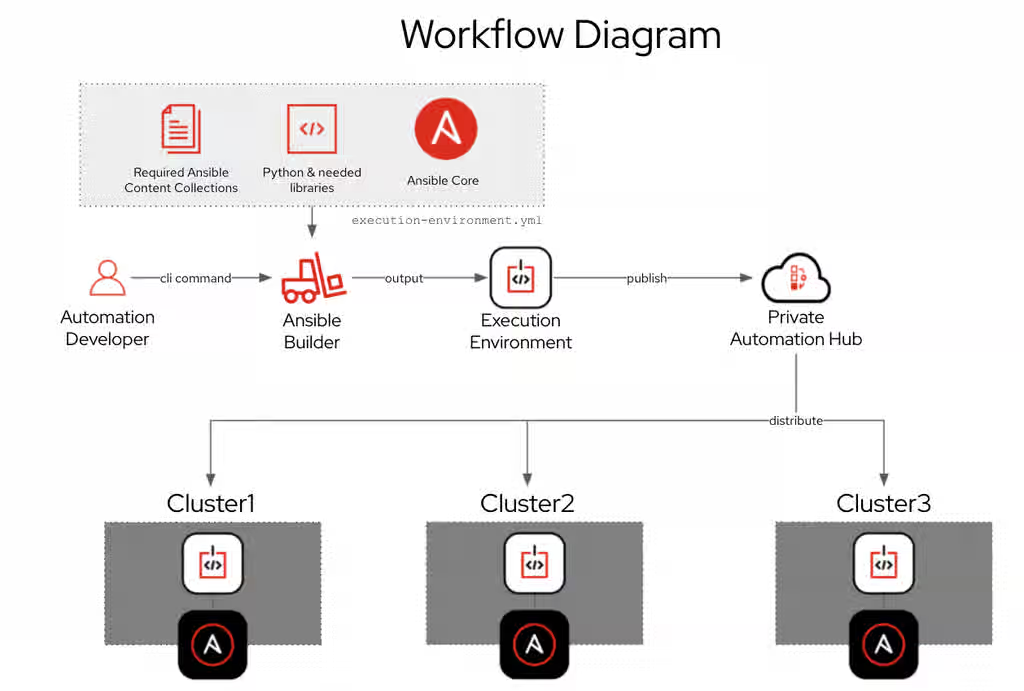
Using private automation hub
In the high level diagram above you can see that automation developers will create content just like they did before Ansible Automation Platform 2.0 The command line utility execution environment builder (ansible-builder) will create an execution environment based on your execution-enviornment.yml definition file as outlined in this blog. Automation creators can publish content to private automation hub.
Practical Example:
For this example we will pull a supported execution environment from the Red Hat Ecosystem Catalog (This content is not included.registry.redhat.io), tag it locally and then push it to private automation hub. First we need to authenticate to This content is not included.registry.redhat.io.
For example on Red Hat Enterprise Linux 8:
$ podman login registry.redhat.io
Username: seanc@redhat.com
Password: ********************
Login Succeeded!
$
We can now download one of the supplied execution environments with Ansible Automation Platform 2.0. At launch there are three fully supported execution environments:
-
Minimal (This content is not included.ee-minimal-rhel8) - Contains Ansible Core 2.11 built on top of UBI8 and Python 3.8. This image doesn’t contain any Collections. You can use this image as the base image to build additional execution environments with your custom Collections or the certified Collections available on Automation Hub.
-
Supported (This content is not included.ee-supported-rhel8) - This is the default image available with the automation controller. It is built on top of the minimal image and contains content collections developed, maintained and supported by Red Hat.
-
Compatibility (This content is not included.ee-29-rhel8) - Contains Ansible 2.9 and all the required ansible dependencies. This image is best for customers who are planning to migrate from Ansible Automation Platform 1.2 to 2.0.
For this example we will download the ee-minimal-rhel8 execution environment. However private automation hub can host multiple execution environments and automation developers can create their own using the command line tool This content is not included.ansible-builder as documented here.
$ podman pull registry.redhat.io/<container image name>:<tag>
$ podman pull registry.redhat.io/ansible-automation-platform-20-early-access/ee-supported-rhel8:2.0.0-11
Trying to pull registry.redhat.io/ansible-automation-platform-20-early-access/ee-supported-rhel8:2.0.0-11...
Getting image source signatures
Checking if image destination supports signatures
Copying blob 4644f822544e skipped: already exists
Copying blob 4d0d850cd4ad skipped: already exists
Copying blob 96965a3a8424 skipped: already exists
Copying blob 3bbba07a88b0 skipped: already exists
Copying blob 895c54e89fd8 [--------------------------------------] 0.0b / 0.0b
Copying config 408bd0e3a5 done
Writing manifest to image destination
Storing signatures
408bd0e3a56123cabe76a5afaa16c7487173e74f745f6051a139813d702a0c
To list all downloaded execution environments use the podman images command.
$ podman images
REPOSITORY                                                                            TAG       IMAGE ID      CREATED     SIZE
registry.redhat.io/ansible-automation-platform-20-early-access/ee-supported-rhel8     latest    408bd0e3a561  6 days ago  920 MB
After you pull images from a registry, tag them for use in your private automation hub container registry. :
$ podman tag registry.redhat.io/[container image name]:[tag] [automation hub URL]/[container image name]
For this environment private automation hub instance does not have a DNS setup yet. I will use the IP address of the host instead :
$ podman tag registry.redhat.io/ansible-automation-platform-20-early-access/ee-supported-rhel8 192.168.1.5/example_ee
We will now see the new container image tag example_ee:
$ podman images
REPOSITORY                                                                            TAG       IMAGE ID      CREATED     SIZE
registry.redhat.io/ansible-automation-platform-20-early-access/ee-supported-rhel8     latest    408bd0e3a561  6 days ago  920 MB
192.168.1.5/example_ee                                                                latest    408bd0e3a561  6 days ago  920 MB
Authenticate to private automation hub using the credentials you have previously setup when it was installed:
$ podman login -u=[username] -p=[password] [automation-hub-url]
For this environment it would look like this:
$ podman login --tls-verify=false -u="admin" -p="mypassword" 192.168.1.5
Login Succeeded!
The --tls-verify=false flag was used because DNS and TLS certificates were not set up yet.
Finally we can publish using the follow command:
$ podman push [automation-hub-url]/[container image name]
For this environment it would look like this:
$ podman push --tls-verify=false 192.168.1.5/example_ee
Getting image source signatures
Copying blob d7ecef9dcc97 done
Copying blob 9132e95b7c1b done
Copying blob bc7bdf0ec1b9 done
Copying blob 0122cc8a95bd done
Copying blob 12a68283d0e0 done
Copying config 408bd0e3a5 done
Writing manifest to image destination
Storing signatures
$ podman --version
podman version 3.2.2
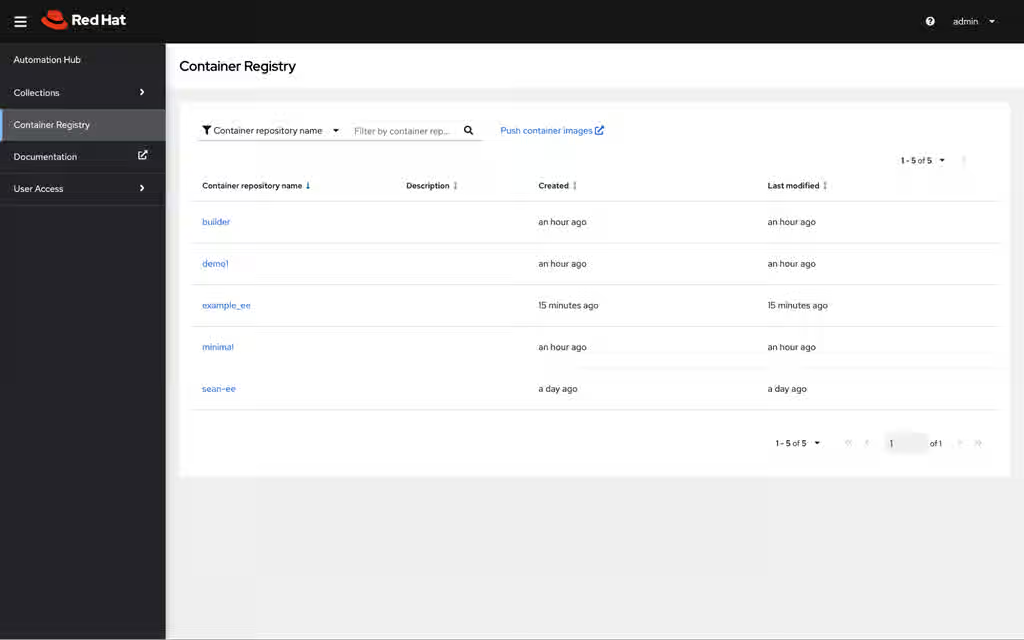
Logging into the Web UI we will notice there is a new Container Registry and the example_ee is displayed:
Synchronize private automation hub with automation controller
To synchronize execution environments with automation controller (new name for the WebUI and API component formerly known as Ansible Tower) create a Container Registry credential.
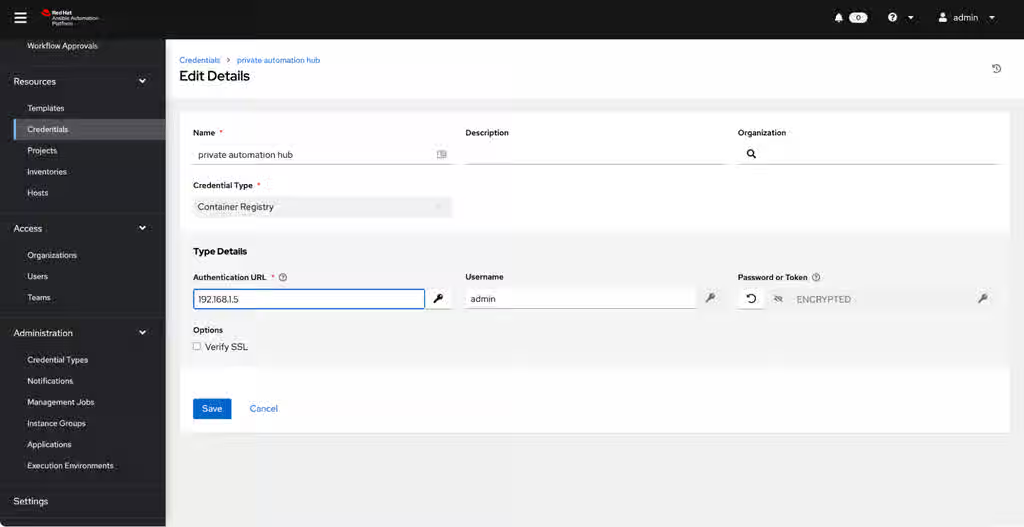
The authentication URL is just the DNS name or IP address of your private automation hub host (no https header).
Next, under Execution Environments create a new execution environment and source the credential you just created. Refer to the Content from docs.ansible.com is not included.documentation for additional information.
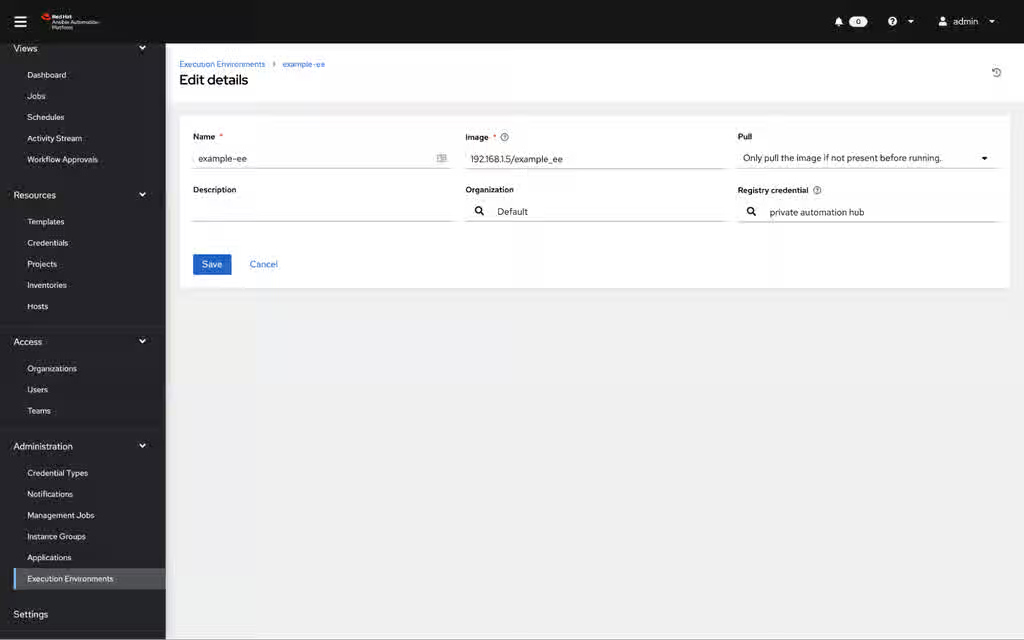
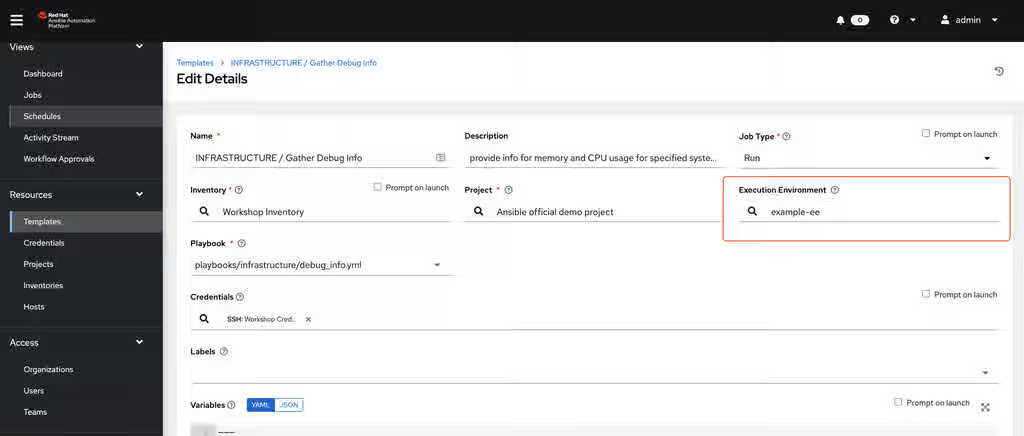
Finally on the job template (under templates) assign the execution environment as highlighted in the red square below:
Want to learn more about automation controller? Read the blog: What’s New in Ansible Automation controller 4.0 by Technical Marketing Manager Craig Brandt.
What's next?
For more information on Ansible Automation Platform 2.0 please refer to the Ansible Automation Platform 2.0 Early Access Homepage.
Documentation references:
- Content from docs.ansible.com is not included.Automation controller - Use an execution environment in jobs
- This content is not included.Private automation hub - Managing containers in private automation hub
Want to meet the blog authors and developers for Ansible Automation Platform? Join us at Ansiblefest 2021 Content from www.ansible.com is not included.Content from www.ansible.com is not included.https://www.ansible.com/ansiblefest