Red Hat Lightspeed (formerly Insights) for Runtimes
Red Hat Lightspeed available for Runtimes
Red Hat Lightspeed for Runtimes can help in improving operational efficiency in the areas of performance, stability, and availability, as well as security and compliance use cases. Lightspeed for Runtimes collects and sends metadata that can evaluate your Runtimes product on Red Hat Enterprise Linux estate for a list of Common Vulnerabilities and Exposures (CVEs) impacting your systems.
In addition, Lightspeed for Runtimes data will be able to show you applicable errata or patches, identify differences in installed packages between systems or as compared to a baseline.
You can opt-out of the insights-client. For more information, see the Runtimes product Configuration options.
The Red Hat Lightspeed dashboard for Runtimes is available on the This content is not included.Red Hat Hybrid Cloud Console. Similar to the This content is not included.RHEL dashboard which is available on the This content is not included.Red Hat Hybrid Cloud Console, the Runtimes dashboard will show the inventory of the Runtimes installations, CVE details, and so on.
The Java workload information for the Runtimes product installed on Red Hat Enterprise Linux (RHEL) is available on the This content is not included.RHEL dashboard in Inventory > Systems, the individual system page. See the section How to see the Java workload data for Runtimes products for more information.
What is Red Hat Lightspeed and how does it help you?
Red Hat Lightspeed is a Software-as-a-Service (SaaS) application included with almost every subscription to Red Hat Enterprise Linux, Red Hat OpenShift, and Red Hat Ansible Automation Platform [1].
Powered by predictive analytics, Red Hat Lightspeed gets smarter with every additional piece of intelligence and data. It can automatically discover relevant insights, recommend tailored, proactive, next actions, and even automate tasks. Focusing on areas of operations, security, and business, Insights proactively alerts administrators and stakeholders before an outage, security event, or overspending occurs.
Using Red Hat Lightspeed, customers can benefit from the experience and technical knowledge of Red Hat Certified Engineers, making it easier to identify, prioritize and resolve issues before business operations are affected.
As a SaaS offering, located at This content is not included.Red Hat Hybrid Cloud Console, Red Hat Lightspeed is regularly updated. Regular updates expand the Lightspeed knowledge archive in real time to reflect new IT challenges that can impact the stability of mission-critical systems.
New features that will improve the performance, stability and security of the Runtimes product will be available in Red Hat Lightspeed in future releases.
What are the prerequisites to run Red Hat Lightspeed for Runtimes products?
The insights-java-client is enabled for a Runtimes product only if installed on Red Hat Enterprise Linux (RHEL), and the RHEL system has insights-client installed, configured, and registered. For more information, see the This content is not included.Client Configuration Guide for Red Hat Lightspeed.
How to see the Java workload data for Runtimes products?
The Red Hat Lightspeed dashboard for Runtimes is available on This content is not included.Red Hat Hybrid Cloud Console.
To see the Runtimes products data, follow the steps:
-
Install and get started with Red Hat Lightspeed for Red Hat Enterprise Linux (RHEL) using the documentation Getting Started with Red Hat Lightspeed.
For more information, see the complete documentation for Red Hat Lightspeed for RHEL. -
On the Red Hat Hybrid Cloud Console main page, click RHEL.
-
In the left navigation bar, click Inventory > Systems.
The Systems page lists the systems that are managed by Lightspeed for Red Hat Enterprise Linux. -
To view the Java workload information for the Runtimes product installed on Red Hat Enterprise Linux (RHEL), click a system name.
A page listing all the system information opens.
On the system information page, click the Details tab. The Java workload information is listed in the Application Services Processes box.
Use the information to monitor your Java workloads.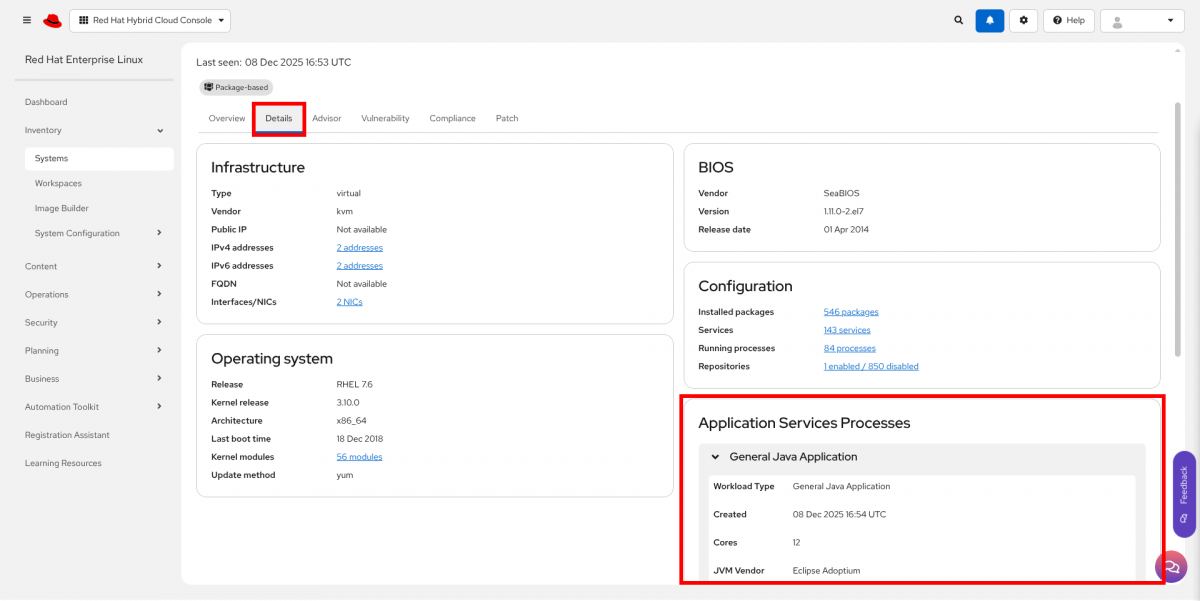
Application Services Processes shown in Red Hat Hybrid Cloud Console
How data and application security are handled in Red Hat Lightspeed
For information about how Red Hat Lightspeed handles data and application security, see:
- This content is not included.Red Hat Lightspeed data and application security
- This content is not included.Automation Analytics Security and Data Handling FAQ
Runtimes Support for Red Hat Lightspeed
Red Hat JBoss Enterprise Application Platform
JBoss Enterprise Application Platform (JBoss EAP) 7.4 Update 11 and 8.0 GA onward, contain the insights-java-client. The insights-java-client is enabled for JBoss EAP only if JBoss EAP is installed on Red Hat Enterprise Linux (RHEL), and the RHEL application has insights-java-client installed, configured, and registered. For more information, see the This content is not included.Client Configuration Guide for Red Hat Lightspeed.
Note: An issue in JBoss EAP Update 11 can cause an Out of Memory error on startup for JBoss EAP instances running with a small heap size and large number of deployments, when JBoss EAP is on RHEL with the insights-client installed. Until the bug is fixed, for JBoss EAP instances with a small heap size can disable Insights as shown here. This issue has been fixed in This content is not included.JBoss EAP Update 12 and later versions.
What data does the insights-client collect?
JBoss EAP insights-java-client collects and sends the following data to Red Hat Lightspeed:
- Server configuration which is trimmed of all sensitive data.
- List of all applications deployed on JBoss EAP and their respective jar file names and hashes.
- List of all the jar file names and hashes that are available in the classpath of the server.
- JBoss EAP server installation details such as JBoss EAP versions, JBoss EAP XP versions, information if JBoss EAP uses its Git integration to manage configuration.
If you set the logging level to DEBUG for the category org.jboss.eap.insights.report , you can get the EAP specific JSON payload in the log files.
Configuration options
The in-process clients are configured using a combination of environment variables and system properties. You can use the following environment variables to configure the insights-client available with JBoss EAP.
| Environment variable | Java System Property | Description | Default value |
|---|---|---|---|
| RHT_INSIGHTS_JAVA_OPT_OUT | rht.insights.java.opt.out | Opt out of Red Hat Lightspeed | false |
| RHT_INSIGHTS_JAVA_PROXY_HOST | rht.insights.java.proxy.host | Host name of the proxy server | |
| RHT_INSIGHTS_JAVA_PROXY_PORT | rht.insights.java.proxy.port | Port number of the proxy server |
Note: You can also set these configuration options using Java system properties. However, the environment variables take precedence over the Java system property.
Red Hat Data Grid
Red Hat Data Grid 8.4 Update 7 onward, contains the insights-java-client. The insights-java-client is enabled only if Red Hat Data Grid is installed on Red Hat Enterprise Linux (RHEL), and the RHEL system has insights-java-client installed, configured, and registered. For more information, see the This content is not included.Client Configuration Guide for Red Hat Lightspeed.
What data does the insights-java-client collect?
Red Hat Data Grid insights-java-client collects and sends the following data to Red Hat Lightspeed:
- Server configuration which is trimmed of all sensitive data.
- List of all the jar file names and hashes that are available in the classpath of the server.
- Red Hat Data Grid version.
- Cluster topology. Node UUIDs are used instead of IP addresses for security reasons.
- Cross-site topology. Node UUIDs are used instead of IP addresses for security reasons.
- Number of caches (not counting the internal caches).
- Features combinations usages (for example, 3 cache transactional+persistent, 7 cache bounded+indexed)
- Cache stores used.
- Security realms (for example, properties, LDAP).
- TLS [endpoint | transport].
- Size of entries in the caches
- Used encodings
- Number of protostream schemas
- Client versions
If you set the logging level to DEBUG for the category org.infinispan.server.insights , you can get the Infinispan specific JSON payload in the log files.
Configuration options
The in-process clients are configured using a combination of environment variables and system properties. The following environment variables are available for Red Hat Lightspeed client available with Red Hat Data Grid.
| Environment variable | Java System Property | Description | Default value |
|---|---|---|---|
| RHT_INSIGHTS_JAVA_OPT_OUT | rht.insights.java.opt.out | Opt out of Red Hat Lightspeed | false |
| RHT_INSIGHTS_JAVA_PROXY_HOST | rht.insights.java.proxy.host | Host name of the proxy server | |
| RHT_INSIGHTS_JAVA_PROXY_PORT | rht.insights.java.proxy.port | Port number of the proxy server |
Note: You can also set these configuration options using Java system properties. However, the environment variables take precedence over the Java system property.
Red Hat build of Cryostat
Red Hat build of Cryostat 2.4 onward, enables integration with Red Hat Lightspeed. This is enabled if the Red Hat build of Cryostat operator is installed on OpenShift and if the latest build version of the This content is not included.Cryostat Java agent is configured with the Java workload.
What data does Red Hat Lightspeed collect?
- Application configuration which is trimmed of all sensitive data.
- Information about the Java virtual machine (Vendor, version, etc).
- List of all the jar file names and hashes that are available
Configuration options
| Environment variable | Java System Property | Description | Default value |
|---|---|---|---|
| INSIGHTS_ENABLED | N/A | Enable Red Hat Lightspeed through the Cryostat operator | true |
| RHT_INSIGHTS_JAVA_OPT_OUT | rht.insights.java.opt-out | Opt out of Red Hat Lightspeed | false |
Note: Lightspeed is available by default. Setting the configuration option using an environment variable through the Cryostat operator enables/disables Lightspeed for all Java workloads configured with Cryostat. For more fine grain tuning, setting the Cryostat agent system property enables/disables Lightspeed for a Java workload.
Additional resources:
- [1] Red Hat Lightspeed Getting Started guide
- This content is not included.[2] Red Hat Lightspeed
- [3] Product documentation for Red Hat Lightspeed
- This content is not included.[4] Red Hat Hybrid Cloud Console