Troubleshooting Quay Authentication
Table of Contents
Introduction
-
The combination of authentication and authorization is crucial for secure access to Red Hat Quay, safeguarding sensitive container images, verifying user identities, enforcing access controls, facilitating auditing and accountability, and enabling seamless integration with external identity providers. By prioritizing authentication, organizations can bolster the overall security and integrity of their container registry environment
-
Here are the primary authentication methods supported by Red Hat Quay:
-
Username and Password: Users can authenticate by providing their username and password, which are validated against the user database configured in Red Hat Quay. This traditional method requires users to enter their credentials to gain access.
-
OAuth: Red Hat Quay supports OAuth authentication, which allows users to authenticate using their credentials from third-party services like Google, GitHub, or Keycloak. OAuth enables a seamless and federated login experience, eliminating the need for separate account creation and simplifying user management.
-
OIDC: OpenID Connect enables single sign-on (SSO) capabilities and integration with enterprise identity providers. With OpenID Connect, users can authenticate using their existing organizational credentials, providing a unified authentication experience across various systems and applications.
-
Token-Based Authentication: Users can obtain unique tokens that grant access to specific resources within Red Hat Quay. Tokens can be obtained through various means, such as OAuth or by generating API tokens within the Red Hat Quay user interface. Token-based authentication is often used for automated or programmatic access to the registry.
-
External Identity Provider: Red Hat Quay can integrate with external identity providers, such as LDAP or AzureAD, for authentication purposes. This integration allows organizations to leverage their existing identity management infrastructure, enabling centralized user authentication and reducing the need for separate user databases.
-
Troubleshooting Steps
-
Enable Debug Mode for Quay
-
Examine authentication provider logs
  $ oc logs quay-pod-name &> quay.logs

  $ podman logs quay-container &> quay.logs
-
Example OIDC logs backed by Azure AD
  gunicorn-web stdout | 2023-01-20 15:41:52,071 [205] [DEBUG] [app] Starting request: urn:request:0d88de25-03b0-4cf9-b8bc-87f1ac099429 (/oauth2/azure/callback) {'X-Forwarded-For': '174.91.xx.xx'}
  gunicorn-web stdout | 2023-01-20 15:41:52,074 [205] [DEBUG] [urllib3.connectionpool] Starting new HTTPS connection (1): login.windows.net:443
  ...
  gunicorn-web stdout | 2023-01-20 15:41:52,603 [205] [DEBUG] [urllib3.connectionpool] https://login.windows.net:443 "POST /6c87869d-c91d-4797-9abd-dddf5ccdf89e/oauth2/token HTTP/1.1" 200 4585
gunicorn-web stdout | 2023-01-20 15:41:52,604 [205] [DEBUG] [oauth.oidc] Using key `...`, attempting to decode token `eyJ0eXAi...Q` with aud `c910c4...` and iss `https://sts.windows.net/6c878.../`
  ...
  gunicorn-web stdout | 2023-01-20 15:41:52,929 [205] [DEBUG] [urllib3.connectionpool] https://login.windows.net:443 "GET /common/discovery/keys HTTP/1.1" 200 12002
  gunicorn-web stdout | 2023-01-20 15:41:53,670 [205] [DEBUG] [urllib3.connectionpool] https://login.windows.net:443 "GET /6c87869d-c91d-4797-9abd-dddf5ccdf89e/openid/userinfo?alt=json HTTP/1.1" 200 575
  gunicorn-web stdout | 2023-01-20 15:41:53,671 [205] [DEBUG] [oauth.oidc] Found e-mail address `user@...` for sub `PK7Zpg2Y...`
  gunicorn-web stdout | 2023-01-20 15:41:53,685 [205] [DEBUG] [data.model.user] Email and username are unique!
  ...
  gunicorn-web stdout | 2023-01-20 15:41:53,731 [205] [DEBUG] [endpoints.common] Successfully signed in as user live_com_user with uuid 3e001259-1d68-4ca2-8a18-f5182e38dab8
  ...
  nginx stdout | 174.91.xx.xx (-) - - [20/Jan/2023:15:41:53 +0000] "GET /oauth2/azure/callback?code=0.ATAAnYaHbB3J... HTTP/2.0" 302 277 "https://QUAY_HOSTNAME/" "Mozilla/5.0 (Windows NT 10.0; Win64; x64; rv:108.0) Gecko/20100101 Firefox/108.0" (1.665 1889 1.664)
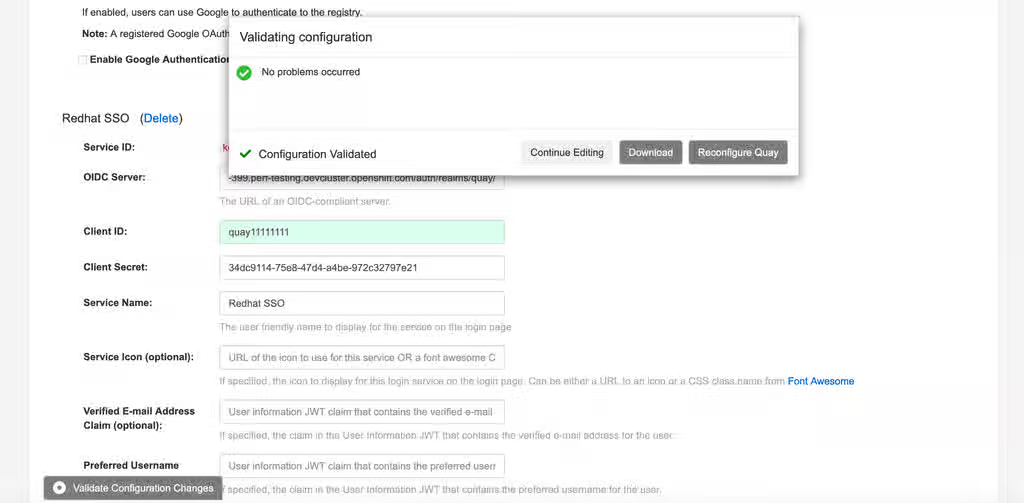
- Review the Authentication Configuration from Quay config.yaml file
  $ oc exec -it quay-pod-name -- cat /conf/stack/config.yaml

  $ podman exec -it quay-container cat /conf/stack/config.yaml
- All users for external authentication are shown in federatedlogin table. Check it from Quay's database.
  quay=# select * from federatedlogin;

   id | user_id | service_id |                service_ident                |               metadata_json
  ----+---------+------------+---------------------------------------------+-------------------------------------------
    1 |       1 |          3 | ibazulic1                                   | {}
    2 |       1 |          8 | PK7Zpg2Yu2AnfUKG15hKNXqOXirqUog6G-oE7OgzSWc | {"service_username": "live.com#ibazulic"}
    3 |       2 |          3 | testuser                                    | {}
    4 |       2 |          4 | 110875797246250333431                       | {"service_username": "ibazulic"}
    5 |       3 |          3 | ibazulic                                    | {}
    6 |       3 |          1 | 26310880                                    | {"service_username": "ibazulic"}
  (6 rows)
- Verify the users are inserted in
usertable
  quay=# select username, email from "user";

   username  |        email
  -----------+----------------------
   ibazulic1 | ibazulic@outlook.com
   testuser  | ibazulic@gmail.com
   ibazulic  | ibazulic@redhat.com
  (3 rows)
Known Issues
- Unable to configure Quay Team Sync
- 401 UNAUTHORIZED when pushing helm charts to quay
- Configuring AzureAD authentication for Red Hat Quay